 TutorialKart.com
PostgreSQL SELECT FROM Table Query
The PostgreSQL SELECT statement retrieves data from one or more table columns. You can return every row, choose specific columns, filter records, sort the result, remove duplicate values, or limit the number of rows returned.
The examples below use a table named employees with columns such as employee_id, employee_name, department, and salary.
PostgreSQL SELECT All Columns and Rows
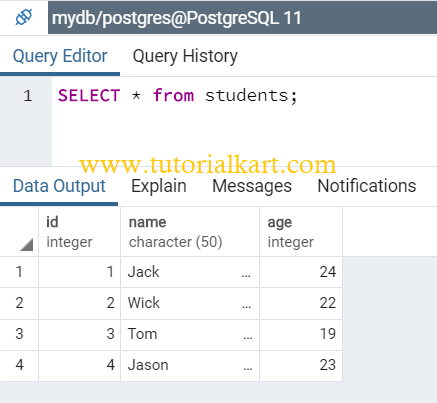
Use an asterisk (*) after SELECT to retrieve every column from a table.
 SELECT *
	FROM tablename;
Replace tablename with the name of the table you want to query. For example, the following statement returns all columns and rows from the employees table.
SELECT *
FROM employees;
Using SELECT * is convenient while inspecting a table. In application queries, listing only the required columns is usually clearer and avoids retrieving unnecessary data.
PostgreSQL SELECT Specific Columns
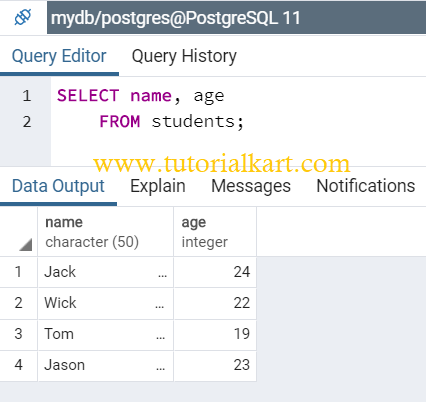
To retrieve only selected columns, write their names after the SELECT keyword and separate them with commas.
 SELECT column1, column2
	FROM tablename;
This example returns only the employee name and department columns.
SELECT employee_name, department
FROM employees;
The columns appear in the result in the same order in which they are listed in the query.
PostgreSQL SELECT Rows with a WHERE Condition
Add a WHERE clause when only rows that satisfy a condition should be returned.
SELECT column1, column2
FROM tablename
WHERE condition;
The following query returns employees who belong to the Sales department.
SELECT employee_id, employee_name, salary
FROM employees
WHERE department = 'Sales';
Text values are enclosed in single quotation marks. Numeric conditions do not require quotation marks.
SELECT employee_name, salary
FROM employees
WHERE salary > 50000;
PostgreSQL SELECT and Sort Rows with ORDER BY
SQL tables do not provide a guaranteed row order unless the query includes an ORDER BY clause. Use ASC for ascending order or DESC for descending order.
SELECT employee_name, salary
FROM employees
ORDER BY salary DESC;
The query above lists employees from the highest salary to the lowest salary. PostgreSQL uses ascending order by default when neither ASC nor DESC is specified.
PostgreSQL SELECT the First N Rows with LIMIT
Use the PostgreSQL LIMIT clause to restrict the maximum number of rows returned by a query.
 SELECT *
	FROM tablename;
	LIMIT 2;
In a valid PostgreSQL statement, LIMIT belongs before the final semicolon, as shown below.
SELECT *
FROM employees
LIMIT 2;
Combine LIMIT with ORDER BY when you need a predictable subset, such as the two employees with the highest salaries.
SELECT employee_name, salary
FROM employees
ORDER BY salary DESC
LIMIT 2;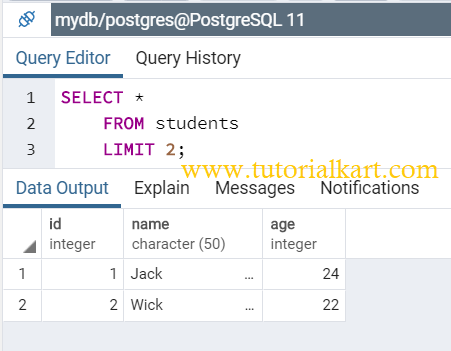
PostgreSQL SELECT Rows with LIMIT and OFFSET
The OFFSET clause skips a specified number of rows before PostgreSQL starts returning results. It is commonly used with LIMIT for basic pagination.
SELECT employee_id, employee_name
FROM employees
ORDER BY employee_id
LIMIT 10 OFFSET 20;
This query skips the first 20 ordered rows and returns up to 10 subsequent rows. Use a stable ORDER BY expression so that pages are returned consistently.
PostgreSQL SELECT Unique Values with DISTINCT
Use DISTINCT when duplicate values should appear only once in the result.
SELECT DISTINCT department
FROM employees
ORDER BY department;
When multiple columns are listed, PostgreSQL removes duplicate combinations of those column values rather than evaluating each column independently.
PostgreSQL SELECT Calculated Values and Column Aliases
A SELECT list may contain expressions as well as stored columns. Use AS to assign a readable name to a calculated result.
SELECT employee_name,
       salary,
       salary * 12 AS annual_salary
FROM employees;
The alias affects the result column heading. It does not rename the underlying table column.
PostgreSQL SELECT Clause Order
When several clauses are used together, write them in PostgreSQL’s expected syntax order.
SELECT [DISTINCT] column_list
FROM table_name
WHERE condition
ORDER BY column_name [ASC | DESC]
LIMIT row_count
OFFSET rows_to_skip;
Not every query needs every clause. Include only the clauses required for the result you want.
Common PostgreSQL SELECT Query Errors
- Placing the semicolon too early: A semicolon ends the SQL statement, so clauses such as
ORDER BYandLIMITmust appear before it. - Using double quotes for text values: PostgreSQL uses single quotes for string literals. Double quotes are used for quoted identifiers.
- Expecting an automatic row order: Add
ORDER BYwhenever the sequence of rows matters. - Selecting unavailable columns: Confirm the exact table and column names before running the query.
- Using SELECT * unnecessarily: Retrieve only the columns required by the application or report.
PostgreSQL SELECT FROM Table FAQs
How do I select all rows from a PostgreSQL table?
Use SELECT * FROM table_name;. This returns all columns for every row visible to the current database user.
How do I select only certain columns in PostgreSQL?
List the required column names after SELECT, separated by commas. For example, SELECT employee_name, salary FROM employees;.
How do I select the first 10 rows in PostgreSQL?
Add LIMIT 10 before the terminating semicolon. Include ORDER BY when the identity or order of those 10 rows matters.
How do I remove duplicate values from a PostgreSQL SELECT result?
Place DISTINCT immediately after SELECT, such as SELECT DISTINCT department FROM employees;.
Why does a PostgreSQL SELECT query return rows in a different order?
PostgreSQL does not guarantee result order without an ORDER BY clause. Query plans and table changes can cause rows to appear in a different sequence.
PostgreSQL SELECT Query Review Checklist
- Verify that the table and column names match the PostgreSQL schema.
- Use single quotes for text values in
WHEREconditions. - Place
WHERE,ORDER BY,LIMIT, andOFFSETbefore the final semicolon. - Add
ORDER BYwhen the row sequence or limited subset must be predictable. - Select only the columns required by the query result.
PostgreSQL SELECT FROM Table Summary
In this PostgreSQL Tutorial, we learned how to retrieve all columns, select specific columns, filter rows with WHERE, sort results with ORDER BY, return a limited number of rows, skip rows with OFFSET, remove duplicates with DISTINCT, and create calculated result columns.