 TutorialKart.com
PostgreSQL WHERE Clause
The PostgreSQL WHERE clause filters rows according to a Boolean condition. Only rows for which the condition evaluates to TRUE are returned. Rows for which the condition evaluates to FALSE or NULL are excluded.
You can use WHERE with SELECT, UPDATE, and DELETE statements. This tutorial begins with SELECT examples and then covers common comparison, logical, range, pattern, and null-check conditions.
PostgreSQL WHERE Syntax with SELECT
The syntax of WHERE clause to be used along with SELECT FROM statement is as follows.
 SELECT column1, column2, columnN
	FROM table_name
	WHERE search_condition;
In this syntax:
column1,column2, andcolumnNare the columns to include in the result.table_nameis the table from which PostgreSQL reads rows.search_conditionis an expression that PostgreSQL evaluates for each row.
Common comparison operators include =, <> or !=, >, >=, <, and <=.
Filter PostgreSQL Rows with a Comparison Condition
Consider the following table. We will apply WHERE clause on this table and use the same for all subsequent examples.
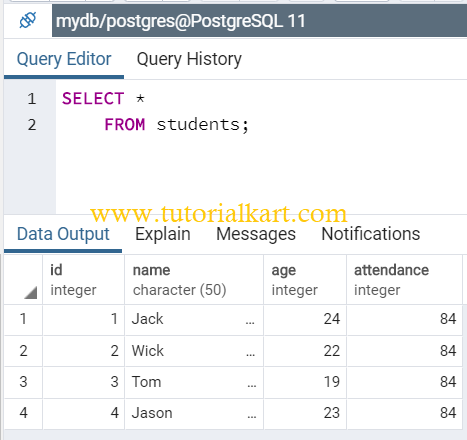
The following query returns only rows where age is greater than 20. Here, the search condition is age>20.
SELECT *
	FROM students
	WHERE age>20;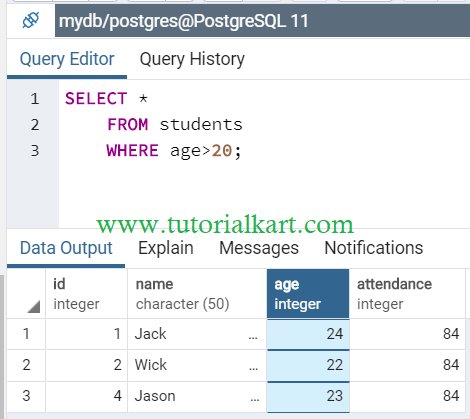
For text values, place the value inside single quotes. PostgreSQL string comparisons are case-sensitive unless you use a case-insensitive operator such as ILIKE.
SELECT *
FROM students
WHERE name = 'Arun';
PostgreSQL WHERE with AND Conditions
Use the AND operator when every condition must be true. The following query returns students whose age is greater than 20 and whose ID is greater than 1.
SELECT *
	FROM students
	WHERE age>20 AND id>1;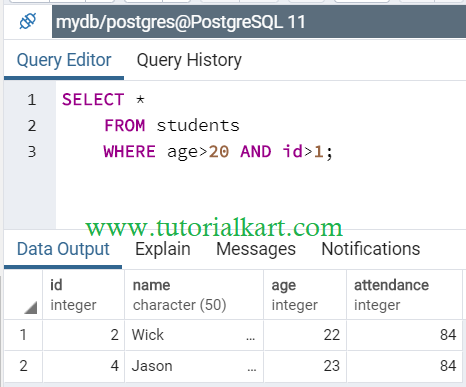
PostgreSQL WHERE with OR Conditions
Use the OR operator when at least one condition may be true. The following query returns rows where the age is greater than 20 or the ID is greater than 1.
SELECT *
	FROM students
	WHERE age>20 OR id>1;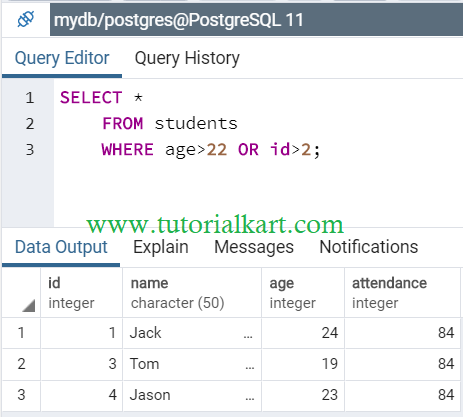
When a condition combines AND and OR, use parentheses to make the intended logic clear. PostgreSQL evaluates AND before OR.
SELECT *
FROM students
WHERE (age > 20 OR id = 1)
  AND name <> 'Ravi';
PostgreSQL WHERE with IN
The IN operator checks whether a value matches any value in a list. The following query returns rows where age is either 22 or 23.
SELECT *
	FROM students
	WHERE age IN (22, 23);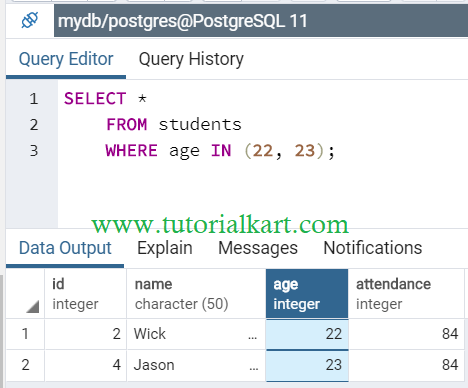
PostgreSQL WHERE with NOT IN
The NOT IN operator excludes values that appear in a list. The following query returns rows where age is neither 22 nor 23.
SELECT *
	FROM students
	WHERE age NOT IN (22, 23);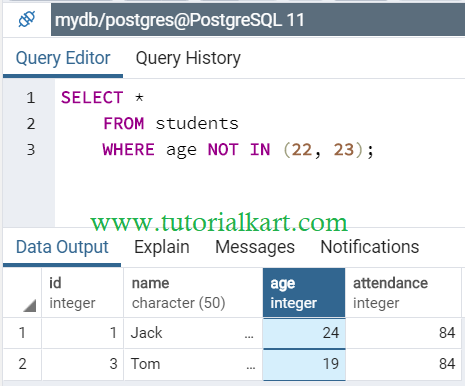
Be careful when a NOT IN list or subquery can contain NULL. Because SQL uses three-valued logic, the condition may evaluate to unknown and return no rows. For nullable subquery results, NOT EXISTS is often safer.
PostgreSQL WHERE with BETWEEN for Ranges
BETWEEN tests an inclusive range. Both boundary values are included.
SELECT *
FROM students
WHERE age BETWEEN 20 AND 23;
The preceding condition is equivalent to age >= 20 AND age <= 23.
PostgreSQL WHERE with LIKE and ILIKE
Use LIKE for case-sensitive pattern matching and ILIKE for case-insensitive pattern matching. In a pattern, % matches any sequence of characters and _ matches one character.
SELECT *
FROM students
WHERE name ILIKE 'a%';
This query matches names beginning with A or a.
PostgreSQL WHERE with IS NULL and IS NOT NULL
Do not compare null values with = NULL or <> NULL. Use IS NULL or IS NOT NULL.
SELECT *
FROM students
WHERE age IS NULL;SELECT *
FROM students
WHERE age IS NOT NULL;Use WHERE Safely with UPDATE and DELETE
A WHERE clause limits which rows an UPDATE or DELETE statement changes. Without it, PostgreSQL applies the statement to every row in the table. Review the matching rows with a SELECT query before running a data-changing statement.
UPDATE students
SET age = 24
WHERE id = 3;DELETE FROM students
WHERE id = 3;PostgreSQL WHERE Clause Notes
- Use single quotes for text and date literals.
- Use parentheses when combining multiple logical conditions.
- Use
IS NULLandIS NOT NULLfor null checks. - Remember that
BETWEENincludes both endpoints. - Verify a condition with
SELECTbefore using it inUPDATEorDELETE. - For frequently filtered columns in large tables, an appropriate index may improve query performance.
PostgreSQL WHERE Clause FAQs
Can a PostgreSQL WHERE clause contain multiple conditions?
Yes. Combine conditions with AND, OR, and NOT. Use parentheses when the intended evaluation order is not obvious.
Why does WHERE column = NULL not return rows?
NULL represents an unknown value, so equality comparisons with it do not evaluate to true. Use WHERE column IS NULL instead.
Is BETWEEN inclusive in PostgreSQL?
Yes. value BETWEEN lower AND upper includes values equal to both the lower and upper bounds.
What is the difference between LIKE and ILIKE in PostgreSQL?
LIKE performs case-sensitive pattern matching, while PostgreSQL’s ILIKE performs case-insensitive pattern matching according to the active locale.
PostgreSQL WHERE Clause Summary
In this PostgreSQL Tutorial, we used the WHERE clause to filter table rows with comparison operators, logical operators, lists, ranges, patterns, and null checks. The same filtering rules can also limit the rows affected by UPDATE and DELETE.