 TutorialKart.com
PostgreSQL CREATE USER with a Password Expiration Date
Use the VALID UNTIL option in a PostgreSQL CREATE USER statement to set the date and time after which the user’s password can no longer be used for authentication.
The expiration applies to password authentication. It does not automatically delete the user, terminate existing sessions, or prevent authentication methods that do not use the stored PostgreSQL password.
PostgreSQL CREATE USER VALID UNTIL syntax
The syntax is shown below.
CREATE USER username WITH [otheroptions] PASSWORD 'password' VALID UNTIL 'absolutedate';In this syntax:
usernameis the name of the PostgreSQL user.otheroptionsrepresents optional role attributes such asCREATEDBorCREATEROLE.passwordis the password assigned to the user.absolutedateis the date or timestamp at which password authentication expires.
PostgreSQL users are roles that have the LOGIN attribute. Therefore, CREATE USER is effectively an alternative form of CREATE ROLE with login permission enabled.
Create a PostgreSQL user whose password expires on a specific date
In this example, we create a user named lini whose password is valid until 2020-11-08.
CREATE USER lini WITH PASSWORD 'P8Ssi6@86s$sasdimrg' VALID UNTIL '2020-11-08';Run the statement in pgAdmin Query Tool, psql, or another PostgreSQL SQL client while connected as a role that has permission to create users.
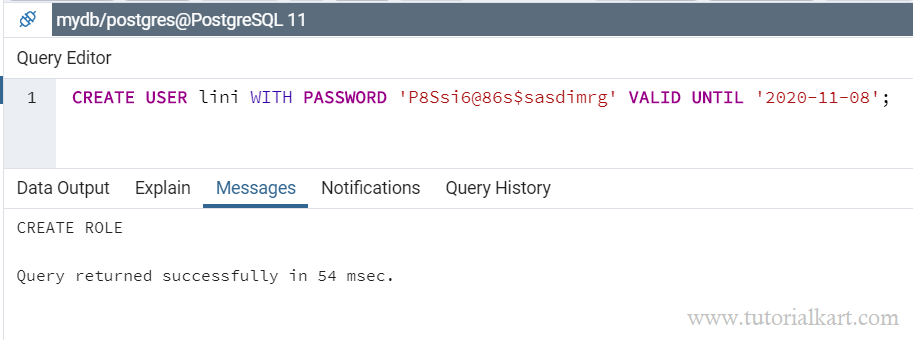
PostgreSQL creates the user with login permission, the supplied password, and the specified password-expiration value.
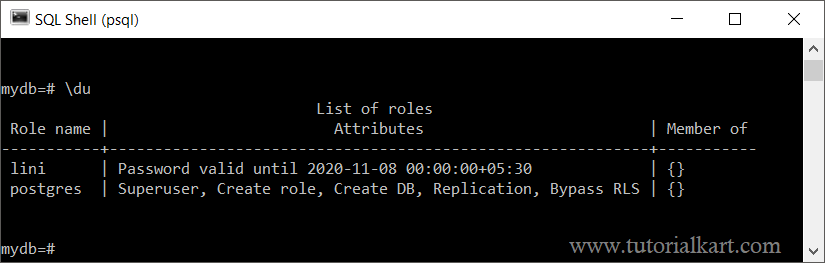
Verify the PostgreSQL password expiration date
The \du command in psql can confirm that the role exists and show its main attributes.
\du liniTo check the stored password-validity timestamp directly, query the pg_roles system view.
SELECT rolname, rolcanlogin, rolvaliduntil
FROM pg_roles
WHERE rolname = 'lini';
The rolvaliduntil column contains the password expiration timestamp. A null value means that no password-expiration date is currently set for the role.
Create a PostgreSQL user with an exact expiration timestamp
A date without a time is interpreted as midnight. When the exact expiration time matters, provide a complete timestamp and time-zone offset.
CREATE USER report_user
WITH PASSWORD 'replace_with_a_secure_password'
VALID UNTIL '2027-03-31 23:59:59+00';
Including the time zone makes the intended expiration moment clearer when the database server, administrator, and application operate in different time zones.
Change the password expiration date for an existing PostgreSQL user
Use ALTER USER with VALID UNTIL when the role already exists.
ALTER USER lini VALID UNTIL '2027-12-31 23:59:59+00';You can update the password and its expiration in the same statement.
ALTER USER lini
WITH PASSWORD 'replace_with_a_new_secure_password'
VALID UNTIL '2027-12-31 23:59:59+00';
Remove a PostgreSQL password expiration date
Set VALID UNTIL to infinity when the password should not expire automatically.
ALTER USER lini VALID UNTIL 'infinity';After changing the value, query pg_roles again to verify the result.
What happens after a PostgreSQL password expires?
After the VALID UNTIL timestamp passes, PostgreSQL rejects new password-authenticated connections for that role. The role itself remains in the database cluster, and its owned objects and privileges are not removed.
An already established database session is not normally disconnected merely because the password expires. The expiration is checked when a new password-authentication attempt occurs.
The setting may not block authentication performed through methods that do not validate the PostgreSQL password, such as operating-system-based authentication or certificate authentication. Review the relevant rules in pg_hba.conf when password expiration is being used as an access-control measure.
PostgreSQL VALID UNTIL errors and checks
| Issue | Likely cause | What to check |
|---|---|---|
| The user cannot log in immediately | The expiration date is already in the past or resolves to an earlier time because of time-zone interpretation. | Query rolvaliduntil and use a timestamp with an explicit time-zone offset. |
| The user can still connect after expiration | The connection may use an authentication method that does not check the PostgreSQL password. | Review the matching pg_hba.conf rule and the authentication method used by the client. |
| Permission denied when creating the user | The current role lacks permission to create or manage roles. | Run the statement as a superuser or a role with suitable CREATEROLE authority. |
The expiration value is not visible in \du | The standard role listing does not always display password-validity details. | Read rolvaliduntil from the pg_roles view. |
PostgreSQL password expiration FAQs
Does VALID UNTIL delete the PostgreSQL user?
No. It only sets the password-expiration timestamp. The role, its privileges, and its owned database objects remain unchanged.
Can VALID UNTIL include both a date and a time?
Yes. A complete timestamp can include the date, time, and time-zone offset. This is preferable when the password must expire at an exact moment.
How do I extend an existing PostgreSQL user’s password validity?
Run ALTER USER username VALID UNTIL 'new_timestamp'; and then verify the new value in pg_roles.
Does an expired PostgreSQL password close active connections?
No. Password expiration is evaluated during a new password-authentication attempt and does not normally terminate sessions that are already connected.
PostgreSQL CREATE USER VALID UNTIL review checklist
- Confirm that the role name follows the project’s PostgreSQL naming rules.
- Use a strong password and avoid exposing real credentials in scripts, screenshots, or version control.
- Specify an exact timestamp and time-zone offset when midnight expiration is not intended.
- Verify the stored value through
pg_roles.rolvaliduntil. - Check the applicable
pg_hba.confauthentication rule if expired credentials still appear to work. - Use
ALTER USERto extend, shorten, or remove the expiration date later.
Summary of PostgreSQL CREATE USER with VALID UNTIL
Use CREATE USER ... PASSWORD ... VALID UNTIL to create a PostgreSQL login role with a password-expiration date. Verify the value in pg_roles, use an explicit timestamp when the exact expiration moment matters, and use ALTER USER when the validity period must be changed later. Continue with this PostgreSQL Tutorial for related PostgreSQL user-management topics.