 TutorialKart.com
PostgreSQL CREATE USER
Use the PostgreSQL CREATE USER statement to create a role that can log in to the database server. You can create a basic login role or assign options such as a password, database-creation privilege, role-creation privilege, connection limits, and an account expiration time.
In PostgreSQL, CREATE USER is an alias for CREATE ROLE with the LOGIN attribute. The account is created for the PostgreSQL database cluster, not for only the database that is currently selected.
Permissions Required to Create a PostgreSQL User
You must connect as a PostgreSQL superuser or as a role that has the CREATEROLE attribute. A role with CREATEROLE can create and manage many non-superuser roles, but it cannot grant privileges that it does not possess.
PostgreSQL CREATE USER Syntax
Following is the syntax of CREATE USER query.
 CREATE USER name [ [ WITH ] option [ ... ] ]

 where option can be:

       SYSID uid
     | CREATEDB | NOCREATEDB
     | CREATEROLE | NOCREATEROLE
     | IN GROUP groupname [, ...]
     | [ ENCRYPTED | UNENCRYPTED ] PASSWORD 'password'
     | VALID UNTIL 'abstime'
The original syntax above shows options used by older PostgreSQL releases. A practical current form is shown below. Available options can vary by server version, so check the documentation for the PostgreSQL version installed on your system.
CREATE USER user_name
    [ WITH ]
    [ PASSWORD 'password' ]
    [ CREATEDB | NOCREATEDB ]
    [ CREATEROLE | NOCREATEROLE ]
    [ SUPERUSER | NOSUPERUSER ]
    [ INHERIT | NOINHERIT ]
    [ LOGIN | NOLOGIN ]
    [ REPLICATION | NOREPLICATION ]
    [ BYPASSRLS | NOBYPASSRLS ]
    [ CONNECTION LIMIT connection_limit ]
    [ VALID UNTIL 'timestamp' ]
    [ IN ROLE role_name [, ...] ];
We will see the usage of the options using examples.
Create a PostgreSQL User Without Additional Options
The following statement creates a login role named lini. Because no password or elevated attributes are specified, the role receives PostgreSQL’s default role settings.
CREATE USER lini;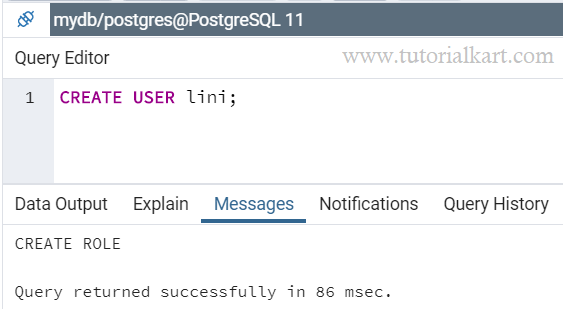
Output
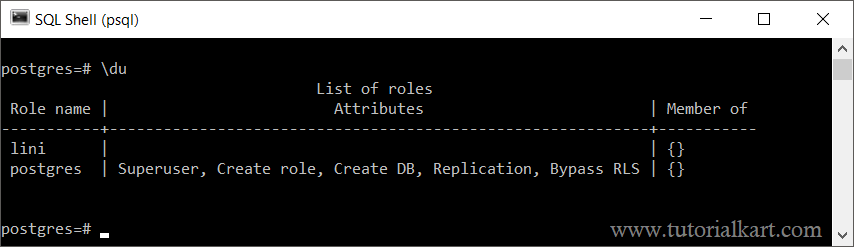
When you list the users from psql shell, the table contains our newly added user. Also, as we have not mentioned any options while creating this user, the List of roles Attributes column is empty for the user.
Create a PostgreSQL User with a Password
Use the PASSWORD option when the user must authenticate with a password. Replace the sample value with a strong password appropriate for your environment.
CREATE USER app_user WITH PASSWORD 'replace_with_a_strong_password';For production administration, avoid exposing passwords in shell history, scripts, logs, or shared screenshots. In an interactive psql session, the \password command can set a role password without placing the clear-text password directly in the SQL command history.
\password app_userCreate a PostgreSQL User with CREATEDB
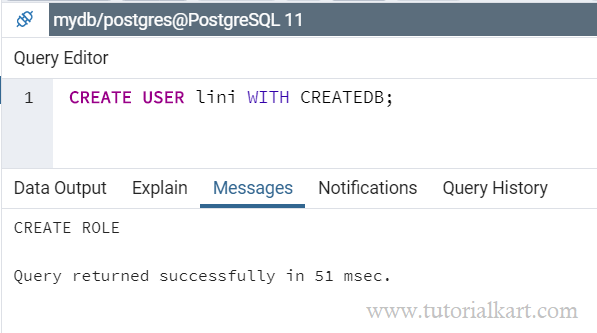
This example shows to CREATE USER with attribute CREATEDB. This means, that this user has the privilege to create databases.
CREATE USER lini WITH CREATEDB;Run this query in Query Tool.
Check the users list in psql shell.
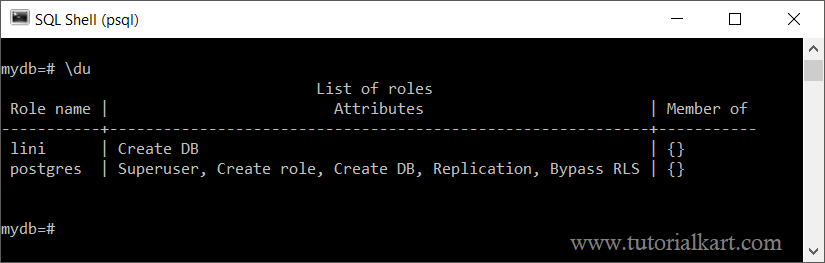
The user is created with the Create DB under the List of roles.
Note: If you do not mention the option CREATEDB while creating the user, NOCREATEDB will be applied to the user and the user cannot create databases.
Create a PostgreSQL User with CREATEROLE
Use CREATEROLE to allow the new user to create, alter, and drop eligible roles. Grant this attribute only when the account is expected to perform role administration.
CREATE USER lini WITH CREATEROLE;Note: If you do not mention the option CREATEROLE while creating the user, NOCREATEROLE will be applied to the user and the user cannot create roles.
Create a PostgreSQL User with Multiple Attributes
You can provide multiple options while creating a user.
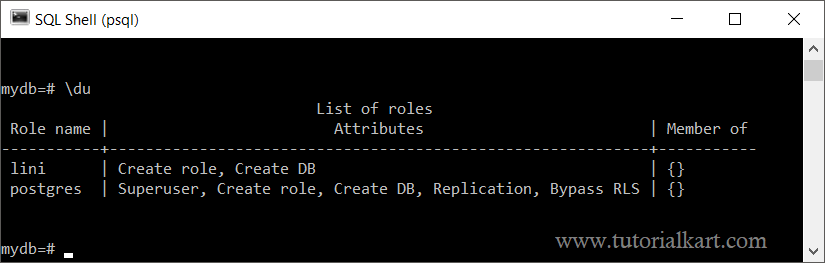
In the following example, we created user lini with options that enable the user to create database and create users.
CREATE USER lini WITH CREATEDB CREATEROLE;Run the query in psql shell or Query Tool.
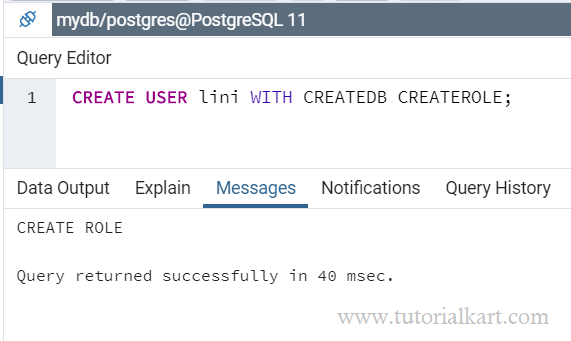
When you list the user in psql shell, you would see the user created with the provided options.
Create a PostgreSQL User with a Connection Limit and Expiration Date
The following example creates a login role that can open up to five concurrent connections and use its password until the specified timestamp.
CREATE USER reporting_user
WITH PASSWORD 'replace_with_a_strong_password'
CONNECTION LIMIT 5
VALID UNTIL '2027-12-31 23:59:59+00';
A connection limit of -1 means that PostgreSQL does not impose a role-specific limit. Server-wide and database-wide connection limits can still apply.
Add a New PostgreSQL User to an Existing Role
Group privileges are commonly managed through roles. You can create the user and make it a member of an existing role with IN ROLE.
CREATE USER analyst_user
WITH PASSWORD 'replace_with_a_strong_password'
IN ROLE reporting_readonly;
The target role must already exist, and the account running the command must have sufficient authority to grant membership.
Grant Database and Schema Access to the New User
Creating a PostgreSQL user does not automatically grant access to every database, schema, table, or sequence. Grant only the privileges required by the application or person using the account.
GRANT CONNECT ON DATABASE app_database TO app_user;
GRANT USAGE ON SCHEMA public TO app_user;
GRANT SELECT, INSERT, UPDATE, DELETE
ON ALL TABLES IN SCHEMA public
TO app_user;
Privileges on future tables are controlled separately with ALTER DEFAULT PRIVILEGES. Run that command as the role that will own the future objects, or specify the appropriate owner role.
ALTER DEFAULT PRIVILEGES IN SCHEMA public
GRANT SELECT, INSERT, UPDATE, DELETE ON TABLES TO app_user;
Verify the PostgreSQL User in psql
Use the following psql meta-command to list roles and their attributes.
\duYou can also query PostgreSQL’s role catalog.
SELECT rolname,
       rolcanlogin,
       rolcreatedb,
       rolcreaterole,
       rolconnlimit,
       rolvaliduntil
FROM pg_roles
WHERE rolname = 'app_user';
Change or Remove a PostgreSQL User
Use ALTER USER to change attributes after the account has been created.
ALTER USER app_user WITH CREATEDB;
ALTER USER app_user WITH PASSWORD 'new_strong_password';
Use DROP USER to remove the role. PostgreSQL will reject the command when the role still owns database objects or has dependent privileges that must be reassigned or removed first.
DROP USER app_user;Common PostgreSQL CREATE USER Errors
Permission denied to create role: Connect as a superuser or use an account with the CREATEROLE attribute.
Role already exists: PostgreSQL role names must be unique within the cluster. Choose another name, remove the existing role when appropriate, or alter the existing role instead.
Password authentication failed: Confirm the user name and password, then review the matching rules in pg_hba.conf. A successfully created role can still be unable to connect when client authentication rules or database privileges deny access.
Permission denied for database or schema: Grant CONNECT on the database and the required schema and object privileges. The ability to log in is separate from permission to use database objects.
PostgreSQL CREATE USER FAQs
What is the difference between CREATE USER and CREATE ROLE in PostgreSQL?
CREATE USER creates a role with LOGIN enabled by default. CREATE ROLE creates a role with NOLOGIN by default unless you explicitly add LOGIN.
Does CREATE USER give access to an existing PostgreSQL database?
No. The user may also need CONNECT on the database, USAGE on the schema, and privileges on tables, sequences, functions, or other objects.
How do I create a read-only PostgreSQL user?
Create a login role, grant it membership in a read-only group role, or grant CONNECT, schema USAGE, and SELECT on the required tables. Also configure default privileges when the user must read tables created later.
Can a PostgreSQL user be created without a password?
Yes. Whether that user can connect depends on the authentication rules configured for the connection. For password-based authentication, set a password before attempting to log in.
PostgreSQL CREATE USER Summary
Use CREATE USER to create a PostgreSQL login role, then grant only the database and object privileges the account needs. In this PostgreSQL Tutorial, we created users with basic settings, passwords, role-management privileges, database-creation privileges, connection limits, expiration dates, and role memberships.