 TutorialKart.com
PostgreSQL List Users and Roles
To list users in PostgreSQL, open the psql shell and run the \du command. PostgreSQL manages users as roles, so this command displays both login roles and group roles defined in the current PostgreSQL cluster.
\du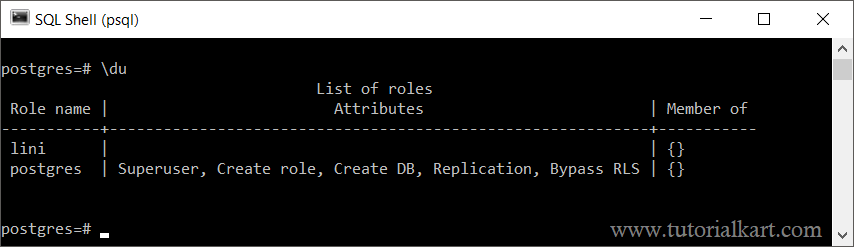
The command returns a table with the columns Role name, Attributes, and Member of. These columns show the name of each role, its administrative capabilities, and its membership in other roles.
List PostgreSQL Users with the psql \du Command
After connecting to the PostgreSQL server with psql, enter \du at the prompt. The backslash command is handled by psql, so it does not require a semicolon.
psql -U postgres\duUse the extended form \du+ when you also want additional details, such as a role description.
\du+Understanding the Role Name Column in \du
The Role name column contains the name assigned to each PostgreSQL role. A role can represent a person, an application account, or a reusable group of privileges.
A role is considered a user when it has the LOGIN attribute. Roles without LOGIN are commonly used as group roles for managing permissions.
Understanding PostgreSQL Role Attributes
The Attributes column shows the capabilities assigned to each role. A blank value means that the role does not have any of the elevated attributes displayed by \du.
In the screenshot above, the postgres role has the attributes Superuser, Create role, Create DB, Replication, and Bypass RLS. These attributes allow the role to perform administrative operations that ordinary login roles cannot perform.
- Superuser: Bypasses most permission checks in the PostgreSQL cluster.
- Create role: Allows the role to create and manage eligible roles.
- Create DB: Allows the role to create databases.
- Replication: Allows the role to initiate streaming replication or use replication-related connections when configuration permits.
- Bypass RLS: Allows the role to bypass row-level security policies.
- Cannot login: Indicates that the role cannot be used directly to establish a database session.
- No inheritance: Indicates that privileges from role memberships are not inherited automatically.
Understanding the Member Of Column in PostgreSQL
The Member of column lists the roles to which the current role belongs. PostgreSQL role membership is commonly used to assign the same privileges to multiple users without granting each permission separately.
For example, an administrator can create a group role named reporting_readonly, grant table permissions to that role, and then make several login users members of it.
GRANT reporting_readonly TO analyst_user;After this command, reporting_readonly appears in the Member of column for analyst_user.
List PostgreSQL Users with a SQL Query
You can also list PostgreSQL users by querying the pg_user system view. This view returns roles that are allowed to log in.
SELECT usename
FROM pg_user
ORDER BY usename;
To display additional user properties, select the relevant columns from pg_user.
SELECT usename,
       usesuper,
       usecreatedb,
       valuntil
FROM pg_user
ORDER BY usename;
The usesuper column indicates whether a user is a superuser, usecreatedb indicates whether the user can create databases, and valuntil shows the password expiration timestamp when one has been configured.
List All PostgreSQL Roles from pg_roles
The pg_roles system view includes both login users and non-login group roles. It is useful when you need more detail than the \du summary provides.
SELECT rolname,
       rolcanlogin,
       rolsuper,
       rolcreatedb,
       rolcreaterole,
       rolreplication,
       rolbypassrls,
       rolconnlimit,
       rolvaliduntil
FROM pg_roles
ORDER BY rolname;
The rolcanlogin column is especially useful for distinguishing login users from group roles. A value of true means that the role can be used to connect to PostgreSQL.
List Only PostgreSQL Roles That Can Log In
Filter pg_roles by rolcanlogin when you want a list containing only roles that function as database users.
SELECT rolname
FROM pg_roles
WHERE rolcanlogin = true
ORDER BY rolname;
Check a Specific PostgreSQL User
To check whether a particular PostgreSQL user exists, filter the pg_roles view by role name.
SELECT rolname,
       rolcanlogin,
       rolsuper,
       rolcreatedb,
       rolcreaterole
FROM pg_roles
WHERE rolname = 'app_user';
If the query returns no rows, a role with that exact name does not exist in the current PostgreSQL cluster.
Show Role Memberships for PostgreSQL Users
The following query lists role membership relationships by joining PostgreSQL system catalogs.
SELECT member_role.rolname AS member_name,
       parent_role.rolname AS granted_role
FROM pg_auth_members AS membership
JOIN pg_roles AS member_role
  ON member_role.oid = membership.member
JOIN pg_roles AS parent_role
  ON parent_role.oid = membership.roleid
ORDER BY member_role.rolname, parent_role.rolname;
This result shows each member role together with the role granted to it. It is useful for reviewing permission inheritance and group-role assignments.
Why a PostgreSQL User May Not Appear in \du
The \du command lists roles from the PostgreSQL cluster to which the current psql session is connected. If an expected user is missing, check the following:
- You may be connected to a different PostgreSQL server, port, or cluster.
- The role may have been created on another PostgreSQL instance.
- The role name may use quoted mixed-case characters and therefore require an exact case-sensitive match.
- The role may have been renamed or removed.
- Your database client may be showing cached information that needs to be refreshed.
Difference Between PostgreSQL Users and Roles
PostgreSQL uses a unified role system. A user is a role with permission to log in, while a group role usually has no login permission and is used to collect privileges.
CREATE USER app_user;
CREATE ROLE reporting_readonly NOLOGIN;
The first statement creates a role with LOGIN enabled. The second creates a non-login role intended for permission management.
PostgreSQL List Users FAQs
Which command lists all users in PostgreSQL?
Run \du in the psql shell. You can also query pg_user to list login users or pg_roles to list all roles.
How do I list only PostgreSQL login users?
Query pg_roles with the condition rolcanlogin = true, or select users from the pg_user system view.
What is the difference between \du and \du+?
\du displays role names, attributes, and memberships. \du+ displays the same information with additional details, such as role descriptions.
Does PostgreSQL keep separate user lists for each database?
No. PostgreSQL roles are defined for the entire database cluster. Database access and object privileges are granted separately for each database and its objects.
How can I check whether a PostgreSQL user is a superuser?
Run \du and inspect the Attributes column, or query the rolsuper column in pg_roles.
PostgreSQL User Listing Summary
Use \du for a quick list of PostgreSQL users and roles, and use \du+ for additional role details. For filtering, automation, or detailed audits, query pg_user, pg_roles, and pg_auth_members.