 TutorialKart.com
An inspection method in SAP QM defines how a quality inspection characteristic must be checked. It can describe the test procedure, required qualification, validity period, explanatory text, classification, and supporting documents used by the inspector.
This tutorial explains how to create an inspection method in SAP using transaction code QS31, maintain its general data, link a document, release the method, and verify that it is ready for assignment to a master inspection characteristic.
What an SAP QM inspection method controls
An inspection method provides reusable instructions for performing a test. It does not itself define the inspection limits or sample size. Those controls are usually maintained through master inspection characteristics, sampling procedures, inspection plans, and related SAP QM master data.
- What type of inspection or test must be performed
- Which procedure or measuring technique should be used
- Required inspector qualification or authorization
- Validity period for the inspection method
- Short text and detailed instructions
- Search terms and classification data
- Reference documents, specifications, or work instructions
Prerequisites before creating an inspection method in SAP QM
Before starting the QS31 procedure, confirm the following details with the quality planning team:
- The plant in which the inspection method will be used
- A unique inspection method key or naming convention
- The date from which the method becomes valid
- The required SAP QM status, such as created or released
- A clear short description and optional long text
- Any document number, document type, part, and version that must be linked
- Authorization to create and release inspection methods
QS31 transaction and SAP menu path for inspection methods
An inspection method in SAP QM can be created using transaction code QS31 or through the SAP menu.
- Transaction code: QS31
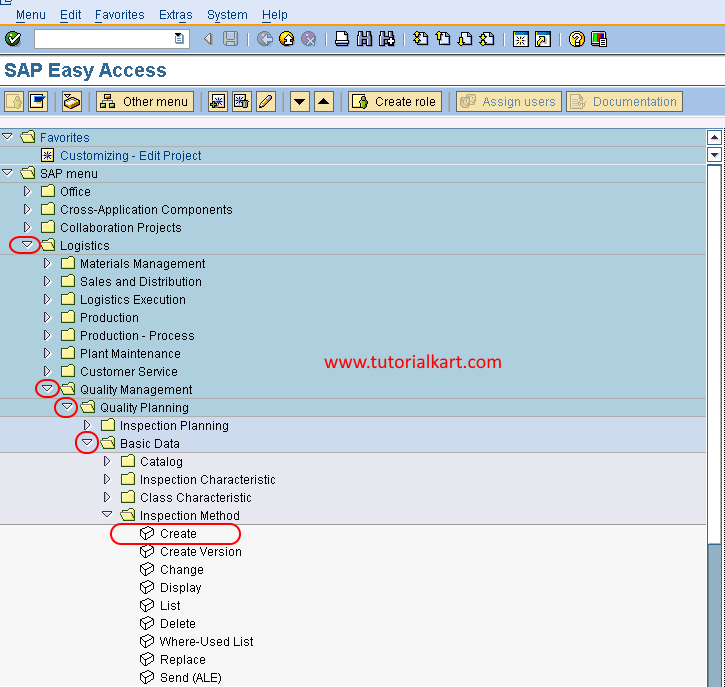
- Menu path: SAP Menu > Logistics > Quality Management > Quality Planning > Basic Data > Inspection Method > Create
Related transactions commonly used after creation are QS32 for changing an inspection method and QS33 for displaying it. Access depends on the SAP release and assigned user authorization.
Step 1: Open the SAP QM inspection method creation screen
Execute transaction code “QS31” in the SAP command field and press Enter to continue.
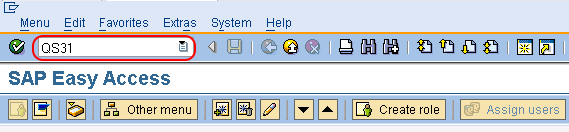
Alternatively, use the SAP menu path.
Follow Logistics > Quality Management > Quality Planning > Basic Data > Inspection Method, and then choose Create.
Step 2: Enter the plant, inspection method key, and valid-from date
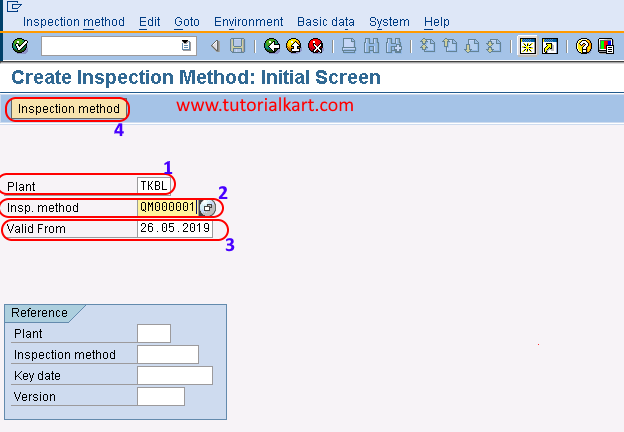
On the Create Inspection Method: Initial Screen, update the following fields:
- Plant: Enter the plant code or select the plant key using the available input help.
- Inspection method: Enter the inspection method key that identifies the procedure in SAP QM.
- Valid from: Enter the date from which the inspection method becomes valid.
The inspection method key should follow the organization’s naming standard. Use a stable identifier because the method may later be assigned to multiple master inspection characteristics.
After entering the required values, choose Inspection Method to continue to the general data screen.
Step 3: Maintain the inspection method general data
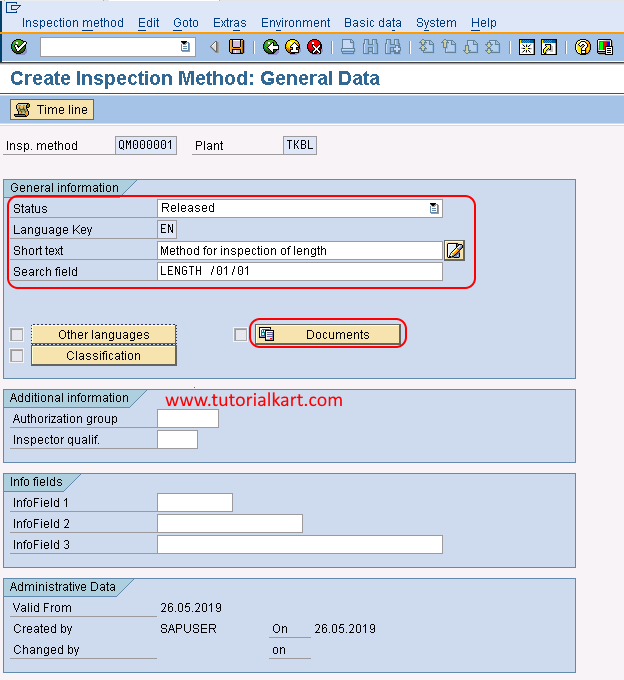
On the Create Inspection Method: General Data screen, maintain the descriptive and control information for the method.
- Status: Select the appropriate status. Choose Released only when the method has been reviewed and is ready for productive use.
- Language key: Confirm the language in which the description and text are maintained. In many systems, EN is proposed by default.
- Short text: Enter a clear description of the test procedure, such as Visual Packaging Check or Digital Vernier Measurement.
- Search field: Enter a meaningful search term that helps users find the inspection method.
- Long text: Add detailed instructions when the short text is not sufficient to explain the inspection procedure.
Avoid releasing an inspection method with incomplete instructions. The method should tell the inspector what procedure to use, while detailed tolerances and valuation rules remain controlled by the assigned inspection characteristic and inspection plan.
After entering the general data, choose Documents when a controlled document, specification, drawing, or work instruction must be linked.
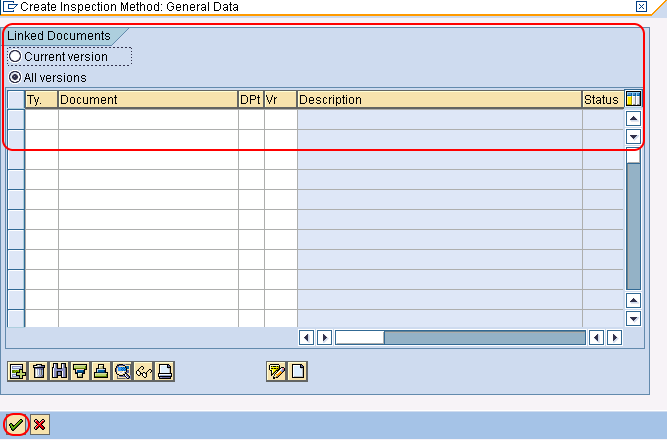
Step 4: Link a quality document to the inspection method
On the Link Document screen, enter the document information that identifies the applicable specification or test instruction.
- Versions: Select the appropriate version option, such as All Versions, according to document-control requirements.
- Ty.: Enter the SAP document type.
- Document: Enter the document number.
- DPt: Enter the document part.
- Version: Enter or confirm the required document version.
Linking a document is optional unless required by the organization’s quality procedure. When document management is used, verify that the selected version is valid and released before relying on it as the inspection instruction.
After updating the document details, press Enter to validate the entries and continue.
Step 5: Save and verify the SAP QM inspection method
Review the plant, inspection method key, validity date, status, descriptions, and document assignment. Then choose the Save icon to create the inspection method in SAP QM.

A confirmation message is displayed after the inspection method is created, for example: “Inspection method QM000001 TKBL 26.05.2019 was created.” The exact method number, plant, and date depend on the values entered in your system.
Use transaction QS33 to display the saved method and verify its status, text, validity period, and document links. Use QS32 when authorized changes are required.
Example inspection method data for SAP QM
| Field | Example value | Purpose |
|---|---|---|
| Plant | TKBL | Identifies the plant in which the method is maintained |
| Inspection method | QM000001 | Unique key for the test procedure |
| Valid from | 26.05.2019 | Date from which the method can be used |
| Status | Released | Allows productive use after review |
| Short text | Digital Vernier Measurement | Describes the inspection procedure |
| Search field | VERNIER | Helps users locate the method |
How an inspection method is used with a master inspection characteristic
After creation, the inspection method can be assigned to a master inspection characteristic. The characteristic defines what is measured or evaluated, while the inspection method explains how the check is performed.
- Create or change the required master inspection characteristic.
- Confirm that the characteristic and inspection method have compatible plant and validity settings.
- Assign the inspection method to the characteristic where the SAP screen permits it.
- Use the characteristic in an inspection plan or another applicable task list.
- Create or process an inspection lot and confirm that the inspection instruction is available to the user.
An inspection method does not create an inspection lot and does not determine the sampling quantity by itself. Inspection-lot creation depends on the inspection type and business trigger, while sample calculation depends on the sampling procedure and related configuration.
Inspection method, master inspection characteristic, and sampling procedure differences
| SAP QM object | Main purpose | Example |
|---|---|---|
| Inspection method | Explains how the test is performed | Measure diameter using a calibrated digital vernier |
| Master inspection characteristic | Defines what must be checked and how the result is valuated | Shaft diameter with target value and tolerance limits |
| Sampling procedure | Determines the sample size and sampling valuation approach | Inspect 10 units from the received lot |
| Inspection plan | Combines operations and characteristics for a material inspection | Incoming inspection plan for purchased shafts |
Common QS31 inspection method errors and checks
| Issue | What to check |
|---|---|
| Inspection method cannot be saved | Check mandatory fields, plant entry, validity date, naming rules, and user authorization. |
| Inspection method cannot be assigned | Check the plant, validity period, release status, and compatibility with the master inspection characteristic. |
| Released status is unavailable | Review authorization, status configuration, workflow requirements, and required approvals. |
| Linked document is not accepted | Check document type, number, part, version, status, and Document Management System authorization. |
| Method is not found in search help | Check plant, valid-from date, deletion indicators, status, search field, and language-dependent text. |
| Wrong procedure appears during inspection | Review the method assigned to the master inspection characteristic and the characteristic selected in the inspection plan. |
SAP QM inspection method maintenance practices
- Use a consistent naming convention for inspection method keys and search fields.
- Write the short text so an inspector can distinguish similar methods quickly.
- Use long text or linked documents for detailed test instructions.
- Release the inspection method only after technical and quality review.
- Maintain accurate valid-from dates when procedures change.
- Create a new version or validity period instead of overwriting historically important instructions.
- Confirm that linked document versions match the approved quality procedure.
- Test the method through the assigned characteristic and inspection plan before productive use.
For release-specific behavior and current SAP S/4HANA instructions, refer to the applicable official SAP Quality Management documentation for the installed deployment and release.
SAP QM inspection method FAQs
Which transaction code creates an inspection method in SAP QM?
Transaction code QS31 is used to create an inspection method. QS32 is generally used to change it, and QS33 is used to display it.
Is an inspection method mandatory for every SAP QM characteristic?
No. Whether an inspection method is required depends on the organization’s quality process and the way the inspection characteristic is configured. It is useful when the test procedure must be standardized or documented for repeated use.
What is the difference between QS31 and QS21?
QS31 creates an inspection method that explains how a test is performed. QS21 creates a master inspection characteristic that defines what is inspected and can contain control indicators, specifications, and valuation-related settings.
Why is the inspection method not available in an inspection plan?
Check whether the method is released, valid on the inspection plan date, maintained for the correct plant, and assigned to the relevant master inspection characteristic. Authorization and task-list selection settings may also affect availability.
Can a document be linked to an SAP QM inspection method?
Yes. A controlled document can be linked by entering its document type, document number, part, and version. The required fields and available options depend on the organization’s SAP Document Management configuration.
SAP QM inspection method editorial QA checklist
- Confirm that QS31, QS32, and QS33 are described for the correct create, change, and display purposes.
- Verify that the existing screenshots match the current step order and field descriptions.
- Check that plant, inspection method key, and valid-from date are clearly identified as initial-screen entries.
- Confirm that Released status is presented as a controlled business decision rather than an automatic requirement.
- Verify that document type, number, part, and version are described accurately for linked documents.
- Ensure the tutorial distinguishes inspection methods from master inspection characteristics, sampling procedures, and inspection plans.
- Check that the example confirmation message is labeled as an example rather than a universal system message.
- Validate release-specific field names and navigation against the target SAP ERP or SAP S/4HANA system before publication.