 TutorialKart.com
How to Define Certificate Types in SAP QM
A certificate type in SAP Quality Management identifies a category of quality certificate used in certificate processing. It is assigned to a certificate profile, which then controls the characteristics, result sources, specification sources, texts, and form used for the certificate.
Certificate types are commonly used to separate certificate processes such as outgoing certificates of analysis, customer-specific quality certificates, or other certificate categories required by an organization. The certificate type itself is a short key and description; the detailed certificate content is maintained in the related certificate profile.
| Transaction code | SPRO |
| SAP Navigation Path | SPRO > IMG > Quality Management > Quality Certificates > Certificate Profile > Define Certificate Types |
| Configuration object | Certificate type |
| Main purpose | Classify certificate profiles used in SAP QM certificate processing |
How SAP QM Certificate Types Relate to Certificate Profiles
The certificate type and certificate profile serve different purposes in SAP QM:
- Certificate type: Provides a key and description used to classify a certificate profile.
- Certificate profile: Defines the certificate form, inspection characteristics, result origins, specification origins, and other controls used to produce the certificate.
- Certificate processing: Uses the configured profile together with relevant material, customer, inspection, and output data to create or issue a quality certificate.
Defining a certificate type does not generate a quality certificate by itself. It creates a configuration value that can later be assigned when a certificate profile is created.
Checks Before Defining a Certificate Type in SAP QM
- Decide which business certificate category the new key will represent.
- Confirm that an existing certificate type does not already meet the requirement.
- Follow the naming convention used for SAP QM configuration keys in your organization.
- Prepare a short description that clearly distinguishes the certificate type from similar entries.
- Confirm that you have authorization to maintain SAP IMG configuration and save changes to a transport request.
Configuration Steps to Define Certificate Types in SAP QM
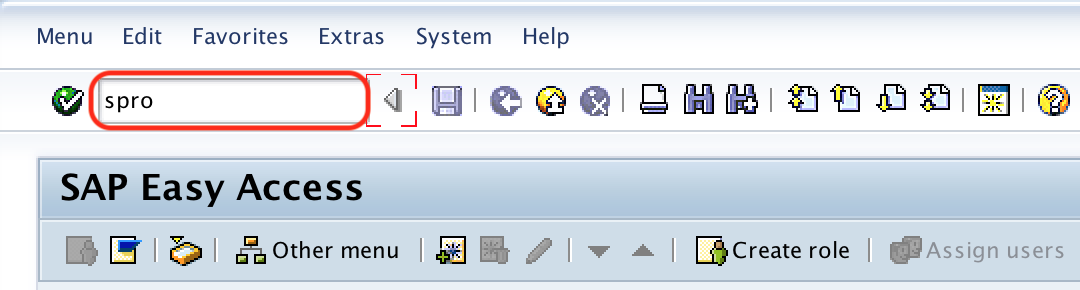
Step 1: Execute t-code SPRO from the SAP command field.
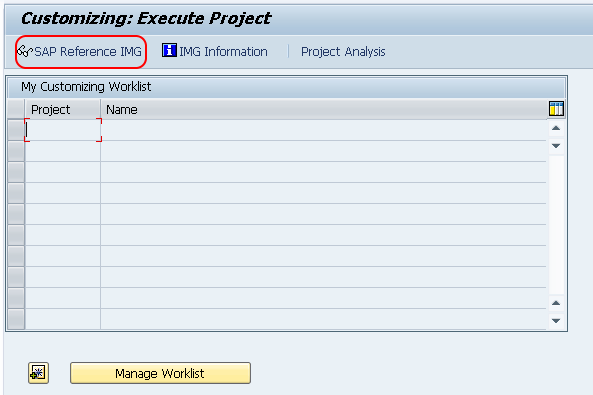
Step 2: On the Customizing screen, choose SAP Reference IMG.
Step 3: In the SAP Reference IMG, follow the path:
- Quality Management
- Quality Certificates
- Certificate Profile
- Define Certificate Types
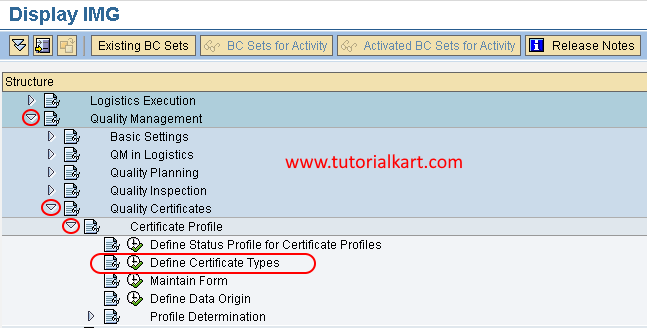
Choose the IMG activity Define Certificate Types to open the maintenance view for certificate type entries.
Step 4: On the certificate types overview screen, choose New Entries to create a certificate type according to the business requirement.
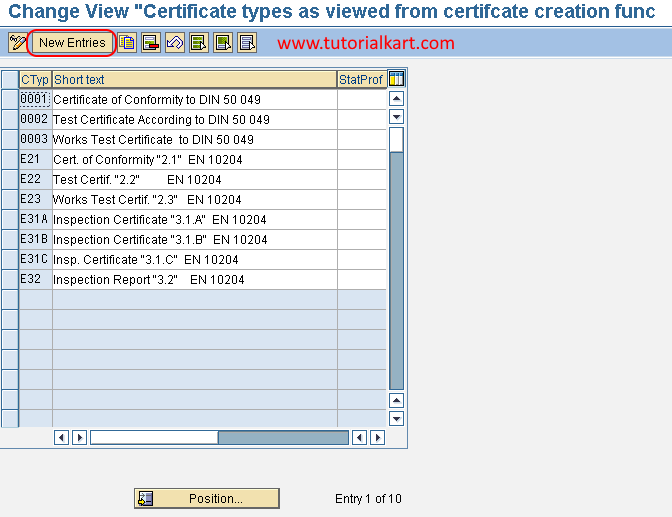
Step 5: On the New Entries: Overview of Added Entries screen, maintain the following fields.
- CType: Enter the key for the new certificate type. Use a key that follows the configuration naming standards used in your SAP system.
- Short text: Enter a clear description of the certificate type. The description should indicate the certificate category or business purpose.
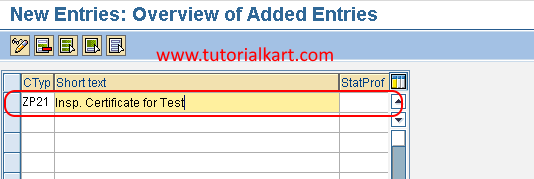
Choose the Save icon to save the certificate type in the SAP system. When prompted, assign the configuration change to the appropriate transport request.
Example Certificate Type Entries in SAP QM
The values used in each SAP system depend on the organization’s certificate processes. The following table shows illustrative examples only.
| Certificate type key | Example short text | Possible use |
|---|---|---|
| ZCOA | Certificate of Analysis | Classify profiles used for certificates containing inspection results and specifications |
| ZOUT | Outgoing Quality Certificate | Classify profiles used for customer-facing outgoing certificates |
| ZCUS | Customer-Specific Certificate | Classify profiles created for a particular customer certificate format |
These keys are examples and are not standard values that must be used. Review existing configuration before creating a new certificate type.
What to Configure After Creating the Certificate Type
After the certificate type has been defined, the next step is generally to create a certificate profile and assign the new type to it. The certificate profile contains the detailed controls required for certificate generation.
- Create the certificate profile with transaction QC01.
- Assign the required certificate type on the initial profile screen.
- Maintain the certificate form or layout.
- Add the master inspection characteristics that should appear on the certificate.
- Select the appropriate result origin and inspection specification origin.
- Review material, customer, and output-related certificate settings required by the business process.
- Test certificate processing with representative inspection data before production use.
Incoming quality certificates used during goods receipt follow a different process from outgoing quality certificates issued to customers. Do not assume that defining an outgoing certificate type completes incoming certificate control or goods-receipt certificate checks.
Certificate Type, Certificate Profile, and Inspection Type Differences
| SAP QM object | Purpose | Example role |
|---|---|---|
| Certificate type | Classifies a certificate profile | Distinguishes a certificate of analysis from another certificate category |
| Certificate profile | Defines the content and presentation of a quality certificate | Controls form, characteristics, results, specifications, and printed texts |
| Inspection type | Controls how and when an inspection lot is created and processed | Supports inspection processes such as goods receipt, production, or other configured inspection origins |
An inspection type is not the same as a certificate type. Inspection types belong to inspection-lot processing, while certificate types classify certificate profiles used in quality certificate processing.
Common SAP QM Certificate Type Configuration Issues
- Duplicate certificate type: Check the existing entries before creating a new key with the same purpose.
- Unclear short text: Use a description that identifies the certificate category instead of a generic label such as “Quality Certificate.”
- Certificate type cannot be used in QC01: Confirm that the configuration was saved in the correct client and transported where required.
- Certificate is not generated: Defining a certificate type is only one configuration step. Verify the certificate profile, profile assignment, inspection results, output settings, and relevant master data.
- Wrong process selected: Confirm whether the requirement concerns an outgoing quality certificate, an incoming certificate at goods receipt, or another quality document process.
SAP QM Certificate Type Editorial Review Checklist
- Verify that the IMG path ends with Certificate Profile > Define Certificate Types.
- Confirm that the article distinguishes certificate types from certificate profiles.
- Confirm that certificate types are not described as generating certificates by themselves.
- Check that example certificate type keys are clearly identified as illustrative custom values.
- Verify that incoming certificate processing is not presented as identical to outgoing certificate processing.
- Confirm that QC01 is mentioned only as the next step for creating a certificate profile.
- Check that transport handling is described conditionally because system procedures can vary.
FAQs About Certificate Types in SAP QM
What is a certificate type in SAP QM?
A certificate type is a configuration key used to classify a certificate profile. The certificate profile contains the detailed settings that control the content and layout of a quality certificate.
What transaction is used to define certificate types in SAP QM?
Certificate types are defined through transaction SPRO in the SAP Reference IMG under Quality Management, Quality Certificates, Certificate Profile, and Define Certificate Types.
What is the difference between a certificate type and a certificate profile?
The certificate type classifies the profile. The certificate profile defines the form, inspection characteristics, result sources, specification sources, descriptions, and other certificate controls.
Which transaction creates a certificate profile in SAP QM?
Transaction QC01 is used to create a certificate profile. The certificate type defined in Customizing can be entered on the initial QC01 screen.
Is a certificate type the same as an inspection type in SAP QM?
No. A certificate type classifies certificate profiles, while an inspection type controls inspection-lot creation and processing for a specific inspection scenario.