 TutorialKart.com
CSS background-position-x
The background-position-x property in CSS specifies the horizontal position of a background image. It allows developers to position the background image precisely along the x-axis of an element.
Syntax of background-position-x
</>
Copy
background-position-x: value;Values
| Value | Description |
|---|---|
left | Positions the background image at the left side along the x-axis. |
right | Positions the background image at the right side along the x-axis. |
center | Positions the background image at the center along the x-axis. |
x% | The left side is 0%, and the right side is 100%. The percentage value refers to the width of the background positioning area minus the width of the background image. |
xpos | Specifies the horizontal distance from the left side. Units can be pixels (e.g., 10px) or any other CSS units. |
xpos offset | A two-value syntax supported only in Firefox and Safari. The first value is left or right, and the second value is the horizontal offset from that side. Units can be pixels or any other CSS units. |
initial | Sets the property to its default value (0%). |
inherit | Inherits the value from the parent element. |
Default Value
0%
Examples for background-position-x
Using the CSS background-position-x Property
The following examples demonstrate how to use the background-position-x property to position the background image horizontally.
</>
Copy
/* Position background at the left */
.element {
  background-image: url('https://www.tutorialkart.com/img/mountains.jpg');
  background-position-x: left;
}

/* Position background 50% horizontally */
.element {
  background-image: url('https://www.tutorialkart.com/img/mountains.jpg');
  background-position-x: 50%;
}

/* Position background 30px from the left */
.element {
  background-image: url('https://www.tutorialkart.com/img/mountains.jpg');
  background-position-x: 30px;
}
Example for Centered Background on X-Axis
Below is an example demonstrating how to center the background image horizontally using background-position-x: center:
index.html
</>
Copy
<!DOCTYPE html>
<html lang="en">
<head>
<style>
  .box {
    width: 300px;
    height: 200px;
    border: 2px solid black;
    background-image: url('https://www.tutorialkart.com/img/lion_small.jpg');
    background-repeat: no-repeat;
    background-position-x: center;
    display: flex;
    justify-content: center;
    align-items: center;
    color: white;
    font-size: 18px;
    text-align: center;
  }
</style>
</head>
<body>

<div class="box">Centered Background on X-Axis</div>

</body>
</html>
Example for Background on X-Axis at 0
background-position-x: 0;
index.html
</>
Copy
<!DOCTYPE html>
<html lang="en">
<head>
<style>
  .box {
    width: 300px;
    height: 200px;
    border: 2px solid black;
    background-image: url('https://www.tutorialkart.com/img/lion_small.jpg');
    background-repeat: no-repeat;
    background-position-x: 0;
    display: flex;
    justify-content: center;
    align-items: center;
    color: white;
    font-size: 18px;
    text-align: center;
  }
</style>
</head>
<body>

<div class="box">Background on X-Axis 0</div>

</body>
</html>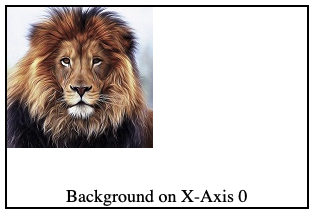
Example for Background on X-Axis at 20%
background-position-x: 20%;
index.html
</>
Copy
<!DOCTYPE html>
<html lang="en">
<head>
<style>
  .box {
    width: 300px;
    height: 200px;
    border: 2px solid black;
    background-image: url('https://www.tutorialkart.com/img/lion_small.jpg');
    background-repeat: no-repeat;
    background-position-x: 20%;
    display: flex;
    justify-content: center;
    align-items: end;
    color: black;
    font-size: 18px;
    text-align: center;
  }
</style>
</head>
<body>

<div class="box">Background on X-Axis at 20%</div>

</body>
</html>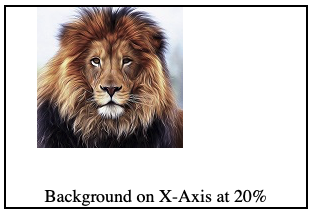
Browser Support
The background-position-x property is supported in most modern browsers, but the two-value syntax is only supported in Firefox and Safari. Below is a compatibility table:
| Browser | Version |
|---|---|
| Chrome | 1.0 |
| Edge | 12.0 |
| Firefox | 49.0 |
| Safari | 1.0 |
| Opera | 15.0 |
Browser Support for Two-Value Syntax
| Browser | Version |
|---|---|
| Chrome | Not supported |
| Edge | Not supported |
| Firefox | 49.0 |
| Safari | 15.4 |
| Opera | Not supported |