
CSS background-repeat
The background-repeat property in CSS specifies whether and how a background image is repeated. It can repeat the background image horizontally, vertically, both, or not at all. This property is useful for controlling the behavior of background images in various design layouts.
Syntax of background-repeat
</>
Copy
background-repeat: repeat | repeat-x | repeat-y | no-repeat | initial | inherit;Values
| Value | Description |
|---|---|
repeat | Repeats the background image both horizontally and vertically. This is the default value. |
repeat-x | Repeats the background image horizontally only. |
repeat-y | Repeats the background image vertically only. |
no-repeat | Does not repeat the background image. The image is displayed only once. |
initial | Sets the property to its default value (repeat). |
inherit | Inherits the value from the parent element. |
Default Value
repeat
Examples for background-repeat
Using the CSS background-repeat Property
The following examples demonstrate how to use the background-repeat property with different values.
</>
Copy
/* Repeat background both horizontally and vertically */
.element {
  background-image: url('https://www.tutorialkart.com/img/mountains.jpg');
  background-repeat: repeat;
}

/* Repeat background horizontally only */
.element {
  background-image: url('https://www.tutorialkart.com/img/mountains.jpg');
  background-repeat: repeat-x;
}

/* Repeat background vertically only */
.element {
  background-image: url('https://www.tutorialkart.com/img/mountains.jpg');
  background-repeat: repeat-y;
}

/* Do not repeat the background */
.element {
  background-image: url('https://www.tutorialkart.com/img/mountains.jpg');
  background-repeat: no-repeat;
}
Example for Repeat Background
Below is an example demonstrating how to use background-repeat: repeat to display the background image repeatedly along both the axis.
index.html
</>
Copy
<!DOCTYPE html>
<html lang="en">
<head>
<style>
  .box {
    width: 300px;
    height: 300px;
    border: 2px solid black;
    background-image: url('https://www.tutorialkart.com/img/lion_small.jpg');
    background-repeat: repeat;
  }
</style>
</head>
<body>

<h1>Repeat Background</h1>
<div class="box"></div>

</body>
</html>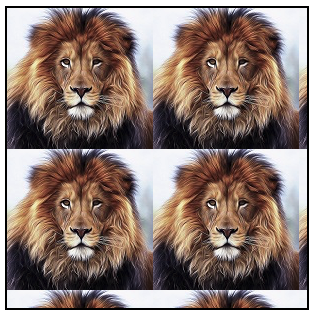
Example for Repeat Background along X-axis
background-repeat: repeat-x;
</>
Copy
<!DOCTYPE html>
<html lang="en">
<head>
<style>
  .box {
    width: 300px;
    height: 300px;
    border: 2px solid black;
    background-image: url('https://www.tutorialkart.com/img/lion_small.jpg');
    background-repeat: repeat-x;
  }
</style>
</head>
<body>

<h1>Repeat Background along X-axis</h1>
<div class="box"></div>

</body>
</html>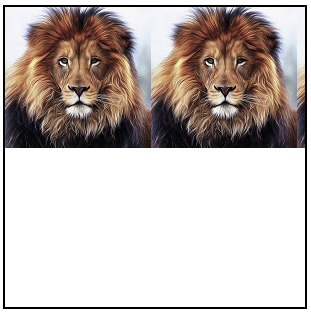
Example for Repeat Background along Y-axis
background-repeat: repeat-y;
</>
Copy
<!DOCTYPE html>
<html lang="en">
<head>
<style>
  .box {
    width: 300px;
    height: 300px;
    border: 2px solid black;
    background-image: url('https://www.tutorialkart.com/img/lion_small.jpg');
    background-repeat: repeat-y;
  }
</style>
</head>
<body>

<h1>Repeat Background along Y-axis</h1>
<div class="box"></div>

</body>
</html>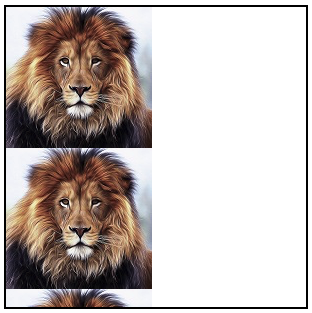
Example for Background with No Repeat
background-repeat: no-repeat;
</>
Copy
<!DOCTYPE html>
<html lang="en">
<head>
<style>
  .box {
    width: 300px;
    height: 300px;
    border: 2px solid black;
    background-image: url('https://www.tutorialkart.com/img/lion_small.jpg');
    background-repeat: no-repeat;
  }
</style>
</head>
<body>

<h1>No Repeat Background</h1>
<div class="box"></div>

</body>
</html>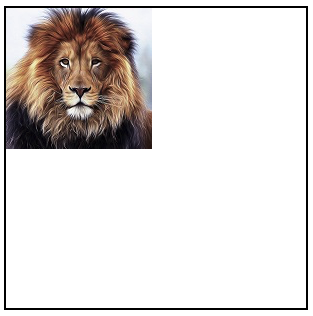
Browser Support
The background-repeat property is supported in all modern browsers. Below is a compatibility table:
| Browser | Version |
|---|---|
| Chrome | 1.0 |
| Edge | 4.0 |
| Firefox | 1.0 |
| Safari | 1.0 |
| Opera | 3.5 |