 TutorialKart.com
What Is a Quality Certificate in SAP QM?
A quality certificate in SAP Quality Management (SAP QM) is a document that communicates the quality-related properties of a material, batch, or delivery. It can include inspection characteristics, specifications, inspection results, batch information, and statements confirming that defined quality requirements were met.
Quality certificates are commonly exchanged with customers and suppliers. For an outgoing delivery, a company may issue a certificate of analysis or certificate of conformity to the customer. For an incoming procurement process, the supplier may be required to provide a certificate before or with the delivered material.
What a SAP QM Quality Certificate Can Document
A quality certificate does not create product quality by itself. It records and communicates quality information produced through configured inspection, batch, and delivery processes.
- The material and batch covered by the certificate
- The customer, supplier, delivery, or inspection lot associated with the document
- Required inspection characteristics and their specifications
- Recorded inspection results, such as measured values or qualitative findings
- Confirmation that predefined inspections were performed
- Statements of conformity with agreed customer or regulatory requirements
- Manufacturing, test, release, or shelf-life information when configured
Outgoing and Incoming Quality Certificates in SAP
Outgoing Quality Certificates for Customers
An outgoing quality certificate accompanies or follows a shipment to a customer. SAP can generate the certificate using information from the delivery, material master, batch, inspection lot, master inspection characteristics, and certificate profile.
Depending on the business requirement, the document may be printed, archived, or distributed electronically. A certificate may also be created for an inspection lot or batch when no delivery document is available.
Incoming Quality Certificates from Suppliers
In an incoming procurement process, a supplier may be required to submit a quality certificate for a purchased material. SAP QM can record whether the certificate was received and use certificate-related controls as part of the goods receipt and inspection process.
The incoming certificate requirement should be coordinated with the material, vendor, purchasing, and inspection settings. Whether a missing certificate blocks or delays further processing depends on the organization’s configuration and business rules.
Certificate of Analysis and Certificate of Conformity in SAP QM
The term quality certificate covers several document types. Two common examples are:
- Certificate of Analysis: Reports actual test or inspection results for selected characteristics, such as purity, dimensions, moisture, strength, or chemical composition.
- Certificate of Conformity: Confirms that the supplied material complies with specified requirements without necessarily listing every measured result.
The exact certificate name and content are determined by the organization’s industry, customer agreement, material requirements, and certificate profile configuration.
How SAP QM Builds a Quality Certificate
SAP assembles a quality certificate from master data, inspection data, and transaction data. The following components commonly contribute to the final document:
- Certificate type: Defines the business category and control settings for the certificate.
- Certificate profile: Determines which characteristics, results, texts, and additional fields appear on the certificate.
- Master inspection characteristics: Provide reusable definitions for the quality characteristics to be inspected and reported.
- Inspection lot and results: Supply recorded inspection values and valuations when results are required on the certificate.
- Material and batch data: Provide identification, classification, production, expiration, and other batch-related information.
- Delivery and partner data: Identify the shipment, customer, ship-to party, and relevant output recipient.
- Form and output settings: Control the visual layout and how the certificate is printed or distributed.
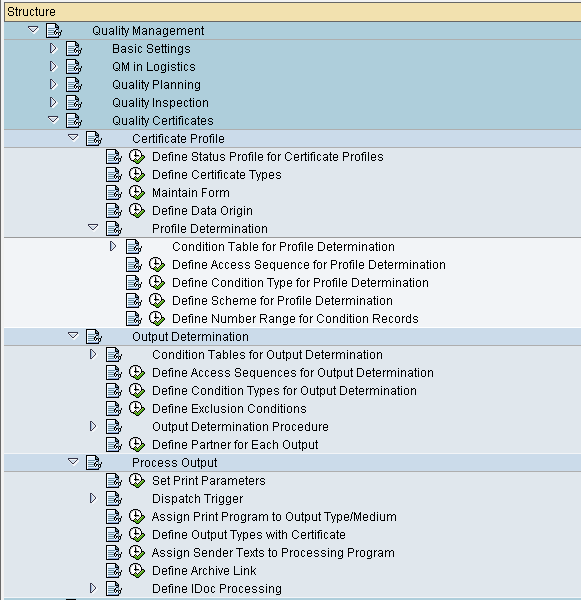
Certificate Profile in SAP QM
The certificate profile is the central control object for an outgoing quality certificate. It specifies what information SAP should select and display for a particular certificate scenario.
- Which inspection characteristics are included
- Whether specifications, results, or both are displayed
- How characteristics are selected and ordered
- Which texts and statements appear on the certificate
- Whether batch, material, inspection lot, or delivery information is shown
- How missing results or uninspected characteristics are handled
- Which form or output layout is used
A profile must also be assigned to the relevant business combination, such as a material, customer, or certificate type. The assignment ensures that SAP selects the correct profile when the certificate is generated.
Typical SAP Quality Certificate Process
- The business defines the certificate required for a material and customer or supplier relationship.
- Quality planners maintain the required master inspection characteristics and inspection plan.
- An inspection lot is created and inspection results are recorded when the process requires measured values.
- The batch, material, delivery, and partner information is completed.
- SAP determines the applicable certificate type and certificate profile.
- The certificate is generated using the configured data selection and form layout.
- The user reviews the certificate for missing values, incorrect characteristic selection, or output errors.
- The approved certificate is printed, archived, or sent to the recipient.
SAP QM Quality Certificate Configuration Steps
- Create certificate types
- Create and maintain the quality certificate settings required for the business process.
- Define condition types for output determination in SAP QM.
- Create master inspection characteristic
- Create certificate profile
- Assign the certificate profile to the applicable material, customer, certificate type, or organizational combination.
- Configure the certificate form and output or correspondence settings.
- Test certificate generation with representative inspection results, batches, and deliveries.
Example of a Quality Certificate in SAP
Consider a chemical manufacturer that ships a batch-controlled material to a customer. The customer requires a certificate of analysis with every delivery.
- The inspection plan contains characteristics for purity, moisture, density, and appearance.
- The quality laboratory records results for the production batch.
- The batch is assigned to the outbound delivery.
- The certificate profile selects the four required characteristics and their results.
- SAP adds the material number, batch number, delivery number, production date, and customer information.
- The generated certificate is reviewed and sent with the shipment.
If the customer only requires confirmation that the batch passed inspection, the profile can instead produce a certificate of conformity with a compliance statement and fewer detailed results.
Common Reasons a SAP Quality Certificate Is Incomplete
- The certificate profile is not assigned to the correct material or customer combination.
- Required master inspection characteristics are missing from the inspection plan or certificate profile.
- Inspection results have not been recorded, completed, or valuated.
- The delivery does not contain the expected batch or material data.
- The certificate profile selection conditions exclude the required characteristic.
- The certificate form does not contain the expected fields or text elements.
- Output determination does not find a valid output record or recipient.
- The selected data source does not match the inspection lot, batch, or delivery being processed.
SAP Quality Certificate Review Checklist
- Confirm that the certificate identifies the correct material, batch, customer, and delivery.
- Verify that every customer-required inspection characteristic appears in the intended order.
- Check that specifications, units of measure, results, and valuations are displayed correctly.
- Confirm that unrecorded or rejected results are handled according to the approved business rule.
- Test the certificate profile assignment for each relevant material and customer combination.
- Verify that the output form remains readable when characteristic descriptions or result values are long.
- Check that the certificate is generated only after the required inspection and release activities are complete.
- Validate printing, electronic distribution, and archiving in the target SAP environment.
Quality Certificate in SAP QM FAQs
What is the purpose of a quality certificate in SAP?
Its purpose is to communicate documented quality information for a material, batch, inspection lot, or delivery. It may report actual inspection results or confirm that the product complies with defined requirements.
Can SAP create a quality certificate without an outbound delivery?
Yes. Depending on the configured process, a certificate can be created with reference to an inspection lot or batch even when an outbound delivery is not available.
What is the difference between a certificate profile and a certificate type?
The certificate type identifies and controls the certificate category used in the business process. The certificate profile controls the detailed content, such as characteristics, specifications, results, texts, and data selection rules.
What is transaction QC55 used for in SAP QM?
In classic SAP QM environments, QC55 is associated with processing quality certificates for deliveries. The available functions and screens can vary by SAP release, activated components, and configuration, so users should verify the transaction behavior in their own system.
Why are inspection results missing from a SAP certificate of analysis?
Results may be missing because the characteristic is not included in the certificate profile, the inspection has not been completed, the profile selection conditions exclude the result, or the certificate is referencing a different inspection lot or batch.