 TutorialKart.com
Azure Virtual Machines, VM Sizes, and Billing Basics
Azure Virtual Machines are compute resources in Microsoft Azure that let you run Windows or Linux servers without buying and managing physical hardware. You choose a VM image, region, size, disk configuration, network settings, and pricing option, then Azure provisions the virtual server for your workload.
An Azure VM size defines the amount of CPU, memory, temporary storage, network bandwidth, and supported storage features available to the virtual machine. Billing depends on the VM size, operating system, region, uptime, disks, public IPs, data transfer, and the pricing model you select.
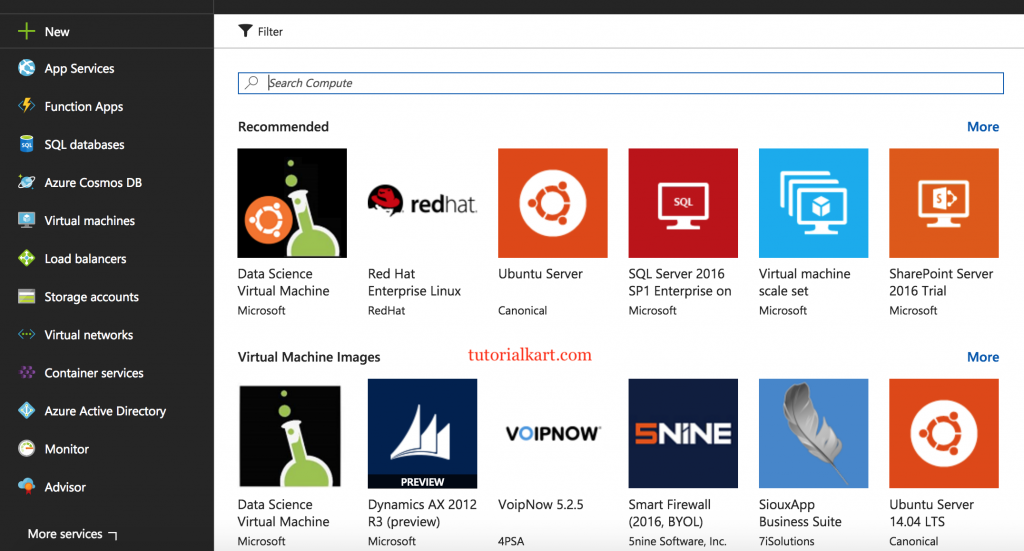
What an Azure Virtual Machine Includes
When you create an Azure virtual machine, you are not selecting only a server name. You are selecting a complete compute configuration. A typical VM setup includes the following components.
- VM image: the operating system and optional preinstalled software, such as Windows Server, Ubuntu, Red Hat Enterprise Linux, SQL Server images, or custom images.
- VM size: the hardware profile, including vCPUs, memory, local temporary storage, maximum data disks, and expected network performance.
- Region and availability option: the Azure datacenter region and resiliency choice, such as availability zones, availability sets, or single-instance deployment.
- Disks: the OS disk and any attached data disks, usually managed disks such as Standard HDD, Standard SSD, Premium SSD, or Ultra Disk where supported.
- Networking: virtual network, subnet, network interface, network security group, public IP address, and load balancer settings when needed.
- Access and identity: SSH keys, passwords, managed identity, role-based access control, and monitoring settings.
The older Basic and Standard tier distinction used in many early Azure VM tutorials is no longer the main way to choose modern Azure VMs. Current sizing is mainly organized by VM families and series, such as general purpose, compute optimized, memory optimized, storage optimized, GPU, and high performance compute.
Azure VM Size Families and Common Use Cases
Azure VM sizes are grouped into families. Each family is designed around a different balance of CPU, memory, storage throughput, GPU capability, or high-performance networking. The exact sizes available can vary by region and generation, so always confirm availability before finalizing a design.
| Azure VM family | Typical size series examples | Best suited for |
|---|---|---|
| General purpose | B, D, Das, Dds, Dsv, Dls | Web servers, small databases, development systems, business applications, and balanced CPU-to-memory workloads. |
| Compute optimized | F, Fsv | Batch processing, application servers, gaming servers, and workloads that need more CPU than memory. |
| Memory optimized | E, Es, Eds, M | Relational databases, in-memory analytics, SAP workloads, and applications that need a high memory-to-vCPU ratio. |
| Storage optimized | L, Lsv | NoSQL databases, data warehousing, log processing, and workloads that need high local disk throughput. |
| GPU accelerated | NC, ND, NV | AI training, inference, visualization, rendering, graphics workstations, and GPU-based compute. |
| High performance compute | H, HB, HC | Scientific simulations, computational fluid dynamics, financial risk modeling, and tightly coupled HPC jobs. |
For many new deployments, start with a general purpose D-series or burstable B-series VM for testing, then move to a more specialized family only when the workload clearly needs more CPU, memory, storage throughput, GPU acceleration, or HPC networking.
General Purpose Azure VM Sizes for Balanced Workloads
General purpose Azure VM sizes provide a balanced ratio of vCPU to memory. They are commonly used for web applications, small and medium databases, development environments, build servers, and line-of-business applications. B-series VMs are useful for workloads that are usually idle or low-load but occasionally need to burst CPU. D-series VMs are a common choice when you need steadier performance.
Compute Optimized Azure VM Sizes for CPU-Heavy Applications
Compute optimized Azure VM sizes provide a higher CPU-to-memory ratio. Choose this family when the application spends more time processing data than holding large datasets in memory. Examples include batch jobs, media processing, application servers, and high-throughput service layers.
Memory Optimized Azure VM Sizes for Databases and Analytics
Memory optimized VM sizes provide more RAM per vCPU. These sizes fit relational database servers, in-memory caches, analytics workloads, and enterprise applications where memory pressure affects performance. E-series and M-series sizes are common examples in this category.
Storage Optimized Azure VM Sizes for High Disk Throughput
Storage optimized VM sizes are designed for high local disk throughput and I/O performance. Use them when the workload is storage-bound rather than CPU-bound, such as large NoSQL databases, log indexing, data warehousing, and distributed storage systems.
GPU and HPC Azure VM Sizes for Specialized Compute
GPU sizes include NVIDIA or AMD GPU resources for workloads such as AI, visualization, rendering, and virtual workstations. HPC sizes are designed for technical computing and may include faster interconnect options. These sizes are usually selected only after confirming that the application can use the specialized hardware effectively.
How to Read Azure VM Size Names
Azure VM names contain useful information about the family, generation, number of vCPUs, and extra capabilities. The exact pattern can vary, but the following example shows how to read a typical size name.
| VM size name part | Example in Standard_D4s_v5 | Meaning |
|---|---|---|
Standard | Standard | The VM pricing tier used in the Azure size name. |
| Family letter | D | The general purpose D-series family. |
| Number | 4 | Usually indicates the vCPU count for the size. |
| Feature suffix | s | Indicates support for Premium SSD storage on many VM series. |
| Version | v5 | The generation of that VM series. |
Some VM size names include additional letters for features such as AMD processors, Intel processors, constrained vCPU sizes, local temporary disks, or other storage and memory variations. Read the full size documentation before assuming that two sizes with similar names have the same disk or networking limits.
Azure VM Sizes and Configurations to Compare Before Deployment
Do not choose an Azure VM size from vCPU and RAM alone. Two VMs with similar CPU and memory values can have different disk limits, IOPS limits, network performance, accelerator support, and regional availability.
| Configuration item | Why it matters for Azure virtual machines |
|---|---|
| vCPUs | Controls available compute capacity and affects licensing and compute cost. |
| Memory | Important for databases, caches, analytics workloads, Java applications, and memory-heavy services. |
| Temporary storage | Useful for scratch data, but it is not persistent storage and should not hold important data. |
| Maximum data disks | Limits how many managed disks you can attach to the VM. |
| Disk IOPS and throughput | Determines whether the VM can use the performance offered by attached disks. |
| Network bandwidth | Important for web traffic, distributed systems, backup transfers, and database replication. |
| Premium storage support | Needed when the workload requires Premium SSD or higher storage performance. |
| Region availability | Not every VM size is available in every Azure region or availability zone. |
For production systems, also consider availability zones, backup, patching, monitoring, autoscaling design, and recovery requirements. A VM size decision is part of the larger architecture, not just a price comparison.
Azure VM Billing and Pricing Factors
Azure virtual machines are commonly billed for compute based on the VM size and the time the VM is running. However, the final monthly bill often includes more than compute. Storage, network traffic, public IP addresses, backup, licensing, monitoring, and support options can also affect cost.
| Cost factor | How it affects Azure VM billing |
|---|---|
| VM size | Larger sizes with more vCPUs, memory, GPUs, or special hardware usually cost more per hour. |
| Operating system | Windows and commercial Linux images may include licensing cost, while some Linux images have different pricing. |
| Azure region | Prices vary by region, and not all VM sizes are available everywhere. |
| Running time | Compute charges normally apply while the VM is running. Stopping and deallocating a VM helps stop compute charges. |
| Managed disks | OS disks and data disks are billed separately based on disk type, size, performance tier, and transactions where applicable. |
| Snapshots and backups | Backup storage, recovery services, and snapshots can add recurring cost. |
| Network usage | Outbound data transfer, load balancers, NAT gateways, and public IP resources may create additional charges. |
| Pricing model | Pay-as-you-go, reserved instances, savings plans, and Spot VMs have different cost and commitment behavior. |
A common mistake is to compare only the hourly VM compute price and ignore disks and networking. For example, a low-cost VM with several Premium SSD data disks may have a noticeably higher monthly cost than the compute number alone suggests.
Pay-As-You-Go Azure VM Pricing
Pay-as-you-go pricing is useful when you need flexibility. You can create, resize, stop, or delete VMs without a long-term compute commitment. It is often used for testing, short-term projects, unpredictable workloads, and systems that may change frequently.
Reserved Instances and Savings Plans for Azure VM Cost Control
Reserved instances and savings plans can reduce compute cost when you have predictable long-running workloads. They usually require a commitment, so they should be considered after you understand the VM size family, region, operating system, and usage pattern you expect to keep.
Spot Azure VMs for Interruptible Workloads
Spot VMs can offer lower compute prices by using unused Azure capacity, but they can be evicted when Azure needs the capacity back or when pricing conditions change. Use Spot VMs for workloads that can tolerate interruption, such as batch processing, testing, CI jobs, and stateless workers.
How to Estimate Azure VM Costs Before Creating a VM
The safest way to estimate Azure VM billing is to use the Azure pricing calculator and enter the same region, operating system, VM size, disk type, disk count, expected uptime, licensing option, and networking assumptions you plan to use in production.
- Choose the Azure region where the VM will run.
- Select the operating system and VM size family.
- Add the OS disk and any data disks with the correct storage type and size.
- Set expected running hours, such as 24×7 production use or limited development hours.
- Add related resources such as public IP, load balancer, backup, monitoring, and outbound transfer where applicable.
- Compare pay-as-you-go with reservation or savings plan options only when the usage is predictable.
For a simple monthly estimate, multiply the hourly compute price by expected running hours, then add disk, network, backup, and licensing costs. For example, a VM running all day for a 30-day month runs for about 720 hours.
Estimated monthly VM cost =
(hourly compute price × expected running hours)
+ managed disk cost
+ network cost
+ backup and monitoring cost
+ licensing or image charges
Azure CLI Command to Check Available VM Sizes in a Region
Before selecting a size, check whether that VM size is available in the target region. With Azure CLI, you can list VM sizes for a region as shown below.
az vm list-sizes --location eastus --output tableYou can also review size availability and pricing in the Azure portal while creating a VM. If a size is unavailable in a region or quota is insufficient, Azure may require a different region, a quota increase, or a different VM family.
Choosing the Right Azure VM Size for a Workload
The best Azure VM size depends on the application pattern. Start with the workload requirements, not the largest available size. Oversized VMs increase cost, while undersized VMs can cause slow response times, disk bottlenecks, or failed deployments.
- For development and testing: use small B-series or D-series VMs, schedule shutdowns, and resize only when needed.
- For web applications: start with general purpose sizes and scale horizontally with load balancing when traffic grows.
- For databases: compare memory, disk throughput, IOPS limits, and backup requirements before choosing a size.
- For CPU-heavy jobs: compare compute optimized sizes and benchmark the actual workload.
- For GPU workloads: choose a GPU series that matches the framework, driver, and memory requirements.
- For production systems: include monitoring, scaling rules, availability zones, backup, and disaster recovery in the design.
After deployment, monitor CPU percentage, available memory, disk queue length, disk throughput, network usage, and application response time. Resize the VM when the metrics show a consistent mismatch between capacity and workload.
Azure VM Cost Optimization Checklist
- Stop and deallocate development VMs when they are not in use.
- Right-size VMs after reviewing actual CPU, memory, disk, and network metrics.
- Use autoscaling or scale sets for workloads that can scale horizontally.
- Review unattached managed disks, old snapshots, unused public IP addresses, and idle load balancers.
- Use reservations or savings plans only for predictable long-running compute usage.
- Use Spot VMs only for workloads that can restart or tolerate eviction.
- Place workloads in the correct region after considering latency, compliance, availability, and price.
- Review VM generations periodically because newer sizes may offer better performance or pricing for the same workload.
Azure Virtual Machine QA Checklist for Editorial Review
- The article explains that Azure VM size affects CPU, memory, storage limits, network performance, and cost.
- The article avoids fixed hourly prices unless they are clearly tied to a region, date, operating system, and pricing model.
- The image URL and existing media reference are unchanged.
- The Basic versus Standard tier wording is not presented as the main modern VM sizing model.
- Azure VM billing includes compute, disks, networking, backup, public IPs, and licensing where applicable.
- The article explains how to choose VM sizes by workload instead of recommending one size for every use case.
- Any command-line example uses a PrismJS-compatible code block class.
Azure Virtual Machines FAQs
What are the different VM sizes in Azure?
Azure VM sizes are grouped into families such as general purpose, compute optimized, memory optimized, storage optimized, GPU accelerated, and high performance compute. Each family includes multiple series and generations with different CPU, memory, disk, and networking capabilities.
How are Azure virtual machines billed?
Azure VMs are commonly billed for compute while the VM is running, based on size, region, operating system, and pricing model. Managed disks, snapshots, backups, public IP addresses, load balancers, outbound data transfer, monitoring, and licensing can add separate charges.
How do I select the best Azure VM configuration?
Start with workload requirements: CPU, memory, disk IOPS, storage throughput, network usage, region, availability, and software licensing. Choose a reasonable starting size, monitor real usage, and resize when performance metrics show the VM is too small or too large.
Does stopping an Azure VM stop all charges?
Stopping and deallocating a VM generally stops compute charges, but storage and some related resources can continue to be billed. The OS disk, data disks, snapshots, backups, and reserved public IP resources may still create cost.
Are Azure VM prices the same in every region?
No. Azure VM prices and size availability can vary by region. Always check the target region in the Azure pricing calculator or Azure portal before estimating monthly cost.
Summary of Azure VM Sizes and Billing
Azure Virtual Machines provide configurable Windows and Linux servers in Azure. The VM size controls the compute profile, but a complete VM decision should also include disks, networking, availability, monitoring, and cost. For accurate Azure VM billing, compare the correct region, VM size, operating system, disk setup, uptime, and pricing model instead of relying on old static price tables.