 TutorialKart.com
How to Add a New Column to an Existing MySQL Table
Use the MySQL ALTER TABLE ... ADD COLUMN statement when an existing table needs an additional field. You can define the new column’s data type, default value, nullability, constraints, and position within the table.
For example, you can add an email column to a students table without recreating the table. Existing rows are retained, although the value assigned to the new column depends on its definition.
MySQL ALTER TABLE ADD COLUMN Syntax
To add one column to an existing MySQL table, use the following syntax:
ALTER TABLE table_name
ADD [COLUMN] new_column_name column_definition [FIRST|AFTER existing_column];
The statement contains these parts:
- table_name is the name of the existing MySQL table.
- COLUMN is optional.
ADD email VARCHAR(255)andADD COLUMN email VARCHAR(255)are equivalent forms. - new_column_name is the name assigned to the new column.
- column_definition specifies the data type and optional attributes such as
NOT NULL,DEFAULT,UNIQUE, orAUTO_INCREMENT. - FIRST places the new column before all existing columns. AFTER existing_column places it after a named column. If neither clause is supplied, MySQL adds the column at the end of the table.
Check the MySQL Table Before Adding a Column
Inspect the current table structure before choosing a column name, data type, default value, or position. The following statements can be used to review the table definition:
DESCRIBE students;

SHOW COLUMNS FROM students;
Also consider how the change affects existing rows and application code. On production systems, take a current backup and test the statement in a staging environment, especially when the table is large or frequently updated.
Example: Add an AUTO_INCREMENT Primary Key Column
In this example, we shall add a new column to the students table whose structure is given below:
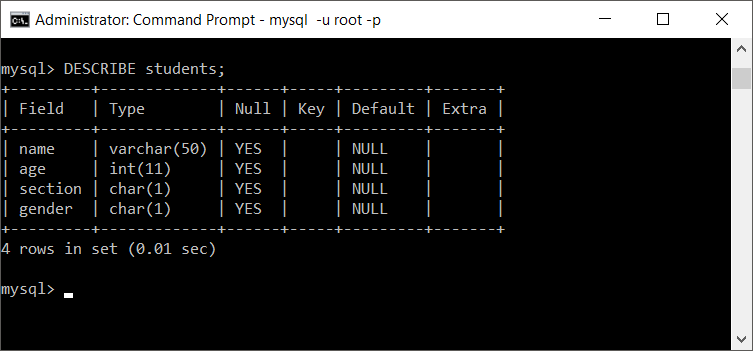
Now we shall add a new column, named id which shall be the PRIMARY key and AUTO_INCREMENT for every new record.
We shall execute the following query to add id column to students table.
ALTER TABLE students ADD id INT AUTO_INCREMENT PRIMARY KEY;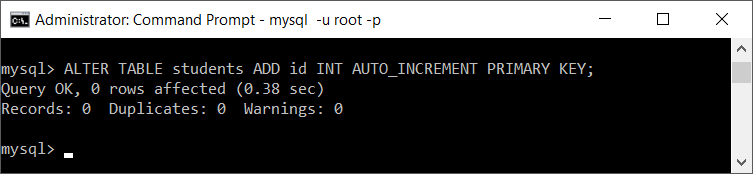
Let us see the students table structure.
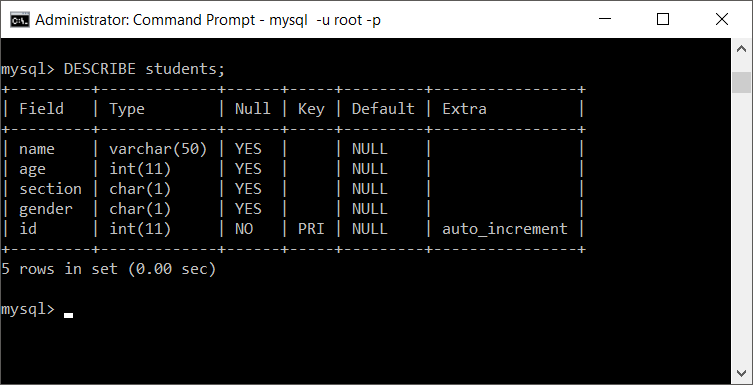
Now, we shall see the contents of the table.
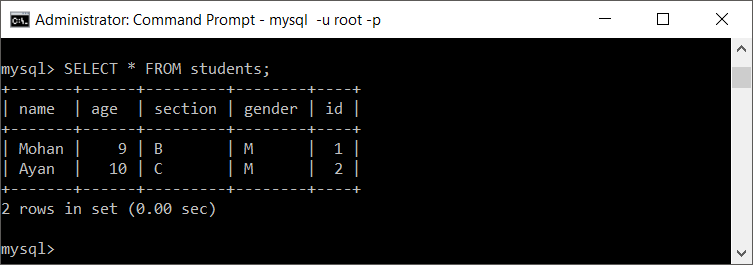
The new id column identifies each row with an automatically generated integer. Before running this form on another table, confirm that the table does not already have a primary key and that existing data permits the new constraint.
Add a MySQL Column with a Default Value
A default value is used when an INSERT statement does not provide a value for the new column. The following statement adds a status column and assigns active as its default:
ALTER TABLE students
ADD COLUMN status VARCHAR(20) NOT NULL DEFAULT 'active';
After the change, new rows that omit status receive the default value. Review the resulting values in existing rows as well, because MySQL applies the column definition while altering the table.
Add a Column, Populate Existing Rows, and Make It NOT NULL
When each existing row needs a calculated or row-specific value, a controlled three-step change is often clearer than adding a required column immediately:
ALTER TABLE students
ADD COLUMN email VARCHAR(255) NULL;

UPDATE students
SET email = CONCAT('student', id, '@example.com')
WHERE email IS NULL;

ALTER TABLE students
MODIFY COLUMN email VARCHAR(255) NOT NULL;
Replace the sample update expression with values that are valid for your data. Verify that no NULL values remain before changing the column to NOT NULL.
SELECT COUNT(*) AS rows_without_email
FROM students
WHERE email IS NULL;
Place the New Column FIRST or AFTER Another Column
Column order does not usually affect query results when columns are named explicitly, but MySQL lets you choose a physical display position for the new column.
Add a column at the beginning of the table:
ALTER TABLE students
ADD COLUMN student_code VARCHAR(20) FIRST;
Add a column after an existing column:
ALTER TABLE students
ADD COLUMN date_of_birth DATE AFTER name;
If the column named in the AFTER clause does not exist, MySQL returns an error and does not apply the alteration.
Add Multiple Columns in One MySQL ALTER TABLE Statement
MySQL can add several columns in one table alteration. Separate each ADD COLUMN clause with a comma:
ALTER TABLE students
ADD COLUMN phone VARCHAR(20),
ADD COLUMN enrolled_on DATE,
ADD COLUMN is_active BOOLEAN NOT NULL DEFAULT TRUE;
Combining related changes can be easier to manage than issuing several separate alterations. Confirm each column name and definition before running the statement, because an error in one clause can prevent the complete statement from succeeding.
Add a Column in MySQL Workbench
You can add a column through the MySQL Workbench table editor:
- Open the required MySQL connection and expand the target schema.
- Expand Tables, right-click the table, and select Alter Table.
- Open the Columns section and add a row for the new column.
- Enter the column name, choose its data type, and select required attributes such as NN for
NOT NULLor AI forAUTO_INCREMENT. - Select Apply, review the generated
ALTER TABLEstatement, and apply the change.
Reviewing the generated SQL before applying it helps confirm the exact table, column definition, and constraints that Workbench will use.
Verify the Newly Added MySQL Column
After running ALTER TABLE, inspect the structure and query a small set of rows:
SHOW COLUMNS FROM students;

SELECT *
FROM students
LIMIT 10;
Check the column name, data type, nullability, default value, key information, and position. Also test the application’s insert and update operations so that omitted values, required fields, and constraints behave as intended.
Common MySQL ADD COLUMN Errors and Checks
- Duplicate column name: choose a name that is not already present in the table.
- Unknown column in AFTER clause: verify the spelling and current structure with
SHOW COLUMNS. - Invalid default value: make sure the default matches the column’s data type and the SQL mode used by the server.
- NOT NULL conflicts: decide what value existing rows should receive before enforcing a required column.
- Application compatibility: avoid relying on
SELECT *column order in application logic, and update inserts that omit an explicit column list. - Operational impact: an
ALTER TABLEoperation can consume time and resources. Plan production changes according to the table size, workload, MySQL version, and storage engine.
MySQL Add Column FAQs
How do I add a new column to an existing MySQL table?
Run ALTER TABLE table_name ADD COLUMN column_name data_type;. For example, ALTER TABLE students ADD COLUMN phone VARCHAR(20); adds phone at the end of the students table.
How do I add a MySQL column with a default value?
Include a DEFAULT clause in the column definition, such as ALTER TABLE students ADD COLUMN status VARCHAR(20) DEFAULT 'active';. Add NOT NULL when the column must always contain a value.
Can MySQL add more than one column at a time?
Yes. Use one ALTER TABLE statement with multiple comma-separated ADD COLUMN clauses.
How do I add values to the new column for existing rows?
Add the column with a suitable default or allow NULL temporarily, then run an UPDATE statement to populate row-specific values. After verification, you can change the column to NOT NULL when required.
Does MySQL add a new column at the end of the table?
Yes, that is the default position. Use FIRST to place it at the beginning or AFTER existing_column to place it after a specific column.
Editorial QA Checklist for MySQL ADD COLUMN
- Confirm that every example uses MySQL-compatible
ALTER TABLE ... ADD COLUMNsyntax. - Verify that the table and column names used in each query are consistent with the explanation.
- Check that default values match their declared MySQL data types.
- Confirm that the tutorial explains how existing rows are handled before recommending
NOT NULL. - Ensure that
FIRST,AFTER, multiple-column additions, verification queries, and MySQL Workbench steps are covered.
Summary: Adding Columns with ALTER TABLE in MySQL
Use ALTER TABLE with ADD COLUMN to extend an existing MySQL table. Define the data type and constraints carefully, decide how existing rows should be populated, and verify the final structure with SHOW COLUMNS or DESCRIBE. In this MySQL Tutorial, we covered single and multiple columns, default values, column placement, Workbench steps, and post-change checks.