 TutorialKart.com
List All Users in MySQL Server
MySQL stores account information in the mysql.user system table. To list the accounts configured on a server, connect with an administrative account that can read this table, and query the User and Host columns.
First, login to MySQL Server. From a terminal, a typical connection command is:
mysql -u root -pEnter the password when prompted. Do not place the password directly in the command because it may be saved in shell history or exposed to other local processes.
Basic MySQL Query to Show Usernames
The following query returns the value in the User column for every row in mysql.user:
SELECT user FROM mysql.user;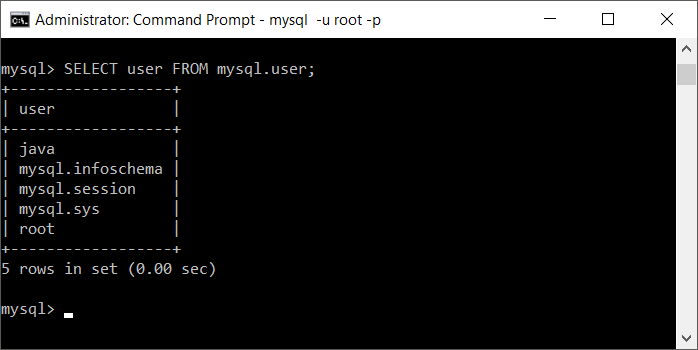
This query returns usernames, but it does not show the host component of each account. A username can appear more than once because MySQL identifies an account by both its username and its permitted client host.
List MySQL Accounts with User and Host
Use the following query for a complete and practical account list:
SELECT User, Host
FROM mysql.user
ORDER BY User, Host;
A result can contain entries such as 'root'@'localhost', 'app_user'@'10.%', or 'report_user'@'%'. These are different MySQL accounts even when two rows use the same username.
+-------------+-----------+
| User        | Host      |
+-------------+-----------+
| app_user    | 10.%      |
| report_user | %         |
| root        | localhost |
+-------------+-----------+
Show Only Unique MySQL Usernames
To remove repeated usernames from the result, use DISTINCT. This is useful for a quick summary, but it hides the host restrictions that distinguish separate accounts.
SELECT DISTINCT User
FROM mysql.user
ORDER BY User;
Check the Current MySQL Login and Authenticated Account
The client login name and the account MySQL actually used for authentication can differ. Run both functions when diagnosing account matching or privilege issues:
SELECT USER() AS client_login,
       CURRENT_USER() AS authenticated_account;
USER() reports the username and client host supplied by the connection. CURRENT_USER() reports the MySQL account row used to authenticate and authorize the session.
View Privileges for a Specific MySQL User
Use SHOW GRANTS to inspect the privileges and roles assigned to an account. Specify both the username and host exactly as they appear in the account list.
SHOW GRANTS FOR 'app_user'@'10.%';To view grants for the account used by the current session, run:
SHOW GRANTS FOR CURRENT_USER;The mysql.user table includes account and global privilege-related columns, but SELECT * FROM mysql.user; is not the best way to audit permissions. Modern MySQL installations can also use roles, dynamic privileges, and grants stored across other grant tables. Use SHOW GRANTS for an account-level privilege review.
List Global User Privileges from INFORMATION_SCHEMA
To review global privileges in a tabular result, query INFORMATION_SCHEMA.USER_PRIVILEGES:
SELECT GRANTEE, PRIVILEGE_TYPE, IS_GRANTABLE
FROM INFORMATION_SCHEMA.USER_PRIVILEGES
ORDER BY GRANTEE, PRIVILEGE_TYPE;
The GRANTEE value is displayed in 'user'@'host' format. This view covers global privileges; database-, table-, column-, routine-, role-, and dynamic-privilege information may require other views or SHOW GRANTS.
Find MySQL Users in MySQL Workbench
In MySQL Workbench, open the server connection and go to the administration or management area. Select Users and Privileges to view configured accounts. Choose an account to inspect its login settings, administrative roles, and schema privileges.
The Workbench account list is convenient for interactive administration. For scripts, server audits, or remote terminal sessions, the SQL queries above are easier to repeat and export.
Fix Access Denied When Querying mysql.user
If MySQL returns an error such as SELECT command denied, the connected account does not have permission to read the grant table. Connect with an authorized administrative account or ask the database administrator to provide the required account list. Avoid granting broad access merely to run a one-time check.
You can still inspect the grants for your own authenticated account with the following statement when the server permits it:
SHOW GRANTS;MySQL Password and Authentication Data Safety
MySQL does not provide a command to display users’ plaintext passwords. Authentication data may be stored as plugin-specific hashes or other credentials. Do not include authentication columns in reports, screenshots, logs, or support messages. Use account-management statements such as ALTER USER when a password must be changed.
MySQL User Listing FAQs
What is the command to show all users in MySQL?
Run SELECT User, Host FROM mysql.user ORDER BY User, Host;. Including Host is important because MySQL account names consist of both a username and a host.
Why does the same MySQL username appear multiple times?
Each row can represent a different account, such as 'sam'@'localhost' and 'sam'@'%'. They can have different authentication settings and privileges.
How do I check privileges for a MySQL user?
Run SHOW GRANTS FOR 'username'@'host'; using the exact username and host from mysql.user. Use SHOW GRANTS FOR CURRENT_USER; for the authenticated account.
Can I list MySQL users without root access?
Only if the connected account has permission to read the relevant system metadata. Without that permission, ask an administrator for the list or inspect only the grants available to your current account.
How do I see MySQL users in Workbench?
Open the MySQL connection, enter the administration or management area, and select Users and Privileges. The available controls depend on the privileges of the connected account.
Editorial QA Checklist for Listing MySQL Users
- Confirm the main query includes both
UserandHost. - Explain that MySQL accounts are identified as
'user'@'host'. - Use
SHOW GRANTSrather than treatingSELECT * FROM mysql.useras a complete privilege audit. - Do not expose authentication strings, hashes, or passwords in examples or screenshots.
- Verify that access-denied guidance does not recommend unnecessary administrative privileges.