 TutorialKart.com
Duplicate a Table in MySQL
You can duplicate a MySQL table by copying its rows, creating a new table from its definition, or combining both operations. The correct method depends on whether the duplicate must contain data, indexes, constraints, triggers, or only selected rows and columns.
The two commonly used approaches are:
- Use
CREATE TABLE ... AS SELECTto create a table from query results and copy data in one statement. - Use
CREATE TABLE ... LIKEfollowed byINSERT ... SELECTto copy the supported table definition and indexes first, and then copy the rows.
These approaches do not create an identical copy of every database object. MySQL does not automatically copy triggers with either method. In addition, CREATE TABLE ... LIKE does not copy foreign key definitions. Review those objects separately when an exact schema duplicate is required.
MySQL Table Duplication Methods Compared
| Duplication requirement | Recommended MySQL statement | Important limitation |
|---|---|---|
| Copy columns and rows in one operation | CREATE TABLE new_table AS SELECT * FROM old_table; | Indexes, primary keys, triggers, foreign keys, auto-increment behavior, and some column attributes are not reproduced as a complete schema definition. |
| Copy table structure without rows | CREATE TABLE new_table LIKE old_table; | The new table is empty, and triggers and foreign key definitions are not copied. |
| Copy structure, indexes, and rows | CREATE TABLE ... LIKE, followed by INSERT ... SELECT | Triggers, foreign keys, grants, and the auto-increment value still require verification. |
| Copy selected rows or columns | Use a column list and a WHERE clause | Source and destination column types and order must be compatible. |
| Copy a table to another database | Use database-qualified table names | The destination database must exist, and the account must have the required privileges. |
Duplicate MySQL Table Structure and Data with CREATE TABLE AS SELECT
A table’s structure includes its columns and properties such as data types, character sets, and default values. The records stored in those columns are the table’s data.
To create a new table from the columns and rows returned by another table, use CREATE TABLE ... AS SELECT. Following is the syntax:
CREATE TABLE new_table AS SELECT * FROM old_table;This statement creates the destination table and inserts the selected rows in one operation. It is suitable for temporary analysis tables, filtered copies, and data snapshots where an exact copy of every index and constraint is not required.
Do not use this method as an exact schema-cloning operation. Compare the source and destination definitions when primary keys, unique indexes, defaults, auto-increment columns, generated columns, triggers, or foreign keys are required.
Example: Duplicate the students Table as pupils
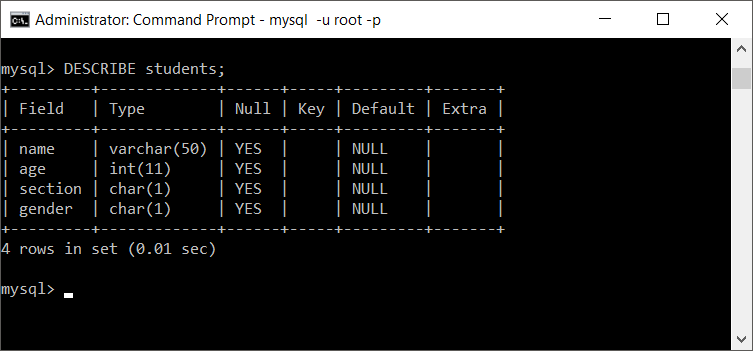
Following is the students table’s structure.
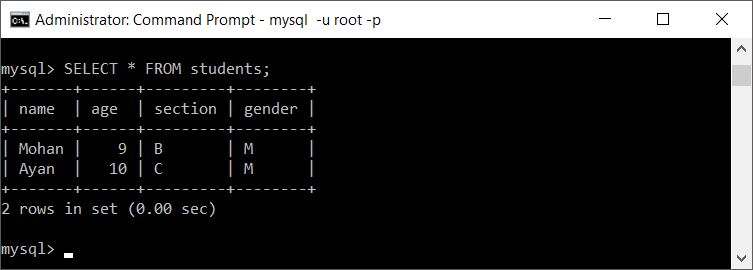
And students table has the following data.
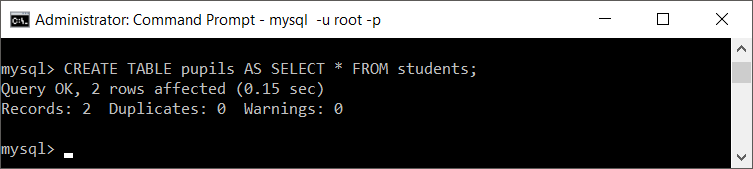
Now we shall copy the structure and data of students into a new table pupils.
Let us see if both duplicate and original tables exist.
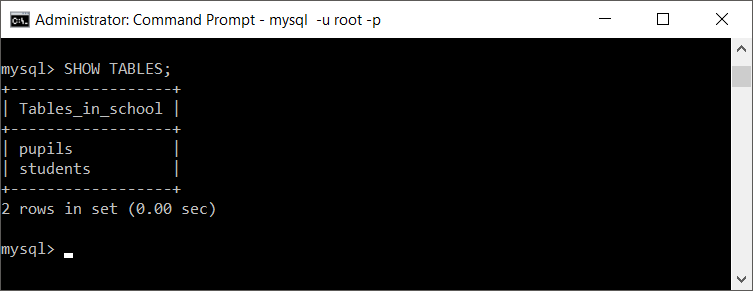
Both table names should now appear. Next, compare the destination table’s columns and rows with the source table.
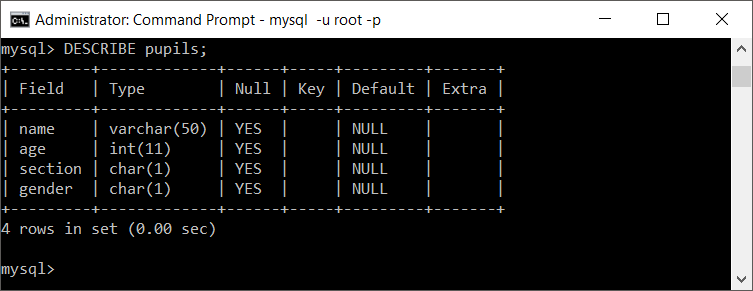
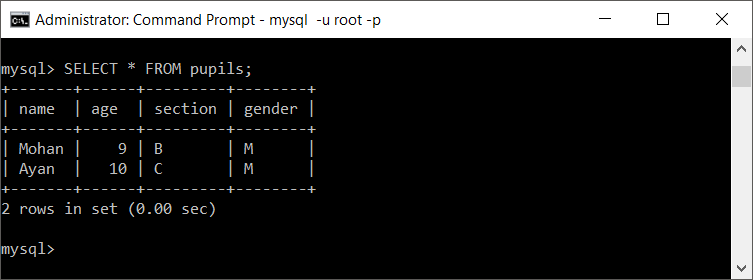
The rows have been copied to pupils. Use SHOW CREATE TABLE when you also need to compare indexes, constraints, defaults, and other table attributes.
Duplicate Only the MySQL Table Structure Without Data
Use CREATE TABLE ... LIKE when you need a new empty table based on an existing table definition:
CREATE TABLE new_table LIKE old_table;For example, the following statement creates an empty pupils table based on students:
CREATE TABLE pupils LIKE students;The new table receives the supported column definitions and indexes, but it does not receive any rows. Triggers and foreign key definitions are also not copied automatically.
Duplicate MySQL Table Structure, Indexes, and Data
To duplicate a MySQL table’s structure and indexes, and then copy its data, run two SQL statements in the MySQL command-line interface or another SQL client.
CREATE TABLE new_table LIKE old_table;
INSERT new_table SELECT * FROM old_table;- The first query creates an empty table based on the old table’s supported definition and indexes.
- The second query copies the rows from the old table to the new table.
- Triggers are not copied automatically and must be recreated separately.
- Foreign key definitions are not copied by
CREATE TABLE ... LIKEand must be added separately when required.
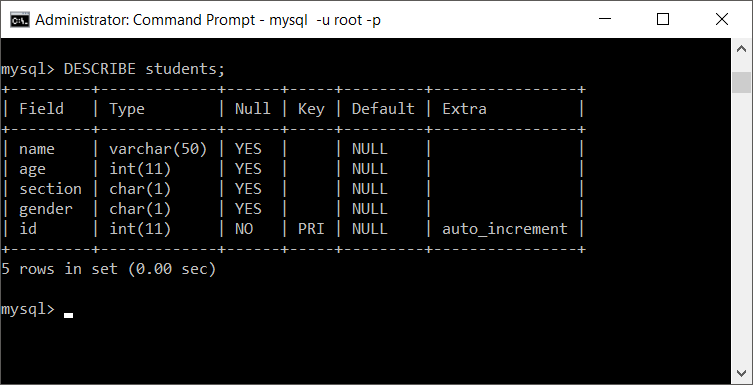
To check the effect on index, we shall add a new column to mysql table students and try duplicating the table.
students table structure
students table index
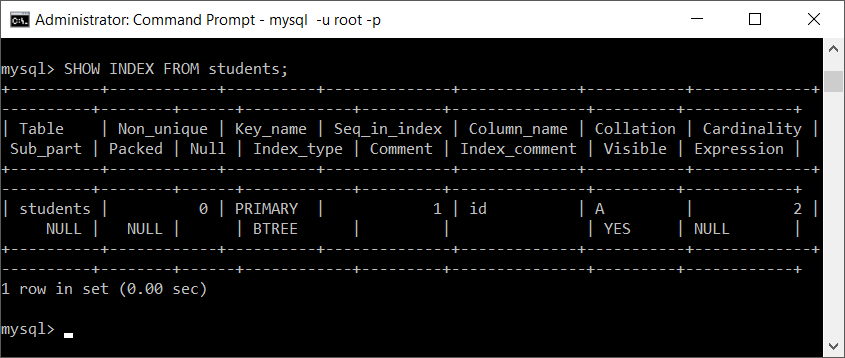
Now we shall copy the table definition, indexes, and data into a new table called pupils.
Run the following two queries.
CREATE TABLE pupils LIKE students;
INSERT pupils SELECT * FROM students;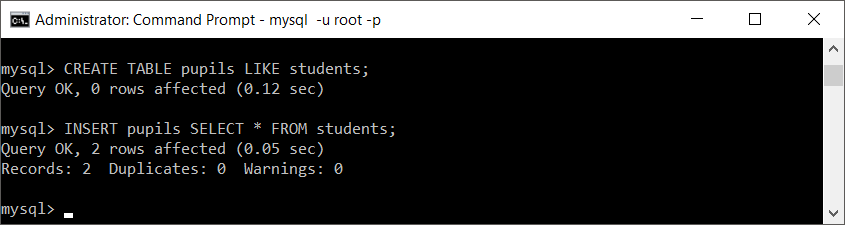
Let us see what happened to the index of newly created table pupils.
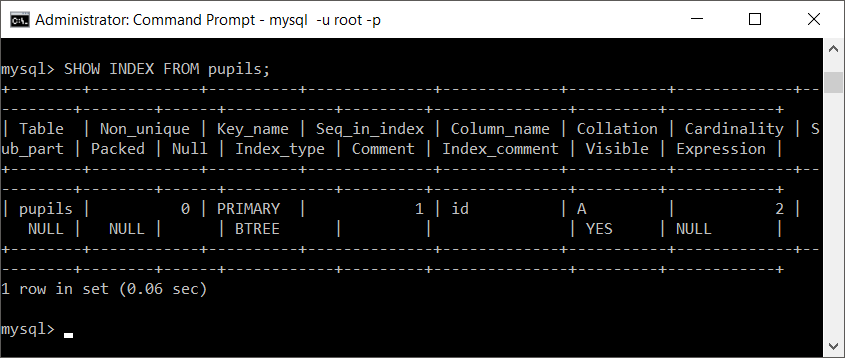
For application and production scripts, an explicit column list is safer than SELECT *. It documents the intended column mapping and avoids accidental mismatches if a table definition changes.
INSERT INTO pupils (student_id, student_name, class_name)
SELECT student_id, student_name, class_name
FROM students;
Duplicate Selected MySQL Rows or Columns
Add a column list and a WHERE condition when the new table should contain only part of the source data. The following statement creates a table containing active students:
CREATE TABLE active_students AS
SELECT student_id, student_name, class_name
FROM students
WHERE status = 'active';
When the destination should retain the supported source structure and indexes, create it with LIKE first and then insert the filtered rows:
CREATE TABLE active_students LIKE students;

INSERT INTO active_students
SELECT *
FROM students
WHERE status = 'active';
Copy a MySQL Table to Another Database
Use database-qualified table names to duplicate a table into another database on the same MySQL server. The destination database must already exist.
CREATE TABLE archive.students_copy LIKE school.students;

INSERT INTO archive.students_copy
SELECT *
FROM school.students;
The MySQL account must be able to read the source table and create and populate the destination table. Triggers, foreign keys, routines, events, and table-specific grants require separate review.
Duplicate a Table in MySQL Workbench
MySQL Workbench can run the same duplication statements used in the command-line client. Open a SQL Editor tab for the required connection and execute the following example:
USE school;

CREATE TABLE pupils LIKE students;

INSERT INTO pupils
SELECT *
FROM students;- Select the correct schema in the Navigator or run
USE database_name;. - Run
CREATE TABLE ... LIKEto create the destination table. - Run
INSERT ... SELECTto copy the rows. - Refresh the Schemas panel and inspect the newly created table.
- Compare its definition, indexes, row count, triggers, and foreign keys with the source table.
Recreate MySQL Triggers for the Duplicated Table
MySQL triggers belong to a specific table and are not copied by CREATE TABLE ... LIKE or CREATE TABLE ... AS SELECT. List the source table’s triggers before duplicating it:
SHOW TRIGGERS
WHERE `Table` = 'students';
Retrieve the definition of each required trigger before adapting it for the new table:
SHOW CREATE TRIGGER trigger_name;Create the destination triggers with unique trigger names and the correct destination table. Consider whether the triggers should exist before or after the initial data copy, because an active destination trigger can run for every inserted row.
Verify the Duplicated MySQL Table
Do not verify the operation only by checking that the new table name exists. Compare the source and destination definitions, indexes, triggers, and row counts:
SHOW CREATE TABLE students;
SHOW CREATE TABLE pupils;

SHOW INDEX FROM students;
SHOW INDEX FROM pupils;

SELECT COUNT(*) AS source_rows FROM students;
SELECT COUNT(*) AS copied_rows FROM pupils;

SHOW TRIGGERS
WHERE `Table` IN ('students', 'pupils');
Also test representative reads and writes against the new table. If the source table receives updates while data is being copied, choose an appropriate transaction or maintenance strategy so that the duplicate represents the intended point in time.
Common MySQL Table Duplication Errors
| MySQL duplication problem | Likely cause | What to check |
|---|---|---|
| Destination table already exists | CREATE TABLE requires an unused table name | Choose a different name or remove the existing destination only after confirming that it is no longer needed. |
| Duplicate-key error during the insert | The destination contains values that conflict with a primary key or unique index | Inspect existing destination rows and decide whether to clear, merge, update, or exclude conflicting records. |
| Column-count or data-type mismatch | SELECT * does not match the destination table | Specify matching source and destination column lists in the same order. |
| Missing trigger on the duplicate | Triggers are not copied automatically | Inspect the source triggers and recreate the required definitions for the destination table. |
| Missing foreign key | CREATE TABLE ... LIKE does not copy foreign key definitions | Review SHOW CREATE TABLE and add the required constraints after validating the copied data. |
| Unexpected next auto-increment value | The copied definition and inserted identifiers do not leave the required sequence value | Inspect the destination table and set the next auto-increment value explicitly when necessary. |
MySQL Duplicate Table Editorial QA Checklist
- Confirm that the tutorial distinguishes
CREATE TABLE ... AS SELECTfromCREATE TABLE ... LIKE. - Confirm that it does not claim that MySQL automatically copies triggers or foreign key definitions.
- Verify that source and destination table names remain consistent throughout each SQL example.
- Check that examples using
SELECT *explain when an explicit column list is safer. - Verify the duplicated table with
SHOW CREATE TABLE,SHOW INDEX, trigger checks, and row counts. - Check permissions and database-qualified names before copying a table across databases.
- Review the destination table’s auto-increment value and representative read and write operations.
MySQL Duplicate Table FAQs
How do I duplicate a MySQL table with all its data?
Run CREATE TABLE new_table LIKE old_table; and then INSERT INTO new_table SELECT * FROM old_table;. This copies the supported table definition and indexes before copying the rows. Review triggers and foreign keys separately.
How do I duplicate a MySQL table without copying its data?
Use CREATE TABLE new_table LIKE old_table;. The resulting table is empty. Triggers and foreign key definitions are not copied automatically.
Does CREATE TABLE AS SELECT copy indexes and primary keys?
It creates columns from the query result and copies the selected rows, but it should not be used when an exact reproduction of indexes, primary keys, defaults, auto-increment behavior, triggers, foreign keys, and other schema details is required.
Does MySQL copy triggers when duplicating a table?
No. Inspect the source table’s triggers with SHOW TRIGGERS and retrieve individual definitions with SHOW CREATE TRIGGER. Adapt and recreate only the triggers required for the destination table.
Can I duplicate a MySQL table into another database?
Yes, when both databases are on the same MySQL server and the account has suitable privileges. Use qualified names such as archive.students_copy and school.students in the CREATE TABLE and INSERT ... SELECT statements.
MySQL Table Duplication Summary
In this MySQL Tutorial, we learned to duplicate a table using CREATE TABLE ... AS SELECT and CREATE TABLE ... LIKE with INSERT ... SELECT. Use the first method for query-based copies and the second when the duplicate should retain the supported table definition and indexes. Verify triggers, foreign keys, grants, row counts, and auto-increment behavior separately.