 TutorialKart.com
MySQL SELECT DISTINCT Values from a Column
A MySQL table can contain repeated values when a column does not have a uniqueness constraint. Use SELECT DISTINCT when you need the query result to contain each value, or each selected combination of values, only once.
For example, if several students belong to the same section, a normal SELECT section query returns the section once for every matching row. Adding DISTINCT returns one row for each different section value.
MySQL SELECT DISTINCT Syntax for One Column
To get unique or distinct values from one column, place DISTINCT immediately after SELECT.
SELECT DISTINCT(column_name) FROM your_table_name;The parentheses in the existing syntax above are accepted, but DISTINCT is a SELECT modifier rather than a function. The following form is clearer and more commonly used.
SELECT DISTINCT column_name
FROM table_name;
MySQL DISTINCT with Multiple Columns
You can select distinct values from two or more columns by separating the column names with commas.
SELECT DISTINCT column_name_1, column_name_2 FROM your_table_name;With multiple columns, MySQL evaluates the complete selected row. It returns each unique combination of column_name_1 and column_name_2, not independently unique values from each column.
Example: Select Distinct Values from the students Table
Consider the following students table data.
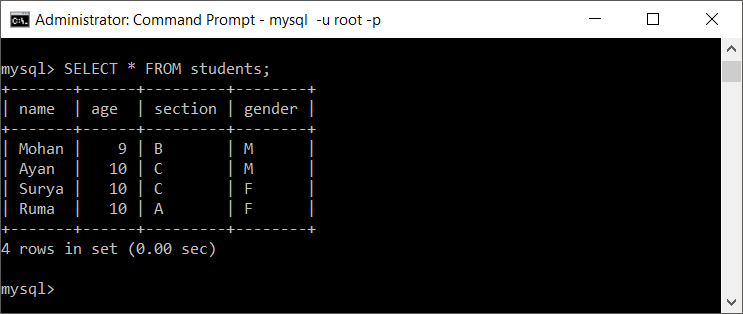
In this table:
- The
agecolumn contains two distinct values:9and10. - The
sectioncolumn contains three distinct values:A,B, andC. - The
gendercolumn contains two distinct values:MandF.
The following queries return distinct values from these columns.
Get DISTINCT Values from the age Column
SELECT DISTINCT(age) FROM students;
The result contains one row for each different age stored in the table.
Get DISTINCT Values from the section Column
SELECT DISTINCT section FROM students;
This query removes repeated section values from the result set.
Get DISTINCT Combinations of section and age
SELECT DISTINCT section, age FROM students;
The result contains each distinct section-and-age pair. A section may still appear more than once when it is associated with different ages.
Sort Distinct MySQL Values with ORDER BY
DISTINCT does not guarantee the order of returned rows. Add ORDER BY when the result must be sorted.
SELECT DISTINCT age
FROM students
ORDER BY age ASC;
To sort text values, specify the selected column in the same way.
SELECT DISTINCT section
FROM students
ORDER BY section;
Filter Rows Before Returning DISTINCT Values
A WHERE clause filters source rows before MySQL removes duplicates from the selected result.
SELECT DISTINCT section
FROM students
WHERE age = 10
ORDER BY section;
This query returns the sections that have at least one student whose age is 10.
Count Distinct Values in a MySQL Column
Use COUNT(DISTINCT column_name) when you need the number of different non-NULL values rather than the values themselves.
SELECT COUNT(DISTINCT section) AS distinct_section_count
FROM students;
For the sample data, the count is 3 because the distinct sections are A, B, and C.
How SELECT DISTINCT Handles NULL in MySQL
When the selected column contains several NULL values, SELECT DISTINCT returns one NULL row along with the other distinct values. In contrast, COUNT(DISTINCT column_name) does not count NULL.
SELECT DISTINCT section
FROM students;
SELECT DISTINCT Versus a UNIQUE Constraint
SELECT DISTINCT changes only the query result; it does not change the stored rows or prevent future duplicates. A UNIQUE constraint is a table rule that prevents duplicate values, or duplicate combinations of values, from being stored in the constrained key.
Use DISTINCT for reporting or reading deduplicated results. Use a UNIQUE constraint when duplicates should not be allowed in the data model.
CREATE TABLE users (
    user_id INT PRIMARY KEY,
    email VARCHAR(255) UNIQUE
);
Check Whether a MySQL Column Has Duplicate Values
To check whether a column is currently unique, group by that column and return values whose count is greater than one.
SELECT email, COUNT(*) AS occurrences
FROM users
GROUP BY email
HAVING COUNT(*) > 1;
If this query returns no rows, no duplicate non-NULL values were found by the query. Be aware that multiple NULL values require separate handling when checking business-level uniqueness.
Using SELECT DISTINCT * in MySQL
SELECT DISTINCT * is valid. It removes rows only when every selected column has the same value as another row.
SELECT DISTINCT *
FROM students;
If the table includes a primary key, each row is already different by that key, so SELECT DISTINCT * usually returns the same rows as SELECT *. Select only the columns needed for the result.
MySQL DISTINCT Performance Considerations
MySQL may need to sort rows or use an internal temporary structure to remove duplicates. On large tables, select only required columns, filter rows with WHERE where appropriate, and review the execution plan with EXPLAIN. An index on the filtered or selected columns may help, depending on the query and data distribution.
EXPLAIN
SELECT DISTINCT section
FROM students
WHERE age = 10;
Common MySQL DISTINCT Mistakes
- Expecting each column to be deduplicated separately: with multiple selected columns,
DISTINCTapplies to the complete combination. - Relying on result order: use
ORDER BYfor a defined order. - Using DISTINCT to repair duplicate data: it hides duplicates in the result but does not remove or prevent them.
- Selecting unnecessary columns: extra columns can make otherwise repeated values appear distinct.
- Confusing DISTINCT with GROUP BY: use
GROUP BYwhen you also need aggregates such asCOUNT(),SUM(), orAVG().
MySQL SELECT DISTINCT FAQs
How do I select only unique values from one MySQL column?
Use SELECT DISTINCT column_name FROM table_name;. It returns one row for each different value in the selected column.
Does MySQL have a SELECT UNIQUE keyword?
Use SELECT DISTINCT in MySQL to remove duplicate result rows. UNIQUE is normally used when defining an index or constraint, not as the standard MySQL replacement for DISTINCT in a SELECT query.
Can DISTINCT be used with multiple columns?
Yes. SELECT DISTINCT column1, column2 returns unique combinations of the two columns. It does not independently return every unique value from each column.
Can I use SELECT DISTINCT * in MySQL?
Yes, but it removes only completely identical selected rows. If a primary key is included, every row is already distinct by that key.
How can I count unique values in a MySQL column?
Use SELECT COUNT(DISTINCT column_name) FROM table_name;. The count excludes NULL values.
MySQL DISTINCT Tutorial QA Checklist
- Verify that every multi-column example explains that uniqueness applies to the complete column combination.
- Confirm that examples requiring a predictable order include
ORDER BY. - Check that
SELECT DISTINCTand aUNIQUEconstraint are described as different operations. - Confirm that the distinction between
SELECT DISTINCTandCOUNT(DISTINCT ...)forNULLvalues is accurate. - Run added SQL examples against a compatible MySQL test table before publishing changes to production documentation.
Summary of Selecting Unique Values in MySQL
Use SELECT DISTINCT to remove duplicate rows from a query result. For one column, it returns each different value once. For multiple columns, it returns each different combination once. Add WHERE to filter source rows, ORDER BY to sort the result, and COUNT(DISTINCT ...) to count distinct non-NULL values.
In this MySQL Tutorial, we have learnt to get distinct values of one or more columns.