 TutorialKart.com
Why MySQL LAST_INSERT_ID() Returns 0
LAST_INSERT_ID() returns the first automatically generated AUTO_INCREMENT value produced by the most recent successful insert on the current MySQL connection. It returns 0 when the connection has not generated an auto-increment value, when the table does not use an AUTO_INCREMENT column, or when the statement updated or ignored a row instead of inserting a new one.
This tutorial explains how to identify the cause of MySQL LAST_INSERT_ID() returning 0 and how to correct the table definition, insert statement, or connection handling.

How MySQL LAST_INSERT_ID() Works
MySQL stores the last generated auto-increment value separately for each client connection. Another connection cannot overwrite the value for your session. The function is normally called immediately after the INSERT statement and on the same connection.
INSERT INTO table_name (column_name)
VALUES (column_value);

SELECT LAST_INSERT_ID();
The table must contain an indexed integer column defined with AUTO_INCREMENT. In most tables, that column is also the primary key.
Check Whether the Table Has an AUTO_INCREMENT Column
Before changing the query, inspect the table definition.
SHOW CREATE TABLE students;Look for a definition similar to student_id INT NOT NULL AUTO_INCREMENT. If no column has the AUTO_INCREMENT attribute, an insert cannot generate the value that LAST_INSERT_ID() is designed to return.
Example Table Before Adding an AUTO_INCREMENT Primary Key
Consider the following students table.

If this table has no AUTO_INCREMENT column, inserting a row does not generate an identifier. Calling LAST_INSERT_ID() on a new connection therefore returns 0.
Add an AUTO_INCREMENT Primary Key to the MySQL Table
Add a new integer primary-key column when the table does not already have a suitable key. Review the existing schema first because a table can have only one AUTO_INCREMENT column.
ALTER TABLE students
ADD COLUMN student_id INT UNSIGNED NOT NULL AUTO_INCREMENT PRIMARY KEY;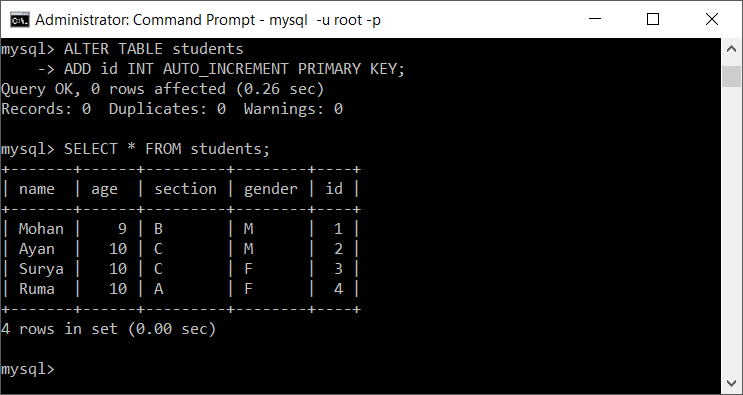
For a new table, define the auto-increment key when creating the table.
CREATE TABLE students (
    student_id INT UNSIGNED NOT NULL AUTO_INCREMENT,
    name VARCHAR(100) NOT NULL,
    age INT,
    section VARCHAR(10),
    gender CHAR(1),
    PRIMARY KEY (student_id)
);
Insert a Row and Read LAST_INSERT_ID() on the Same Connection
Insert a row without supplying a value for the auto-increment column. MySQL then generates the identifier.
INSERT INTO students (name, age, section, gender)
VALUES ('Arun', 10, 'A', 'M');

SELECT LAST_INSERT_ID() AS student_id;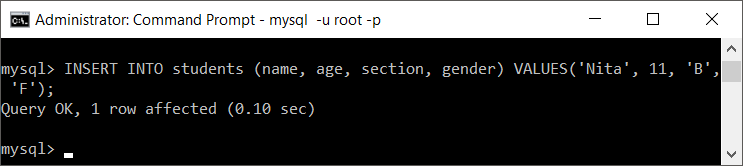
The result is the identifier generated for the inserted row. Call the function before releasing the connection back to a pool or opening a different database session.

Common Causes of MySQL LAST_INSERT_ID() Returning 0
The Insert Did Not Generate an AUTO_INCREMENT Value
LAST_INSERT_ID() does not return an arbitrary primary-key value. It reports an automatically generated value. If the table has no AUTO_INCREMENT column, the result can remain 0.
The ID Was Supplied Explicitly in the INSERT Statement
When the application supplies the identifier instead of allowing MySQL to generate it, do not depend on LAST_INSERT_ID() to return that explicit value.
INSERT INTO students (student_id, name, age, section, gender)
VALUES (500, 'Meera', 9, 'B', 'F');
If the application needs the value 500, it already has that value and should use it directly.
LAST_INSERT_ID() Was Called from a Different Connection
The stored value belongs to the current connection. This commonly causes problems in applications that use connection pools:
- Connection A executes the
INSERT. - Connection A is returned to the pool.
- Connection B executes
SELECT LAST_INSERT_ID(). - Connection B has not generated an ID, so it returns
0or its own session value.
Execute the insert and retrieve the generated key through the same connection. Most database drivers provide a generated-keys API that should be preferred over issuing a separate query when available.
The INSERT Failed, Was Ignored, or Inserted No Row
An error, an ignored duplicate, or another no-insert outcome does not produce a successfully inserted row whose generated ID can be relied on. Check the statement result, warnings, and affected-row count before reading the ID. Some storage engines can still consume an allocated auto-increment number, which is one reason gaps may appear.
INSERT IGNORE INTO students (student_id, name)
VALUES (1, 'Duplicate Key Example');

SHOW WARNINGS;
ON DUPLICATE KEY UPDATE Took the Update Path
An INSERT ... ON DUPLICATE KEY UPDATE statement may update an existing row instead of inserting a new one. In that case, no new auto-increment value is generated automatically.
When the application must obtain the existing row ID as well as a newly inserted ID, assign the key to LAST_INSERT_ID() in the update clause.
INSERT INTO users (email, display_name)
VALUES ('user@example.com', 'New Name')
ON DUPLICATE KEY UPDATE
    user_id = LAST_INSERT_ID(user_id),
    display_name = 'New Name';

SELECT LAST_INSERT_ID() AS user_id;
This pattern requires email to have a unique key and user_id to be the auto-increment key. The update branch sets the session’s last-insert value to the existing row ID.
LAST_INSERT_ID() with Multi-Row Inserts
For an insert that generates several auto-increment values, LAST_INSERT_ID() returns the first generated value from that statement.
INSERT INTO students (name, age, section, gender)
VALUES
    ('Asha', 9, 'A', 'F'),
    ('Ravi', 10, 'B', 'M'),
    ('Nila', 9, 'C', 'F');

SELECT LAST_INSERT_ID() AS first_generated_id;
Do not assume that every subsequent generated value can always be derived by simple arithmetic. Gaps can occur because of failed statements, concurrent activity, allocation rules, or configuration.
LAST_INSERT_ID() and Transactions
The function is connection-specific, not transaction-specific. A rollback does not make an allocated auto-increment value reusable, and application code should not treat auto-increment values as gap-free sequence numbers.
START TRANSACTION;

INSERT INTO students (name, age, section, gender)
VALUES ('Kiran', 10, 'A', 'M');

SELECT LAST_INSERT_ID();

ROLLBACK;
After the rollback, the row is not committed, but the generated number may remain consumed. Use the ID only after confirming that the transaction completed as intended.
MySQL LAST_INSERT_ID() Troubleshooting Checklist
- Run
SHOW CREATE TABLE table_name;and confirm that the expected column isAUTO_INCREMENTand indexed. - Omit the auto-increment column from the
INSERT, or passNULLwhen the SQL mode and schema permit MySQL to generate it. - Verify that the insert succeeded and actually added a row.
- Call
LAST_INSERT_ID()immediately after the insert on the same connection. - For
ON DUPLICATE KEY UPDATE, decide whether the update branch should explicitly setLAST_INSERT_ID(existing_id). - In application code, prefer the database driver’s generated-key result where available.
MySQL LAST_INSERT_ID() FAQs
What does LAST_INSERT_ID() return in MySQL?
It returns the first auto-increment value generated by the most recent successful insert on the current connection. If the connection has not generated such a value, it returns 0.
Is MySQL LAST_INSERT_ID() safe when several users insert rows?
Yes, because the value is maintained per connection. Inserts made by other clients do not change the value stored for your connection. The insert and ID retrieval must still use the same connection.
Why does LAST_INSERT_ID() return 0 after an INSERT?
The usual causes are a missing AUTO_INCREMENT column, an explicitly supplied ID, a failed or ignored insert, an update instead of an insert, or reading the value from a different connection.
What does LAST_INSERT_ID() return after a multi-row INSERT?
It returns the first automatically generated ID from that insert statement.
Can LAST_INSERT_ID() return an existing row ID after ON DUPLICATE KEY UPDATE?
Yes. In the update clause, use an assignment such as id = LAST_INSERT_ID(id). A following SELECT LAST_INSERT_ID() then returns the existing row’s ID on the same connection.
Editorial QA Checklist for LAST_INSERT_ID() Returning 0
- Confirm that every example retrieves the generated ID on the same MySQL connection that performed the insert.
- Verify that the sample key column is
AUTO_INCREMENTand indexed, normally as the primary key. - Check that the tutorial distinguishes an automatically generated ID from an explicitly supplied ID.
- Confirm that the
ON DUPLICATE KEY UPDATEexample explains the insert and update branches separately. - Test the added SQL against a disposable MySQL schema before publishing.
Fix Summary for MySQL LAST_INSERT_ID() Returning 0
Define an indexed AUTO_INCREMENT column, allow MySQL to generate its value, confirm that the insert added a row, and retrieve the ID immediately on the same connection. When an upsert updates an existing row, use LAST_INSERT_ID(existing_id) in the update clause if the application needs one query path for both inserted and existing IDs.