 TutorialKart.com
List Connected Users on a MySQL Server
MySQL exposes its current client sessions through the process list. Use SHOW PROCESSLIST to see connected users, their client hosts, selected databases, current commands, session duration, and executing statements.
To get the list of connected users to MySQL Server, login to MySQL Server, and run the following SQL Query in mysql command line interface.
SHOW PROCESSLIST;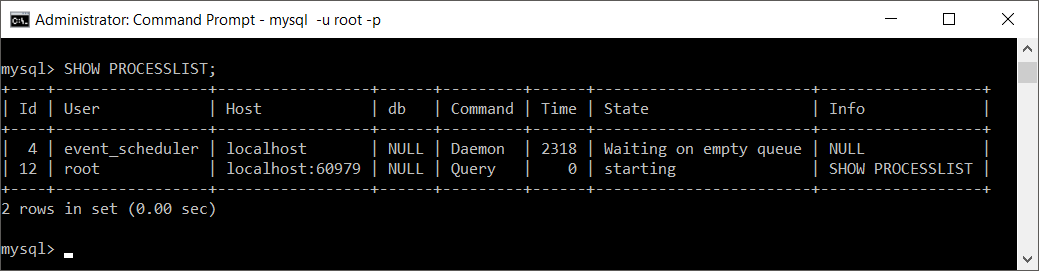
Each row represents one server thread or client session. The connection used to run SHOW PROCESSLIST also appears in the result.
MySQL SHOW PROCESSLIST Columns
| Column | Meaning |
|---|---|
Id | Unique connection or process identifier. |
User | MySQL account associated with the session. |
Host | Client hostname or IP address, usually followed by the client port. |
db | Currently selected database, or NULL when none is selected. |
Command | Current thread command, such as Query or Sleep. |
Time | Number of seconds the thread has remained in its current state. |
State | More detail about what the thread is doing. |
Info | Currently executing statement, when one is available. |
Check a New MySQL User Connection
To confirm that the process list changes as users connect, open another terminal or Command Prompt window and log in with a different MySQL account.
In this example, the second connection uses the MySQL user java.
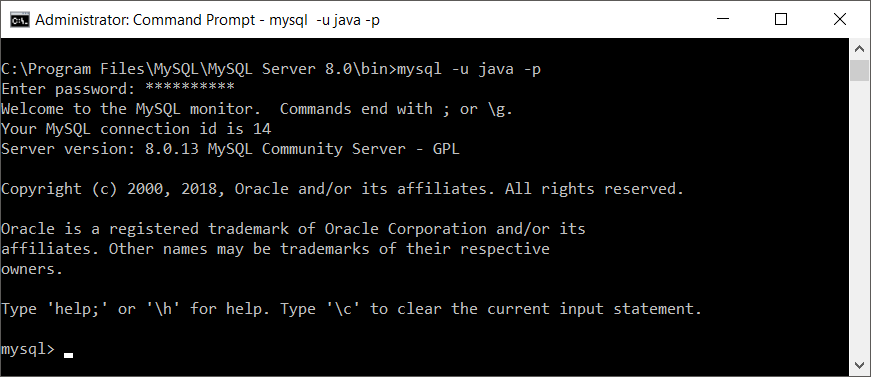
Run SHOW PROCESSLIST; again from the first session.
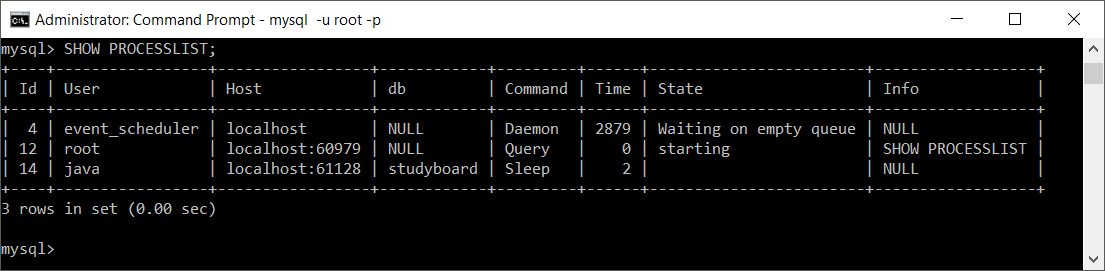
The new row shows that the user java is connected and currently has the studyboard database selected.
Show Complete SQL Statements for Connected MySQL Users
SHOW PROCESSLIST can truncate the text shown in the Info column. Use SHOW FULL PROCESSLIST when you need the complete current statement:
SHOW FULL PROCESSLIST;This command is useful when investigating long-running statements, blocked sessions, or connections that remain active longer than expected.
Query Connected MySQL Users with INFORMATION_SCHEMA
The INFORMATION_SCHEMA.PROCESSLIST table provides process-list data in a form that can be filtered, sorted, grouped, and selected by column.
SELECT
    ID,
    USER,
    HOST,
    DB,
    COMMAND,
    TIME,
    STATE,
    INFO
FROM INFORMATION_SCHEMA.PROCESSLIST
ORDER BY TIME DESC;
This result contains the same main connection details while allowing standard SQL conditions and aggregate functions.
Show Only Active MySQL Queries
Sleeping sessions are connected but are not currently executing a statement. To focus on active work, exclude rows whose command is Sleep:
SELECT
    ID,
    USER,
    HOST,
    DB,
    TIME,
    STATE,
    INFO
FROM INFORMATION_SCHEMA.PROCESSLIST
WHERE COMMAND <> 'Sleep'
ORDER BY TIME DESC;
Find Long-Running MySQL Connections and Queries
The following query lists non-sleeping sessions that have remained in their current state for at least 30 seconds:
SELECT
    ID,
    USER,
    HOST,
    DB,
    TIME,
    STATE,
    INFO
FROM INFORMATION_SCHEMA.PROCESSLIST
WHERE COMMAND <> 'Sleep'
  AND TIME >= 30
ORDER BY TIME DESC;
A large Time value does not by itself prove that a query has a problem. Review the command, state, statement text, application behavior, and expected workload before taking action.
Count Current MySQL Connections by User
Group the process list by USER to see how many current sessions belong to each MySQL account:
SELECT
    USER,
    COUNT(*) AS connection_count
FROM INFORMATION_SCHEMA.PROCESSLIST
GROUP BY USER
ORDER BY connection_count DESC, USER;
This query counts sessions, not distinct people. An application account may open several simultaneous connections through a connection pool.
Count Active and Sleeping Connections by MySQL User
SELECT
    USER,
    SUM(COMMAND = 'Sleep') AS sleeping_connections,
    SUM(COMMAND <> 'Sleep') AS active_connections,
    COUNT(*) AS total_connections
FROM INFORMATION_SCHEMA.PROCESSLIST
GROUP BY USER
ORDER BY total_connections DESC, USER;
This separates idle sessions from sessions currently performing another command.
Show MySQL Connections by Client IP Address
The HOST column commonly contains a client address and port in a form such as 192.0.2.10:52144. To list current sessions with their reported client locations, run:
SELECT
    ID,
    USER,
    HOST,
    DB,
    COMMAND,
    TIME
FROM INFORMATION_SCHEMA.PROCESSLIST
ORDER BY HOST, USER;
Multiple rows can share the same client IP because one application or computer may maintain several connections. Connections made through local sockets may be displayed differently from remote TCP connections.
Check Which MySQL User the Current Session Uses
Use USER() and CURRENT_USER() to inspect the account information for your own session:
SELECT
    USER() AS connected_as,
CURRENT_USER() AS authenticated_as;USER()reports the username and client host supplied for the connection.CURRENT_USER()reports the MySQL account that the server matched for privilege checking.
The values can differ when MySQL authenticates the connection using a matching account entry that is not identical to the supplied username and host combination.
Connected MySQL Users Versus Configured MySQL Accounts
The process list shows current sessions only. It does not list every account configured on the server. To list defined MySQL accounts, an administrator with suitable privileges can query the mysql.user system table:
SELECT User, Host
FROM mysql.user
ORDER BY User, Host;
MySQL identifies an account by both its username and host. For example, 'appuser'@'localhost' and 'appuser'@'192.0.2.%' are separate account entries.
The server does not expose account passwords as readable text. Authentication credentials are stored in a protected form, so a forgotten password must be reset by an authorized administrator rather than retrieved from the user table.
Permissions Required to View MySQL Connections
A user without process-monitoring privileges normally sees only sessions associated with that user’s account. An administrative account with the appropriate process privilege can inspect sessions belonging to other users.
If two administrators receive different process-list results, check their granted privileges before assuming that sessions are missing.
SHOW GRANTS FOR CURRENT_USER;View Connected Users in MySQL Workbench
In MySQL Workbench, connect to the server and open the administration area for client connections. The connection view displays session details such as connection identifiers, users, client hosts, databases, commands, execution times, and current statements when your account has permission to see them.
You can also open a SQL editor tab in Workbench and execute SHOW FULL PROCESSLIST; or one of the filtered INFORMATION_SCHEMA.PROCESSLIST queries shown above.
Disconnect a MySQL Session by Process ID
An authorized administrator can terminate a connection using the numeric value from the process list:
KILL connection_id;For example, to terminate connection ID 42:
KILL 42;Verify the user, host, database, and statement before terminating a connection. Stopping the wrong session can interrupt application requests or roll back unfinished work.
MySQL Connected Users Editorial QA Checklist
- The tutorial clearly distinguishes currently connected sessions from configured MySQL accounts.
- The
SHOW PROCESSLISTandSHOW FULL PROCESSLISTcommands are presented as connection-monitoring commands. - The meanings of
User,Host,db,Command,Time,State, andInfoare explained. - Queries for active sessions, per-user connection counts, long-running statements, and client hosts use process-list data correctly.
- The permissions limitation is stated so readers understand why they may see only their own sessions.
- The account-listing section does not imply that MySQL passwords can be displayed or recovered.
- The warning before using
KILLexplains the risk of terminating an application session.
MySQL Connected Users FAQs
How do I show all users currently connected to MySQL?
Run SHOW PROCESSLIST; or SHOW FULL PROCESSLIST;. To see sessions belonging to other accounts, your MySQL account must have the appropriate process-monitoring privilege.
How do I count MySQL connections for each user?
Group INFORMATION_SCHEMA.PROCESSLIST by USER and use COUNT(*). The result counts current sessions for each account, including multiple sessions opened by the same application.
How do I see the IP addresses connected to MySQL?
Inspect the Host column returned by the process list. For TCP connections, it normally shows the client hostname or IP address and the client’s source port.
Why does SHOW PROCESSLIST display only my own connection?
Your account may not have permission to inspect sessions owned by other users. Check the account’s grants or ask an authorized database administrator to run the command.
Does SHOW PROCESSLIST display every MySQL user account?
No. It displays current server sessions. To list configured accounts, an authorized administrator can query the User and Host columns in mysql.user.