 TutorialKart.com
Rename a Table in MySQL with RENAME TABLE
Use the RENAME TABLE statement to change the name of an existing MySQL table without recreating the table or copying its rows. For example, the following statement renames students to pupils:
RENAME TABLE old_name TO new_name;The table data, columns, indexes, and table options remain associated with the renamed table. Before running the statement in an application database, check queries, scripts, reports, scheduled jobs, and stored objects that may still use the old table name.
Steps to Rename a MySQL Table from the Command Line
To rename MySQL Table,
- Open mysql command line by logging to MySQL server.
- Switch to specific Database.
- Run RENAME SQL Query.
A typical command-line session starts with the following login command. Replace username with a MySQL account that has permission to rename the table.
mysql -u username -pSelect the database, confirm the current table name, run the rename statement, and verify the result:
USE school;
SHOW TABLES;
RENAME TABLE students TO pupils;
SHOW TABLES;
MySQL RENAME TABLE Syntax
The syntax to rename a table in MySQL is
RENAME TABLE old_name TO new_name;Use qualified names when you are not relying on the currently selected database:
RENAME TABLE database_name.old_table
TO database_name.new_table;
Backticks are useful when an identifier contains spaces, special characters, or a reserved word. Simple table names do not normally require them.
RENAME TABLE `order` TO `customer_order`;Example: Rename the students Table to pupils
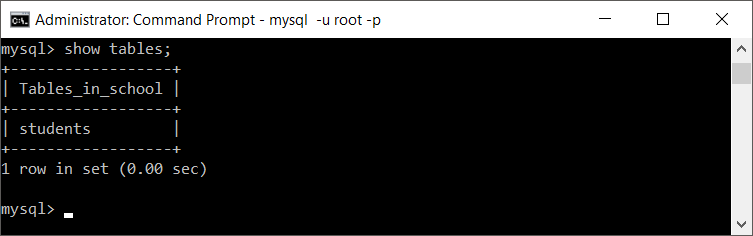
In this example, we shall use a database named ‘school’ and try to change the name of ‘students’ table to ‘pupils’.
Initially, we have
Now run the following command to rename the MySQL table name:
RENAME TABLE students TO pupils;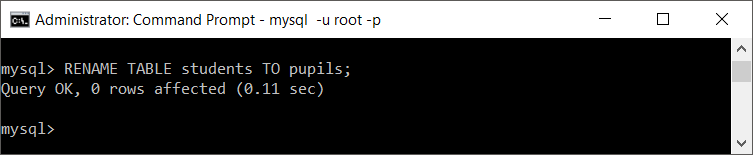
If you query the tables in the database, you will see pupils.
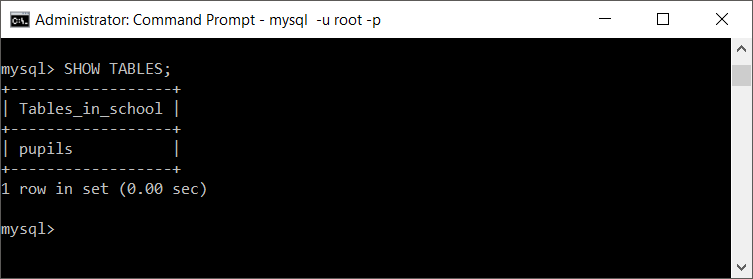
Confirm that the new table can be queried:
SELECT * FROM pupils;To restore the original name, reverse the two identifiers:
RENAME TABLE pupils TO students;Now, try changing it back the table name from ‘pupils’ to ‘students’.
Rename a MySQL Table with ALTER TABLE
MySQL also supports ALTER TABLE ... RENAME for renaming one table. The following statement is equivalent to renaming students with RENAME TABLE:
ALTER TABLE old_table RENAME TO new_table;ALTER TABLE students RENAME TO pupils;Use RENAME TABLE when you need to rename several tables in one statement. Use ALTER TABLE ... RENAME when you are already working with other table-alteration operations or when renaming a temporary table.
Rename Multiple MySQL Tables in One Statement
RENAME TABLE accepts multiple old-name and new-name pairs separated by commas. MySQL processes the pairs from left to right. If the statement fails, the renames in that statement are not applied.
RENAME TABLE students TO pupils,
             teachers TO faculty,
             classes TO courses;
Swap Two MySQL Table Names with a Temporary Name
You cannot rename one table directly to a name that is already in use. To swap two table names, include an unused temporary name in the same multi-table statement:
RENAME TABLE students TO students_tmp,
             pupils TO students,
             students_tmp TO pupils;
Check first that students_tmp does not already exist.
Move and Rename a MySQL Table to Another Database
You can qualify both table names to move a table between databases on the same MySQL server:
RENAME TABLE source_database.table_name
TO destination_database.table_name;RENAME TABLE school.pupils TO archive.pupils_2026;The destination database must already exist, and the MySQL account must have the required privileges in both locations. A table with triggers cannot be moved to another database by this method. A view can be renamed, but it cannot be moved to a different database with RENAME TABLE.
Rename a MySQL Table in phpMyAdmin
- Open phpMyAdmin and select the database from the left navigation panel.
- Select the table that you want to rename.
- Open the Operations tab.
- Find the option labeled Rename table to.
- Enter the new table name and submit the change.
- Return to the database structure page and confirm that the new name appears.
phpMyAdmin sends the corresponding SQL operation to MySQL. The logged-in MySQL user still needs the privileges required for the rename.
MySQL Table Rename Privileges, Locks, and Dependencies
- Required privileges: MySQL requires
ALTERandDROPprivileges on the original table, andCREATEandINSERTprivileges for the new table name. - Metadata locks: The statement may wait while another transaction or session is using the table. Commit or roll back long-running transactions before retrying.
- Table-specific grants: Privileges granted specifically on the old table name are not transferred automatically to the new name. Review and recreate those grants where required.
- Foreign keys and checks: MySQL updates relevant internal metadata during a rename, but a constraint-name conflict can cause the statement to fail. Verify the table definition after renaming.
- Application dependencies: Update SQL queries, ORM mappings, configuration files, reports, stored procedures, events, and deployment scripts that refer to the old name.
- Temporary tables:
RENAME TABLEdoes not rename aTEMPORARYtable. UseALTER TABLE ... RENAMEin the same session instead.
Common MySQL RENAME TABLE Errors
| Problem | Likely cause | What to check |
|---|---|---|
| Table does not exist | The source name or selected database is incorrect | Run SELECT DATABASE(); and SHOW TABLES;, or use a fully qualified table name. |
| Table already exists | The destination name is already used | Choose another name, drop an obsolete table only after verification, or use a temporary name for a swap. |
| Access denied | The MySQL account lacks one or more required privileges | Review grants for the source and destination names with an administrator. |
| Statement keeps waiting | A metadata lock is held by another session | Finish the blocking transaction and retry during a suitable maintenance window. |
| Trigger in wrong schema | A table with triggers is being moved across databases | Keep the table in the same database or plan a separate migration for its triggers. |
Verify the Renamed MySQL Table
After the rename, verify both the new name and the retained table definition:
SHOW TABLES LIKE 'pupils';
SHOW CREATE TABLE pupils;
SELECT COUNT(*) FROM pupils;
You can also confirm that the old name no longer resolves:
SHOW TABLES LIKE 'students';MySQL Table Rename Pre-deployment Checklist
- Confirm the source table exists in the intended database.
- Confirm the destination table name is unused and follows the project’s naming convention.
- Identify application code, views, procedures, reports, jobs, and integrations that use the old name.
- Verify the account has the required source and destination privileges.
- Check for long-running transactions that may hold a metadata lock.
- Back up the schema or record the current
SHOW CREATE TABLEoutput before a production change. - After renaming, test reads, writes, foreign-key operations, and application deployment scripts.
- Review table-specific grants and reapply them to the new table name when needed.
MySQL Rename Table FAQs
How do I rename a table in MySQL?
Run RENAME TABLE old_name TO new_name;. Select the correct database first with USE database_name;, or qualify both names with the database name.
What is the difference between RENAME TABLE and ALTER TABLE RENAME?
Both can rename a single MySQL table. RENAME TABLE can rename multiple tables in one statement and can perform name swaps with a temporary name. ALTER TABLE ... RENAME is also the option to use for a temporary table.
Does renaming a MySQL table delete its data?
No. A successful rename changes the table identifier; it does not delete the rows or rebuild the table from an empty definition. You should still verify application dependencies and the table definition after the change.
Can I rename multiple MySQL tables at once?
Yes. Add comma-separated old_name TO new_name pairs to one RENAME TABLE statement. MySQL evaluates the pairs from left to right.
How do I rename a MySQL table in phpMyAdmin?
Select the database and table, open the Operations tab, enter the new value in Rename table to, and submit the change. Confirm the result from the database structure page.
MySQL RENAME TABLE Reference
For version-specific behavior and privilege details, refer to the MySQL RENAME TABLE statement documentation.