 TutorialKart.com
Select Rows in Ascending Order in MySQL
Use the MySQL ORDER BY clause with ASC to return rows in ascending order based on the values in one or more columns. Ascending order means smallest to largest for numbers, earliest to latest for dates, and collation-based alphabetical order for text.
In this MySQL Tutorial, we shall learn how to select rows of a table based on the ascending order of values in a column.
MySQL ORDER BY ASC Syntax
To sort rows of a result set in ascending order of values in a column, use the syntax of the following SQL Query.
SELECT * FROM table_name ORDER BY column_name [ASC];The ASC keyword is optional because MySQL sorts in ascending order by default when an ORDER BY direction is not specified. These two queries therefore produce the same ordering:
SELECT * FROM table_name ORDER BY column_name;
SELECT * FROM table_name ORDER BY column_name ASC;
Use ORDER BY after the FROM and optional WHERE clauses. When a query also contains LIMIT, place ORDER BY before LIMIT.
Sort the Students Table by Name in Ascending Order
Consider the following students table.
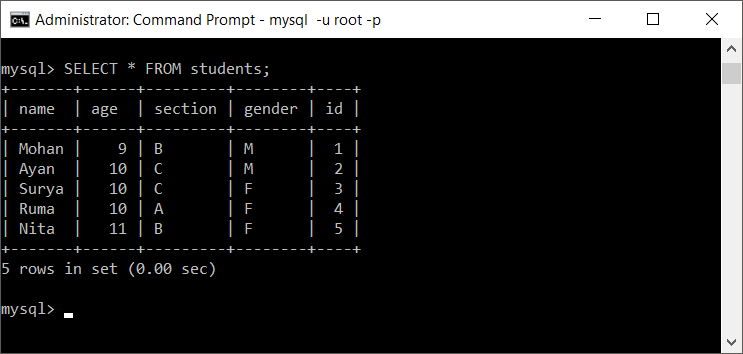
Now we shall sort these rows in ASCENDING ORDER of name column.
Run the following query to sort the records in ascending order.
SELECT * FROM students ORDER BY name ASC;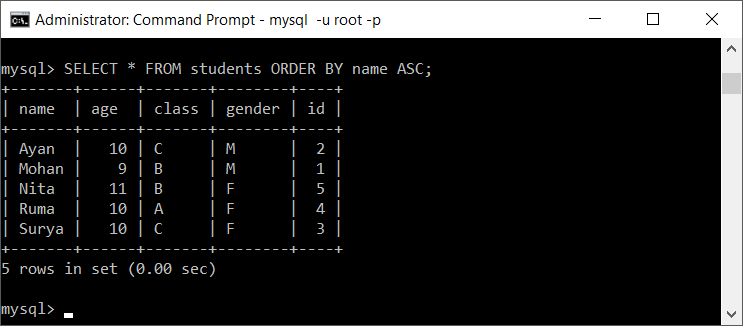
The result contains the same rows as the table, but MySQL arranges them according to the values in name. The table itself is not modified; only the order of rows in the result set changes.
Select Specific Columns and Sort Them in Ascending Order
You do not have to select every column. The following query returns only the student identifier and name, while sorting the result by name:
SELECT id, name
FROM students
ORDER BY name ASC;
A column used for sorting does not always need to appear in the selected column list. For example, you can display student names while ordering them by their identifiers:
SELECT name
FROM students
ORDER BY id ASC;
Sort Numeric and Date Columns from Lowest to Highest
For numeric columns, ascending order places lower values before higher values. The following query sorts students by age:
SELECT id, name, age
FROM students
ORDER BY age ASC;
For date and datetime columns, ascending order places earlier values before later values:
SELECT id, name, admission_date
FROM students
ORDER BY admission_date ASC;
Sort by Multiple Columns in Ascending Order
List multiple columns in the ORDER BY clause when one column may contain duplicate values. MySQL first sorts by the first column and then uses the next column to order rows that have equal values in the preceding column.
SELECT id, name, age
FROM students
ORDER BY age ASC, name ASC;
In this query, students are ordered by age. Students with the same age are then ordered by name.
You may also combine ascending and descending directions in the same query:
SELECT id, name, age
FROM students
ORDER BY age ASC, name DESC;
How MySQL Sorts Text Values and NULL Values
Text ordering depends on the column’s collation. The collation determines rules such as case sensitivity, accent sensitivity, and the relative order of characters. Therefore, two columns that use different collations can produce different alphabetical results even when they contain similar text.
In MySQL, NULL values appear before non-NULL values when a column is sorted in ascending order. To place NULL values last, sort first by whether the value is NULL, and then by the column itself:
SELECT id, name, age
FROM students
ORDER BY age IS NULL ASC, age ASC;
Return the First Rows After Ascending Sort
Use LIMIT after ORDER BY when you need only the first rows from the sorted result. For example, the following query returns the five youngest students:
SELECT id, name, age
FROM students
ORDER BY age ASC
LIMIT 5;
Common ORDER BY ASC Mistakes in MySQL
- Assuming row order without ORDER BY: MySQL does not guarantee a particular result order unless the query contains an
ORDER BYclause. - Placing ASC before the column: Write
ORDER BY column_name ASC, notORDER BY ASC column_name. - Using a quoted number column: Numeric values stored in a text column are sorted as text, so values such as
10may appear before2. - Expecting ORDER BY to change table storage: Sorting affects the query result only. It does not permanently rearrange rows in the table.
- Ignoring duplicate sort values: Add another column, usually a unique identifier, when you need a stable and predictable order among ties.
MySQL Ascending Order FAQs
How do I select rows in ascending order in MySQL?
Add ORDER BY column_name ASC to the query. For example, SELECT * FROM students ORDER BY name ASC; sorts student rows by name in ascending order.
Is ASC required in a MySQL ORDER BY clause?
No. Ascending order is the default direction in MySQL. ORDER BY name and ORDER BY name ASC are equivalent.
How do I sort by two columns in ascending order?
Separate the columns with commas, as in ORDER BY age ASC, name ASC. MySQL sorts by age first and uses name to order rows with the same age.
Why is MySQL not sorting numbers correctly?
The values may be stored in a character column such as VARCHAR. Character columns use text ordering, where 10 can sort before 2. Store numeric data in a numeric type, or convert the expression to a numeric value when sorting legacy data.
Where do NULL values appear in ascending order?
MySQL places NULL values before non-NULL values in ascending order. Use an expression such as ORDER BY age IS NULL ASC, age ASC when NULL values should appear last.
Editorial QA Checklist for MySQL ORDER BY ASC
- Confirm that every ascending-order query places
ORDER BYafterFROMorWHEREand beforeLIMIT. - Verify that examples distinguish text, numeric, and date sorting behavior.
- Check that the tutorial states
ASCis optional because ascending is the MySQL default. - Confirm that multiple-column examples explain how MySQL resolves duplicate values in the first sort column.
- Verify that the explanation of text sorting refers to collation and that the handling of
NULLvalues is MySQL-specific.