 TutorialKart.com
Update a MySQL Column to CURRENT_TIMESTAMP When a Row Changes
To store the time of the latest change to a MySQL row, define a TIMESTAMP or DATETIME column with ON UPDATE CURRENT_TIMESTAMP. MySQL then refreshes that column automatically when another value in the row is changed.
This tutorial shows how to add automatic timestamp updating to an existing column, verify the column definition, update the timestamp manually when needed, and avoid common mistakes.
How ON UPDATE CURRENT_TIMESTAMP Works in MySQL
A column declared with ON UPDATE CURRENT_TIMESTAMP receives the current date and time after an update changes another column in the same row. The automatic value uses the MySQL server’s current timestamp and the active session time-zone rules.
DEFAULT CURRENT_TIMESTAMPsupplies the current timestamp when a new row is inserted and no value is provided for the column.ON UPDATE CURRENT_TIMESTAMPrefreshes the column when an existing row is changed.- If an
UPDATEstatement assigns a column its existing value, MySQL may treat the row as unchanged, so the automatic timestamp does not need to advance. - You can force a new value by explicitly assigning
CURRENT_TIMESTAMPto the timestamp column.
MySQL ALTER TABLE Syntax for Automatic CURRENT_TIMESTAMP Updates
The following syntax changes an existing column so that it uses the current timestamp by default and whenever the row is updated:
ALTER TABLE table_name
    CHANGE column_name
        column_name TIMESTAMP NOT NULL
                    DEFAULT CURRENT_TIMESTAMP
                    ON UPDATE CURRENT_TIMESTAMP;
In this statement:
ALTER TABLE table_namechanges the structure of the specified table.CHANGE column_nameidentifies the existing column. WithCHANGE, the column name appears twice because MySQL expects both the old and new names.column_name TIMESTAMP NOT NULLrestates the column name, data type, and nullability.DEFAULT CURRENT_TIMESTAMPgives newly inserted rows the current timestamp when no explicit value is supplied.ON UPDATE CURRENT_TIMESTAMPrefreshes the value after a qualifying row update.
If the column name is not being renamed, MODIFY COLUMN is often easier to read. It still requires the complete intended column definition.
ALTER TABLE table_name
    MODIFY COLUMN column_name TIMESTAMP NOT NULL
        DEFAULT CURRENT_TIMESTAMP
        ON UPDATE CURRENT_TIMESTAMP;
Example: Automatically Update the useractions.updateon Column
Consider the table, useractions, with the following data.
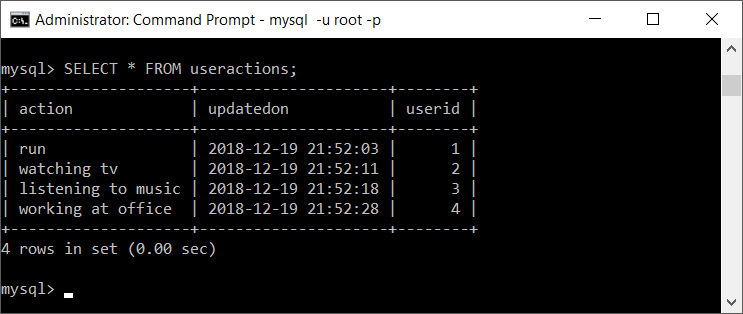
Now we shall update action to sleeping where userid=2.
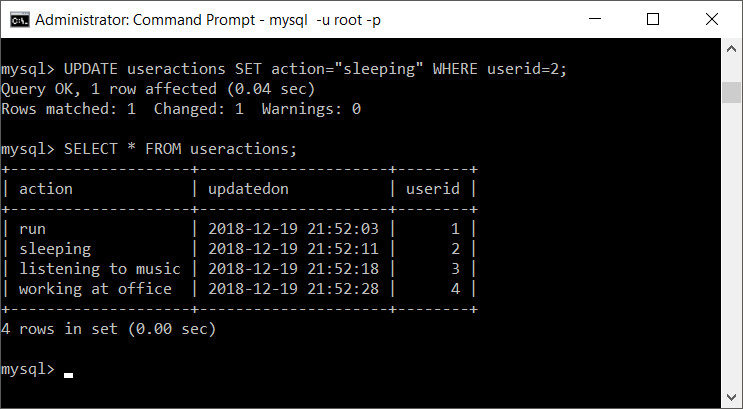
The action value changes, but the updateon value does not change because the column has not yet been defined with an automatic update clause.
Run the following query to redefine updateon with both a default current timestamp and automatic update behavior.
ALTER TABLE useractions
    CHANGE updateon
        updateon TIMESTAMP NOT NULL
            DEFAULT CURRENT_TIMESTAMP
            ON UPDATE CURRENT_TIMESTAMP;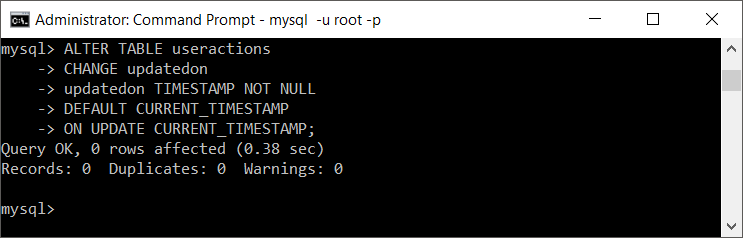
Now update the row where userid=2 again. Because action changes, MySQL assigns the current timestamp to updateon.
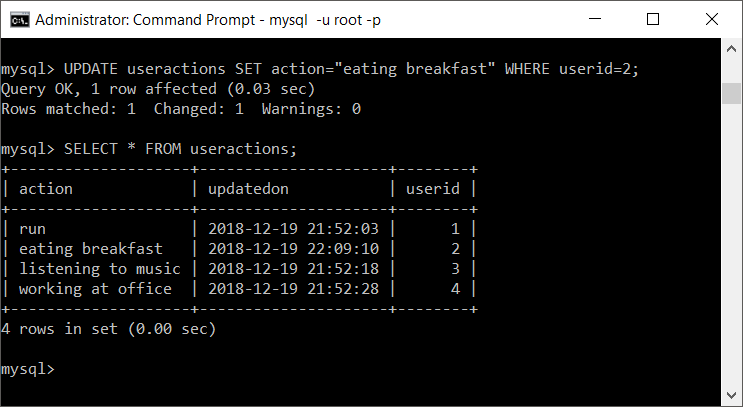
Verify the MySQL CURRENT_TIMESTAMP Column Definition
After altering the table, inspect its generated definition. This confirms that MySQL retained the expected data type, default value, nullability, and ON UPDATE clause.
SHOW CREATE TABLE useractions;You can also inspect the column metadata with DESCRIBE:
DESCRIBE useractions;To test the behavior with SQL rather than a graphical client, read the row, update another column, and read it again.
SELECT userid, action, updateon
FROM useractions
WHERE userid = 2;

UPDATE useractions
SET action = 'working'
WHERE userid = 2;

SELECT userid, action, updateon
FROM useractions
WHERE userid = 2;
Manually Set a MySQL Timestamp to the Current Time
Automatic updating is not required when you only need to set the current timestamp in a specific statement. Assign CURRENT_TIMESTAMP directly in the UPDATE query.
UPDATE useractions
SET action = 'sleeping',
    updateon = CURRENT_TIMESTAMP
WHERE userid = 2;
CURRENT_TIMESTAMP and NOW() are commonly used as equivalent current date-and-time expressions in MySQL.
Use CURRENT_DATE When Only the MySQL Date Is Required
Use CURRENT_TIMESTAMP when the column must store both date and time. To update a DATE column without a time component, use CURRENT_DATE or CURDATE().
UPDATE useractions
SET action_date = CURRENT_DATE
WHERE userid = 2;
TIMESTAMP vs DATETIME for MySQL Updated-Time Columns
Both TIMESTAMP and DATETIME can be declared with automatic initialization and update clauses in supported MySQL versions. Choose the type according to how the application handles time zones and date ranges.
TIMESTAMPvalues are converted between the session time zone and UTC when stored and retrieved.DATETIMEstores the date and time value without that automatic time-zone conversion.- Use a consistent application and database time-zone policy, especially when users or servers operate in different regions.
- Before altering an existing production column, review its current definition so that attributes such as nullability, precision, comments, and indexes are not unintentionally changed.
Common MySQL ON UPDATE CURRENT_TIMESTAMP Issues
- The timestamp does not change: Confirm that another column received a genuinely different value and verify the table definition with
SHOW CREATE TABLE. - The column definition loses an attribute:
CHANGEandMODIFYrequire the complete new definition, so include every attribute that must be retained. - The timestamp changes unexpectedly: Any qualifying update to the row can refresh the automatic column. Update only the rows and columns intended by the statement.
- The displayed time is unexpected: Check the MySQL session time zone and the application’s time-zone conversion logic.
- Only the date is needed: Use a
DATEcolumn withCURRENT_DATEinstead of storing an unnecessary time component.
MySQL CURRENT_TIMESTAMP FAQs
How do I update a timestamp automatically in MySQL?
Define the column with ON UPDATE CURRENT_TIMESTAMP. Add DEFAULT CURRENT_TIMESTAMP as well when new rows should receive the current timestamp automatically.
How do I get the current timestamp in a MySQL query?
Use CURRENT_TIMESTAMP or NOW(). Either expression can be selected directly or assigned in an INSERT or UPDATE statement.
Does ON UPDATE CURRENT_TIMESTAMP run when the assigned value is unchanged?
The automatic timestamp is intended to change when the row’s data changes. Assigning a column its existing value may leave the row unchanged and therefore may not advance the timestamp.
Can a DATETIME column use ON UPDATE CURRENT_TIMESTAMP?
Yes, supported MySQL versions allow automatic initialization and updating for both DATETIME and TIMESTAMP columns. Check the documentation for the exact MySQL version used by your server.
How can I force the timestamp to update immediately?
Assign the column explicitly: SET updateon = CURRENT_TIMESTAMP. This is useful when the timestamp must change even if no other stored value changes.
MySQL Automatic Timestamp Editorial QA Checklist
- Confirm that every
ALTER TABLEexample restates the full intended column definition. - Verify that automatic updates and manual
CURRENT_TIMESTAMPassignments are explained separately. - Check that the example changes another column before expecting
ON UPDATEto refresh the timestamp. - Confirm that
TIMESTAMPandDATETIMEtime-zone behavior is not described as identical. - Test version-specific behavior against the MySQL automatic initialization and updating documentation.
The useractions.updateon column is now configured to record the current timestamp whenever MySQL applies a qualifying change to its row.