 TutorialKart.com
What is SAP ABAP Data Dictionary?
SAP ABAP Data Dictionary, also called DDIC, is the central place where SAP data definitions are created and maintained. It stores technical and semantic definitions for database tables, fields, domains, data elements, views, search helps, and lock objects. ABAP programs, screens, reports, and other Workbench objects can reuse these definitions instead of defining the same data structure repeatedly.
SAP ABAP data dictionary is a central and structured source of data for development of objects. It is a database independent DDL (Data Definition Language) and mainly deals with create, edit, drop the database tables. In data dictionary you can define and maintain objects which are related to database. The ABAP data dictionary can be easily integrated with the ABAP workbench, so all the components of workbench can be easily access the definitions stored in the ABAP dictionary.
In daily ABAP development, the Data Dictionary is used before writing many reports or interfaces. A developer checks field definitions, table keys, relationships, fixed values, foreign keys, and search helps so that the ABAP code follows the same business data model used by the SAP system.
Why ABAP Data Dictionary is Important in SAP Development
The SAP ABAP Data Dictionary keeps data definitions consistent across the system. For example, if a field uses a data element with a label and a domain with allowed values, the same field meaning can be reused in tables, structures, screens, reports, and search helps. This reduces duplicate definitions and helps developers understand business data more clearly.
- It defines database tables, structures, views, domains, and data elements.
- It stores field labels, technical data types, lengths, and value ranges.
- It supports input help using search helps.
- It supports data consistency using foreign keys and check tables.
- It provides lock objects to control parallel access to business data.
- It allows ABAP programs to refer to common dictionary definitions.
SAP ABAP Data Dictionary Objects in SE11
Functions of data dictionary :
The important functions of data dictionary objects are as follows.
- Database tables
- Domains
- Data elements
- Views
- Search helps
- Lock Objects
These objects are closely connected. A table field usually refers to a data element, the data element refers to a domain, and the domain contains the technical attributes such as data type, length, and possible values. This layered design makes the dictionary easier to maintain.
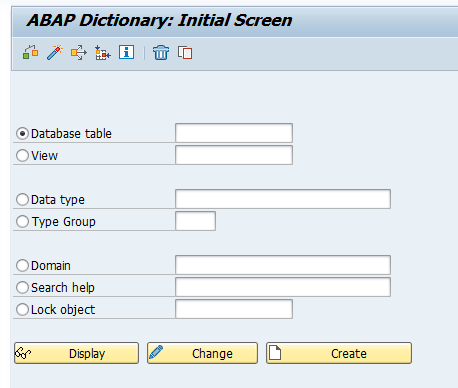
How to Open SAP ABAP Dictionary Using Transaction SE11
Navigation
| Transaction code | SE11 |
| SAP Menu Path | Tools > ABAP Workbench > Development > SE11 – ABAP Dictionary |
SE11 is the main transaction used to create, display, and change ABAP Dictionary definitions. From SE11, you can work with database tables, views, data types, type groups, domains, search helps, and lock objects. A beginner should first use SE11 in display mode to understand standard SAP objects before creating custom objects.
Database Tables in SAP ABAP Data Dictionary
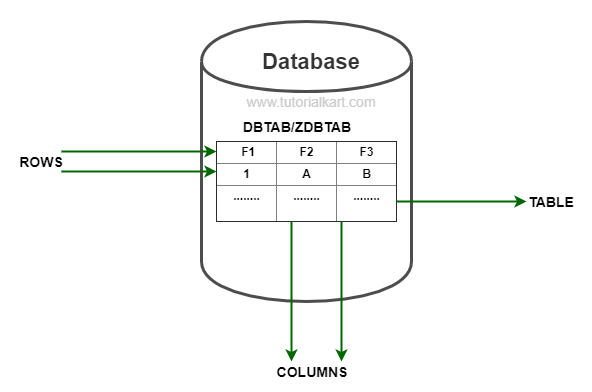
1. Database Tables : – Database tables are the collection of fields which contain physical data. It is an object that stores data in the form if rows and columns. So the database tables are made up of rows by columns.
In the ABAP Dictionary, a database table definition contains fields, key fields, data elements, technical settings, delivery class, enhancement category, and other table-level attributes. When a table is activated, the corresponding database object is created or adjusted in the underlying database system.
The different types of tables are
- Transparent tables
- Pooled tables
- Cluster tables
For modern development and beginner learning, transparent tables are the most important table type to understand because their structure is directly represented in the database. Pooled and cluster tables are older table concepts found in existing SAP systems and are mainly useful when reading or maintaining legacy objects.
Domains in SAP ABAP Dictionary
2. Domains : – Domains in SAP are used to maintain technical information of field such as data types, data length, value range, etc.
A domain defines the technical properties of a field. These properties include data type, number of characters or digits, decimal places, lowercase setting, and possible fixed values. If several fields need the same technical format, they can refer to the same domain through their data elements.
| FIELD NAME | DATA TYPE | DATA LENGTH |
| EMP_NO | NUMC | 15 |
| EMP_NAME | CHAR | 35 |
Data Elements in SAP ABAP Dictionary
3. Data elements : – Data element is the combination of data type, length and description . It is used to maintain fields in this tables or structures – learn how to create data elements in SAP.
A data element gives business meaning to a field. It normally refers to a domain for the technical format and stores field labels such as short, medium, long, and heading labels. For example, two fields may technically be character fields of length 10, but their data elements can describe different meanings such as customer number, material group, or employee code.
| Dictionary object | Main purpose | Simple example |
|---|---|---|
| Domain | Defines technical attributes such as data type, length, and fixed values | CHAR length 10 |
| Data element | Defines business meaning and field labels | Employee Number |
| Table field | Uses the data element in a table or structure | ZEMPLOYEE-EMP_NO |
Views in SAP ABAP Dictionary
4. Views : – View is a logical table that extracts the data from table at run time. Views can be defined using one or more multiple tables – learn how to create view in SAP.
Views help developers work with selected fields or combined data without always reading every table separately. The view type depends on the purpose: reading data, maintaining data, providing search help, or projecting a limited set of fields.
Different view types are
- Data base view
- Maintenance view
- Help view
- Projection view
| View type | Use in ABAP Dictionary |
|---|---|
| Database view | Combines fields from one or more tables for read access. |
| Maintenance view | Supports data maintenance through generated maintenance dialogs. |
| Help view | Supports search help definitions where data comes from multiple tables. |
| Projection view | Shows selected fields from a single table. |
Search Helps in SAP ABAP Dictionary
5. Search helps : – Search helps are used to display all the possible entries in search help window. To display search help window, use function key F4 or search help icon. Types of search helps are
- Elementary search help &
- Collective search help.
An elementary search help defines one search path for possible entries. A collective search help groups multiple elementary search helps so the user can choose from different search options. Search helps improve input accuracy because users can select valid values instead of typing unknown keys manually.
Lock Objects in SAP ABAP Dictionary
6. Local Objects : – Lock objects are used to control the parallel access for the same data by the multiple users i.e. synchronous access to the same data is provided using lock objects. Lock objects in data dictionary should start with the letter E.
Lock objects help prevent conflicting changes when more than one user or program tries to work with the same business data at the same time. When a lock object is created and activated, SAP generates enqueue and dequeue function modules that can be used in ABAP programs to set and release locks.
SE11 and SE16 Difference in SAP ABAP
SE11 and SE16 are often searched together because both are used while working with SAP tables. However, they are used for different purposes. SE11 is used for dictionary definitions, while SE16 is used mainly to display table data.
| Transaction | Main use | Typical user action |
|---|---|---|
| SE11 | ABAP Dictionary object definition | Create, display, or change tables, domains, data elements, views, search helps, and lock objects. |
| SE16 | Table data display | Enter a table name, give selection values, and view records stored in the table. |
For example, if you want to check the fields and key structure of a table, use SE11. If you want to view the records stored in that table, use SE16 or the table display option available in your SAP system.
ABAP Dictionary Relationship Between Table, Data Element, and Domain
The relationship between table fields, data elements, and domains is one of the first concepts a beginner should understand in ABAP Dictionary. A table field stores data. The data element explains what the field means. The domain defines the field’s technical format.
- A table contains fields such as employee number, employee name, company code, or material number.
- Each field can refer to a data element that provides business labels and documentation.
- The data element usually refers to a domain that defines data type, length, and allowed values.
- When the dictionary object is activated, these definitions become available to ABAP programs and other SAP tools.
How ABAP Developers Use SE11 in Real Work
ABAP developers use SE11 while creating new custom objects and while analyzing standard SAP objects. Before writing a SELECT statement, a developer checks the table fields, primary key, foreign key relationships, and field meanings. This avoids wrong joins, incorrect filters, and unclear report output.
- Check whether a field is a key field or a normal field.
- Find the data element and domain behind a table field.
- Review fixed values maintained in a domain.
- Understand foreign key relationships and check tables.
- Create custom tables, structures, and views for development requirements.
- Display search helps used by input fields.
- Create lock objects for custom table update logic.
Common Mistakes When Using SAP ABAP Data Dictionary
ABAP Dictionary objects affect many programs and screens. Beginners should make changes carefully, especially in shared systems where one definition may be reused in several places.
- Creating a new domain when an existing suitable domain already exists.
- Using unclear names for custom data elements and tables.
- Ignoring field labels, which later affects screen and report readability.
- Changing a domain or data element without checking where it is used.
- Creating tables without proper key fields and technical settings.
- Confusing SE11 table definitions with SE16 table data display.
- Forgetting to activate dictionary objects after changes.
SAP ABAP Data Dictionary QA Checklist
Use this checklist when reviewing ABAP Dictionary learning material, custom table designs, or SE11 documentation.
- Does the explanation clearly define SAP ABAP Data Dictionary before listing SE11 objects?
- Are domains and data elements explained as separate dictionary objects?
- Does the tutorial explain the difference between table definition in SE11 and table data display in SE16?
- Are database tables, views, search helps, and lock objects described with their practical use?
- Does the content warn users to check where-used lists before changing reused dictionary objects?
- Are table keys, technical settings, field labels, and activation mentioned for custom table creation?
- Is the image alt text relevant to SAP ABAP Data Dictionary or SE11?
SAP ABAP Data Dictionary FAQs
What is SAP ABAP Data Dictionary?
SAP ABAP Data Dictionary is the central repository for defining and maintaining data objects such as tables, domains, data elements, views, search helps, and lock objects. ABAP programs and other SAP tools reuse these definitions for consistent data handling.
What is SE11 used for in SAP?
SE11 is used to open the ABAP Dictionary. Developers use it to create, display, and change dictionary objects such as database tables, structures, data elements, domains, views, search helps, and lock objects.
What is the difference between SE11 and SE16?
SE11 is used to maintain the definition of dictionary objects, such as table fields and data elements. SE16 is used to display data records stored inside a table. In simple terms, SE11 shows structure and SE16 shows data.
What is the difference between a domain and a data element in SAP ABAP?
A domain defines technical properties such as data type, length, decimal places, and fixed values. A data element gives business meaning to a field and stores field labels. A data element usually refers to a domain.
Why are lock objects used in ABAP Dictionary?
Lock objects are used to control parallel access to the same data. They help prevent two users or programs from changing the same business record at the same time in a conflicting way.