 TutorialKart.com
SAP ABAP Indexes for Database Table Access
In SAP ABAP, a database index is an additional database structure that helps the database locate table rows without scanning every record. Indexes can improve the performance of suitable read operations, but they also require storage and must be maintained whenever table data is inserted, updated, or deleted.
An index does not remove duplicate data from a table. Record uniqueness is primarily controlled by the table key and, where required, by a unique secondary index. Indexes should therefore be designed from actual access conditions rather than added to every frequently used field.
Primary and Secondary Indexes in SAP ABAP
- Primary index
- Secondary index
Primary Index Based on SAP Table Key Fields
The primary index is created automatically from the key fields of a database table. Its field order follows the order of the table key.
For example, if a client-dependent table has the key fields MANDT and EMP_ID, the primary index is based on those fields in that sequence. A query that supplies the complete key normally provides an efficient access path.
Secondary Index for Additional SAP Table Access Paths
A secondary index is defined separately for a database table when important queries frequently filter or sort by fields that are not adequately covered by the primary index. The index contains selected table fields in a defined order.
Secondary indexes should be introduced only after reviewing the relevant SQL statements, data volume, field selectivity, existing indexes, and database execution plan. An index that does not match actual selection conditions may provide little benefit while increasing write and storage costs.
When a Secondary Index Can Improve SAP ABAP Performance
A secondary index may be useful when all of the following conditions are substantially true:
- A table contains enough records for a full table scan to be costly.
- A frequently executed query uses a stable combination of fields in its selection conditions.
- The selected fields reduce the result to a relatively small part of the table.
- The required access path is not already covered by the primary index or another secondary index.
- The expected read-performance benefit is greater than the additional cost for inserts, updates, deletes, transports, and database storage.
Before creating an index, review the ABAP Open SQL statement and verify that the performance issue is caused by database access rather than unnecessary repeated calls, broad result sets, missing conditions, or inefficient application logic.
How SAP Uses the Leftmost Fields of a Secondary Index
The sequence of fields in an index is significant. Database optimizers can usually use an index most effectively when a query supplies conditions for its leading fields.
Assume a secondary index is defined in this order:
- MANDT
- DEPARTMENT
- JOIN_DATE
A query that filters by MANDT and DEPARTMENT is more likely to use this index effectively than a query that filters only by JOIN_DATE. Place commonly supplied and selective leading conditions first, while considering the database platform and actual execution plan.
Unique and Non-Unique Secondary Indexes in SAP
A secondary index can be defined as unique or non-unique, depending on the SAP release and index settings available for the table.
- Non-unique secondary index: Multiple table rows may contain the same combination of indexed field values. This is the usual choice for search-oriented indexes.
- Unique secondary index: The indexed field combination must be unique across the relevant rows. Activation or data changes can fail when duplicate combinations exist.
Do not mark an index as unique merely to improve performance. Use uniqueness only when it represents a real data rule that must be enforced.
Create a Secondary Index in SAP ABAP with SE11
| Transaction code | SE11 |
| SAP Menu Path | SAP Menu > Tools > ABAP Workbench > Development > SE11 – ABAP Dictionary |
The following procedure creates a secondary index for the example table ZEMPLOYEE. The available fields and screen labels may vary slightly by SAP release.
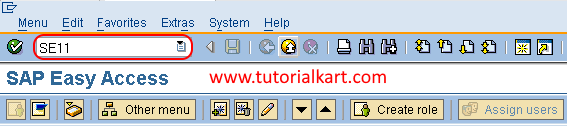
Step 1: Open the ABAP Dictionary in Transaction SE11
Execute transaction code SE11 in the SAP command field.
Step 2: Open the SAP Database Table in Change Mode
On the ABAP Dictionary: Initial Screen, select Database table, enter the table name, and choose Change.
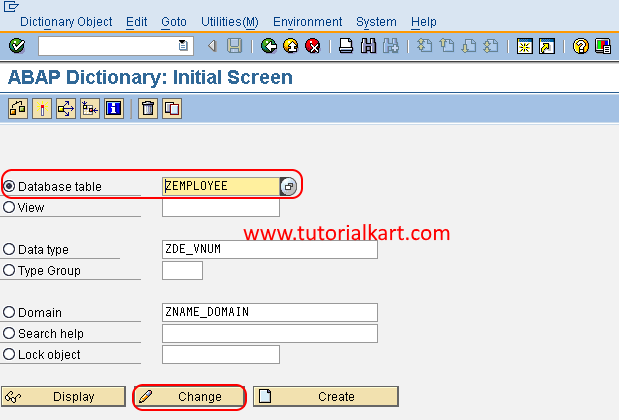
Use change mode only when you are authorized to modify the Dictionary object. For an SAP standard table, follow the applicable enhancement, modification, and support policies before adding an index.
Step 3: Open the Index List for the SAP Table
On the Dictionary: Maintain Table screen, choose Indexes.
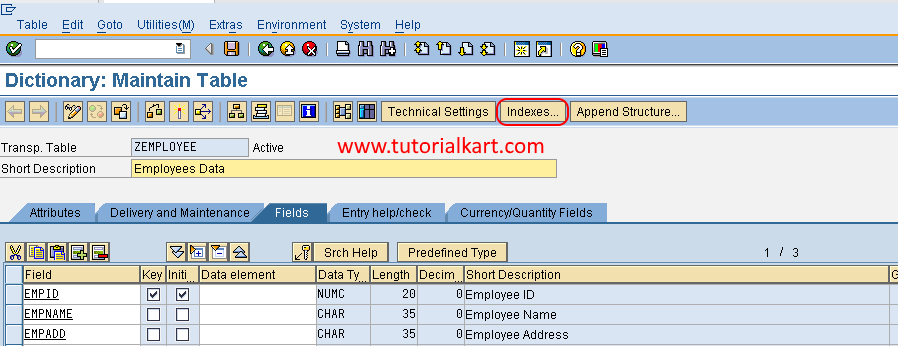
The index list displays secondary indexes already defined for the table. Review them before creating another index, because an existing index may already cover the required access path.
Step 4: Start Creating the ZEMPLOYEE Secondary Index
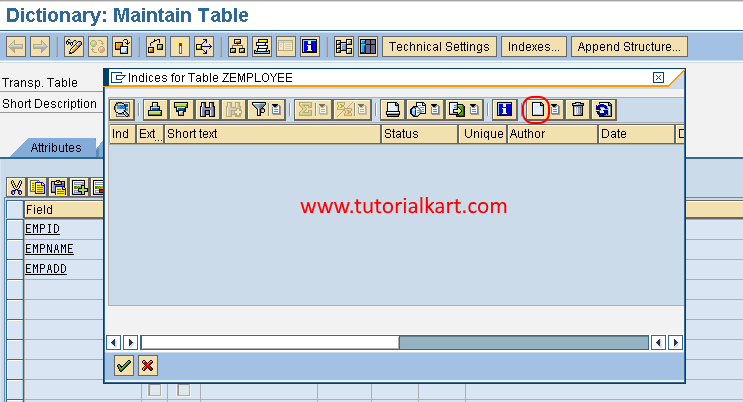
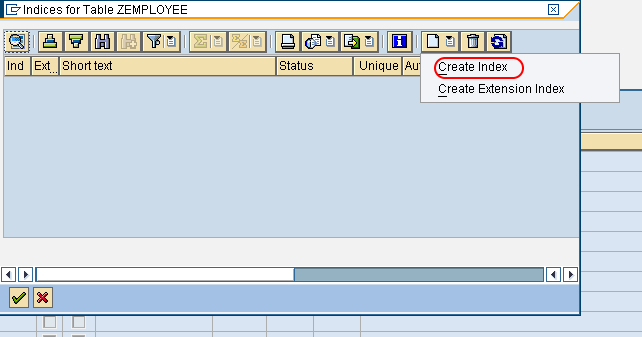
In the Indices for Table ZEMPLOYEE window, choose the create icon.
Step 5: Select Create Index
Choose Create Index when the system asks which index operation you want to perform.
Step 6: Enter the SAP Secondary Index Identifier
Enter an index identifier accepted by your SAP system and press Enter. In the illustrated SAP GUI workflow, the identifier can contain up to three characters.
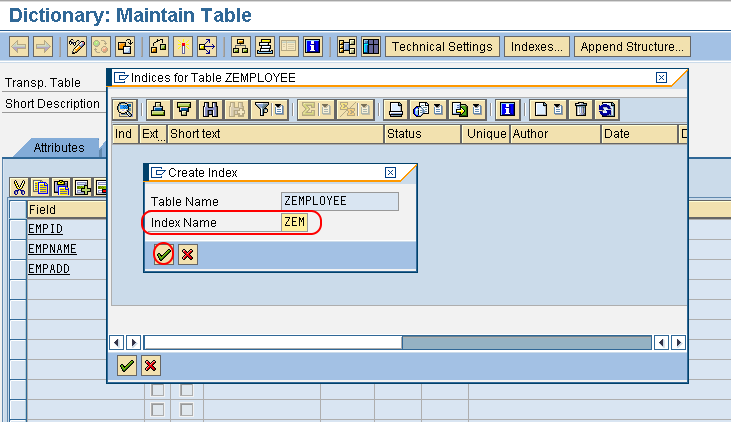
Use the project’s naming convention so that the index purpose can be traced through its description, transport documentation, and related performance analysis.
Step 7: Define the Secondary Index Fields and Their Order
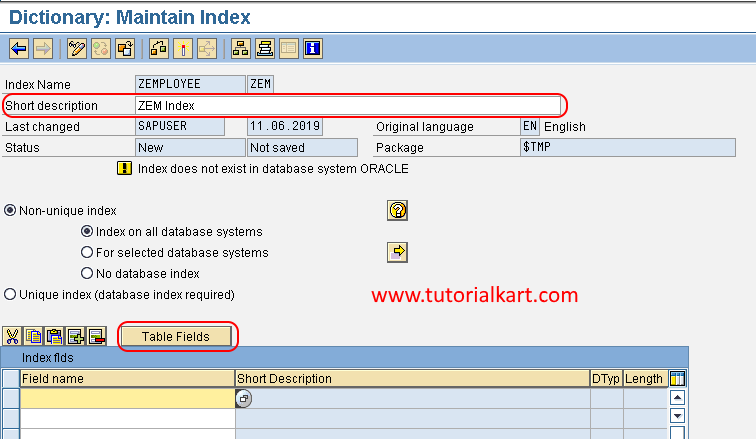
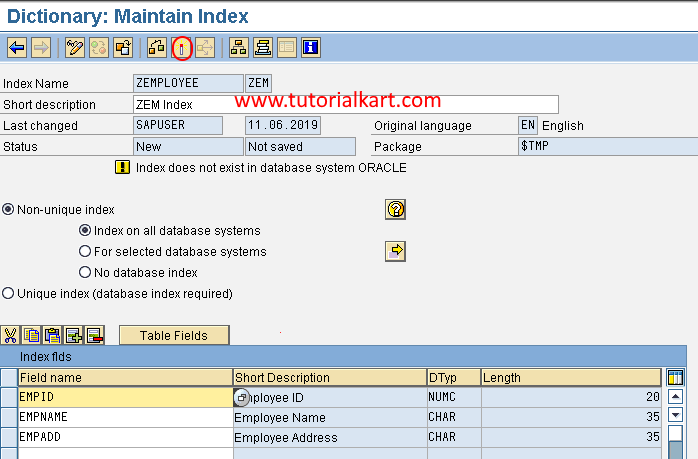
On the Dictionary: Maintain Index screen, maintain the index definition:
- Short description: Enter a description that identifies the query or access path supported by the index.
- Unique index: Select this only when the indexed field combination must be unique.
- Index fields: Add the required table fields in the order in which the database should evaluate the index.
Choose the required fields and select Copy.
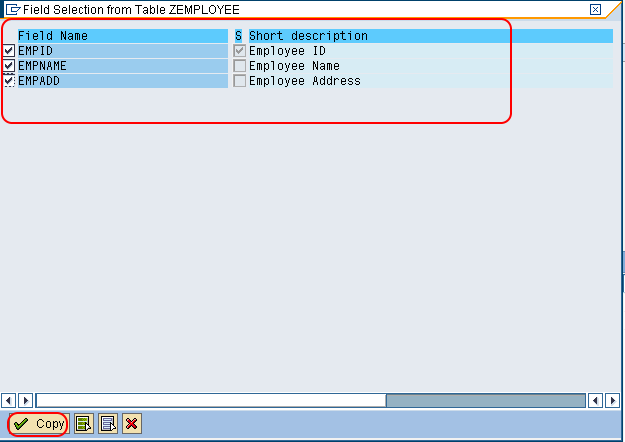
For a client-dependent table, the client field may need to be included as the first index field, depending on the access pattern and database behavior. Verify the proposed field order against the actual SQL statements rather than copying the order from another index.
Step 8: Save and Activate the SAP ABAP Index
Save the index definition and choose the activate icon. Activation creates the corresponding index in the database when the definition is valid.
Assign the index to the correct package and transport request when it must move to other SAP systems. Choose Local Object only for a genuinely local or temporary development that will not be transported.
Review the activation log if the index is not activated successfully. For a large table, creating the physical database index can require significant database resources, so coordinate productive-system deployment with the responsible technical team.
Example Field Order for a ZEMPLOYEE Secondary Index
Suppose the table is frequently queried by department and employee status. A possible index definition is:
| Index Position | Field | Reason |
|---|---|---|
| 1 | MANDT | Restricts access to the current client for a client-dependent table |
| 2 | DEPARTMENT | Common leading selection condition |
| 3 | EMP_STATUS | Further narrows records within a department |
This index may support a query that supplies both department and employee status. It may be less useful for a query that filters only by employee status because that field is not the leading business field in the index.
Verify Whether SAP Uses the New Secondary Index
Creating and activating an index does not guarantee that every relevant query will use it. The database optimizer selects an access path based on factors such as available indexes, conditions, statistics, estimated row counts, joins, ordering, and database-specific cost calculations.
After activation, test the affected business process and examine the SQL execution using the performance-analysis tools approved for your SAP system. Confirm that:
- The intended SQL statement is responsible for the original performance issue.
- The database chooses the new index for the relevant execution plan when appropriate.
- Elapsed time, database time, and records examined improve under representative data volumes.
- The index does not cause unacceptable overhead for data-changing operations.
- Performance remains acceptable after database statistics are updated.
Testing should use realistic selection values. A condition that returns most of a table may still lead the optimizer to choose a table scan because using an index would not reduce the work sufficiently.
Secondary Index Costs in SAP ABAP Tables
Each secondary index introduces operational costs that should be included in the design decision:
- Insert cost: A new index entry must be created when a row is inserted.
- Update cost: Changes to indexed fields require corresponding index changes.
- Delete cost: Index entries must be removed when rows are deleted.
- Storage cost: The database stores the indexed values and row references separately from the table.
- Maintenance cost: Indexes must be reviewed during table redesign, performance tuning, upgrades, migrations, and archiving changes.
A table with many write operations may be affected more by additional indexes than a mostly read-only table. The correct number of indexes is therefore determined by workload and access paths, not by a fixed target.
How to Delete a Secondary Index in SAP ABAP
Delete an index only after confirming that it is no longer required by important SQL statements, interfaces, reports, or background jobs. Removing an index can change database execution plans.
Step 1: Open the SAP Table Index List
Execute SE11, enter the database table name, choose Change, and open Indexes.
Step 2: Select the Secondary Index to Remove
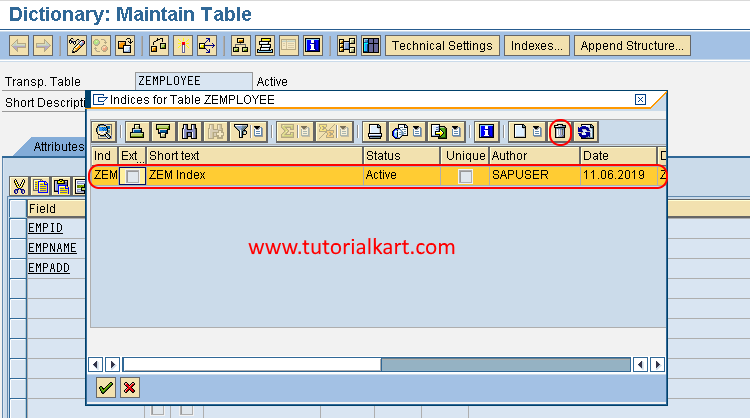
Select the unwanted secondary index and choose the delete icon.
Step 3: Confirm the SAP Index Deletion
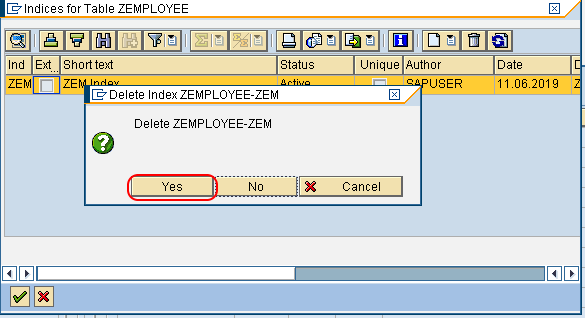
A warning message appears. Choose Yes only after verifying that the selected index is the intended one.
Save and activate the change so that the index definition and corresponding database object are removed. Assign the change to the appropriate transport request when required.

Common SAP ABAP Secondary Index Design Mistakes
Creating an Index for Every WHERE Condition
Not every selection field requires an index. Review query frequency, table size, selectivity, and existing indexes before adding another database object.
Using a Low-Selectivity Field as the Only Index Field
A field with only a few repeated values, such as a simple status flag, may return a large percentage of the table. An index on that field alone may not reduce database work enough to be useful.
Placing the Most Important Condition in the Wrong Position
An index may not support the intended query when its leading fields are omitted from the selection. Define the field sequence from the actual access pattern and verify it with an execution plan.
Duplicating an Existing SAP Table Index
Two indexes with the same leading field combination may provide overlapping access paths while increasing write and storage overhead. Compare the proposed index with every existing index first.
Adding an Index Without Measuring the Result
Measure the relevant SQL statement before and after the change. Retain the index only when representative testing shows a justified improvement without unacceptable side effects.
SAP ABAP Index Review Checklist
- The slow SQL statement and affected table have been identified through measurement.
- The table contains enough data for index access to provide a meaningful benefit.
- The proposed leading fields match the frequent WHERE conditions.
- The indexed fields have sufficient selectivity for the expected input values.
- The index does not unnecessarily duplicate the primary index or another secondary index.
- The field order has been reviewed for client dependency and actual query patterns.
- Unique index status is selected only when it represents a valid business rule.
- The impact on inserts, updates, deletes, storage, and data loads has been considered.
- The index is saved in the correct package and transport request.
- The index activates successfully in the ABAP Dictionary and database.
- The execution plan and runtime improvement have been verified with representative data.
- The change has been documented so the index can be reviewed during future table or application changes.
FAQs About SAP ABAP Indexes
What is the difference between a primary index and a secondary index in SAP ABAP?
The primary index is generated from the database table’s key fields. A secondary index is an additional access path defined for frequently used field combinations that are not sufficiently supported by the primary index.
Does a secondary index prevent duplicate records in an SAP table?
A normal non-unique secondary index does not prevent duplicates. A unique secondary index can enforce uniqueness for its indexed field combination, but it should be used only when that uniqueness is a required data rule.
Why might SAP not use a newly created secondary index?
The database optimizer may choose another index or a table scan when the query omits leading index fields, returns a large share of the table, uses conditions with low selectivity, has outdated statistics, or has a lower estimated cost through another access path.
Can a secondary index slow down an SAP table?
Yes. Every additional index consumes storage and must be maintained during inserts, updates, and deletes. An unnecessary or poorly designed index can increase write time without improving important read operations.
Should a secondary index be created directly on an SAP standard table?
Changes to SAP standard tables require careful review. Confirm the performance evidence, applicable SAP guidance, upgrade implications, transport process, and support policy before creating or changing an index on a standard object.