 TutorialKart.com
What is domain in SAP ABAP
SAP ABAP domain is an object that specifies technical information of data type and length for a field. Domain determines sign, Lowercase, conversion routine, fixed values and value table. The existing domain can be used by multiple fields as per requirements instead of creating new domains in SAP.
In the ABAP Dictionary, a domain defines the technical value range of a field. It answers questions such as: What data type is allowed? How many characters can the value contain? Are lowercase letters permitted? Should a conversion routine be applied? Are only specific fixed values allowed? Because a domain is reusable, the same domain can be assigned to several data elements that share the same technical rules.
Domain in SAP ABAP and its role in ABAP Dictionary
A domain is one of the basic building blocks of the SAP ABAP Dictionary. It is normally used below a data element. The domain controls the technical properties, while the data element gives business meaning, field labels, and documentation to the field.
| ABAP Dictionary object | Main purpose | Example |
|---|---|---|
| Domain | Defines technical type, length, decimals, lowercase setting, fixed values, value table, and conversion routine. | ZDO_CUSTOMER_TYPE with CHAR length 1 and fixed values A, B, C. |
| Data element | Defines semantic meaning, field labels, and documentation for a field. | ZDE_CUSTOMER_TYPE with label Customer Type. |
| Table field | Uses the data element to store a value in a database table or structure. | ZCUSTOMER-CUST_TYPE. |
This separation helps keep SAP development consistent. For example, if several fields must use the same character length and same set of allowed values, they can share one domain instead of repeating the same technical definition in many places.
SAP transaction code and menu path for creating ABAP domain
| Transaction code | SE11 |
| SAP Menu Path | SAP Menu > Tools > ABAP Workbench > Development > SE11 – ABAP Dictionary |
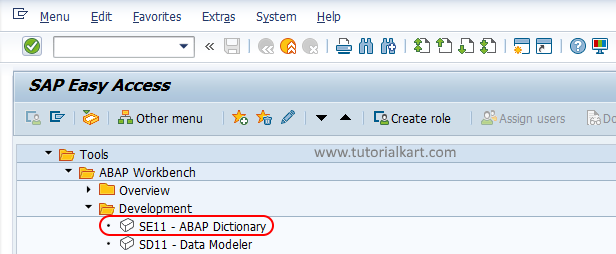
Important SAP ABAP domain fields to understand before creation
Before creating a domain in SAP ABAP, decide the technical rules clearly. A domain is reused by data elements, so changing it later can affect more than one field.
| Domain field | Meaning in SAP ABAP | Typical use |
|---|---|---|
| Data type | Specifies the technical data type such as CHAR, NUMC, DATS, TIMS, DEC, or CURR. | Choose CHAR for text codes, NUMC for numeric character values, and DATS for dates. |
| No. Characters | Defines the maximum length of the domain value. | Use 10 for a 10-character code or name abbreviation. |
| Decimal places | Defines the number of decimal places for numeric domains where applicable. | Used with quantity, amount, or decimal values. |
| Output length | Controls how the value is displayed on screens and lists. | Useful when display format differs from internal length. |
| Lowercase | Allows lowercase letters for character-based values. | Enable only when lowercase input must be stored. |
| Sign | Allows negative values for numeric fields where the data type supports it. | Used for balance, adjustment, or difference fields. |
| Conversion routine | Formats values while moving between internal and external display formats. | Common in master data numbers and formatted identifiers. |
| Fixed values | Restricts the field to a defined list of allowed values. | Used for status, category, type, or indicator fields. |
| Value table | Defines a table that can be proposed as a check table when foreign key relationships are created. | Used when valid values are maintained in a separate table. |
How to create Domain in SAP
Step 1 : – Execute tcode “SE11” from SAP Command field.
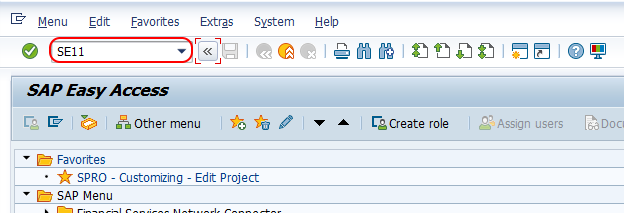
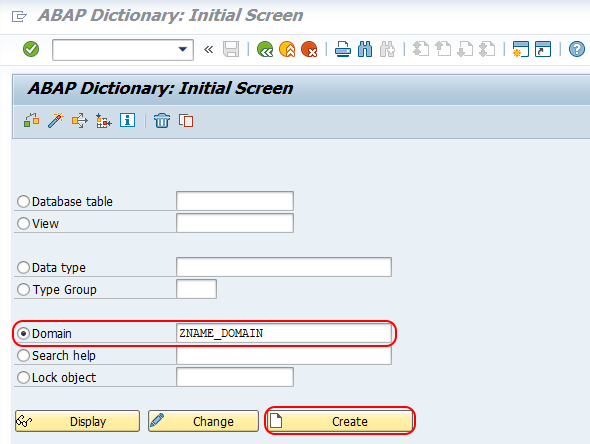
Step 2 : – On ABAP Dictionary: Initial screen, provide the following details.
- Domain : – Enter the name of domain that you want to create. The domain name should start with the letter Z or Y.
- Create : – Click on create icon.
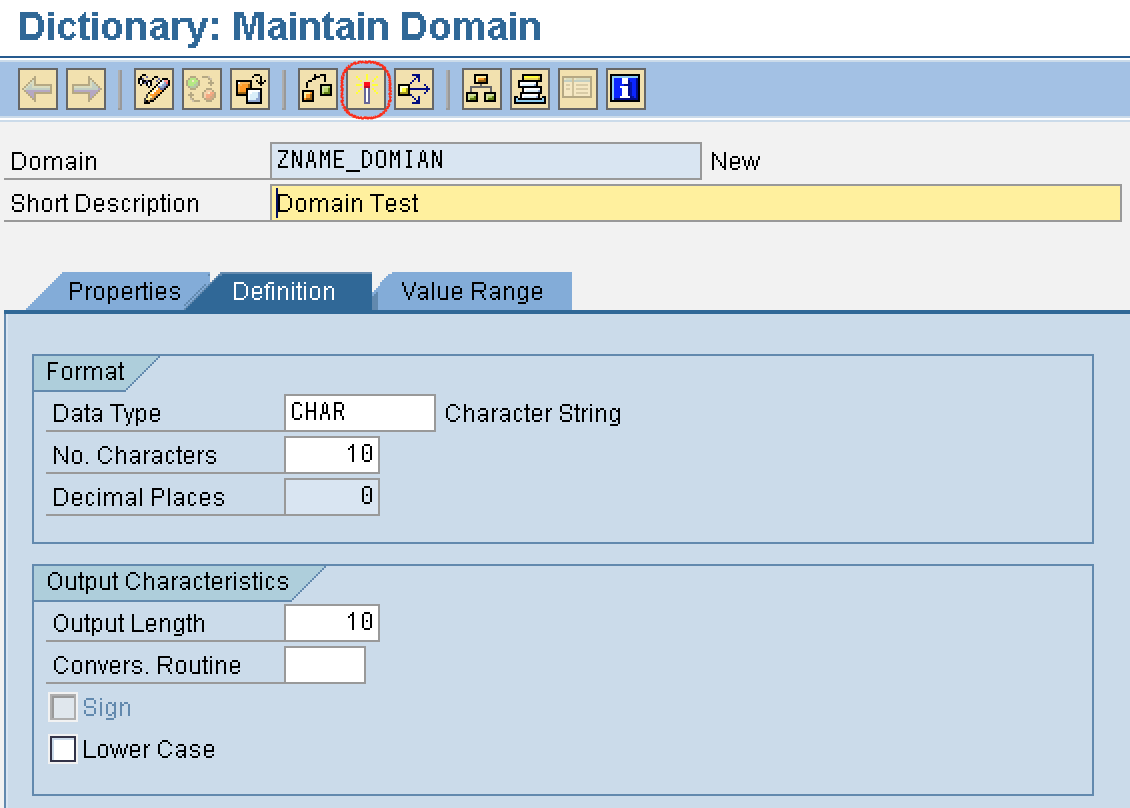
Step 3 : – On Dictionary: change domain screen, provide the following details.
- Short Description : – Provide the short descriptive text of domain.
- Data type : – Point the cursor on data type field and press function key F4, now the possible entries displays on the screen. Choose the data type as CHAR (Character String).
- No. Characters : – Provide the length of domain as 10.
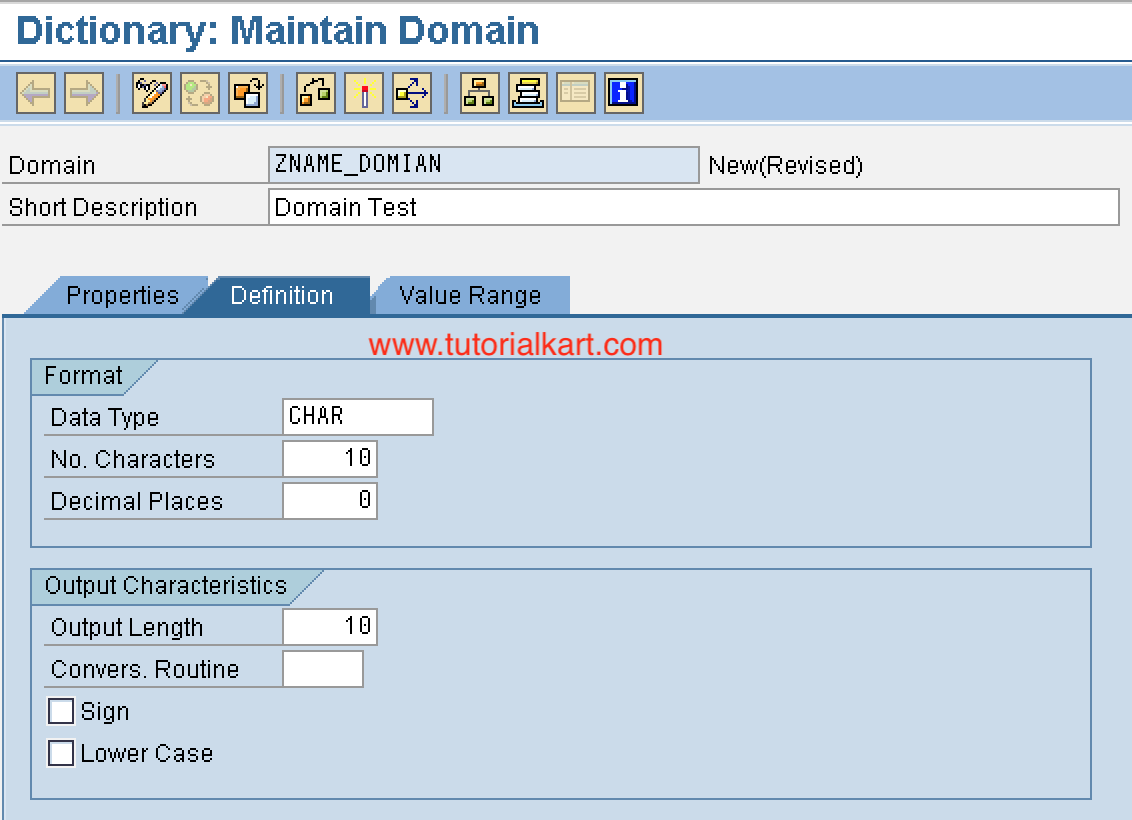
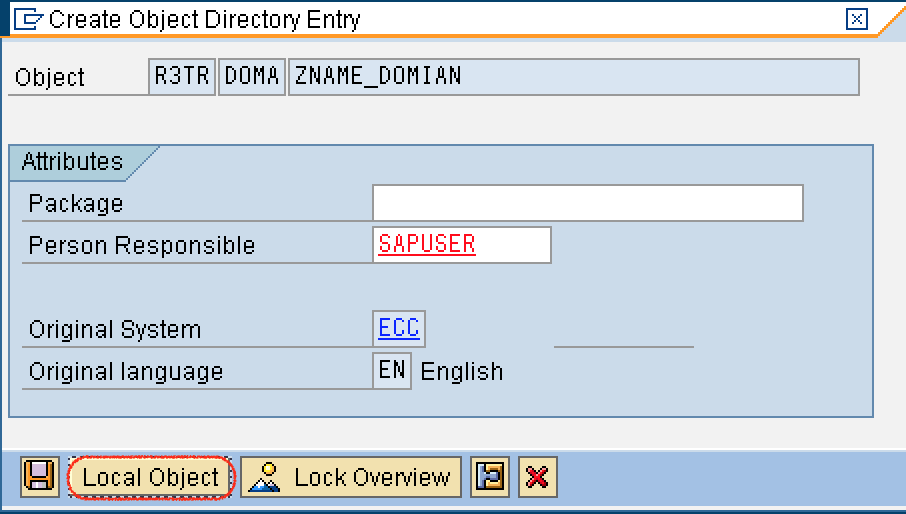
After maintaining all the required details for domain, press enter and click on save icon to save the data. Choose the local object from create object directory entry screen.
Step 4 : – After you create domain in SAP, you need to activate it. Choose activate icon or press (ctrl+F3) from your keyboard.
Successfully we have created domain in SAP ABAP.
Adding fixed values to a domain in SAP ABAP
Fixed values are useful when a field should accept only a small predefined set of values. For example, a customer type domain can allow only R for Retail, W for Wholesale, and D for Distributor. When a data element uses this domain, the fixed values can help users choose valid entries through input help.
| Fixed value | Short description |
|---|---|
| R | Retail Customer |
| W | Wholesale Customer |
| D | Distributor |
To maintain fixed values, open the domain in SE11, go to the Value Range tab, enter the allowed values with descriptions, save the domain, and activate it. Use fixed values only when the list is small and stable. If values are maintained frequently or stored in a custom table, a value table and check table design is usually more suitable.
Using value table in SAP ABAP domain
The value table field in a domain is used to specify the table that contains allowed values for that domain. It does not automatically validate every field by itself. Validation is normally enforced through a foreign key relationship where the value table can be proposed as the check table.
Use a value table when valid values are stored in a database table and can be reused across multiple fields. For example, if customer category values are maintained in a custom table, the domain can point to that table as the value table and the table field can later use it in a foreign key check.
Domain naming rules and transport choice in SAP ABAP
For custom development, domain names usually start with Z or Y. Use a clear name that explains the value being stored. A name such as ZDO_CUST_TYPE is easier to understand than a generic name such as ZDOMAIN1.
- Use
ZorYfor custom domain names. - Keep the name short but meaningful.
- Do not create a new domain if a suitable standard or existing custom domain already exists.
- Use a package and transport request for development that must move to quality and production systems.
- Use Local Object only for practice, temporary work, or objects that should not be transported.
How SAP ABAP domain works with data element and table field
After creating a domain, the usual next step is to create a data element based on that domain. Then the data element can be assigned to a table field or structure component. This keeps the design clean because the domain controls technical rules, and the data element controls business meaning.
| Step | Object | What is assigned |
|---|---|---|
| 1 | Domain | Define data type, length, fixed values, value table, and other technical settings. |
| 2 | Data element | Assign the domain and maintain field labels and documentation. |
| 3 | Table field or structure field | Assign the data element to the field. |
| 4 | Program, screen, or report | Use the table field with consistent technical and semantic definitions. |
Common mistakes while creating domain in SAP ABAP
- Creating a new domain without checking whether a suitable domain already exists.
- Choosing CHAR when NUMC, DATS, DEC, or another data type would be more accurate.
- Using too short a length and later needing a disruptive change after the domain is reused.
- Forgetting to activate the domain after saving it.
- Using fixed values for a list that should be maintained in a table.
- Assuming that the value table alone performs validation without a proper foreign key check.
- Using Local Object for development that should be transported to another SAP system.
SAP ABAP domain FAQ
What are domains in SAP ABAP?
Domains in SAP ABAP are ABAP Dictionary objects that define the technical properties and value range of fields. A domain can define data type, length, decimal places, lowercase setting, sign, fixed values, value table, and conversion routine.
How to create a domain in SAP ABAP?
To create a domain in SAP ABAP, open transaction SE11, select Domain, enter a custom domain name, click Create, maintain the short description, data type, and length, save the object, assign it to a package or local object, and activate it.
What is the difference between domain and data element in SAP ABAP?
A domain defines technical properties such as data type and allowed values. A data element defines the business meaning of a field and stores field labels and documentation. Usually, a data element is created using a domain.
Can one SAP ABAP domain be used by many fields?
Yes. One SAP ABAP domain can be reused by multiple data elements and fields when the same technical rules are required. This reuse is one of the main reasons domains are created in the ABAP Dictionary.
Does a value table in a domain automatically validate field values?
No. A value table in a domain does not automatically validate every field by itself. It can be proposed as the check table when creating a foreign key relationship, and that foreign key check is what normally enforces validation.
Editorial QA checklist for SAP ABAP domain tutorial
- Verify that the tutorial explains domain as a technical ABAP Dictionary object, not as a business label.
- Check that the steps use SE11 and mention activation after saving the domain.
- Confirm that the difference between domain, data element, and table field is clearly explained.
- Ensure fixed values are described for small stable lists only.
- Ensure value table is explained correctly as a proposal for check table usage, not automatic validation by itself.
- Check that all existing screenshots and links remain unchanged.
In this SAP ABAP tutorial, we learned what a domain is, how to create a domain in SE11, which technical fields are important, how fixed values and value tables are used, and how a domain connects with data elements and table fields in the ABAP Dictionary.