 TutorialKart.com
SAP ABAP Views in Data Dictionary
ABAP views in the Data Dictionary are logical views that present fields from one or more database tables as a single reusable object. The view definition is stored in the ABAP Dictionary, while the business data continues to come from the underlying table or tables. This makes a view useful when a program, search help, or maintenance screen needs only selected fields or a defined relationship between tables.
In SAP ABAP, the term view can refer to classic Dictionary views created in transaction code SE11 and, in newer development, to ABAP CDS views. This tutorial focuses on classic ABAP Dictionary views: database view, projection view, help view, and maintenance view.
Why ABAP Dictionary Views Are Used
ABAP views are used when the same table relationship or field selection is needed repeatedly. Instead of writing the same join or selecting unnecessary columns in several programs, you can define a Dictionary view once and use it where it is technically suitable.
- To read selected fields from one table or from related tables.
- To simplify ABAP Open SQL statements by exposing a reusable view name.
- To reduce the amount of data transferred when only a few fields are required.
- To support F4 input help through help views and search helps.
- To maintain related table data through controlled maintenance views, where appropriate.
Types of ABAP Views in SE11
The main types of classic ABAP Dictionary views are listed below.
| ABAP view type | Based on | Main purpose | Data maintenance |
|---|---|---|---|
| Database view | One or more tables, commonly with join conditions | Read data through a defined table relationship | Normally used for display/read access |
| Projection view | One table | Expose only selected fields of a table | Can be used for maintenance when the technical conditions are met |
| Help view | Multiple tables with an outer join concept | Provide data for search helps and F4 help | Not used directly for maintenance |
| Maintenance view | Related tables linked by foreign keys | Maintain distributed data in a controlled way | Used with table maintenance where suitable |
Database View in SAP ABAP
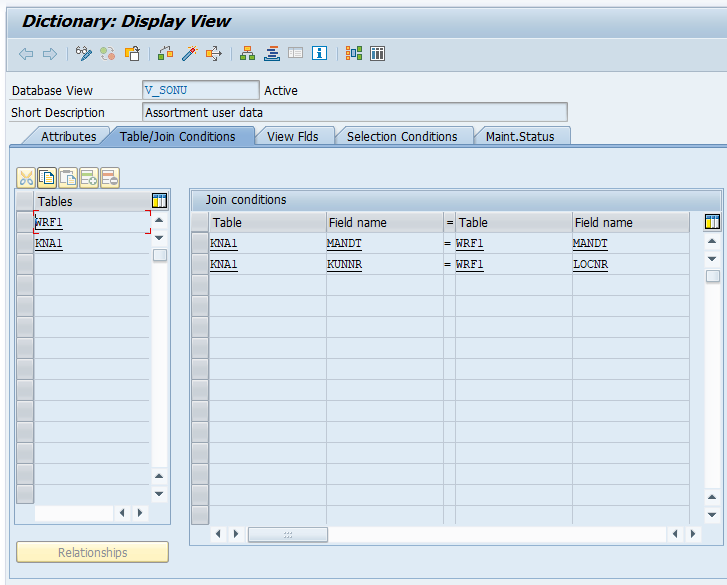
A database view is a Dictionary view used to read fields from one or more tables. When more than one table is used, the relationship is defined with join conditions. Database views are mainly used for reading data; they are not meant for direct business data maintenance in normal application scenarios.
Use a database view when you frequently need the same fields from related tables. For example, if a report repeatedly reads header and item information with the same join condition, a database view can make the read logic clearer.
Important Points About ABAP Database Views
- The view fields are selected from the base table fields.
- Join conditions define how the tables are connected.
- The view does not store separate business data like a transparent table.
- The result depends on the current contents of the underlying tables.
- Authorization, buffering, and performance still need to be reviewed according to the actual tables and usage.
SELECT field1, field2
  FROM zmy_database_view
  INTO TABLE @DATA(result).
The example above shows the usual idea: an ABAP program reads from the view name in Open SQL, while the view definition decides which table fields and join conditions are used.
Projection View in SAP ABAP
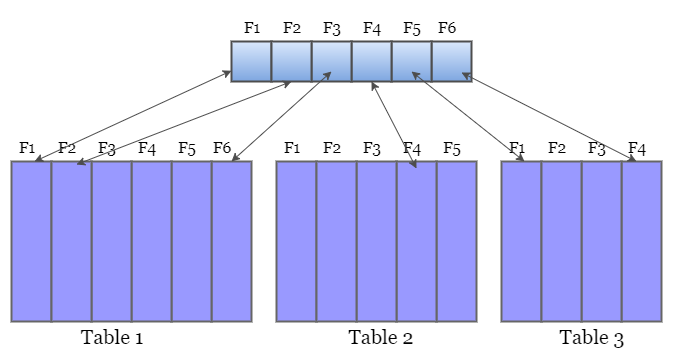
A projection view is created on a single table. It contains only selected fields from that table. The purpose is to provide a smaller and more specific interface to the table instead of exposing every field to a program or maintenance function.
Projection views are useful when a large table has many fields but a particular program or user interface needs only a limited set of columns. They can also help restrict the visible structure of a table for a specific technical use case.
Projection View Example Scenario
Assume a custom employee table contains personal, payroll, and department fields. If a small department lookup requires only employee number, name, and department, a projection view can expose only those required fields. The remaining fields stay outside that view definition.
A projection view is based on a single table, so it does not define joins between multiple tables. Depending on the table design and view settings, it may support data maintenance operations such as insert, update, delete, and select. Always check the actual Dictionary settings and generated maintenance behavior before using a projection view for updates.
Help View in SAP ABAP Search Helps
A help view is used as a selection method for search helps. It is designed for F4 input help when the value list needs fields from more than one table and the required relationship is better represented with an outer join concept.
You do not normally execute a help view directly as an end-user object. Instead, it is included in a search help, and that search help is attached to a field, data element, or screen field. When the user presses F4, the search help uses the help view to collect and display possible values.
- Help views support input help design.
- They are connected to search helps rather than used as standalone report objects.
- They are useful when the F4 help list requires fields from related tables.
Maintenance View in SAP ABAP Table Maintenance
A maintenance view is used to maintain data that is logically connected but stored in more than one table. The tables in a maintenance view are normally connected through foreign key relationships. SAP can use such a view with table maintenance tools to generate maintenance dialogs.
Maintenance views must be designed carefully. If the table relationships are not clear or the maintenance logic is not controlled, updates across multiple tables can create inconsistent data. For this reason, maintenance views are usually created only when there is a valid maintenance requirement and the table relationships are well defined.
How to Create an ABAP View Using SE11
You can create ABAP views using transaction code SE11. The exact screens may differ by SAP release and system settings, but the general process is similar.
- Open transaction code SE11.
- Select the option for creating a view.
- Enter the view name and choose the required view type.
- Enter a short description for the view.
- Add the base table or tables.
- Define join conditions, if the selected view type requires table relationships.
- Select the fields that must appear in the view.
- Maintain selection conditions if required.
- Check, save, and activate the view.
- Test the view with a small and relevant data selection before using it in reports or maintenance dialogs.
ABAP Views and ABAP CDS Views
Classic ABAP Dictionary views and ABAP CDS views are related concepts, but they are not the same development object. Classic Dictionary views are created in tools such as SE11 and are common in older ABAP development. ABAP CDS views are defined with CDS source code and annotations, and they are widely used in newer ABAP and SAP S/4HANA development for semantic data models.
If the requirement is a simple classic Dictionary object, an SE11 view may be enough. If the requirement involves modern analytical modeling, associations, annotations, or service exposure, an ABAP CDS view is usually the more relevant object. The final choice depends on the SAP release, development standards, and the consuming application.
CDS View, AMDP, and Classic ABAP View: Which One to Use?
A common question is whether CDS, AMDP, or a classic ABAP view is better. There is no single answer for every system. Use the object that matches the requirement and the SAP platform.
| Requirement | Suitable option | Reason |
|---|---|---|
| Simple reusable read access in a classic ABAP system | Classic ABAP Dictionary view | Easy to define in SE11 and suitable for basic table joins or field subsets |
| Semantic data model with annotations and modern ABAP usage | ABAP CDS view | Designed for richer data modeling and modern consumption patterns |
| Database-specific procedural logic on SAP HANA | AMDP | Used when logic must be pushed down into database procedures and cannot be expressed cleanly in CDS or Open SQL |
Common Mistakes While Creating SAP ABAP Views
- Creating a database view when a projection view is enough for a single-table field subset.
- Adding too many fields and then using only a few of them in ABAP programs.
- Defining join conditions without checking the table keys and foreign key relationships.
- Using a maintenance view without reviewing how updates will affect each underlying table.
- Treating a help view like a normal report data source instead of using it through a search help.
- Ignoring authorizations and performance checks because the object is a view.
Editorial QA Checklist for SAP ABAP Views Tutorial
- Confirm that database view, projection view, help view, and maintenance view are explained separately.
- Check that projection view is described as a single-table view, not a multi-table join view.
- Check that help view is connected to search help and F4 input help.
- Check that maintenance view warnings mention table relationships and possible inconsistency.
- Check that CDS views and AMDP are not presented as the same object as classic SE11 Dictionary views.
- Check that all new code blocks use PrismJS-compatible WordPress classes.
SAP ABAP Views FAQs
What are views in SAP ABAP?
Views in SAP ABAP are Dictionary objects that present selected fields from one or more database tables. They provide a logical data set for reading, input help, or controlled maintenance, depending on the view type.
What are the four classic ABAP Dictionary view types?
The four classic ABAP Dictionary view types are database view, projection view, help view, and maintenance view. Each type has a different purpose and different technical restrictions.
Can an ABAP database view store data?
No. A database view does not store separate business data like a table. It reads data from the underlying table or tables according to the view definition.
What is the difference between a projection view and a database view?
A projection view is based on one table and exposes selected fields from that table. A database view can be based on multiple tables and uses join conditions to read related data.
Are ABAP CDS views the same as SE11 ABAP views?
No. ABAP CDS views are modern CDS development objects defined with CDS syntax and annotations. SE11 ABAP views are classic ABAP Dictionary view objects such as database views, projection views, help views, and maintenance views.