 TutorialKart.com
What is Data Element in SAP ABAP
Data element in SAP ABAP is an ABAP Dictionary object that defines the semantic meaning of a field. It stores field information such as short description, field labels, documentation, and the data type reference used by table fields, structure fields, screen fields, and program variables.
A data element is normally assigned to a domain. The domain controls the technical attributes such as data type, length, decimals, output length, conversion routine, and value range. The data element gives the field its business meaning and display text.
Data Element = Description + Field Labels + Documentation + Domain reference
For example, a domain may define a character field of length 10, while a data element can describe that field as Vendor Number, Customer Number, or Material Group. The same technical type can therefore be reused with different business meanings.
Why data elements are used in SAP ABAP Dictionary
Data elements are used to keep field definitions consistent across SAP tables, structures, views, and ABAP programs. Instead of manually defining the meaning and labels of every field, you define them once in the data element and reuse the data element wherever the same business field is required.
- Business meaning: A data element explains what the field represents, such as vendor number, sales order number, or posting date.
- Reusable labels: Short, medium, long, and heading labels can be reused automatically in screens and reports.
- Technical consistency: When assigned to a domain, the field follows the same data type, length, and value restrictions.
- Documentation: Field help can be maintained so users and developers understand the purpose of the field.
- Dictionary integration: Data elements are used by tables, structures, search helps, screens, reports, and other ABAP Dictionary objects.
Data element and domain difference in SAP ABAP
A data element and a domain are closely related, but they are not the same object. The domain defines the technical side of the field, while the data element defines the semantic side of the field.
| ABAP Dictionary object | Main purpose | Example |
|---|---|---|
| Domain | Defines technical attributes such as data type, length, decimals, conversion routine, and fixed values. | CHAR with length 10 |
| Data Element | Defines business meaning, field labels, short description, and documentation for a field. | Vendor Number |
| Table Field | Uses the data element so that the table field gets both technical and semantic properties. | LIFNR field in a vendor-related table |
In most custom ABAP Dictionary designs, create the domain first when the technical type or value range must be reused. Then create the data element and assign that domain to it.
Before creating a data element in SAP SE11
Before you create a data element, decide the following details clearly:
- The business purpose of the field.
- The data element name, usually beginning with
ZorYfor custom development. - The domain to be assigned, or the built-in type if a separate domain is not required.
- The short, medium, long, and heading labels that should appear in screens and reports.
- The package or local object assignment for saving the data element.
In the example below, we create a data element for a vendor number field and assign it to a suitable domain.
Steps to create data elements in SAP
| Transaction code | SE11 |
| SAP Menu Path | SAP Menu > Tools >> ABAP Workbench >> Development >> ABAP Dictionary |
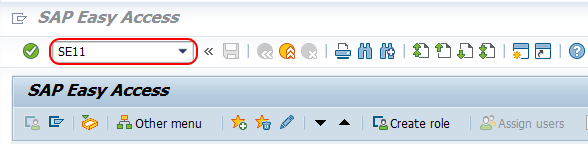
Step 1 : – Execute t-code “SE11” in the command field of SAP easy access.
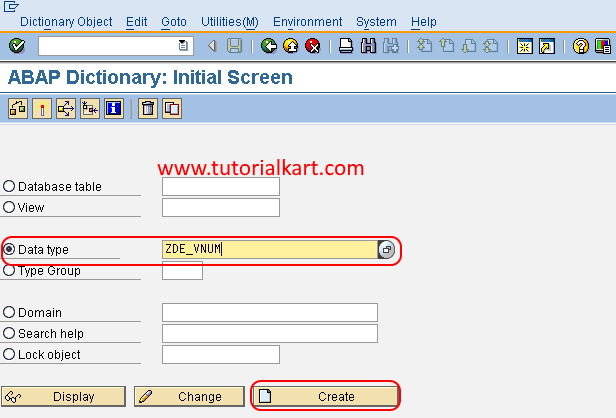
Step 2 : – On ABAP dictionary initial screen, choose radio button data type and enter the name of data element and click on create button.
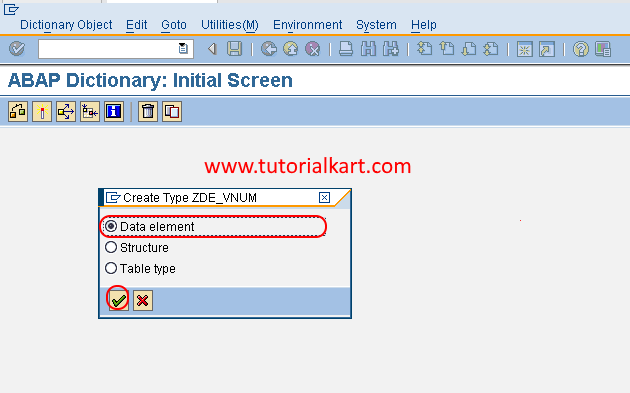
Step 3 : – A popup window opens to choose the type of data type i.e. data element, Structure and table table. Choose the radio button data element and press enter to continue.
Step 4 : – On dictionary: maintain data element screen, update the following details.
- Short Description : – Update the short descriptive text of data element.
- Domain : – Update the domain key for assigning to domain element.
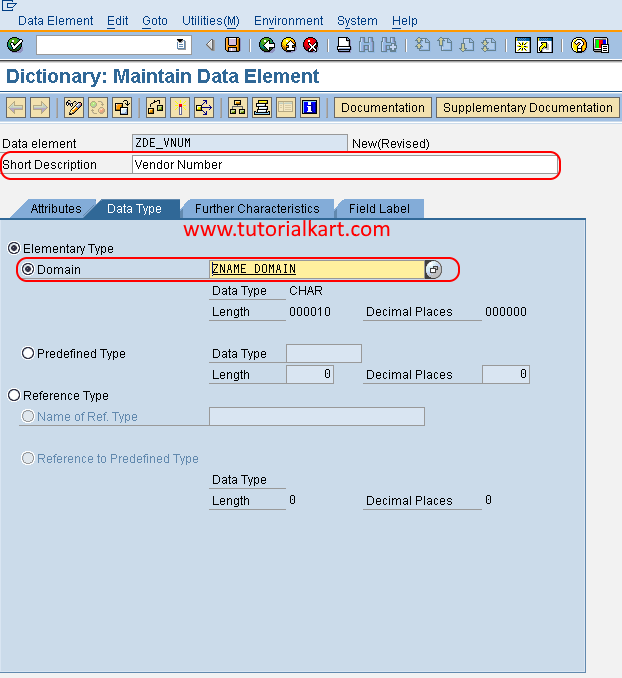
The short description should be meaningful because it helps other developers understand the purpose of the data element in SE11, table definitions, and where-used checks. The domain must already exist, unless you are using a built-in type directly for the data element.
Using a domain or built-in type for SAP data element
For reusable business fields, assigning a domain is the usual approach. A domain is useful when multiple fields should share the same technical type and value restrictions. A built-in type may be used for simple fields where a separate reusable domain is not necessary.
| Choice | When to use |
|---|---|
| Domain | Use when the same technical definition or value range will be reused across multiple fields. |
| Built-in type | Use for a simple field where no reusable domain, fixed values, or shared technical definition is needed. |
Step 5 : – Choose field label tab and update the following details.
Specify short, medium, long and heading length and field labels.
| Length | Field Label | |
| Short | 10 | Vendor |
| Medium | 15 | Vendor Number |
| Long | 20 | Vendor Number |
| Heading | 15 | Vendor Number |
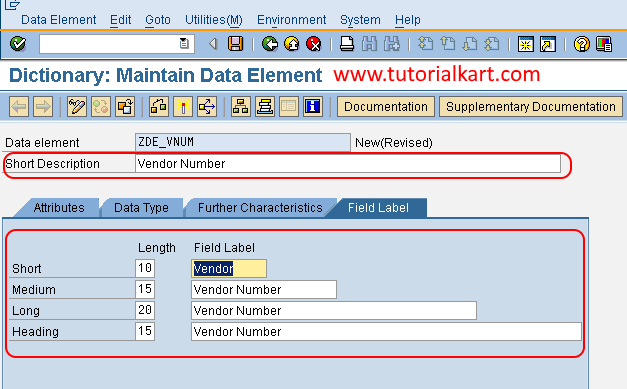
Choose save icon to save the configured data element in SAP.
Field labels are important because they are used as display text in many SAP screens, ALV outputs, and generated user interfaces. Keep the short label compact, and use the medium or long label when the field needs clearer business wording.
Step 6 : – Now you need to activate the created data element. Choose activate icon press (Ctrl+F3) keys from your keyboard and activate the domain element in SAP.
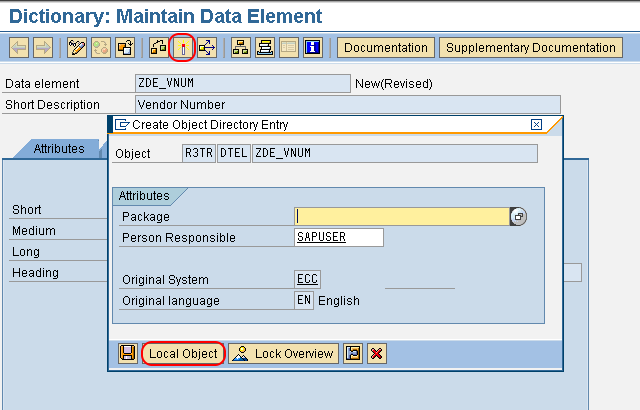
Choose the local object and save the data.
Successfully we have created domain element in SAP ABAP.
After activation, the data element can be assigned to table fields, structure fields, and other ABAP Dictionary objects. If the object is part of a real development project, save it in the correct package instead of saving it as a local object.
Maintain documentation for an SAP ABAP data element
A data element can also have documentation. This documentation is useful for field help and for developers who need to understand the business meaning of the field. When maintaining documentation, describe what the field stores, valid business usage, and any important restrictions.
- Explain the purpose of the field in simple business language.
- Mention whether the field is an identifier, date, amount, quantity, status, or description.
- Describe any value restrictions if they are relevant to users.
- Keep the documentation aligned with the domain and field labels.
Use the created SAP data element in a table field
Once the data element is active, it can be used while creating or changing a database table in SE11. In the table field definition, enter the field name and assign the data element in the data element column. SAP then derives the field labels and technical type through the data element and its domain.
| Table field setting | Example value | Meaning |
|---|---|---|
| Field name | ZVENDOR_NO | Name of the custom table field. |
| Data element | ZVENDOR_NO_DE | Data element that gives the field its meaning and labels. |
| Domain | ZVENDOR_NO_DM | Domain assigned inside the data element for technical properties. |
This reuse is one of the main reasons for creating data elements instead of defining technical types separately for every table field.
Check and activate SAP data element after changes
Whenever you create or change a data element, check and activate it before using it in other Dictionary objects. Activation makes the object available for runtime usage. If there are errors in the assigned domain, field labels, or package assignment, SAP will show activation messages that must be corrected.
- Use Check to verify the data element definition.
- Use Activate or press Ctrl + F3 to activate the data element.
- Activate dependent objects such as domains, tables, and structures when required.
- Use the where-used list to identify objects that already depend on the data element before making changes.
Common mistakes while creating data elements in SAP ABAP
| Mistake | Why it causes problems | Correction |
|---|---|---|
| Creating a data element without a clear business meaning | Other developers cannot understand where it should be reused. | Use a specific short description and clear field labels. |
| Using different data elements for the same business field unnecessarily | Labels and field help become inconsistent across tables and reports. | Reuse an existing active data element when the same meaning applies. |
| Assigning the wrong domain | The field may get the wrong length, type, conversion routine, or value range. | Check the domain definition before assigning it. |
| Saving project objects as local objects | The object may not be transported to other SAP systems. | Save the data element in the correct package for transportable development. |
| Not activating the data element | Inactive objects cannot be used reliably in dependent Dictionary objects. | Activate the data element and resolve activation errors. |
SAP ABAP data element naming and label tips
For custom development, data element names usually follow the project naming standard and begin with Z or Y. A clear naming pattern helps identify the object type and business purpose.
- Use names that describe the business field, not only the technical type.
- Keep labels consistent with the field meaning used in business processes.
- Avoid vague labels such as Number, Code, or Text without context.
- Use the heading label carefully because it may appear in reports and column headers.
- Check whether an SAP standard data element already exists before creating a custom one.
FAQ on SAP ABAP data elements
What is a data element in SAP ABAP?
A data element in SAP ABAP is an ABAP Dictionary object that defines the semantic meaning of a field. It stores the short description, field labels, documentation, and the type reference used by fields in tables, structures, screens, and programs.
What is the difference between domain and data element in SAP ABAP?
A domain defines technical attributes such as data type, length, decimals, and value range. A data element defines the business meaning, field labels, and documentation. A table field usually uses a data element, and the data element refers to a domain.
Can a data element be created without a domain in SAP?
Yes, a data element can be defined using a built-in type instead of a separate domain. However, assigning a domain is preferred when the same technical definition or value range should be reused across multiple fields.
Why are field labels maintained in a data element?
Field labels are maintained in a data element so that the same display text can be reused in screens, reports, table maintenance, and other user interfaces. SAP provides short, medium, long, and heading labels for different display widths.
How do I activate a data element in SAP ABAP?
Open the data element in SE11 and choose the activate icon, or press Ctrl + F3. If SAP shows errors, correct the data type, domain, labels, package, or dependent object issues and activate again.
Editorial QA checklist for SAP ABAP data element tutorial
- The tutorial clearly explains that a data element defines semantic meaning, labels, and documentation.
- The difference between a domain and a data element is explained before the creation steps.
- The SE11 path, data type selection, data element creation, field labels, save, and activation steps are covered.
- The article explains when to use a domain and when a built-in type may be enough.
- The tutorial warns about common mistakes such as wrong domain assignment, unclear labels, local object saving, and inactive data elements.
SAP ABAP data element summary
A data element in SAP ABAP gives a field its business meaning. It works with a domain to provide both semantic and technical information for table fields, structure fields, screens, and ABAP programs. In SE11, you can create a data element by choosing the data type option, entering the data element name, assigning a domain or built-in type, maintaining field labels, saving the object, and activating it.