 TutorialKart.com
What is SAS?
SAS is a software platform and programming environment used to access, prepare, analyze, and report data. Organizations use SAS for tasks such as statistical analysis, data management, forecasting, regulatory reporting, and repeatable business workflows.
The name originally referred to Statistical Analysis System. Today, SAS is used as a product and company name rather than expanded as the name of every SAS product. In this tutorial, SAS refers to the analytics software developed by SAS Institute, not other meanings of the abbreviation.
What SAS Is Used For
SAS combines a programming language with procedures, data-access components, reporting tools, and analytics products. A typical SAS workflow reads data, applies validation or transformation rules, performs an analysis, and produces a table, report, chart, or output data set.
- Data access: Read files, SAS data sets, and supported database sources.
- Data preparation: Filter records, create variables, join tables, handle missing values, and standardize data.
- Statistical analysis: Calculate descriptive statistics and run statistical procedures appropriate to the licensed SAS products.
- Reporting: Produce summary tables, listings, charts, and reusable reports.
- Forecasting and modeling: Build analytical workflows for supported forecasting and predictive tasks.
- Operational analytics: Run scheduled, governed, and repeatable programs in business environments.
SAS Institute and the Development of SAS Software
SAS originated in a university research project created to analyze agricultural data. SAS Institute was incorporated in 1976 and continued developing the software for commercial, government, academic, and research use.
SAS Institute Inc develops the SAS platform and related analytics products. Its headquarters is in Cary, North Carolina.
SAS is used in sectors that need structured data processing and documented analytical workflows, including banking, insurance, government, healthcare, life sciences, manufacturing, retail, education, and telecommunications. The exact products and procedures used vary by organization and license.
SAS Platform Portability and Multivendor Architecture
SAS has historically been available across multiple computing environments. This allows many SAS programs to be moved between supported systems with limited changes when the program does not depend on operating-system-specific paths, commands, encodings, or external components.
Portability does not mean that every program runs unchanged everywhere. File locations, database drivers, available products, host commands, and platform-specific options must still be reviewed when moving a SAS workload.
SAS Database Connectivity and Data Sources
SAS can work with its own data-set format, delimited files, spreadsheets, and supported database systems. Database access commonly depends on an appropriate SAS/ACCESS interface, connector, client library, credentials, and license.
Depending on the configured environment, SAS may connect to platforms such as Oracle, Microsoft SQL Server, IBM Db2, Teradata, and other relational or cloud data sources. A LIBNAME statement, SQL pass-through connection, import facility, or another supported interface can expose that data to a SAS program.
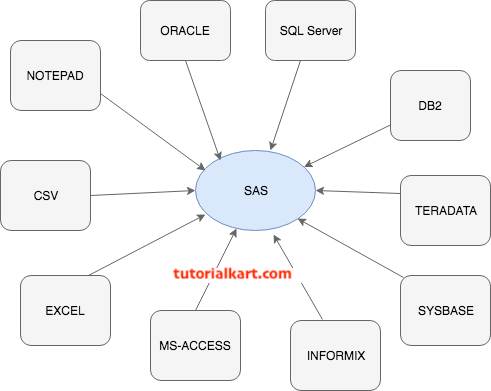
Four Core Tasks in a SAS Data Workflow
A practical SAS workflow can be understood through four related tasks:
- Access the data: Read records from files, SAS libraries, databases, or other configured sources.
- Manage the data: Clean, validate, reshape, combine, and derive values required for analysis.
- Analyze the data: Apply SAS procedures to summarize the data or perform statistical and analytical operations.
- Present the results: Deliver output as tables, listings, charts, files, or reports for the intended audience.
How DATA and PROC Steps Work in SAS Programming
A traditional SAS program is organized into steps. A DATA step generally reads or creates data and applies row-level processing. A PROC step invokes a SAS procedure to summarize, analyze, report, sort, or otherwise process a data set.

SAS DATA Step for Creating and Transforming Data
A DATA step can create a new SAS data set, read an existing data set, calculate variables, select observations, and apply data-quality rules. Its output is commonly another SAS data set, although DATA steps can also write files or generate other output.
- Reads observations from an input source.
- Creates or modifies variables.
- Applies conditional processing and validation rules.
- Writes selected observations to one or more output data sets.
SAS PROC Step for Analysis and Reporting
PROC is short for procedure. Each procedure is designed for a particular operation. For example, a procedure may print observations, calculate summary statistics, sort data, create a frequency table, or fit a statistical model.
- Reads a SAS data set or another supported input.
- Performs the operation defined by the selected procedure.
- Can generate reports, tables, statistics, charts, or output data sets.
Simple SAS Program Using DATA and PROC Steps
The following program creates a small sales data set and then uses PROC MEANS to calculate summary statistics for the Amount variable.
data work.sales;
    input Region $ Amount;
    datalines;
North 1250
South 980
North 1430
West 1175
;
run;

proc means data=work.sales mean min max;
    var Amount;
run;
The DATA step reads four observations into WORK.SALES. The PROC step reads that data set and requests the mean, minimum, and maximum sales amounts. The RUN; statement marks the boundary at which the preceding step can be submitted for execution.
SAS Libraries, Data Sets, and the WORK Library
A SAS library is a collection of SAS files referenced through a library name, also called a libref. A two-level name such as WORK.SALES contains the library name before the period and the member name after it.
- WORK library: Stores temporary files that are normally removed when the SAS session ends.
- Permanent library: Points to a configured storage location so that data sets can remain available for later sessions.
- One-level data-set name: A name such as
SALESusually refers to the WORK library by default. - Two-level data-set name: A name such as
MYLIB.SALESexplicitly identifies both the library and data set.
SAS Programming Compared with R, Python, and SQL
| Technology | Typical role in data work | Key distinction |
|---|---|---|
| SAS | Data preparation, statistical procedures, reporting, and governed analytical workflows | Commercial platform with an established programming language and integrated procedures |
| R | Statistical computing, research, and visualization | Open-source language with a large package ecosystem |
| Python | General programming, data engineering, analytics, automation, and machine learning | Open-source general-purpose language supported by many data libraries |
| SQL | Querying and modifying relational data | Database language often used alongside SAS, R, or Python rather than as a complete replacement |
The appropriate tool depends on the existing technology stack, regulatory requirements, available licenses, team skills, and the type of work being performed. Many data teams use SAS together with SQL, Python, or R instead of treating them as mutually exclusive choices.
When Learning SAS Is Relevant
Learning SAS is most relevant when an employer, academic program, research group, or regulated workflow already uses it. Before choosing a learning path, review job descriptions or project requirements to determine whether they call for SAS programming, SAS administration, a visual SAS interface, or a particular SAS product.
For programming work, begin with libraries, SAS data sets, DATA steps, common procedures, formats, functions, missing values, and debugging through the SAS log. SQL and basic statistics are also useful because SAS programs frequently combine data queries with analytical procedures.
SAS Program Validation and Editorial QA Checklist
- Confirm that SAS is described as a programming and analytics platform, not only as a statistical calculator.
- Use Statistical Analysis System when explaining the historical expansion of SAS; do not substitute “Statistical Analysis Software.”
- Distinguish DATA-step transformation from PROC-step processing without implying that every SAS program must contain both.
- State when database access depends on licensed interfaces, drivers, credentials, or environment configuration.
- Identify sample data and fictional examples clearly so readers do not mistake them for production data.
- Check the SAS log for errors, warnings, conversion notes, uninitialized variables, and unexpected observation counts before accepting results.
Frequently Asked Questions About SAS Software
What is SAS mainly used for?
SAS is mainly used for data access, preparation, statistical analysis, reporting, forecasting, and repeatable analytical workflows. Its use depends on the SAS products licensed and configured by an organization.
Is SAS a programming language or software?
It is both a software platform and a programming environment. The SAS language is used to write DATA steps, PROC steps, macros, SQL queries, and other instructions executed by SAS software.
What is the difference between a DATA step and a PROC step in SAS?
A DATA step generally creates or transforms data through observation-level processing. A PROC step calls a procedure that performs a defined operation such as sorting, reporting, summarizing, or statistical analysis.
Is SAS still worth learning for data analysis?
SAS is worth learning when it is required by a target role, organization, course, or established analytical workflow. If no such requirement exists, compare it with Python, R, SQL, and the tools used in the relevant industry before deciding.