 TutorialKart.com
How to create a Salesforce Visualforce page
A Salesforce Visualforce page is a server-rendered page built with Visualforce markup and, when needed, Apex controllers. You can use it to create a custom user interface in Salesforce, display data, override standard buttons, or build a page that is opened from a custom tab, button, link, or page layout.
To create a Salesforce Visualforce page, you can use the Developer Console, the Visualforce Pages setup screen, or direct URL creation in a development org. The Developer Console is usually the fastest method for beginners because it provides syntax highlighting, tag pair matching, auto-suggest, smart indentation, and autocomplete while editing Visualforce markup.
Before creating a Visualforce page in Salesforce
Make sure you are working in a sandbox, Developer Edition org, or another safe environment before creating or testing pages. You also need permission to access Setup, create Visualforce pages, and use Apex or Developer Console features. In Lightning Experience, many setup paths differ from older Salesforce Classic menu names, but the Visualforce page editor is still available from Setup.
- Page Label is the readable name shown in Setup.
- Page Name is the API name used in the URL, such as
/apex/HelloWorld. - Visualforce markup starts with the
<apex:page>tag. - Preview opens the page so that you can test the output in the browser.
Create a Salesforce Visualforce page from Developer Console
To create Salesforce Visualforce page, navigate to Developer console. Salesforce VF pages can be created and edited using Salesforce developer console and from Pages. Salesforce Developer console has powerful development tools like syntax highlighting, tag pair matching, auto suggest, smart indenting and auto complete. To create Salesforce Visualforce page using developer console follow the steps given below.
- Open Developer console under your name or quick access menu.
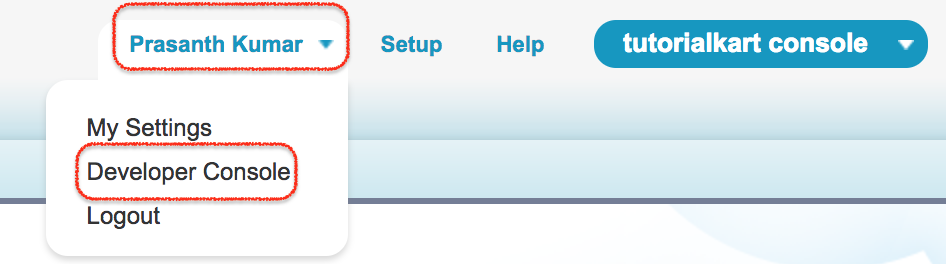
- Now developer Console will be opened in New window.
- To create VF page click File | New | Visualforce page.
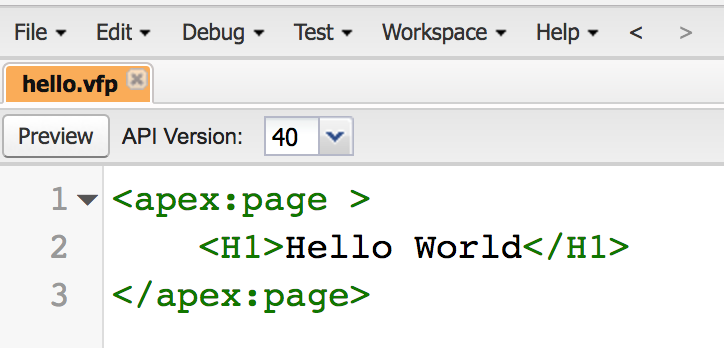
Enter a page name such as HelloWorld. Salesforce uses this name in the page URL, so avoid spaces and special characters. After the page opens in the editor, add the basic Visualforce markup shown below.
<apex:page>
    <h1>Hello World</h1>
</apex:page>- Now to File | Click on save button.
- Now click on preview button to see you new Vf page.
The page preview opens a URL similar to https://your-domain.my.salesforce.com/apex/HelloWorld or a Visualforce domain URL. The exact domain depends on your Salesforce org and My Domain configuration.
Create Salesforce Visualforce pages from Setup
This is another process of creating Salesforce Visualforce pages. To create Visualforce page navigate to Develop | Visualforce Pages.
In Lightning Experience, open Setup, enter Visualforce Pages in the Quick Find box, and select Visualforce Pages. In Salesforce Classic, the older path may appear as Setup | Build | Develop | Pages depending on the org interface and edition.
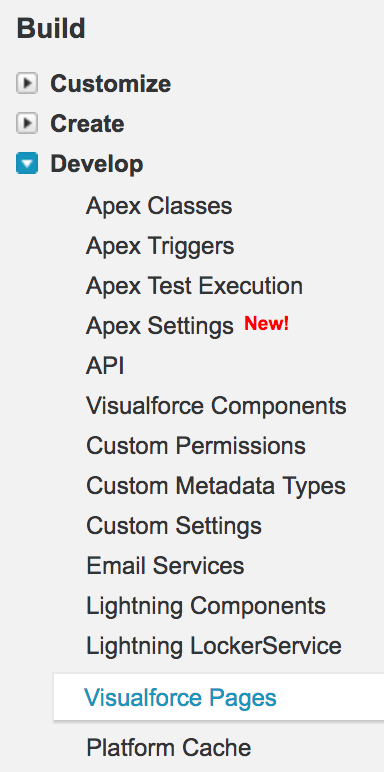
- Click on New button to create Visualforce page.
- Enter label and Name.
- Finally click on save button.
The Setup editor is useful when you want to review page settings such as description, available for Lightning Experience, required permissions, or page security. For regular coding, many developers prefer Developer Console or Salesforce CLI with source control.
Create a Visualforce page directly from a Salesforce URL
This is the third method for creating Visualforce page. As shown in above steps, to create VF page must navigate to Setup | Build | Develop | pages or Developer console every time. To create Visualforce page directly from URL, click on the URL and add /apex/pages at the end of the Salesforce URL as shown below.
- https://c.ap4.visual.force.com/apex/PageName.
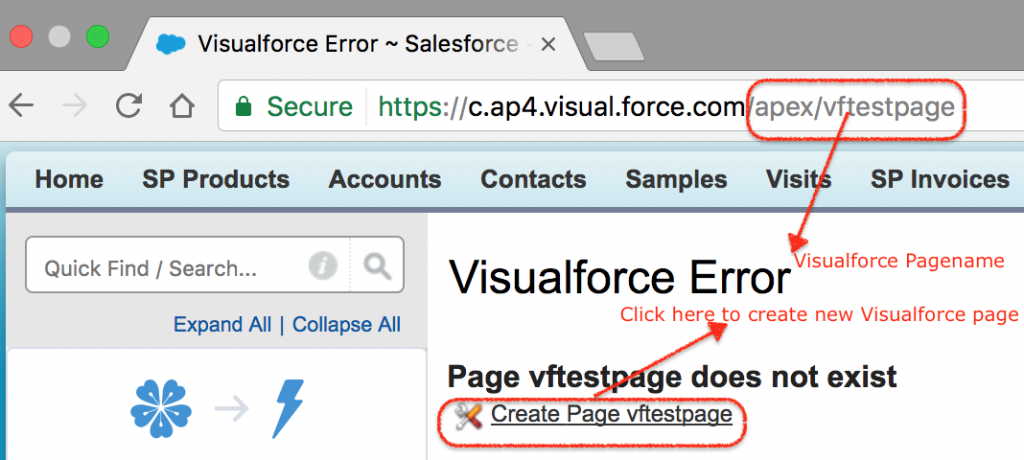
- Click on createpage Vftestpage to create new Vf page in Salesforce.
- To check the created visualforce page navigate to Build | Develop | Visualforce. Here list of all Vf pages in Salesforce will be displayed.
Direct URL creation is convenient for quick practice, but it is not the best long-term development workflow. For team development, use source control and a deployment process instead of creating pages manually in production.
Visualforce Hello World page explained
The smallest Visualforce page begins with <apex:page> and ends with </apex:page>. Standard HTML can be placed inside the page, and Visualforce components can be added when you need Salesforce-specific behavior.
<apex:page>
    <h1>Hello World</h1>
    <p>This is my first Salesforce Visualforce page.</p>
</apex:page>
In this example, <h1> and <p> are HTML tags. The <apex:page> tag tells Salesforce that the file is a Visualforce page and controls page-level behavior such as the controller, standard stylesheets, sidebar display, and record context.
Visualforce page with a standard controller
A Visualforce page can use a standard controller to work with a Salesforce object without writing a custom Apex controller. For example, the following page displays fields from an Account record when the page is opened with an Account record id.
<apex:page standardController="Account">
    <apex:pageBlock title="Account Details">
        <apex:pageBlockSection>
            <apex:outputField value="{!Account.Name}" />
            <apex:outputField value="{!Account.Phone}" />
            <apex:outputField value="{!Account.Industry}" />
        </apex:pageBlockSection>
    </apex:pageBlock>
</apex:page>
To test this type of page, open an Account record and pass the record id in the Visualforce URL. The URL pattern is usually similar to /apex/PageName?id=001.... The record id must belong to the object used by the standard controller.
Where Visualforce pages are used in Salesforce
Visualforce pages can be used in different ways in Salesforce organisation. Some of them are
- VF pages can be used by overriding the standard button.
- VF page can be called using the custom help links for the custom object.
- Creating JavaScript button to open VF page.
- Creating custom buttons to open VF page.
- Vf pages can be added to custom tabs, dashboards and page layouts.
Visualforce is also used in many existing Salesforce orgs for custom pages, PDF generation, legacy custom user interfaces, and pages that depend on Apex controller logic. For new custom UI work, Salesforce Lightning Web Components are often considered first, but Visualforce remains supported and useful in specific scenarios, especially where an existing Visualforce solution already works well.
Visualforce page and Lightning page difference
A Visualforce page is written with Visualforce markup and usually renders on the server. A Lightning page is built in Lightning App Builder by arranging Lightning components, including standard components, custom Lightning Web Components, and other supported components. The choice depends on the requirement, the existing Salesforce architecture, and the amount of custom UI behavior needed.
| Area | Visualforce page | Lightning page |
|---|---|---|
| Primary building block | Visualforce markup and Apex | Lightning components and page regions |
| Common use | Custom legacy pages, PDF output, controller-driven pages | Modern record, app, and home pages |
| Editing experience | Developer Console, Setup editor, or source files | Lightning App Builder and component development tools |
| Best fit | Existing Visualforce customizations and server-rendered pages | New Lightning Experience UI customizations |
Common Visualforce page creation errors
- Invalid page name: Use a valid API-style page name without spaces.
- Missing closing tag: Every Visualforce and HTML tag must be closed correctly.
- Record id not passed: Pages using a standard controller need a valid record id in the URL.
- Permission issue: Users need access to the Visualforce page and to the objects or fields shown on the page.
- Wrong org URL: Use your current Salesforce domain instead of copying an old instance URL from another org.
Editorial QA checklist for this Visualforce page tutorial
- Confirm that the tutorial explains all three Visualforce page creation methods: Developer Console, Setup, and URL.
- Check that every Visualforce code example uses valid
<apex:page>markup. - Verify that the article distinguishes Visualforce pages from Lightning pages without saying that one always replaces the other.
- Ensure that setup paths mention both older Salesforce Classic wording and the Lightning Experience Quick Find approach.
- Review image alt text and make sure at least one image describes creating a Salesforce Visualforce page.
FAQs on creating Salesforce Visualforce pages
How do I create a Visualforce page in Salesforce?
You can create a Visualforce page from Developer Console by selecting File | New | Visualforce Page. You can also open Setup, search for Visualforce Pages, click New, enter the label and name, add Visualforce markup, and save the page.
What is a Salesforce Visualforce page?
A Salesforce Visualforce page is a custom page created with Visualforce markup. It can display Salesforce data, use standard or custom Apex controllers, and provide a custom interface for users inside or outside standard Salesforce record pages.
Is Visualforce still used in Salesforce?
Yes. Visualforce is still used in many Salesforce orgs, especially for existing custom pages, PDF rendering, and controller-based pages. For new Lightning Experience interfaces, teams often evaluate Lightning Web Components first, but Visualforce remains relevant for supported use cases.
What is the difference between a Visualforce page and a Lightning page?
A Visualforce page is written with Visualforce markup and can use Apex controllers. A Lightning page is assembled in Lightning App Builder using Lightning components. Visualforce is more code-centric, while Lightning pages are component-based and designed for Lightning Experience layouts.
Can I create a Visualforce page without Apex?
Yes. A simple Visualforce page can contain only Visualforce markup and HTML. You need Apex only when the page requires custom server-side logic beyond what standard controllers and basic markup provide.