 TutorialKart.com
Standard Controller in Salesforce for Visualforce Pages
Standard Controller in Salesforce is the built-in Visualforce controller that lets a page read, display, edit, save, delete, and navigate a single Salesforce record without writing a full custom Apex controller. It is declared with the standardController attribute on the <apex:page> tag, and it works with both standard objects such as Account and custom objects that are available to Visualforce.
A standard controller is most useful when the page follows normal record behavior. It gives the page access to the record identified by the id parameter in the URL, applies familiar Salesforce behavior such as validation rules during save, and lets you use Visualforce components such as <apex:outputField>, <apex:inputField>, and <apex:commandButton> with less Apex code.
In simple terms, it connects Visualforce to Salesforce records one record at a time. For example, an Account standard controller page can show the current Account name, Account type, and other fields when the page URL contains an Account record Id.
Visualforce pages use a tag-based markup language together with server-side controllers. In this Visualforce developer tutorial, we will use the standardController attribute, read Account fields, add standard actions, and compare standard controllers with custom controllers, controller extensions, and StandardSetController.
What a Controller Does in Salesforce Visualforce
A controller in Salesforce is the server-side logic that tells a Visualforce page what data to load and what should happen when the user clicks a button, edits a field, or opens another page. Visualforce supports different controller patterns depending on how much built-in Salesforce behavior you want to use.
- Standard controller: Salesforce-provided controller for one record of a standard or custom object.
- Custom controller: An Apex class that supplies all controller logic for the page.
- Controller extension: An Apex class that adds extra methods to a standard or custom controller.
- Standard list controller / StandardSetController: Controller support for multiple records, list views, pagination, and selection-style pages.
Use a standard controller when the page mainly needs standard record operations. Use a custom controller when the page does not naturally belong to one object record or when the complete page flow must be written in Apex. Use a controller extension when the standard controller is almost enough, but the page also needs a small amount of custom logic.
standardController Attribute Syntax on apex:page
The standardController attribute is added to the opening <apex:page> tag. The value must be the API name of the object whose record the page should use. For a standard object, use names such as Account, Contact, Opportunity, or Case. For a custom object, use the custom object API name, for example Invoice__c.
<apex:page standardController="ObjectApiName">
    Visualforce markup for one ObjectApiName record
</apex:page>
A Visualforce page cannot use the standardController attribute and the controller attribute at the same time. If you need to keep standard controller behavior and add custom Apex methods, use the extensions attribute instead of replacing the standard controller.
<apex:page standardController="Account" extensions="AccountStandardExtension">
    Visualforce markup here
</apex:page>
Create the StandardControllers Visualforce Page in Salesforce
In this Salesforce developer tutorial, let us create a Visualforce page named StandardControllers and use it with an Account record.
- Log in to Salesforce using your username and password.
- Open an Account record in Salesforce and copy the record Id from the URL, or keep the record open for testing.
- In the browser address bar, enter the Visualforce page URL in the format
/apex/StandardControllers.

- If a Visualforce page named
StandardControllersdoes not exist, Salesforce displays a page creation message.
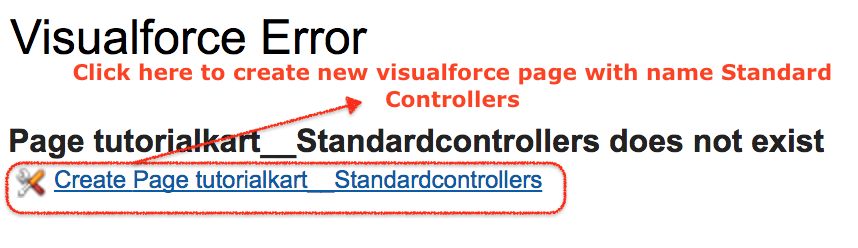
- Click the create page link shown by Salesforce, and then add the Visualforce markup for the standard controller example.
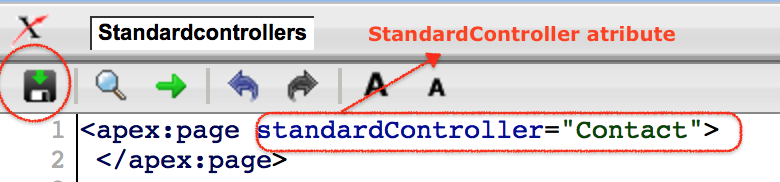
Visualforce built-in component tags begin with the apex: prefix. Most Visualforce components have opening and closing tags, although some components can also be written as self-closing tags when they do not contain child content.
Access Account Data with the Salesforce Standard Controller
Every standard controller includes a getter method that returns the record specified by the id query string parameter in the Visualforce page URL. The record Id in the URL must belong to the same object type as the standard controller. If the page uses standardController="Account", the id value must be an Account Id.
Field values are referenced with merge expressions. For Account fields, the object variable is written in lowercase as account. For example, {!account.name} displays the Account Name, and {!account.type} displays the Account Type when the current user has access to those values.
Retrieving Account Data Using the standardController Attribute
<apex:page standardController="Account" sidebar="false">
   <!-- How to standardcontroller attribute in vfpage -->
      <h1>Your are viewing {!account.name} Account</h1>
      <p>Account type = {!account.type}</p>
  <!-- www.tutorialkart.com -->
</apex:page>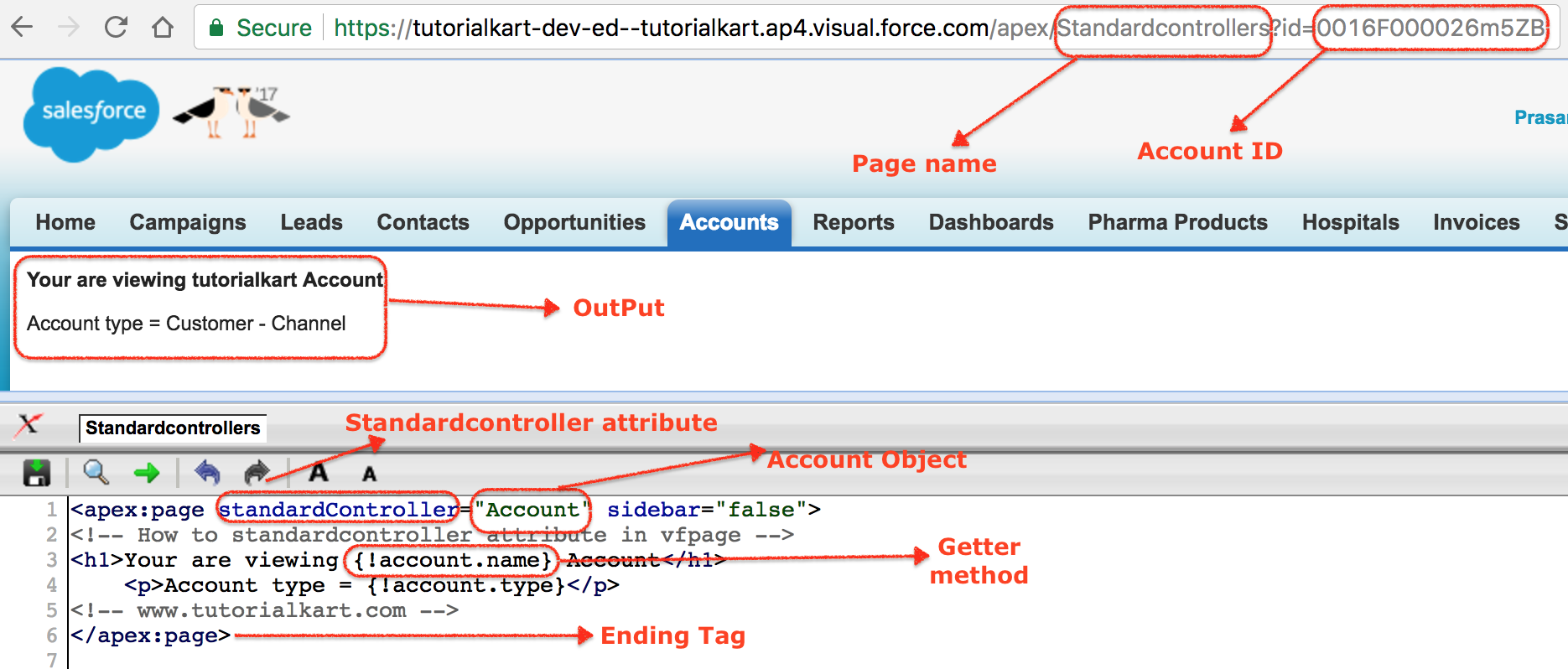
In the above Visualforce page, the Account standard controller reads the Account record from the page URL and exposes it to the page as account. For the getter method to return the right record, open the page with an Account Id in the URL.
/apex/StandardControllers?id=001XXXXXXXXXXXXXXXIf the Id belongs to another object, is missing, or is not accessible to the current user, the page cannot display the expected Account record. This is one of the most common reasons a standard controller page appears blank or shows an access-related error.
Display and Edit Fields with Standard Controller Components
For record pages, prefer <apex:outputField> for read-only field display and <apex:inputField> for editable field display. These components understand Salesforce field metadata better than plain HTML tags and are usually clearer than manually writing every label and value.
<apex:page standardController="Account">
    <apex:form>
        <apex:pageBlock title="Edit Account">
            <apex:pageBlockSection columns="1">
                <apex:inputField value="{!account.Name}"/>
                <apex:inputField value="{!account.Type}"/>
                <apex:inputField value="{!account.Phone}"/>
            </apex:pageBlockSection>

            <apex:pageBlockButtons>
                <apex:commandButton action="{!save}" value="Save"/>
                <apex:commandButton action="{!cancel}" value="Cancel" immediate="true"/>
            </apex:pageBlockButtons>
        </apex:pageBlock>
    </apex:form>
</apex:page>
The {!save} and {!cancel} actions in this example are standard controller actions. When save runs, Salesforce applies the same kind of record save behavior you expect from the platform, including required fields and validation rules. The user still needs suitable permissions for the object and record.
Standard Controller Actions for Save, Edit, Delete, Cancel, and View
A standard controller provides common single-record actions, so you do not need to write Apex DML for basic pages. The exact action you expose should match the purpose of the page and the permissions you expect the user to have.
| Standard controller action | Typical use in Visualforce |
|---|---|
{!save} | Saves the record and returns the user to the standard view behavior for that record. |
{!quicksave} | Saves the record but keeps the user on the same page. |
{!edit} | Navigates to the standard edit page for the record. |
{!delete} | Deletes the record when the user has delete access. |
{!cancel} | Cancels the current operation and returns to the previous appropriate page. |
{!view} | Navigates to the standard view page for the record. |
Do not add delete buttons casually to a Visualforce page. Even though the standard controller checks access, the page should still make the user action clear and avoid accidental record removal.
Use a Controller Extension with StandardController When Logic Is Almost Standard
A controller extension is the correct choice when a Visualforce page should keep the standard controller record context but also needs custom Apex logic. The extension receives an ApexPages.StandardController instance in its constructor and can call standard controller methods or work with the current record.
public with sharing class AccountStandardExtension {
    private final ApexPages.StandardController controller;

    public AccountStandardExtension(ApexPages.StandardController controller) {
        this.controller = controller;
    }

    public PageReference quickSaveAccount() {
        return controller.quicksave();
    }
}
The matching Visualforce page keeps standardController="Account" and adds the extension name. This keeps the page tied to one Account record while allowing the extra quickSaveAccount action.
<apex:page standardController="Account" extensions="AccountStandardExtension">
    <apex:form>
        <apex:commandButton action="{!quickSaveAccount}" value="Quick Save"/>
    </apex:form>
</apex:page>
Standard Controller vs Custom Controller vs StandardSetController
The controller type should be selected from the page requirement, not from habit. The following comparison is a practical way to decide which one fits a Visualforce page.
| Visualforce controller option | Best fit | What you write |
|---|---|---|
| Standard controller | One record page for a standard or custom object | Visualforce markup, usually little or no Apex |
| Custom controller | Page flow does not map to one standard record, or all logic must be custom | Full Apex controller class |
| Controller extension | Standard record behavior plus additional actions or calculations | Apex extension class plus standard controller page |
| StandardSetController | Multiple records, list views, pagination, mass selection, or list-style actions | Apex that works with a set of records |
For example, an Account detail page that shows and edits Account fields is a standard controller use case. A wizard that combines Account, Contact, and custom approval data may need a custom controller. A standard Account edit page with one extra validation message or helper button is often better as a controller extension.
Standard Controller Mistakes That Break Visualforce Pages
- Using the wrong object API name: Use
Accountfor Account andCustom_Object__cfor a custom object. - Missing record Id: A single-record standard controller page usually needs an
idparameter in the URL to load an existing record. - Passing the wrong Id type: An Account standard controller page needs an Account Id, not a Contact, Opportunity, or custom object Id.
- Combining
standardControllerandcontroller: Use one of them, not both. Addextensionswhen you need extra Apex on top of standard behavior. - Writing plain HTML inputs for Salesforce fields: Use
<apex:inputField>when you want Salesforce field metadata and standard save behavior to work cleanly.
Official Salesforce References for Standard Controller
For exact platform behavior and method names, refer to Salesforce documentation while building or reviewing production Visualforce pages.
- Salesforce Visualforce Developer Guide: Standard Controllers
- Apex Reference Guide: ApexPages.StandardController Class
- Trailhead: Visualforce Standard Controllers
FAQs on Standard Controller in Salesforce
What is a standard controller in Salesforce?
A standard controller in Salesforce is a built-in Visualforce controller for one standard or custom object record. It lets the page display fields and run common actions such as save, edit, delete, cancel, and view without a full custom Apex controller.
What is the difference between standard controller and custom controller in Visualforce?
A standard controller uses Salesforce-provided record behavior for one object. A custom controller is an Apex class where the developer writes the page logic. Use a standard controller for normal record pages, and use a custom controller when the page flow or data model is fully custom.
Can a Visualforce page use standardController and controller together?
No. A Visualforce page should not use standardController and controller together on the same <apex:page> tag. To add Apex logic while keeping standard controller behavior, use the extensions attribute.
When should I use a controller extension with a standard controller?
Use a controller extension when the page still belongs to one Salesforce record but needs extra Apex methods, calculations, redirects, or helper actions beyond the built-in standard controller actions.
What is StandardSetController in Salesforce?
StandardSetController is used for Visualforce pages that work with multiple records rather than one record. It is commonly used for list-style pages, pagination, selected records, and actions on sets of records.
Standard Controller QA Checklist for Visualforce Examples
- Confirm that the
standardControllervalue is the correct Salesforce object API name. - Test the Visualforce page with a valid record Id of the same object type.
- Test the page as a user who has only the expected object, field, and record access.
- Check that save actions handle required fields and validation rules clearly.
- Use a controller extension instead of replacing the standard controller when only a small custom action is needed.
Conclusion: When to Use the standardController Attribute
Use the standardController attribute when a Visualforce page is centered on a single Salesforce record and should follow standard platform behavior. It keeps the page simpler, reduces Apex code, and gives you common record actions such as save, edit, delete, cancel, and view. When the page needs extra logic, add a controller extension; when the page no longer fits one standard record, write a custom controller or use StandardSetController for multiple records.