 TutorialKart.com
Salesforce.com, Force.com and Salesforce1 are closely related Salesforce terms, but they do not mean the same thing. Salesforce.com mainly refers to Salesforce as a cloud CRM company and product family, Force.com refers to the older platform name used for building custom cloud applications on Salesforce, and Salesforce1 refers to the older mobile app and mobile platform branding that later became part of the Salesforce mobile experience.
This tutorial explains the difference between Salesforce.com, Force.com and Salesforce1 in practical terms, so that admins, developers and beginners can understand where each name fits in the Salesforce ecosystem.
Difference between Salesforce.com, Force.com and Salesforce1 in one view
| Term | Simple meaning | Main purpose | Best way to understand it today |
|---|---|---|---|
| Salesforce.com | Company name historically used for Salesforce and its CRM products | Manage sales, service, marketing and customer data in the cloud | Think of Salesforce CRM applications such as Sales Cloud and Service Cloud |
| Force.com | Older name for Salesforce’s cloud application development platform | Build custom apps, objects, workflows, automation and business logic | Think of Salesforce Platform, Lightning Platform and platform development tools |
| Salesforce1 | Older mobile app and mobile platform name | Access Salesforce data and custom apps from phones and tablets | Think of the Salesforce mobile app and mobile-ready Lightning pages |
The easiest way to remember the difference is this: Salesforce.com is the CRM product and company context, Force.com is the application-building platform, and Salesforce1 is the mobile access layer.
What is Salesforce.com?
Salesforce.com is the name of the global cloud computing company and is also the name of their flagship CRM product or Customer Relationship Management Software.
In modern usage, people usually say Salesforce instead of Salesforce.com. The legal company name was changed from salesforce.com, inc. to Salesforce, Inc., but many older tutorials, certifications, forum posts and customer conversations still use the Salesforce.com name to mean the Salesforce CRM product.
- Salesforce does not require any software, where customer need to have Internet connection and a browser.
- It is a web based software product that runs on a Cloud platform.
- Salesforce.com allows companies to track and manage their business relationships and the information associated with them.
- It allows companies to manage their accounts, contacts, leads, and most importantly sales opportunities.
For example, a sales team can use Salesforce CRM to store accounts, contacts, leads, activities and opportunities. A service team can use Salesforce to manage cases, customer requests and service history. These are application-level uses of Salesforce rather than platform-development uses.
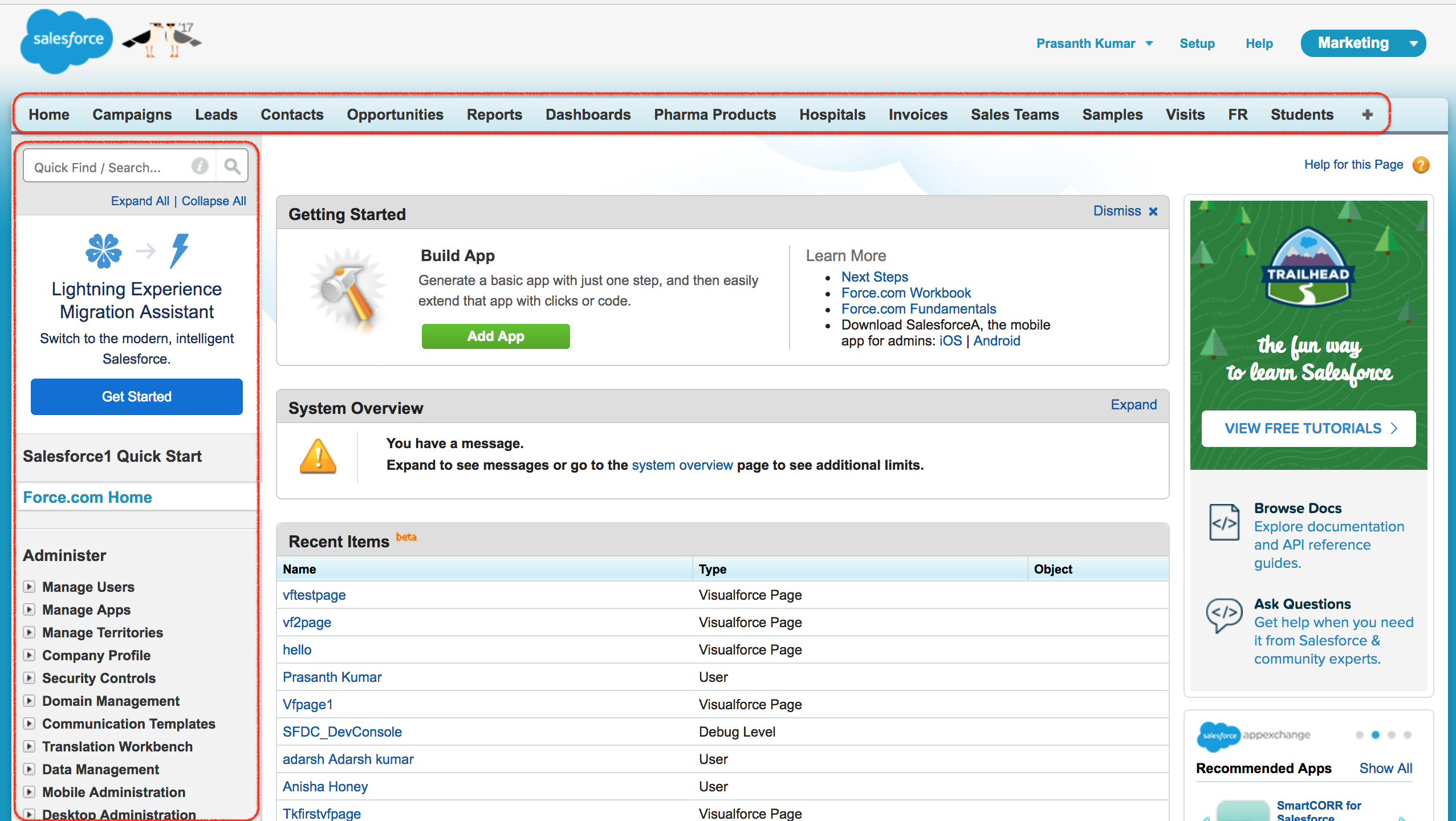
What is force.com?
Force.com is the name of the PAAS (Platform As A Service ) product designed to develop cloud-based apps and websites through cloud IDE (integrated development Environment).
Force.com is best understood as the older platform brand behind Salesforce custom application development. Instead of building an application from scratch on separate servers, a developer could build business applications directly on Salesforce using objects, fields, page layouts, Apex, Visualforce, automation and security settings.
- Force.com is a development platform that was used to create next generation cloud applications.
- It allows Salesforce developers to build and deploy Cloud applications like the applications available in Salesforce App exchange.
- Using Force.com we can build custom apps and third party apps on AppExchange.
- Force.com includes different frameworks and the development tools needed to create any Cloud based application.
Today, the Force.com name is mostly seen in older articles, legacy URLs, package names, license labels and community discussions. Current Salesforce documentation usually describes the same area with terms such as Salesforce Platform, Lightning Platform, Lightning Web Components, Apex, Flow and platform services.
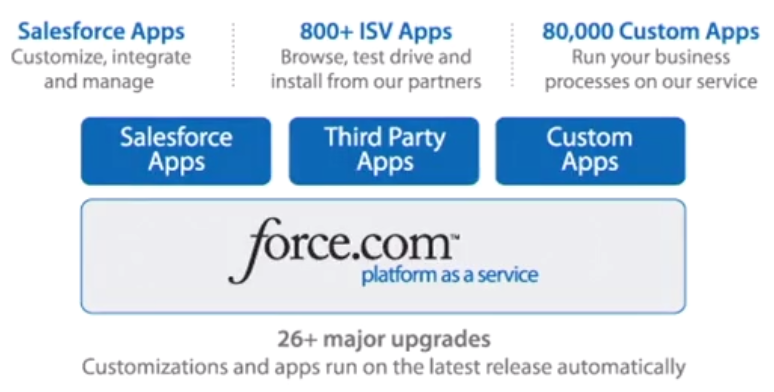
How Force.com differs from Salesforce CRM applications
The main difference between Force.com and Salesforce CRM is the level at which you are working. Salesforce CRM gives users ready-made business features such as leads, accounts, contacts, opportunities, cases, reports and dashboards. Force.com gives admins and developers the platform tools to create or extend applications for a specific business process.
- Use Salesforce CRM when your goal is to manage customer relationships, sales pipelines, service cases or marketing data.
- Use the Salesforce platform tools when your goal is to create custom objects, automate a process, build a custom user interface, integrate with another system or package an app for AppExchange.
- Use both together when a business starts with standard CRM features and then extends them with custom fields, custom apps, Flow automation, Apex logic or Lightning components.
For example, a company may use standard Salesforce opportunities to manage sales deals, and then use platform tools to build a custom approval process for discount requests. The CRM application stores and displays the opportunity; the platform customization controls the business-specific process.
What is Salesforce1?
Salesforce1 is the first CRM platform for developers, ISVs (independent software vendors like Dropbox, Evernote, kenandy), end users, admins and customers moving to the new social, mobile and connected cloud.
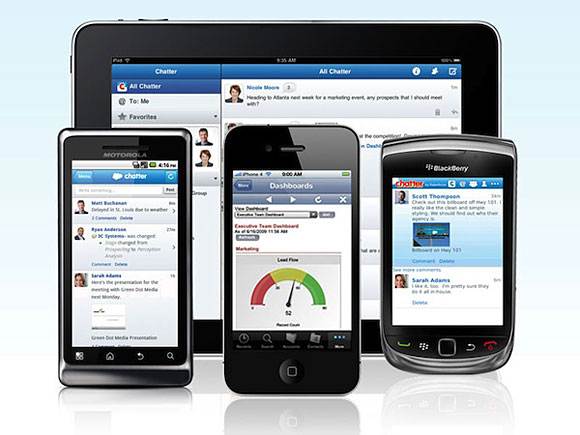
Salesforce1 was introduced as a mobile-first way to access Salesforce from phones and tablets. It helped users open records, view dashboards, use custom actions and work with Salesforce data away from the desktop. In current usage, most people refer to this experience as the Salesforce mobile app.
- Salesforce1 is pronounced as Salesforce one.
- Salesforce1 provides a built-in mobile application that allows users to easily access their Salesforce data through all their mobile devices, and tabs.
- We can use Visualforce to create mobile applications using the tools available with the Salesforce1 platform.
- Salesforce1 is a customer platform that connects all Salesforce apps, all devices and all customer data.
- Salesforce1 is a mobile application which can be downloaded in App Store for IOS devices and Google Play store for Android devices.
For developers and admins, the key point is that Salesforce pages and apps should be designed with mobile users in mind. Lightning record pages, quick actions, compact layouts and responsive components affect how useful Salesforce is on a mobile device.
Salesforce.com vs Force.com vs Salesforce1 with a real business example
Assume a company wants to manage field sales visits. The three terms can be mapped like this:
- Salesforce.com / Salesforce CRM: Sales representatives store accounts, contacts, leads, opportunities and tasks.
- Force.com / Salesforce Platform: Developers create a custom Visit object, add fields for visit notes and build automation to create follow-up tasks.
- Salesforce1 / Salesforce mobile app: Sales representatives open the Visit record on a phone, update notes after a meeting and view the next customer location.
This example shows that the terms are not competitors. They describe different layers of the same Salesforce environment: CRM application, development platform and mobile access.
Which Salesforce term should beginners use today?
When writing or speaking about current Salesforce products, use the latest names where possible. Use Salesforce for the company and CRM product family, Salesforce Platform or Lightning Platform for the app-building platform, and Salesforce mobile app for mobile access. Keep the older names Salesforce.com, Force.com and Salesforce1 in mind because they still appear in older tutorials, URLs, certifications, job descriptions, package references and community answers.
Common confusion in Salesforce.com, Force.com and Salesforce1 terminology
- Salesforce.com is not only a website address. In older learning material, it often refers to the Salesforce company or Salesforce CRM product.
- Force.com is not a separate CRM product. It is the older name for the platform used to build and extend Salesforce applications.
- Salesforce1 is not the same as Sales Cloud. Salesforce1 refers to mobile access, while Sales Cloud is a CRM application for sales teams.
- A custom Salesforce app can use all three ideas. The app may run inside Salesforce CRM, be built using platform tools and be accessed on a mobile device.
- Older names may still be technically visible. Do not be surprised if Force.com appears in a domain, license label, metadata name or old help article.
Salesforce references for current product names
For current terminology, compare older learning material with official Salesforce resources such as the Salesforce explanation of CRM, the Salesforce Developer Documentation, and the Trailhead module on the Salesforce mobile app.
FAQs on Salesforce.com, Force.com and Salesforce1
Is Salesforce.com different from Salesforce?
In most learning contexts, Salesforce.com and Salesforce refer to the same company or CRM product family. Salesforce.com is the older style of naming, while Salesforce is the common current usage.
Is Force.com still used in Salesforce?
The Force.com name is mostly historical, but the platform idea still exists. Today, admins and developers usually refer to Salesforce Platform, Lightning Platform, Apex, Flow, Lightning Web Components and related platform tools.
What is Salesforce1 called now?
Salesforce1 is generally understood today as the Salesforce mobile app experience. Users access Salesforce records, apps, dashboards and actions from phones and tablets through the Salesforce mobile app.
Do I need Force.com separately to use Sales Cloud?
A standard Sales Cloud user does not usually think in terms of buying Force.com separately. Sales Cloud runs on the Salesforce platform, and platform features are used when the organization customizes or extends Salesforce.
Can Visualforce and Lightning pages work with Salesforce mobile?
Yes, Salesforce pages can be designed for mobile use, but the mobile experience depends on how the page, action, component or layout is built. Modern Salesforce implementations usually prefer Lightning pages and responsive Lightning components for mobile-friendly experiences.
Editorial QA checklist for this Salesforce terminology tutorial
- Confirm that Salesforce.com is explained as older naming for Salesforce and its CRM product context.
- Confirm that Force.com is explained as the older platform brand, not as a competing CRM application.
- Confirm that Salesforce1 is explained as older mobile branding connected to the current Salesforce mobile app.
- Check that examples separate CRM use, platform customization and mobile access clearly.
- Review current Salesforce documentation when updating screenshots, product names or licensing references.