 TutorialKart.com
apex:pageMessage component is a Visualforce component used to display one custom message on a Visualforce page with Salesforce message styling. It is useful when you want to show a fixed warning, information note, confirmation, or error message that is written directly in the page markup.
The singular <apex:pageMessage> component is different from <apex:pageMessages>. apex:pageMessage displays a single custom message that you define, while apex:pageMessages displays messages generated for components on the current page, including validation messages and messages added from Apex using ApexPages.addMessage().
apex:pageMessage Component in Visualforce
Use apex:pageMessage when the page must always show a specific message. For example, a Visualforce page may show a warning that a record is read-only, an information note that the user should review values before saving, or a confirmation-style message after a custom action.
Use apex:pageMessages along with it when the same page also needs to display validation errors or Apex controller messages. This is a common pattern because one message can be static and other messages can be generated during form processing.
apex:pageMessage Syntax for a Single Visualforce Message
The basic syntax of the apex:pageMessage component is shown below. The summary value is the main message text, and severity controls the message style.
<apex:pageMessage
    summary="Message summary"
    detail="Optional detailed message"
    severity="warning"
    strength="2" />
apex:pageMessage Component Attributes
The following attributes are commonly used with the Visualforce apex:pageMessage component.
| Attribute | Description |
title | Displays a title for the message. Use it when the message needs a short heading before the summary or detail text. |
summary | Displays the main text of the message. This is the attribute most commonly used for a short warning, error, information, or confirmation message. |
detail | Displays additional detail for the message. Use this when the user needs more explanation than the summary can provide. |
severity | Controls the type of message styling. Common values are error, warning, info, and confirm. |
strength | Controls the visual emphasis of the message icon and styling. The value ranges from 0 to 3 depending on the required emphasis. |
rendered | Boolean attribute that decides whether the component should be displayed. It is useful when a message should appear only under a condition. |
escape | Boolean attribute that decides whether sensitive HTML and XML characters in the message are escaped before rendering. |
showDetail | Boolean attribute that specifies whether the detail text is displayed. The default behavior depends on the component configuration. |
Visualforce Page Example Using apex:pageMessage and apex:pageMessages
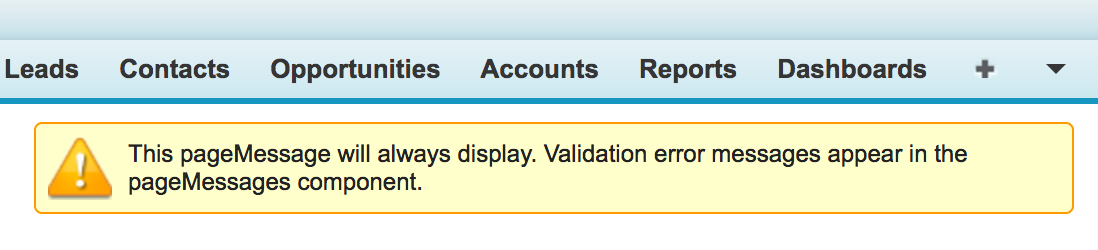
The following Visualforce page uses apex:pageMessage to display one static warning message. It also includes apex:pageMessages so validation errors or controller messages can appear on the same page.
<apex:page>
    <apex:pageMessage summary="This pageMessage will always display. Validation error
                                       messages appear in the pageMessages component."
                      severity="warning" strength="3" />
        <apex:pageMessages />
</apex:page>
In above Visualforce page, We have added apex:pagemessage component and we have added some attributes like Summary, Severity and Strength of the Error message. We have add /> and <apex:pageMessages> components as end tag if not it shows error like Element type “apex:pagemessage” must be followed by either attribute specifications, “>” or “/>”.
In XML-based Visualforce markup, a component must either have a closing tag or be self-closed correctly. Because apex:pageMessage does not contain child markup in this example, it is closed with />. The apex:pageMessages component is also self-closed because it is only used as a placeholder where generated page messages should be rendered.
Output of apex:pageMessage in Visualforce
Using rendered Attribute with apex:pageMessage
The rendered attribute is useful when the message should appear only for a specific condition. In the example below, the warning is displayed only when the controller property showWarning returns true.
<apex:page controller="AccountWarningController">
    <apex:pageMessage
        summary="Please review the account details before saving."
        severity="warning"
        strength="2"
        rendered="{!showWarning}" />
</apex:page>
This approach keeps the message markup in the Visualforce page while the display condition stays in the controller. It is cleaner than duplicating similar pages for different message states.
apex:pageMessage vs apex:pageMessages vs apex:messages
These Visualforce message components sound similar, but they are used for different purposes.
| Component | Use | Typical placement |
<apex:pageMessage> | Displays one custom message defined in the Visualforce markup. | Near the top of the page, inside a page block, or near a related form section. |
<apex:pageMessages> | Displays all page-level messages for the current Visualforce page using Salesforce styling. | Usually near the top of the page or inside the main form area. |
<apex:messages> | Displays messages for components on the page. It is often used when you need a general message display area. | Near input components or near the top of the form, depending on the page design. |
<apex:message> | Displays the message associated with a specific Visualforce component. | Near the related input field or component. |
Adding Apex Controller Messages with apex:pageMessages
When a message is generated from Apex, add apex:pageMessages to the Visualforce page so the message can be shown. The apex:pageMessage component is for a single custom message in markup; it does not automatically collect all controller messages by itself.
<apex:page controller="SaveAccountController">
    <apex:form>
        <apex:pageMessages />
        <apex:commandButton value="Save" action="{!save}" />
    </apex:form>
</apex:page>
The controller action can add a message with ApexPages.addMessage(). The Visualforce page then displays it through apex:pageMessages.
public class SaveAccountController {
    public PageReference save() {
        ApexPages.addMessage(
            new ApexPages.Message(
                ApexPages.Severity.CONFIRM,
                'Account details were reviewed.'
            )
        );
        return null;
    }
}
Common Mistakes with apex:pageMessage in Visualforce
- Using
apex:pageMessagewhen the page actually needsapex:pageMessagesto display validation or Apex-generated messages. - Forgetting to close the component with
/>when there is no separate closing tag. - Using an unsupported or misspelled
severityvalue, which can lead to unexpected message styling. - Putting long instructions in
summaryinstead of usingdetailfor extra explanation. - Setting
escape="false"without a clear reason, which can create unsafe output when message text contains user-controlled values.
apex:pageMessage FAQ
What is apex:pageMessage in Visualforce?
apex:pageMessage is a Visualforce component that displays one custom message on a page using Salesforce styling. It is commonly used for fixed information, warning, error, or confirmation messages.
Which Visualforce component displays all page messages?
apex:pageMessages displays all messages generated for the current Visualforce page. Use it when you need to show validation messages or messages added from an Apex controller.
What is the difference between apex:pageMessage and apex:pageMessages?
apex:pageMessage is singular and displays one custom message defined in markup. apex:pageMessages is plural and displays the generated messages for the page.
Which severity values can be used in apex:pageMessage?
Common severity values used with apex:pageMessage are error, warning, info, and confirm. Choose the value that matches the meaning of the message.
Can Visualforce pages still use apex:pageMessage in Salesforce?
Yes. Visualforce pages can still use apex:pageMessage, especially in existing Visualforce implementations and pages that need Salesforce-styled messages. For new UI work, teams may also evaluate Lightning Web Components depending on the requirement.
Editorial QA Checklist for apex:pageMessage Component
- Confirm that the article clearly separates
apex:pageMessagefromapex:pageMessages. - Verify that every Visualforce code sample uses valid XML-style closing tags.
- Check that the
severityexamples match the intended message meaning. - Ensure any Apex-generated message example includes
apex:pageMessagesin the Visualforce markup. - Review any use of
escape="false"and avoid recommending it unless the security impact is explained.
Conclusion : In this Salesforce tutorial, we have learned about apex:pagemessage component and how it will helpful in visualforce pages. In our upcoming Salesforce tutorial, we will learn about apex:pageblock component.
The important point is to choose the correct message component for the job. Use apex:pageMessage for one custom Visualforce message, and use apex:pageMessages when the page must display validation errors or messages generated by Apex.