 TutorialKart.com
Salesforce MVC architecture is the way Salesforce separates data, user interface, and business logic into three connected parts: Model, View, and Controller. This separation makes it easier to understand how a Salesforce application stores records, displays screens, and responds when users click buttons, save forms, or run automation.
In Salesforce, MVC is not limited to custom code. It also applies to declarative configuration such as objects, fields, page layouts, validation rules, flows, and record pages. Whether you build with point-and-click tools or with Apex and Visualforce, the same Model View Controller idea helps you identify what each part of the application is responsible for.
Salesforce MVC architecture with an Example.
It is very important to understand about the flow of the project when working with Sfdc MVC architecture. Everything we develop in Salesforce is a part of Model View Controller. Developed application in Salesforce is divided into three kinds of components, SFDC MVC design defines the interaction between them.
Example :- When a custom object is created in Salesforce and a visualforce page is created to display the details of the record of the custom object using controller. In this Scenario, we observe three parts Object creation, Visualforce page and Controller.
- Object Creation is part of “Model”.
- Visualforce page is part of “View” and
- Controller is a part of “Controller”.
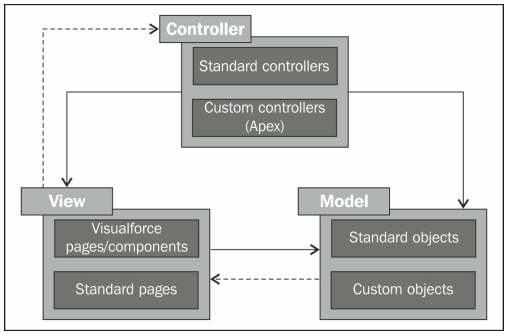
SFDC Model View Controller (MVC).
So Model View Controller (MVC) is a software architecture pattern which separated the representation of information from the user’s interaction. So anything displayed to user is a part of view, business logics/implementation is a part of controller and tables in salesforce is part of Model.
- Model : Model or the database is the backbone which forms the bridge between View and Controller. Data is wrapped in the model and send to the User Interface for display. The metadata, Salesforce objects, Apex Objects and database.com schema forms the model layer.
- View :- Every time we will get a different page view when we click on the page. For every click the page will give us two page views. Force.com uses Visualforce pages, sites and standard UI buttons, forms, tabs and page views to define a view.
- Controller :- Every event performed on the page will be controlled by controller. Force.com uses workflows, Apex triggers and Apex Controllers as the controller in the Salesforce MVC architecture.
When we click on the page, Application, Object, Fields, Tabs some action is going to perform. Here buttons, Tabs are the controllers. It controls and fetch records from the Database and give to the view.
How Model, View, and Controller work together in Salesforce
A Salesforce MVC request usually begins with a user action. A user opens a record page, clicks a button, edits a field, submits a Visualforce form, or saves a Lightning record page. The View receives the interaction and the Controller decides what should happen next. The Controller may read data from the Model, update a record, call business logic, run validation, or return information to the View.
For example, when a user opens an Account record page, the Account object and its fields are part of the Model. The record page or Visualforce page is the View. The standard controller, Apex controller, trigger, validation rule, flow, or other automation that handles actions on that record is part of the Controller layer.
| Salesforce MVC part | Primary responsibility | Common Salesforce examples |
|---|---|---|
| Model | Stores and describes application data | Objects, fields, relationships, record data, metadata, external objects |
| View | Displays data and collects user input | Lightning record pages, Visualforce pages, page layouts, tabs, apps, list views |
| Controller | Handles actions, rules, and business logic | Standard controllers, Apex controllers, triggers, flows, validation rules, assignment rules |
Salesforce MVC example using a custom object and Visualforce page
Consider a simple custom object named Invoice__c. The object stores invoice records. A Visualforce page displays the invoice details. A controller decides which invoice record should be loaded and what actions are available to the user.
- Model: Invoice__c object, Invoice_Number__c field, Amount__c field, Status__c field, and the stored invoice records.
- View: Visualforce page that shows the invoice number, amount, status, and action buttons.
- Controller: Apex controller or standard controller that loads the invoice and handles actions such as save, cancel, or submit.
This mapping helps a developer avoid mixing responsibilities. The object should not contain page markup. The page should not contain all business rules. The controller should not be treated as a data store. Each layer should do its own work and communicate clearly with the other layers.
Declarative Salesforce MVC architecture mapping
Development in Salesforce can be done in two ways: One is point-and-click with out using single line of code which is known as declarative programming and the second method is developing application using code, known as Programmatic development.
Declarative development in Salesforce.
Declarative development in Salesforce is done by point-and-click with out using single line of code using browser. In this method, Salesforce follows MVC Architecture when developing application.
| Model | View | Controller |
| Objects | Applications | Workflow Rules |
| Fields | Tabs | Validation Rules |
| Relationships | Page Layouts | Assignment Rule |
| Records Types |
In current Salesforce implementations, declarative controller logic may also include Flow, approval processes, duplicate rules, sharing rules, assignment rules, escalation rules, and record-triggered automation. These tools do not always look like traditional code, but they still control what happens when data is created, changed, routed, approved, or displayed.
Programmatic Salesforce MVC architecture mapping
Programmatic development in Salesforce.
In this model of development in Salesforce, Salesforce coding is required. The Salesforce MVC architecture are as follows.
| Model | View | Controller |
| Web Services API | Visualforce Pages | Apex Controllers |
| Metadata API | Visualforce Components | Apex Trigger |
| External Object | Site | Web Service API |
For programmatic development, the Model commonly includes sObjects, custom metadata, custom settings, schema definitions, and external object definitions. The View may include Visualforce pages, Visualforce components, Lightning Web Components, Aura components, Experience Cloud pages, or other UI surfaces. The Controller may include Apex classes, Apex triggers, standard controllers, controller extensions, flows invoked by code, and service classes that apply business rules.
Visualforce MVC pattern in Salesforce development
Visualforce makes the MVC pattern easy to see because the page and controller are written as separate files. The page contains markup and component tags. The controller contains Apex methods and properties. The object and fields remain the Model.
<apex:page standardController="Account">
    <apex:pageBlock title="Account Details">
        <apex:outputField value="{!Account.Name}" />
        <apex:outputField value="{!Account.Phone}" />
        <apex:outputField value="{!Account.Industry}" />
    </apex:pageBlock>
</apex:page>
In this example, the Account object is the Model. The Visualforce markup is the View. The standard controller for Account provides controller behavior such as loading the current record and making field values available to the page.
Lightning components and Salesforce MVC architecture
In modern Salesforce development, Lightning Web Components and Lightning record pages are often used instead of Visualforce. The MVC idea still applies, but the mapping can be less obvious because a Lightning component may contain template markup, JavaScript behavior, and calls to Apex or UI APIs.
- Model in Lightning: Salesforce objects, fields, records, schema metadata, custom metadata, and data returned from Apex or Salesforce APIs.
- View in Lightning: HTML templates, Lightning base components, Lightning App Builder pages, record pages, app pages, and Experience Cloud pages.
- Controller in Lightning: JavaScript event handlers, Apex methods, flows, triggers, validation rules, and platform automation that responds to user actions or record changes.
A common mistake is to place too much business logic directly in the View layer. For maintainable Salesforce applications, keep display logic in the component, reusable server-side logic in Apex service classes, and data structure in objects and metadata.
Why Salesforce MVC architecture is useful for admins and developers
Salesforce MVC architecture helps admins and developers discuss application design using clear responsibilities. When a feature behaves incorrectly, MVC also helps with troubleshooting. If a field is missing, check the Model and page layout or component configuration. If a value is displayed wrongly, check the View and data binding. If a record is saved incorrectly, check the Controller layer such as flows, triggers, validation rules, and Apex classes.
The pattern is also useful during design reviews. A good Salesforce design keeps data definitions stable, keeps user interface components focused on display and input, and keeps business logic in a predictable controller layer. This makes the application easier to test, maintain, and change.
Common Salesforce MVC architecture mistakes
- Calling every button a controller: A button is usually part of the View. The action behind the button is handled by a controller, flow, Apex method, or standard Salesforce behavior.
- Putting business rules only in page logic: Rules that protect data quality should usually be enforced with validation rules, flows, triggers, or Apex logic, not only with screen-level checks.
- Ignoring declarative automation: Flow, validation rules, assignment rules, and approval processes also behave like controller logic because they decide what happens to data.
- Mixing Model and View decisions: Field definitions, relationships, and data types belong to the Model, while page layout and component placement belong to the View.
- Building duplicate logic: The same rule should not be repeated separately in Visualforce, Lightning components, flows, and triggers unless there is a clear reason.
Salesforce MVC architecture FAQ
What is MVC architecture in Salesforce?
MVC architecture in Salesforce is the separation of an application into Model, View, and Controller. The Model represents objects, fields, records, and metadata. The View represents pages, layouts, tabs, and components shown to users. The Controller represents the logic that handles actions, validation, automation, and record processing.
What is the Model in Salesforce MVC?
The Model in Salesforce MVC includes standard objects, custom objects, fields, relationships, record data, external objects, custom metadata, and schema definitions. It is the data and metadata layer used by the application.
What is the View in Salesforce MVC?
The View in Salesforce MVC is the user interface layer. Examples include Visualforce pages, Lightning record pages, Lightning Web Components, page layouts, tabs, apps, list views, and Experience Cloud pages.
What is the Controller in Salesforce MVC?
The Controller in Salesforce MVC handles user actions and business logic. Examples include standard controllers, Apex controllers, controller extensions, Apex triggers, flows, validation rules, workflow rules, assignment rules, and approval processes.
Does Lightning Web Components follow MVC in Salesforce?
Lightning Web Components can be understood using the MVC idea, although the structure is not exactly the same as a Visualforce page with an Apex controller. The HTML template is mainly the View, Salesforce objects and data are the Model, and JavaScript handlers, Apex methods, flows, and platform automation provide controller behavior.
Salesforce MVC architecture editorial QA checklist
- Confirm that Model examples include Salesforce data and metadata, not only database tables.
- Confirm that View examples include both Visualforce and modern Lightning user interfaces where relevant.
- Confirm that Controller examples include declarative automation and Apex logic.
- Check that buttons, tabs, and pages are not incorrectly described as full controllers when they are mainly user interface elements.
- Verify that examples separate object design, page display, and business logic clearly.