 TutorialKart.com
Break Statement in R Programming
R break statement is used to break a loop prematurely. The loop could be R repeat loop, R while loop or R for loop.
In R programming, break is usually placed inside an if condition. When the condition becomes TRUE, R immediately exits the nearest running loop and continues with the statement after that loop.
R break Statement Syntax
The syntax of break statement is
breakThe break keyword does not need parentheses or arguments. It must be used inside a loop. A common pattern is to test a condition first and then call break.
for (item in values) {
    if (condition_to_stop_loop) {
        break
    }

    # statements executed while the loop continues
}
How R break Statement Controls Loop Execution
The flow of execution in a loop with break statement is depicted in the following flow diagram.
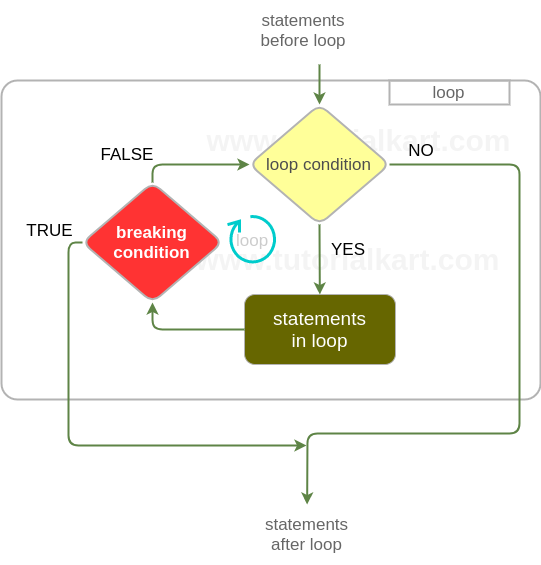
Break statement is kept in the if block with breaking condition. When break condition is met, the loop is broken, execution flow comes out of the loop and continues with the statements after loop statement.
- Before the break condition is met, the loop runs normally.
- When R reaches
break, it stops the current loop immediately. - Statements remaining in the current loop iteration are skipped.
- Program execution resumes after the loop block.
Example 1 – R Break Statement in for, while, and repeat Loops
We shall see some examples using break statement for different loop statements in R programming language.
r_loop_break.R
# R for loop

a = c(2, 45, 9, 12)
print("break for loop")

for(i in a) {
	if(i==9){
		break
	}
	print(i)
}

# R while loop

a = 1
b = 4
print("break while loop")

while(a<5) {
	print(a)
	a = a+1
	if(b+a >6){
		break
	}
}

# R repeat statement

a = 1
print("break repeat loop")

repeat {
	print(a)
	a = a+1
	if(a>6){
		break
	}
}
Output
$ Rscript r_loop_break.R
[1] "break for loop"
[1] 2
[1] 45
[1] "break while loop"
[1] 1
[1] 2
[1] "break repeat loop"
[1] 1
[1] 2
[1] 3
[1] 4
[1] 5
[1] 6
Explanation of the R break Output
In the for loop, R prints 2 and 45. When i becomes 9, the condition i == 9 becomes true and break stops the loop. Therefore, 9 and 12 are not printed.
In the while loop, the value of a is printed before the break condition is checked. After printing 2, the expression b + a > 6 becomes true, so the loop stops.
In the repeat loop, there is no condition in the loop header. The loop would continue indefinitely unless a stopping condition is written inside the loop. Here, break exits the loop after the value 6 is printed and a becomes greater than 6.
R break Statement in a for Loop
The following example searches for the first number greater than 10. Once such a number is found, break stops the loop because there is no need to check the remaining values.
numbers <- c(3, 8, 11, 15, 4)

for (num in numbers) {
    if (num > 10) {
        print(paste("First value greater than 10 is", num))
        break
    }
}
Output
[1] "First value greater than 10 is 11"Although 15 is also greater than 10, it is not checked after the loop reaches 11. This is a typical use of break when only the first matching value is required.
R break Statement in Nested Loops
When break is used inside nested loops, it exits only the innermost loop in which it is placed. The outer loop continues unless it has its own break condition.
for (row in 1:3) {
    for (col in 1:3) {
        if (col == 2) {
            break
        }
        print(paste("row", row, "col", col))
    }
}
Output
[1] "row 1 col 1"
[1] "row 2 col 1"
[1] "row 3 col 1"
For each value of row, the inner loop starts with col = 1. When col becomes 2, the inner loop breaks. The outer loop then moves to the next row.
Difference Between break and next Statements in R
The break and next statements both change the normal flow of a loop, but they do different things.
| Statement | What it does in an R loop | When to use it |
|---|---|---|
break | Stops the loop completely. | Use it when continuing the loop is no longer needed. |
next | Skips the remaining statements in the current iteration and moves to the next iteration. | Use it when only the current value should be skipped. |
For example, use break when you found the value you were searching for. Use next when you want to ignore one value but continue checking the rest of the loop.
values <- c(1, 2, 3, 4, 5)

for (value in values) {
    if (value == 3) {
        next
    }
    if (value == 5) {
        break
    }
    print(value)
}
Output
[1] 1
[1] 2
[1] 4
Here, 3 is skipped because of next. The loop stops completely when value becomes 5, so 5 is not printed.
Common Mistakes with R break Statement
- Using break outside a loop:
breakis valid only inside loop statements such asfor,while, andrepeat. - Forgetting break in a repeat loop: A
repeatloop needs an internal stopping condition. Withoutbreak, it can run indefinitely. - Placing break before required statements: Any statement written after
breakin the same loop iteration will not run. - Expecting break to stop all nested loops: In nested loops,
breakstops only the innermost loop unless additional logic is added for the outer loop.
R break Statement FAQs
What is an example of a break statement in R?
An example is if (x == 5) { break } inside a loop. When x becomes 5, R exits the loop and continues with the code after the loop.
What is the difference between break and next statements in R?
break stops the loop completely. next skips only the current iteration and continues with the next iteration of the same loop.
Can break be used in R for loop and while loop?
Yes. The break statement can be used in for, while, and repeat loops in R.
Does break stop all loops in nested R loops?
No. In nested loops, break stops only the innermost loop where it is executed. The outer loop continues unless you add separate logic to stop it.
Why is break commonly used in R repeat loops?
A repeat loop does not have a condition in its header. Because of this, break is commonly used inside a repeat loop to stop it when a required condition is met.
Editorial QA Checklist for R break Statement Tutorial
- Confirm that every
breakexample is inside a valid R loop. - Check that output blocks match the printed values from the R code.
- Verify that the explanation distinguishes
breakfromnext. - Ensure the nested loop explanation states that
breakexits only the innermost loop. - Check that the
repeatloop examples include a reachable break condition.
Conclusion on R break Statement
In this R Tutorial, we have learnt break statement and how to use it to break loops prematurely.
The key point is that break exits the current loop as soon as the stopping condition is met. It is useful in search tasks, validation checks, menu-style loops, and repeat loops where the stop condition is written inside the loop body.