 TutorialKart.com
Repeat Loop in R
R Repeat Loop does the execution of a set of statements in a loop until a break condition is met. In this R Tutorial, we shall learn Repeat Loop syntax and execution flow with Example R Scripts.
A repeat loop in R is useful when the loop body must run at least once and the stopping condition is easier to check inside the loop. Unlike a for loop, a repeat loop does not have a fixed counter in its header. Unlike a while loop, the condition is not written before the loop starts. The loop continues until R reaches a break statement.
Syntax – R Repeat Loop
The syntax of Repeat Loop in R is
repeat {
      statements
      if(stop_condition) {
          break
      }
  }
The keyword repeat starts the loop. R executes every statement inside the braces. When the if condition becomes TRUE, the break statement exits the repeat loop and the next statement after the loop is executed.
Execution Flow of R repeat Loop
Following picture depicts the flow of execution in and around the repeat loop statement.
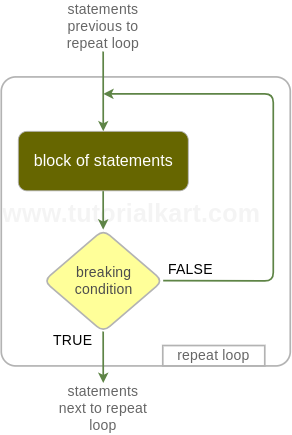
The execution flow is simple: enter the repeat block, run the statements, test the condition placed by the programmer, and exit only when break is reached. If the condition is placed at the end of the block, the loop body runs once before any test happens. If the condition is placed near the beginning, the loop can stop before the remaining statements in that iteration are executed.
Breaking Condition in R repeat Loop
Breaking is done using an R if statement.
It is optional. But if you do not place a breaking condition in the repeat loop statement, the statements in the repeat block will get executed for ever in an infinite loop.
Breaking Condition should return a boolean value, either TRUE or FALSE.
The placement of breaking condition is up to the developer. You may keep it before the “block of statements” block or after it.
In practical R code, the breaking condition is usually based on a counter, a computed value, user input, a search result, or an error/success state. Always make sure that at least one statement inside the loop can eventually make the breaking condition TRUE.
Example 1 – R Repeat Loop
In this example, we will write a repeat loop that executes until the breaking condition becomes true.
r_repeat_loop_ex.R
# R Repeat Loop statement Example

a = 1

repeat {
	# starting of repeat statements block
	print(a)
	a = a+1
	# ending of repeat statements block
	if(a>6){	# breaking condition
		break
	}
}
Output
$ Rscript r_repeat_loop_ex.R
[1] 1
[1] 2
[1] 3
[1] 4
[1] 5
[1] 6
The value of a starts at 1. During each iteration, R prints the current value, increases a by one, and then checks if(a>6). When a becomes 7, the condition is true and break stops the loop. That is why the output prints values from 1 to 6.
R repeat Loop with Break Condition at the Beginning
You can place the break condition before the main statements when the loop should stop as soon as a value is found or a limit is reached. The following example stops before printing numbers greater than 5.
num <- 1

repeat {
    if (num > 5) {
        break
    }

    print(num)
    num <- num + 1
}
Output
[1] 1
[1] 2
[1] 3
[1] 4
[1] 5
R repeat Loop with next Statement
The next statement skips the rest of the current iteration and moves to the next iteration. In a repeat loop, update the counter before using next; otherwise, the same value may repeat forever.
i <- 0

repeat {
    i <- i + 1

    if (i == 3) {
        next
    }

    print(i)

    if (i == 5) {
        break
    }
}
Output
[1] 1
[1] 2
[1] 4
[1] 5
Here, i == 3 triggers next, so the print(i) statement is skipped for that iteration. The loop finally stops when i == 5.
How to Avoid Infinite repeat Loops in R
A repeat loop can easily become infinite because R does not check a condition in the loop header. Use the following checks before running a repeat loop in a script.
- Initialize every counter or control variable before the
repeatblock. - Update the counter or control variable inside the loop.
- Write a
breakcondition that can realistically becomeTRUE. - Place the update before
nextwhennextis used. - Test the loop first with a small limit before using it on larger data.
repeat Loop vs while Loop in R
The main difference is where the condition is checked. A while loop checks its condition before each iteration. A repeat loop runs first and exits only when it reaches break. Use while when the condition is known before the loop starts. Use repeat when the loop must run at least once or when the exit decision depends on work done inside the loop.
| Loop type | Condition location | Runs at least once? | Common use |
|---|---|---|---|
repeat | Inside the loop, usually with if and break | Yes, unless interrupted by an error | Retry logic, input validation, search until found, custom stopping rules |
while | Before the loop body | Only if the condition is initially TRUE | Looping while a known condition remains true |
Common Mistakes with R repeat Loop
- Missing break: Without
break, a repeat loop keeps running until the script is stopped manually. - Counter not updated: If the variable used in the condition never changes, the condition may never become true.
- Using
++like other languages: R does not usei++. Usei <- i + 1ori = i + 1. - Placing
nextbefore the update: This can skip the update and trap the loop on the same value. - Confusing
%>%with loops: The pipe operator passes values between expressions. It is not a loop control statement.
Editorial QA Checklist for R repeat Loop Tutorial
- Does the tutorial clearly state that
repeatruns untilbreakis reached? - Does every repeat loop example include a reachable
breakcondition? - Are output-only examples marked separately from R code examples?
- Does the explanation mention that R uses
i <- i + 1, noti++? - Does the comparison with
whileexplain thatwhilechecks the condition before the loop body?
FAQs on R repeat Loop
What is a repeat loop in R?
A repeat loop in R repeatedly executes a block of statements until a break statement is executed. The stopping condition is written inside the loop body, commonly using an if statement.
How do you write a repeat loop in R?
Write repeat { ... }, place the statements inside the braces, and include an if condition with break to stop the loop. Without a reachable break, the loop becomes infinite.
Can a repeat loop in R run forever?
Yes. A repeat loop runs forever if no break statement is reached. This usually happens when the break condition is missing, always false, or based on a variable that is never updated.
What is the difference between repeat and while loop in R?
A while loop checks its condition before the loop body runs. A repeat loop starts running immediately and checks the exit condition only where you place if and break inside the block.
How do you increment a value inside an R repeat loop?
Use an assignment such as i <- i + 1 or i = i + 1. R does not support the i++ increment syntax used in some other programming languages.
Summary of R repeat Loop Control Flow
In this R Tutorial, we have learnt Repeat Loop, its Syntax and Execution Flow with Example R Scripts.
The key point is that an R repeat loop must be controlled from inside the loop body. Initialize the required variables, update them during each iteration, and use a clear break condition to stop execution safely.