 TutorialKart.com
R loop statements are used when a block of R code must run repeatedly under controlled conditions. In R programming, the main looping statements are for, while, and repeat. You can also use break to stop a loop and next to skip the current iteration and continue with the next one.
R Loop Statements for Repeating Code in R Programming
Repeating execution of a block of statements in a controlled way is an important aspect in any functional programming language. It helps to keep the code concise and clean.
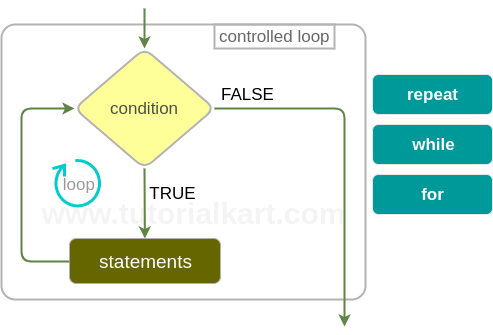
R programming language provides three looping statements. They are :
- R repeat loop – A block of statements are repeated forever. A breaking condition has to be provided inside the repeat block to come out of the loop.
- R while loop – A block of statements are executed repeatedly in a loop till the condition provided to while statement returns TRUE.
- R for loop – A block of statements are executed for each of the items in the list provided to the for loop.
R language also provides a provision to break a loop abruptly.
- R break statement – You may provide an additional condition inside any of the R loops mentioned above. When the condition is satisfied, providing a break statement in conditional code breaks the immediate loop.
Three Main Looping Statements in R: for, while, and repeat
The three R loop statements are used in different situations. A for loop is best when you already know the sequence to iterate over. A while loop is useful when repetition depends on a condition that may change during execution. A repeat loop is used when the code must run at least once and the stopping condition is checked inside the loop body.
| R loop statement | When to use it | How the loop stops |
|---|---|---|
for loop | When you want to iterate over values in a vector, list, sequence, or other iterable object. | Stops after all items in the sequence are processed. |
while loop | When the number of iterations is not fixed before the loop starts. | Stops when the condition becomes FALSE. |
repeat loop | When the loop body should run first and the exit test should be handled inside the loop. | Stops only when a break statement is executed. |
Four Parts of an R Loop: Initialization, Condition, Body, and Update
A loop is easier to understand when it is divided into four practical parts. Not every R loop writes these parts in the same place, but the idea is usually the same.
- Initialization: Set the starting value or prepare the sequence.
- Condition or sequence: Decide whether the loop should continue, or define the values to iterate over.
- Loop body: Write the statements that should run repeatedly.
- Update: Change a counter, data value, or state so that the loop can progress and stop correctly.
R for Loop Syntax and Example
Use an R for loop when you want to run code once for each value in a sequence, vector, or list.
for (variable in sequence) {
  # statements to execute
}
The following R for loop prints each value in a numeric vector.
numbers <- c(10, 20, 30)

for (value in numbers) {
  print(value)
}
[1] 10
[1] 20
[1] 30For index-based iteration, prefer seq_along() when looping through vectors. It behaves safely even when the vector is empty.
fruits <- c("apple", "banana", "mango")

for (i in seq_along(fruits)) {
  print(paste(i, fruits[i]))
}
R while Loop Syntax and Example
Use an R while loop when the loop should continue as long as a logical condition is TRUE. The condition is checked before each iteration, so the loop body may not run at all if the condition is already FALSE.
while (condition) {
  # statements to execute
  # update condition-related value
}count <- 1
while (count <= 3) {
print(count)
count <- count + 1
}[1] 1
[1] 2
[1] 3In R, there is no ++ increment operator like in C, Java, or JavaScript. To increase a value, write an assignment such as count <- count + 1.
R repeat Loop Syntax and Example with break
An R repeat loop runs continuously until a break statement is reached. Because there is no condition in the loop header, you must write a clear exit condition inside the loop body.
repeat {
  # statements to execute

  if (exit_condition) {
    break
  }
}x <- 1
repeat {
print(x)
x <- x + 1
if (x > 3) {
break
}
}[1] 1
[1] 2
[1] 3Using break and next Inside R Loops
The break statement stops the immediate loop. The next statement skips the remaining statements in the current iteration and moves to the next iteration.
for (i in 1:5) {
  if (i == 2) {
    next
  }

  if (i == 4) {
    break
  }

  print(i)
}
[1] 1
[1] 3In this example, the value 2 is skipped because of next. The loop stops before printing 4 because of break.
Nested Loops in R for Matrix-Like Repetition
A nested loop is a loop inside another loop. In R, nested loops are useful when you need to work with combinations of values, rows and columns, or grouped repeated tasks.
for (row in 1:2) {
  for (col in 1:3) {
    print(paste("row", row, "col", col))
  }
}
For large data processing tasks, also consider whether a vectorized R function, an apply family function, or a package function can express the same task more clearly. Loops are valid in R, but vectorized code is often shorter for arithmetic and data transformation work.
Choosing the Right R Loop Statement
Choose the loop based on what controls the repetition. If the input sequence is known, use for. If the loop depends on a condition, use while. If the code must run first and then decide whether to stop, use repeat with break.
| Requirement | Recommended R loop | Reason |
|---|---|---|
| Print each value in a vector | for | The values to iterate over are already available. |
| Keep asking until a condition changes | while | The number of repetitions is not known in advance. |
| Run once before checking the stop rule | repeat | The exit condition belongs inside the loop body. |
| Stop immediately when a target value is found | break inside a loop | The remaining iterations are no longer needed. |
| Skip only selected values | next inside a loop | The loop should continue after ignoring one iteration. |
Common Mistakes in R Loop Statements
- Writing
i++in R: R does not use the++increment operator. Usei <- i + 1. - Forgetting to update a while-loop counter: If the condition never becomes
FALSE, the loop can run indefinitely. - Using
repeatwithoutbreak: A repeat loop must contain a reachable break condition. - Using
1:length(x)for empty vectors: Preferseq_along(x)for safer index loops. - Using loops for simple vector operations: Many calculations in R can be written more directly with vectorized expressions.
R Loop Statements FAQ
What are the looping statements in R?
The main looping statements in R are for, while, and repeat. R also provides break to exit a loop and next to skip the current iteration.
Can I use for loops in R?
Yes. R supports for loops. They are commonly used to iterate over vectors, lists, sequences, columns, files, or any repeated task where each item must be processed one by one.
How do I write ++ looping in R?
R does not support ++ as an increment operator. Instead of writing i++, use i <- i + 1 or i = i + 1 inside the loop.
What are the four components of a loop in R?
The four practical components are initialization, condition or sequence, loop body, and update. In a for loop, the sequence controls the iteration. In a while loop, the condition and update are especially important.
When should I use repeat instead of while in R?
Use repeat when the loop body must run at least once before checking the stopping rule. Use while when the condition should be checked before the first iteration.
Editorial QA Checklist for R Loop Statements Tutorial
- Confirm that the page explains all three R loop statements:
for,while, andrepeat. - Check that every new R code block uses the correct PrismJS
language-rclass and that output-only examples use theoutputclass. - Verify that the tutorial explains
break,next, and the fact that R does not use the++increment operator. - Make sure the original R loops image and existing TutorialKart internal links are unchanged.
- Review that FAQ questions are specific to R loop statements and answer the common search questions directly.
R Loop Statements Summary
In this R tutorial, we have learnt about R loop statements – repeat loop, while loop and for loop. Also we learnt about break statement to break any of the loops abruptly.
Use for when iterating over known values, while when repetition depends on a condition, and repeat when the loop should run until an internal break condition is reached. Use next when only the current iteration should be skipped.