 TutorialKart.com
R operators are symbols or operator words used to perform calculations, compare values, combine logical conditions, assign values to objects, and work with vectors, matrices, and membership checks. In this R tutorial, you will learn arithmetic, relational, logical, assignment, and miscellaneous operators with examples for both single values and vectors.
R Operators Used in Everyday R Programming
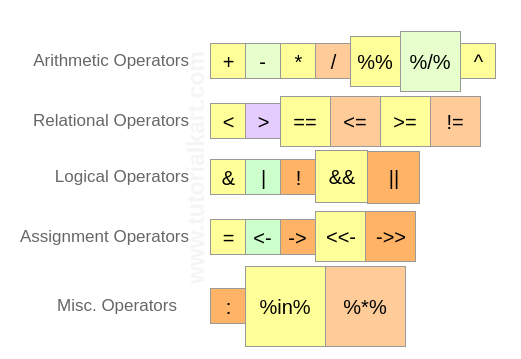
R programming uses operators in most expressions. For example, + adds numbers, < compares two values, & combines logical vectors, and <- assigns a value to an object. The main categories covered in this tutorial are shown in the following picture:
The examples below can be run in RStudio, the R console, or from a terminal using Rscript file_name.R. When an operator is applied to vectors, R usually applies it element by element.
R operator categories at a glance
| R operator category | Common operators | Typical use |
| Arithmetic operators | +, -, *, /, %%, %/%, ^ | Numerical calculations |
| Relational operators | <, >, ==, <=, >=, != | Comparing values and returning TRUE or FALSE |
| Logical operators | &, |, !, &&, || | Combining or negating logical conditions |
| Assignment operators | <-, =, ->, <<-, ->> | Storing values in objects |
| Miscellaneous operators | :, %in%, %*% | Sequences, membership checks, and matrix multiplication |
Basic R operator syntax examples
# Arithmetic
a + b
a %% b
a %/% b

# Relational
a < b
a == b
a != b

# Logical
condition1 & condition2
condition1 | condition2
!condition1

# Assignment
x <- 10
20 -> y

# Miscellaneous
1:5
value %in% vector
matrix_a %*% matrix_b
R Arithmetic Operators for Numbers and Vectors

Arithmetic operators are used to perform mathematical operations. They work with numeric values, integers, complex numbers, and vectors containing these values. With vectors of the same length, the operation is performed element by element.
| Operator | Description | Usage |
| + | Addition of two operands | a + b |
| – | Subtraction of second operand from first | a – b |
| * | Multiplication of two operands | a * b |
| / | Division of first operand with second | a / b |
| %% | Remainder from division of first operand with second | a %% b |
| %/% | Quotient from division of first operand with second | a %/% b |
| ^ | First operand raised to the power of second operand | a^b |
In R, %% returns the remainder and %/% returns the integer quotient. For example, with 7.5 and 2, 7.5 %% 2 gives 1.5, and 7.5 %/% 2 gives 3.
An example for each arithmetic operator on numerical values is provided below.
r_op_arithmetic.R
# R Arithmetic Operators Example for integers

a <- 7.5
b <- 2

print ( a+b )	#addition
print ( a-b )	#subtraction
print ( a*b )	#multiplication
print ( a/b )	#Division
print ( a%%b )	#Reminder
print ( a%/%b )	#Quotient
print ( a^b )	#Power of
Output
$ Rscript r_op_arithmetic.R
[1] 9.5
[1] 5.5
[1] 15
[1] 3.75
[1] 1.5
[1] 3
[1] 56.25
An example for each arithmetic operator on vectors is provided below. The first element of a is combined with the first element of b, the second element with the second element, and so on.
r_op_arithmetic_vector.R
# R Operators - R Arithmetic Operators Example for vectors

a <- c(8, 9, 6)
b <- c(2, 4, 5)

print ( a+b )	#addition
print ( a-b )	#subtraction
print ( a*b )	#multiplication
print ( a/b )	#Division
print ( a%%b )	#Reminder
print ( a%/%b )	#Quotient
print ( a^b )	#Power of
Output
$ Rscript r_op_arithmetic_vector.R
[1] 10 13 11
[1] 6 5 1
[1] 16 36 30
[1] 4.00 2.25 1.20
[1] 0 1 1
[1] 4 2 1
[1]   64 6561 7776
R arithmetic operator precedence with parentheses
When an R expression has more than one arithmetic operator, R follows operator precedence rules. Parentheses make the expression easier to read and remove ambiguity.
print(3 + 2 * 4)
print((3 + 2) * 4)
print(2 ^ 3 + 1)
[1] 11
[1] 20
[1] 9R Relational Operators for Comparing Values

Relational operators compare two operands and return logical output: TRUE or FALSE. They are commonly used in conditions, filtering, and data checks.
| Operator | Description | Usage |
| < | Is first operand less than second operand | a < b |
| > | Is first operand greater than second operand | a > b |
| == | Is first operand equal to second operand | a == b |
| <= | Is first operand less than or equal to second operand | a <= b |
| >= | Is first operand greater than or equal to second operand | a >= b |
| != | Is first operand not equal to second operand | a != b |
Use == for comparison and <- or = for assignment. A common beginner error is writing a = b when the intention is to test whether a and b are equal.
An example for each relational operator on numerical values is provided below.
r_op_relational.R
# R Operators - R Relational Operators Example for Numbers

a <- 7.5
b <- 2

print ( ab )	# greater than
print ( a==b )	# equal to
print ( a<=b )	# less than or equal to
print ( a>=b )	# greater than or equal to
print ( a!=b )	# not equal to
Output
$ Rscript r_op_relational.R
[1] FALSE
[1] TRUE
[1] FALSE
[1] FALSE
[1] TRUE
[1] TRUE
If you are typing the relational operators manually, the corrected comparison sequence for a <- 7.5 and b <- 2 is shown below.
a <- 7.5
b <- 2

print(a < b)
print(a > b)
print(a == b)
print(a <= b)
print(a >= b)
print(a != b)
[1] FALSE
[1] TRUE
[1] FALSE
[1] FALSE
[1] TRUE
[1] TRUEAn example for each relational operator on vectors is provided below.
r_op_relational_vector.R
# R Operators - R Relational Operators Example for Numbers

a <- c(7.5, 3, 5)
b <- c(2, 7, 0)

print ( a<b ) # less than
print ( a>b ) # greater than
print ( a==b ) # equal to
print ( a<=b ) # less than or equal to
print ( a>=b ) # greater than or equal to
print ( a!=b ) # not equal to
Output
$ Rscript r_op_relational_vector.R
[1] FALSE TRUE FALSE
[1] TRUE FALSE TRUE
[1] FALSE FALSE FALSE
[1] FALSE TRUE FALSE
[1] TRUE FALSE TRUE
[1] TRUE TRUE TRUE
R Logical Operators for Combining Conditions

Logical operators in R are used with logical values and expressions that evaluate to logical values. Numeric values can also be used in logical expressions, where 0 behaves as FALSE and non-zero numeric values behave as TRUE.
| Operator | Description | Usage |
| & | Element wise logical AND operation. | a & b |
| | | Element wise logical OR operation. | a | b |
| ! | Element wise logical NOT operation. | !a |
| && | Logical AND using only the first element of each operand. | a && b |
| || | Logical OR using only the first element of each operand. | a || b |
Use & and | when you want element-wise results, especially with vectors. Use && and || mainly in control-flow conditions such as if, where a single TRUE or FALSE value is expected.
An example for each logical operator on numerical values is provided below.
r_op_logical.R
# R Operators - R Logical Operators Example for basic logical elements

a <- 0 # logical FALSE
b <- 2 # logical TRUE

print ( a & b ) # logical AND element wise
print ( a | b ) # logical OR element wise
print ( !a ) # logical NOT element wise
print ( a && b ) # logical AND consolidated for all elements
print ( a || b ) # logical OR consolidated for all elements
Output
$ Rscript r_op_logical.R
[1] FALSE
[1] TRUE
[1] TRUE
[1] FALSE
[1] TRUE
An example for each logical operator on vectors is provided below.
r_op_logical_vector.R
# R Operators - R Logical Operators Example for boolean vectors

a <- c(TRUE, TRUE, FALSE, FALSE)
b <- c(TRUE, FALSE, TRUE, FALSE)

print ( a & b ) # logical AND element wise
print ( a | b ) # logical OR element wise
print ( !a ) # logical NOT element wise
print ( a && b ) # logical AND consolidated for all elements
print ( a || b ) # logical OR consolidated for all elements
Output
$ Rscript r_op_logical_vector.R
[1] TRUE FALSE FALSE FALSE
[1] TRUE TRUE TRUE FALSE
[1] FALSE FALSE TRUE TRUE
[1] TRUE
[1] TRUE
Difference between & and && in R logical expressions
The difference between & and && is important when working with vectors. The & operator compares every element, while && evaluates only the first element of each vector and returns one result.
x <- c(TRUE, FALSE, TRUE)
y <- c(TRUE, TRUE, FALSE)

print(x & y)
print(x && y)
[1] TRUE FALSE FALSE
[1] TRUER Assignment Operators for Creating and Updating Objects

Assignment operators store a value in an R object. The left assignment operator <- is commonly used in R scripts because it clearly separates assignment from equality comparison.
| Operator | Description | Usage |
| = | Assigns right side value to left side operand | a = 3 |
| <- | Assigns right side value to left side operand | a <- 5 |
| -> | Assigns left side value to right side operand | 4 -> a |
| <<- | Assigns right side value to a variable in a parent environment when available | a <<- 3.4 |
| ->> | Assigns left side value to a variable in a parent environment when available | c(1,2) ->> a |
For beginner-level scripts, prefer <- for assignment. Use <<- and ->> only when you intentionally need assignment outside the current local environment, because they can make code harder to trace.
An example for each assignment operator is provided below.
r_op_assignment.R
# R Operators - R Assignment Operators

a = 2
print ( a )

a <- TRUE
print ( a )

454 -> a
print ( a )

a <<- 2.9
print ( a )

c(6, 8, 9) -> a
print ( a )
Output
$ Rscript r_op_assignment.R
[1] 2
[1] TRUE
[1] 454
[1] 2.9
[1] 6 8 9
R Miscellaneous Operators for Sequences, Membership, and Matrix Multiplication
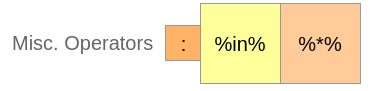
Some useful R operators do not fit neatly into arithmetic, relational, logical, or assignment categories. They are still used frequently in data analysis, especially for creating sequences, checking membership, and multiplying matrices.
| Operator | Description | Usage |
| : | Creates a sequence of numbers from left operand to right operand | a:b |
| %in% | Identifies whether an element belongs to a vector | a %in% b |
| %*% | Performs matrix multiplication | A %*% B |
The colon operator : is useful for simple integer sequences. The %in% operator is useful for filtering and validation. The %*% operator is used when matrix multiplication is required instead of element-wise multiplication.
An example for each miscellaneous operator is provided below.
r_op_misc.R
# R Operators - R Misc Operators

a = 23:31
print ( a )

a = c(25, 27, 76)
b = 27
print ( b %in% a )

M = matrix(c(1,2,3,4), 2, 2, TRUE)
print ( M %*% t(M) )
Output
$ Rscript r_op_misc.R
[1] 23 24 25 26 27 28 29 30 31
[1] TRUE
     [,1] [,2]
[1,] 5 11
[2,] 11 25
R membership operator %in% for checking allowed values
The %in% operator checks whether each value on the left side appears in the vector on the right side. This is useful when validating categories or filtering rows.
status <- c("new", "done", "pending")
allowed <- c("new", "pending")

print(status %in% allowed)
[1] TRUE FALSE TRUER Operators on Vectors and Recycling Behavior
Most R operators are vectorized. This means the operation is applied across the elements of a vector. If the vectors have different lengths, R may recycle the shorter vector. Recycling can be convenient, but it can also cause mistakes when the lengths were not intended to differ.
x <- c(10, 20, 30, 40)
y <- c(1, 2)

print(x + y)
print(x > y)
[1] 11 22 31 42
[1] TRUE TRUE TRUE TRUEHere, R treats y as if it were c(1, 2, 1, 2). When writing production code, check vector lengths before relying on recycling.
R Operators FAQ
Which operator is used for assignment in R?
The most common assignment operator in R is <-. The = operator can also assign values in many situations, but <- is widely used in R scripts because it makes assignment visually different from equality comparison with ==.
What is the difference between %% and %/% in R?
The %% operator returns the remainder after division, while %/% returns the integer quotient. For example, 7 %% 2 returns 1, and 7 %/% 2 returns 3.
What is the difference between & and && in R?
The & operator performs element-wise logical AND and can return a logical vector. The && operator checks only the first element of each operand and returns a single logical value, so it is commonly used in if conditions.
Does R apply operators element-wise on vectors?
Yes. For arithmetic, relational, and logical vector operations, R generally applies the operator element by element. When vector lengths are different, R may recycle the shorter vector, so it is safer to check lengths when the result matters.
What does the %in% operator do in R?
The %in% operator checks whether values on the left side are present in the vector on the right side. It returns TRUE or FALSE for each checked value.
R Operators Accuracy Checklist
- Use
==for equality checks and an assignment operator such as<-for storing values. - Check whether a logical expression needs element-wise operators
&,|or single-result operators&&,||. - Confirm whether multiplication should be element-wise with
*or matrix multiplication with%*%. - Use parentheses when combining arithmetic, relational, and logical operators in the same expression.
- Check vector lengths before relying on R’s recycling behavior.
Summary of R Arithmetic, Relational, Logical, Assignment, and Miscellaneous Operators
R operators allow you to perform calculations, compare values, combine logical conditions, assign values to objects, create sequences, check membership, and multiply matrices. In this R Tutorial, we have learnt about R arithmetic operators, R relational operators, R logical operators, R assignment operators, and R miscellaneous operators with example R commands and R script files.