 TutorialKart.com
R Switch Statement
R switch() selects one value or expression from a list of alternatives. It is commonly used when a program has to choose one action based on a numeric index or a character value.
Unlike the switch case syntax in languages such as C, Java, or JavaScript, R provides switch() as a function. The first argument is evaluated, and R uses that result to decide which following argument should be returned.
There are two practical ways to use switch() in R:
- R switch based on numeric index – If the expression evaluates to a number, R uses that number as a 1-based position to select one of the values.
- R switch based on matching character value – If the expression evaluates to a character value, R matches it with the named cases and returns the corresponding value.
In this tutorial, we will learn both forms with examples, then look at default handling, function usage, and common mistakes.
R switch() syntax for numeric index selection
The syntax of Switch statement which selects one of the cases based on index is
switch(expression, value1, value2, value3, ...)Here, expression should evaluate to a number. R uses that number as the position of the value to return. The first value has index 1, the second value has index 2, and so on.
Example 1: R switch() selects a value by numeric index
In this example, we will use switch statement based on index. The value of y, is taken as index.
y <- 3

x <- switch(
	y,
	"Good Morning",
	"Good Afternoon",
	"Good Evening",
	"Good Night"
)

print(x)
Output
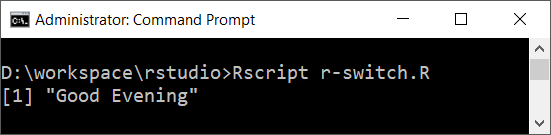
Since y is 3, R returns the third value, "Good Evening".
Example 2: R switch() uses an arithmetic expression as index
In the following R switch statement, we have an expression with two variables: a and b. The expression is evaluated to an integer and this integer is used as an index to select the value.
a <- 1
b <- 2

x <- switch(
	a+b,
	"Good Morning",
	"Good Afternoon",
	"Good Evening",
	"Good Night"
)

print(x)
Output
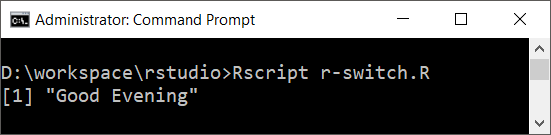
The expression a+b evaluates to 3, so the third value is selected.
R switch() numeric index rules to remember
- Numeric selection in
switch()is 1-based, not 0-based. - If the index is outside the available range, the result is
NULL. - The selected value may be a string, number, vector, list, or expression result.
- Numeric
switch()is useful when the position itself is meaningful, but named character cases are usually clearer for menus and commands.
The following example shows what happens when the numeric index does not point to any available value.
choice <- 5

result <- switch(
  choice,
  "Add",
  "Edit",
  "Delete"
)

print(result)
Output
NULLR switch() syntax for matching character values
The syntax of switch statement based on matching value is
switch(expression, case1=value1, case2=value2, ..., caseN=valueN)Here, expression should evaluate to a character value. R compares that value with the case names. When a case name matches, the corresponding value is returned.
Example 1: R switch() matches a character case
In this example, we will write a switch statement that selects on of the many values by matching expression’s value with the cases.
y <- "12"

x <- switch(
	y,
	"9"="Good Morning",
	"12"="Good Afternoon",
	"18"="Good Evening",
	"21"="Good Night"
)

print(x)
Output
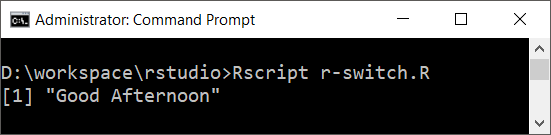
The value of y is "12", so R matches the case named "12" and returns "Good Afternoon".
Example 2: R switch() matches a string created with paste()
In the following R switch statement, we used a string concatenation expression.
a <- "1"
b <- "8"

x <- switch(
	paste(a,b,sep=""),
	"9"="Good Morning",
	"12"="Good Afternoon",
	"18"="Good Evening",
	"21"="Good Night"
)

print(x)
Output
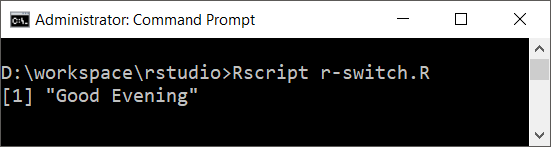
The expression paste(a,b,sep="") returns "18". R therefore selects the case named "18".
R switch() with a default value for unmatched character cases
When a character value does not match any named case, switch() returns NULL unless an unnamed fallback value is supplied. This unnamed value works like a default case.
operation <- "divide"

result <- switch(
  operation,
  add = "Addition selected",
  subtract = "Subtraction selected",
  multiply = "Multiplication selected",
  "Unknown operation"
)

print(result)
Output
[1] "Unknown operation"In this example, "divide" does not match any named case. The unnamed value "Unknown operation" is returned as the fallback.
Using R switch() inside a function
A common use of switch() in R is to choose a calculation or behavior inside a function. This keeps the function readable when there are several possible choices.
calculate <- function(operation, a, b) {
  switch(
    operation,
    add = a + b,
    subtract = a - b,
    multiply = a * b,
    divide = a / b,
    stop("Invalid operation")
  )
}

print(calculate("add", 10, 5))
print(calculate("multiply", 10, 5))
Output
[1] 15
[1] 50
The operation argument controls which expression is evaluated. For invalid input, the final unnamed argument calls stop() and reports an error instead of silently returning NULL.
R switch() vs if…else for multiple choices
Use switch() when one expression has to choose from several fixed alternatives. Use if, else if, and else when each branch depends on a different logical condition.
| Requirement | Better choice in R | Reason |
|---|---|---|
| Select by one numeric index | switch() | The index directly maps to one value. |
| Select by one character command | switch() | Named cases make the code compact and readable. |
| Check ranges such as score > 90 | if...else | The decision depends on logical comparisons. |
| Check several unrelated conditions | if...else | Each branch may need a separate condition. |
Common mistakes with R switch cases
- Expecting 0-based indexing: In numeric
switch(), index1selects the first value. Index0does not select the first value. - Mixing numeric and character logic:
switch(2, ...)uses position, whileswitch("2", ...)uses case-name matching. - Forgetting quotes around character input: Case selection by name needs a character value such as
"add". - Leaving unmatched cases unhandled: For character cases, add a fallback value or an error using
stop(). - Using unclear case names: Prefer meaningful names such as
mean,median, orsuminstead of short names that are hard to understand later.
Frequently asked questions on R switch statement
What is switch() in R?
switch() in R is a function that selects one value or expression from a list of alternatives. It can select by numeric position or by matching a character value with named cases.
Does R have a switch case statement like Java or C?
R does not use the same switch case block syntax used in Java or C. Instead, R uses the switch() function with arguments that represent the available cases.
What does R switch() return when no case matches?
For an unmatched numeric index, switch() returns NULL. For an unmatched character value, it returns NULL unless an unnamed fallback value is provided.
Can R switch() return the result of an expression?
Yes. A case value in switch() can be an expression such as a + b, a function call, a string, a vector, or another object. The selected expression is evaluated and returned.
When should I use switch() instead of if…else in R?
Use switch() when one input value chooses from a fixed set of alternatives. Use if...else when the conditions are comparisons, ranges, or unrelated logical tests.
Editorial QA checklist for this R switch() tutorial
- Verify that numeric
switch()examples show 1-based index selection. - Verify that character
switch()examples use named cases and quoted input values where required. - Confirm that every added code block uses the correct PrismJS class, such as
language-r,language-r syntax, oroutput. - Confirm that fallback behavior for unmatched character cases is explained without implying that all unmatched cases automatically have a default.
- Run the added R examples in a current R console before publishing changes.
R switch statement summary
In this R Tutorial, we learned how the R switch() function works with numeric index selection and character case matching. We also saw how to add a default fallback, how to use switch() inside a function, and when if...else may be a better choice.