 TutorialKart.com
R While Loop
An R while loop repeatedly executes a block of statements as long as a specified condition evaluates to TRUE. It is useful when the number of iterations is not known in advance, but the loop must continue until a condition changes.
In this tutorial, we shall learn the syntax, execution flow, examples with counters, how to stop a while loop using break, how to skip an iteration using next, and common mistakes to avoid while writing while loops in R.
R While Loop Syntax
The syntax of While Loop in R is
while (expression) {
     statement(s)
}
The expression is checked before every iteration. If it evaluates to TRUE, the statements inside the loop are executed. If it evaluates to FALSE, R exits the while loop and continues with the next statement after the loop.
How R Executes a While Loop Condition
The flow of execution is depicted in the following picture.
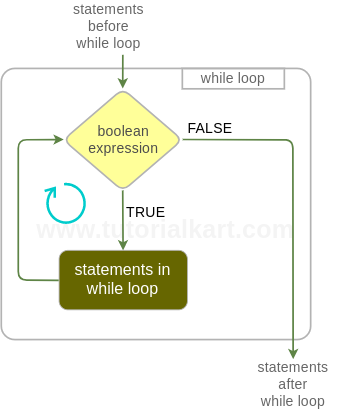
As long as the boolean expression evaluates to TRUE, the statements inside the while block are executed. The point at which the boolean expression results FALSE, the execution flow is out of the while loop statement.
Since the condition is checked before the loop body runs, an R while loop may execute zero times. For example, if the condition is already FALSE before the first iteration, the statements inside the loop are skipped completely.
R While Loop Example to Print Numbers from 1 to N
In this example, we will use while loop and print numbers from 1 to 4.
r_while_loop_ex.R
a <- 1

while(a<5) {
  print(a)
  a = a+1
}
Output
~$ Rscript r_while_loop_ex.R
[1] 1
[1] 2
[1] 3
[1] 4
Here, the variable a starts with the value 1. After every iteration, a is increased by 1. When a becomes 5, the condition a < 5 becomes FALSE, and the loop stops.
R While Loop with Break Statement
Not only the boolean expression next to while keyword could stop the while loop, but also a break statement kept intentionally inside the while loop. An example is provided below.
r_while_loop_break_ex.R
a <- 1
b <- 3

while(a<5) {
  if (a == b) {
    break
  }
  print(a)
  a = a+1
}
Output
~$ Rscript r_while_loop_break_ex.R
[1] 1
[1] 2
The inclusion of break statement might look similar to R Repeat Loop Statement.
In this program, the loop condition allows the loop to continue while a < 5. However, when a becomes equal to b, the break statement immediately terminates the while loop. Therefore, only 1 and 2 are printed.
R While Loop with Next Statement to Skip an Iteration
The next statement skips the remaining statements in the current iteration and moves control back to the while loop condition. It is useful when some values should not be processed, but the loop itself should continue.
r_while_loop_next_ex.R
a <- 0

while (a < 5) {
  a <- a + 1

  if (a == 3) {
    next
  }

  print(a)
}
Output
[1] 1
[1] 2
[1] 4
[1] 5
When a is 3, the next statement skips the print(a) statement for that iteration. The loop then continues with the next value.
R While Loop Example Using User-Controlled Conditions
A while loop is commonly used when the stopping point depends on a condition that changes during execution. The following example adds numbers until the running total reaches or exceeds a limit.
r_while_loop_sum_ex.R
total <- 0
number <- 1

while (total < 10) {
  total <- total + number
  number <- number + 1
}

print(total)
Output
[1] 10The loop keeps adding values while total < 10. Once the total reaches 10, the condition becomes FALSE and the loop stops.
Avoiding Infinite While Loops in R
An infinite while loop occurs when the loop condition never becomes FALSE. This usually happens when the variable used in the condition is not updated correctly inside the loop.
a <- 1

while (a < 5) {
  print(a)
  # Missing update for a
}
In the above syntax demonstration, a remains 1, so the condition a < 5 always stays TRUE. To avoid this, make sure the loop body changes the value that controls the condition, or use a clear break condition when appropriate.
When to Use a While Loop in R Instead of a For Loop
Use a while loop in R when the number of repetitions depends on a condition rather than a fixed sequence. Use a for loop when you already know the sequence or collection to iterate through.
| Loop requirement | Preferred loop in R | Reason |
|---|---|---|
| Run until a condition becomes false | while loop | The number of iterations may not be known before the loop starts. |
| Iterate through a vector, list, or range | for loop | The sequence of values is already available. |
| Run at least once before checking the stopping condition | repeat loop with break | R does not have a direct do while loop syntax. |
For example, reading values until a valid value is found is a good case for a while loop. Processing every element of a vector is usually simpler with a for loop or a vectorized function.
Common Mistakes in R While Loop Programs
- Forgetting to update the variable used in the loop condition.
- Writing a condition that is already
FALSE, causing the loop body to never run. - Using
=inconsistently instead of the usual R assignment operator<-in examples and teaching code. - Placing
nextbefore updating the loop variable, which can accidentally create an infinite loop. - Using a while loop where a vectorized R operation would be clearer and shorter.
R While Loop FAQ
Does R have a while loop?
Yes. R supports the while loop. The loop runs while its condition evaluates to TRUE and stops when the condition becomes FALSE.
How do I write a while loop in R?
Write the while keyword, place the condition inside parentheses, and put the statements inside braces. The basic form is while (condition) { statements }.
Can a while loop in R run zero times?
Yes. Because R checks the condition before executing the loop body, the loop body is skipped if the condition is FALSE at the beginning.
How do I stop a while loop in R?
A while loop stops automatically when its condition becomes FALSE. You can also stop it from inside the loop using the break statement.
Does R have a do while loop?
R does not provide a separate do while loop syntax. A similar pattern can be written using a repeat loop and a break condition.
R While Loop Editorial QA Checklist
- Confirm that every while loop example has a condition that eventually becomes
FALSE. - Check that output blocks match the values printed by the R code.
- Verify that
breakandnextare explained with different purposes. - Ensure the tutorial mentions that R checks the while condition before each iteration.
- Confirm that syntax-only examples use a PrismJS
language-r syntaxclass and output-only examples use theoutputclass.
R While Loop Key Takeaways
In this R Tutorial, we have learnt about the syntax and execution flow of while loop with R example scripts.
A while loop in R is best suited for repeated execution based on a changing condition. Always make sure the condition can become FALSE, and use break or next only when they make the loop logic clearer.