 TutorialKart.com
The following SAP CO tutorial guides you how to define profit center standard hierarchy in controlling area step by step. After maintaining controlling area settings with standard hierarchy, you need to assign hierarchy “IN05_PCSH” to controlling area “TK01” by using the configuration steps below.
Note: – Without this configuration you are not allowed to create profit center in SAP controlling module.
A profit center standard hierarchy is the main tree structure used to organize profit centers for a controlling area. It provides the top hierarchy group under which profit centers are grouped for reporting, master data maintenance, and management accounting analysis.
What Profit Center Standard Hierarchy Means in SAP Controlling Area
In SAP, a profit center represents an area of responsibility that can be evaluated for revenue, cost, and profitability. A standard hierarchy groups these profit centers under one controlling area so that the organization can view results at different levels such as division, region, business unit, plant, or department.
The standard hierarchy is not just a display structure. It is linked to the controlling area configuration and is required before profit centers can be maintained correctly. The top node is usually created as a profit center group, and lower-level nodes are added based on the reporting structure used by the business.
Before You Assign Standard Hierarchy to Controlling Area
Before maintaining the profit center standard hierarchy in the controlling area, check the following points. These checks help avoid common errors such as assigning the wrong hierarchy key or creating profit center master data under an incorrect controlling area.
- The controlling area must already be created and available for configuration.
- The standard hierarchy key, such as IN05_PCSH in this tutorial, should follow the naming convention used by your SAP project.
- The profit center group used as the standard hierarchy should be planned before master data creation.
- The hierarchy should reflect stable reporting levels, not temporary organizational changes.
- You should have authorization to change controlling area settings and save customizing entries.
SAP Menu Path to Define Profit Center Standard Hierarchy
You can maintain standard hierarchy for profit center in SAP by using one of the following navigation method.
Configuration Steps
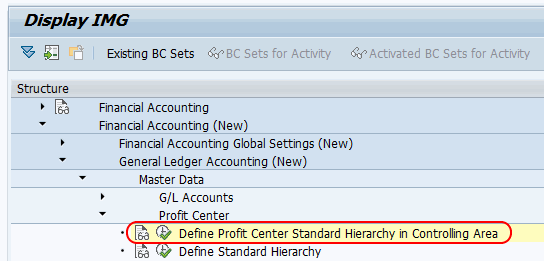
IMG path: – SPRO (Tcode) > SAP Reference IMG > SAP Financial Accounting (New) > General Ledger Accounting (New) > Master Data > Profit Center > Define Profit Center Standard Hierarchy in Controlling Area.
In some SAP systems, the menu path may appear under Controlling or Profit Center Accounting nodes depending on the system version and activated business functions. The configuration purpose remains the same: assign the standard hierarchy key to the relevant controlling area.
Define Profit Center Standard Hierarchy in Controlling Area: Step-by-Step
Step 1: Open SPRO Transaction for SAP Reference IMG
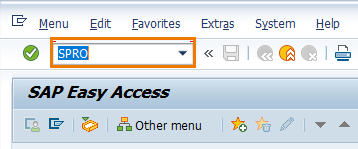
Step 1: Enter SAP transaction code “SPRO” in the SAP command field and click on execute.
Step 2: Choose SAP Reference IMG for Controlling Configuration
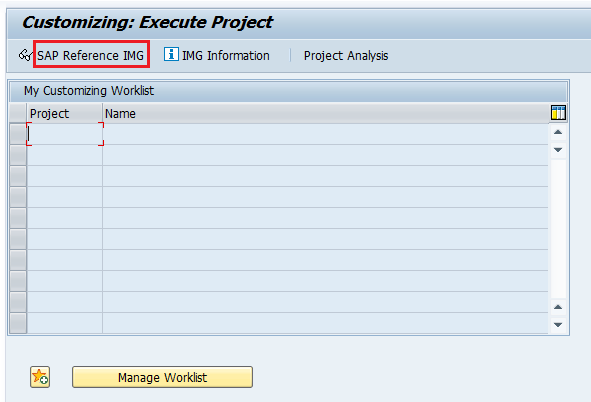
Step 2: On customizing execute project screen, click on SAP reference img option.
Step 3: Open Define Profit Center Standard Hierarchy Activity
Step 3: On display IMG screen, follow the navigation path and click on img activity Define Profit Center Standard Hierarchy in Controlling Area.
Step 4: Assign Standard Hierarchy Key to Controlling Area
Step 4: On change view define profit center standard hierarchy in controlling area screen, update the standard hierarchy key IN05_PCSH in controlling area field.
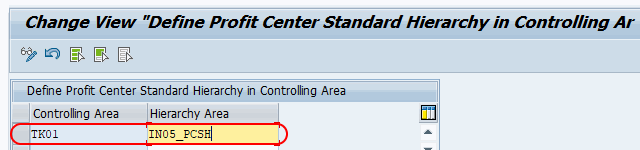
After assigning hierarchy area to controlling area, click on save button and save the configured details.
When SAP prompts for a customizing request, assign the entry to the correct transport request based on your project transport process. This allows the controlling area and standard hierarchy assignment to move from development to quality and production systems through the normal transport route.
What to Do After Assigning Profit Center Standard Hierarchy
After the standard hierarchy is assigned to the controlling area, the next step is to create or maintain the hierarchy structure. The assigned standard hierarchy key should exist as a profit center group, and lower-level nodes should be created according to the reporting structure.
- Use the assigned hierarchy key as the top node for profit center grouping.
- Create lower-level nodes for meaningful reporting levels such as regions, divisions, or plants.
- Assign each profit center to the relevant node when maintaining profit center master data.
- Display the hierarchy after saving to verify that the structure is available.
- Use change transactions only after confirming the impact on reporting and master data maintenance.
For the next configuration activity, refer to the related tutorial on creating profit center group and standard hierarchy in SAP.
Useful SAP Transactions for Profit Center Standard Hierarchy
The following SAP transactions are commonly used while defining, creating, checking, or maintaining profit center standard hierarchy and profit center master data.
| Transaction | Purpose |
|---|---|
| SPRO | Open SAP Reference IMG and maintain the controlling area assignment for standard hierarchy. |
| OKKS | Set the controlling area before working with controlling master data. |
| KCH1 | Create profit center group or standard hierarchy group structure. |
| KCH2 | Change an existing profit center group. |
| KCH3 | Display an existing profit center group. |
| KCH5N | Display or check the profit center standard hierarchy in many SAP GUI systems. |
| KE51 / KE52 / KE53 | Create, change, or display profit center master data. |
How to Check Profit Center Standard Hierarchy Assignment
After saving the configuration, verify both the controlling area assignment and the hierarchy structure. First check whether the standard hierarchy key is assigned to the correct controlling area. Then display the corresponding profit center group to confirm that the top node and lower-level nodes exist.
- Open the same IMG activity and verify the standard hierarchy field for the controlling area.
- Use KCH3 or KCH5N to display the hierarchy structure, depending on the transactions available in your SAP system.
- Create or display a profit center and check whether the standard hierarchy node can be assigned.
- If the hierarchy is not visible, confirm that the correct controlling area is set before checking master data.
SAP S/4HANA Note for Profit Center Standard Hierarchy
The steps in this tutorial follow the classic SAP GUI customizing approach. In SAP S/4HANA and SAP S/4HANA Cloud, profit center hierarchy maintenance can also involve Fiori apps and global hierarchy management, depending on the edition and configuration scope.
For cloud-specific and transport-related behavior, check SAP Help references such as SAP Help for profit center standard hierarchy in SAP S/4HANA Cloud and SAP Help support content for transporting profit center objects. Always follow the process approved for your system landscape.
Common Errors When Defining Profit Center Standard Hierarchy
- Wrong hierarchy key: The hierarchy key entered in the controlling area does not match the profit center group planned for the organization.
- Wrong controlling area: The hierarchy is assigned in one controlling area while profit centers are created under another controlling area.
- Hierarchy group not created: The standard hierarchy key is assigned, but the group structure has not yet been created or maintained.
- Missing transport: The customizing entry is saved locally or assigned to the wrong request, so it is not available in the next system.
- Unstable node design: Lower-level nodes are created for short-term teams or temporary reporting needs, making the hierarchy difficult to maintain later.
Profit Center Standard Hierarchy QA Checklist
Use this checklist before closing the configuration task for defining profit center standard hierarchy in controlling area.
- The controlling area, such as TK01, is the correct controlling area for the company code or organization setup.
- The standard hierarchy key, such as IN05_PCSH, follows the project naming convention.
- The assigned hierarchy key is planned as the top node for the profit center group structure.
- The configuration entry is saved in the correct customizing request.
- The profit center group structure can be created or displayed after assignment.
- Profit center master data can be created and assigned to the expected standard hierarchy node.
- The hierarchy design supports reporting levels that are stable and useful for management accounting.
FAQs on Profit Center Standard Hierarchy in Controlling Area
What is the profit center standard hierarchy in SAP?
The profit center standard hierarchy in SAP is the main tree structure assigned to a controlling area for organizing profit centers. It works as the required hierarchy under which profit centers are grouped for master data maintenance and reporting.
Why is standard hierarchy required for profit center creation?
The standard hierarchy is required because profit centers must be assigned to a hierarchy node in the relevant controlling area. Without the assignment, profit center master data creation or maintenance can be blocked depending on the system setup.
How do I assign profit center standard hierarchy to a controlling area?
Use SPRO and follow the IMG activity for Define Profit Center Standard Hierarchy in Controlling Area. Enter the required standard hierarchy key for the controlling area, save the entry, and assign it to the correct customizing request.
How do I transport profit center standard hierarchy in SAP?
The controlling area assignment is a customizing entry and should be saved in a customizing transport request. Profit center master data and hierarchy objects may follow a different transport or replication process depending on whether the system is SAP ECC, SAP S/4HANA, or SAP S/4HANA Cloud.
What is the difference between profit center group and standard hierarchy?
A profit center group is a grouping of profit centers or lower-level groups. The standard hierarchy is a specific profit center group assigned to a controlling area as the main hierarchy for profit center organization and reporting.