 TutorialKart.com
Versions in SAP Controlling are used to store and manage plan, actual, forecast, and comparison values for a controlling area and fiscal year. SAP delivers the standard version 0, which is commonly used for legal actual values and standard planning. Additional SAP CO versions can be created when an organization wants separate planning scenarios, such as an original budget, revised forecast, or management plan.
In SAP CO, version settings are maintained at two levels: the general version definition and the controlling-area-specific fiscal year settings. The steps below show how to maintain versions in SAP Controlling by using transaction code OKEQ and by copying the standard version 0.
What SAP CO versions control in planning and reporting
A version in SAP Controlling determines how values are stored, copied, translated, and used in planning functions. The version does not replace the controlling area, company code, cost center, or fiscal year. Instead, it gives SAP CO a separate value layer for planning and reporting.
- Version 0 is the standard version delivered by SAP and is normally used for legal actual values and operational planning.
- Additional versions can be used for alternate planning scenarios, simulations, revised budgets, or forecast comparisons.
- Fiscal year settings control whether integrated planning, copying, currency translation, and price calculation are allowed for a version.
- Controlling area settings make the version relevant for a specific controlling area, such as TK01 in the example below.
Before you maintain versions in SAP Controlling
Check the following items before changing SAP CO version settings. This helps avoid configuration gaps after the version is saved.
- The controlling area is already created and assigned correctly.
- The required fiscal year is available for the controlling area.
- You know whether the version should allow copying from another version.
- You have the correct exchange rate type for cost planning, such as P in this example.
- You know whether integrated planning is required for cost centers, business processes, orders, or projects.
Maintain versions in SAP Controlling with OKEQ
The versions in SAP Controlling can be created and configured by using one of the following navigation methods.
Transaction code: – OKEQ
IMG Path: – SPRO > SAP Reference IMG > Controlling > General Controlling > Organizations > Maintain versions.
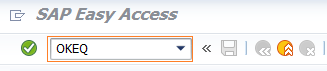
Step 1: – Enter transaction code “OKEQ” in the SAP command field and press enter.
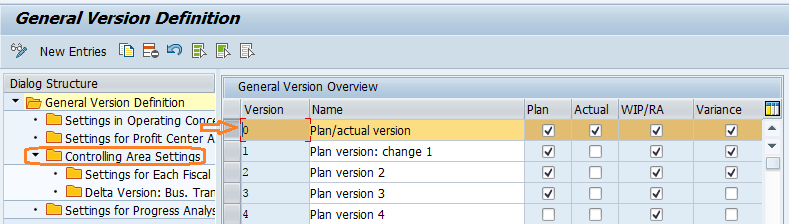
Step 2: – On the general version definition screen, create a new version by copying an existing version or by choosing the new entries option. In this configuration, we will maintain versions in SAP by copying version “0”.
Choose Version “0” and double click on option “Controlling area settings” which is available under dialog structure menu.
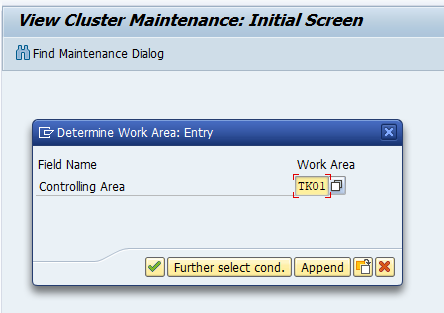
On determine work area entry screen, update the controlling area key “TK01” in the work area field and press enter.
Step 3: – Choose version “0” and click on the option settings for each Fiscal Year.
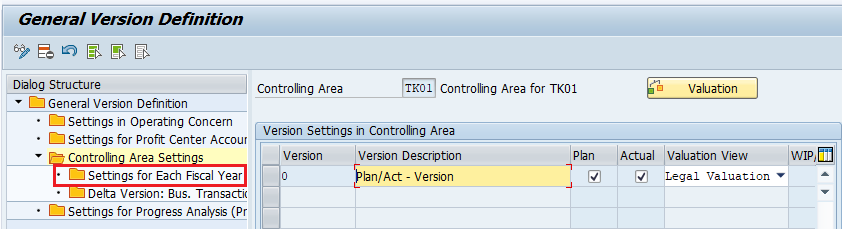
By default, SAP copies version settings for five years. Double click on the required fiscal year, such as “2017” in this example, to maintain the detailed settings.
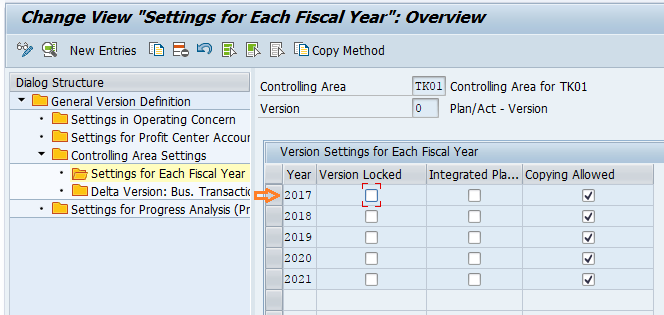
Step 4: – On change view settings for each fiscal year details screen, update the following details.
- Under general indicators, choose Integrated planning and Copying allowed option.
- Under currency translation update the exchange rate type as “P” (Standard translation for cost planning). Update the value date as 01.4.2017.
- Under order/projects select the integrated planning with cost center/bus.processes.
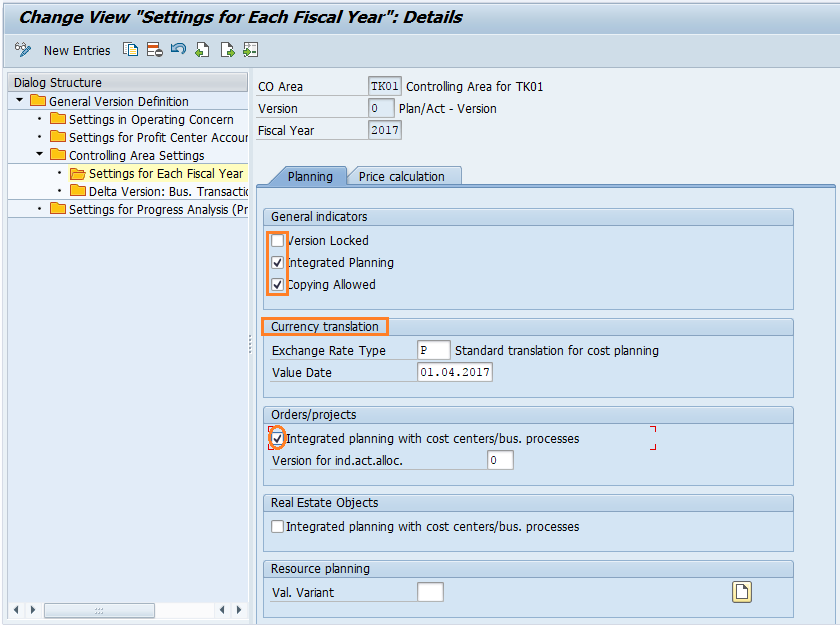
After updating all the required details, click on the price calculation tab and update the following details.
- Under plan select method as periodic price.
- Under actual select method as periodic price.
- Under actual select revaluation as own business transaction.
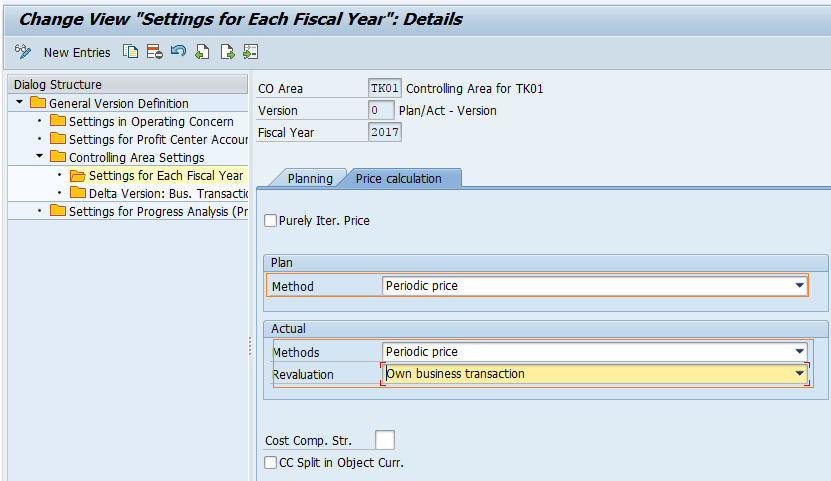
After updating all the required details, click on save button and save the configured details. Successfully we have maintained versions in SAP CO.
How to choose version 0 or a new SAP CO planning version
Most implementations keep version 0 as the main legal and operational version. A new version is useful when the same controlling area needs a separate plan or comparison set without overwriting the existing version.
| SAP CO version choice | When to use it | Typical example |
|---|---|---|
| Use version 0 | For standard actual values and the main planning version used in regular reporting. | Annual operating plan for the controlling area. |
| Copy version 0 to a new version | When the new version should start with existing settings and similar planning behavior. | Creating a revised forecast version from the approved budget version. |
| Create a new version manually | When the version needs different control settings from the beginning. | Simulation planning with different copying or price calculation rules. |
Important fiscal year fields while maintaining SAP CO versions
The fiscal year screen in OKEQ is important because version behavior can change by year. Review these fields carefully before saving the version.
| Field or setting | Purpose in SAP Controlling version setup |
|---|---|
| Integrated planning | Allows planning integration between CO objects such as cost centers, business processes, orders, and projects, depending on the selected options. |
| Copying allowed | Controls whether values can be copied from or to the version during planning activities. |
| Exchange rate type | Defines the rate type used for currency translation in planning. In this example, exchange rate type P is used for cost planning. |
| Value date | Determines the date used for exchange rate determination in the version settings. |
| Price calculation method | Controls how plan and actual periodic prices are calculated for the selected version and fiscal year. |
Common mistakes when maintaining versions in SAP Controlling
- Using the wrong controlling area: Always confirm the work area before changing version settings, especially in systems with more than one controlling area.
- Maintaining only the general version definition: A version also needs controlling-area-specific and fiscal-year-specific settings.
- Forgetting the required fiscal year: If settings are copied for several years, review the exact fiscal year used for planning.
- Disabling copying when planning needs it: If budgets or forecasts are copied between versions, the copying allowed indicator must be maintained correctly.
- Using an incorrect exchange rate type: Currency translation in planning depends on the rate type and value date maintained in the version.
SAP CO version setup checklist before saving OKEQ
- Version number and version description are clear for business users.
- Correct controlling area is entered in the work area screen.
- Required fiscal year is selected and reviewed.
- Integrated planning is enabled only where it is required.
- Copying allowed is selected if plan values must be copied between versions.
- Exchange rate type and value date match the planning requirement.
- Plan and actual price calculation settings are reviewed before saving.
SAP Controlling version documentation and related configuration
For additional reference, you can review SAP Help Portal documentation on Controlling version settings and related FI/CO configuration topics. In the same implementation area, you may also need to review how to maintain controlling area in SAP, fiscal year in SAP, and SPRO configuration navigation.
- SAP Help Portal documentation for versions in Controlling
- SAP Help Portal support content for FI Controlling configuration
FAQ on maintaining versions in SAP Controlling
What is the version in SAP Controlling?
A version in SAP Controlling is a separate value layer used to store plan, actual, forecast, or comparison data for a controlling area and fiscal year. SAP delivers standard version 0, and additional versions can be created for planning or simulation scenarios.
How do I maintain a version in SAP CO?
Use transaction code OKEQ or follow the IMG path SPRO > SAP Reference IMG > Controlling > General Controlling > Organizations > Maintain versions. Then select the version, enter the controlling area, maintain fiscal year settings, and save the configuration.
What is the transaction code for maintaining versions in SAP Controlling?
The transaction code for maintaining versions in SAP Controlling is OKEQ. It is used to define general version settings and controlling-area-specific settings.
Can I copy values from one SAP CO version to another?
Yes, values can be copied between versions when the version and fiscal year settings allow copying. The copying allowed indicator should be maintained based on the planning process used in the controlling area.
What is the transaction code for maintaining controlling area in SAP?
The controlling area is commonly maintained with transaction code OKKP. In this tutorial, the controlling area is entered as the work area while maintaining version settings in OKEQ.