 TutorialKart.com
What is fiscal year in SAP FICO?
In SAP, a financial accounting year is referred to as a fiscal year. The fiscal year tells SAP how to divide an accounting year into posting periods, how to identify the fiscal year from a posting date, and how financial reports should group transactions for period-end and year-end closing.
A fiscal year in SAP FI can contain 12 normal posting periods and up to 4 special posting periods, giving a maximum of 16 periods. Normal posting periods are used for day-to-day business transactions. Special periods are used mainly for year-end adjustment entries, audit corrections, tax adjustments, and closing entries after the last normal period.
The fiscal year is not always the same as the calendar year. Some companies close their books on 31 December, while others follow a different statutory or business year. For example, Indian companies commonly follow April to March, while many companies that use a calendar-year accounting cycle follow January to December.
Fiscal year, accounting year, and posting periods in SAP
In common accounting language, the terms fiscal year and accounting year are often used for the same idea: the 12-month period for which a company prepares its accounts. In SAP, the configuration object that controls this accounting year is the fiscal year variant.
| SAP term | Meaning in SAP FI | Example |
|---|---|---|
| Fiscal year | The accounting year used for financial reporting and closing | 2025, 2026, or a company-specific financial year |
| Posting period | A subdivision of the fiscal year used for posting documents | Period 01, Period 02, Period 12 |
| Special period | Additional period used after the last normal period for adjustment postings | Period 13 to Period 16 |
| Fiscal year variant | The SAP setting that defines the start month, end month, number of periods, and period mapping | K4 for calendar year, V3 for April to March in many training examples |
Fiscal year examples used in SAP company code setup
Every organization records business transactions in books of accounts and closes those books at the end of its accounting year. The exact year-end date depends on the country, legal reporting rules, management reporting needs, and group reporting policy.
- April to March fiscal year: Used by many Indian companies. April is period 01 and March is period 12 when the variant is configured that way.
- January to December fiscal year: Used by many companies that follow the calendar year. January is period 01 and December is period 12.
- Non-calendar fiscal year: Used when the accounting year starts in a month other than January, such as April, July, or October.
- Shortened fiscal year: Used when a company needs fewer than 12 normal posting periods, such as during a new implementation, merger, acquisition, or change in financial year.
When users ask whether a year should be called FY25 or FY24, the answer depends on the company’s naming convention and SAP fiscal year configuration. Many organizations name a fiscal year by the year in which it ends, but SAP period determination should always be checked from the fiscal year variant and company code assignment.
Types of fiscal year variants in SAP
Fiscal year in SAP can be classified into the following common variant types.
- Year-dependent fiscal year variant: A year-dependent fiscal year variant is maintained separately for specific years. Use this when the period dates, number of days, or period-to-date mapping can change from one fiscal year to another. If the year-dependent checkbox is selected, you must maintain period conversion details for each applicable year.
- Year-independent fiscal year variant: A year-independent fiscal year variant uses the same period structure every year. This is common when each fiscal year starts and ends in the same months every year.
- Calendar year fiscal year variant: In a calendar year variant, the fiscal year starts on 1 January and ends on 31 December. The posting periods usually follow the calendar months.
- Non-calendar fiscal year variant: In a non-calendar variant, the fiscal year does not start in January. SAP uses period mapping and, where required, year shift logic to determine the correct posting period and fiscal year.
- Shortened fiscal year variant: A shortened fiscal year contains fewer normal posting periods. It is used for transition scenarios such as a new company code going live in the middle of a year or a company changing its accounting year.
How fiscal year variant controls SAP posting periods
The fiscal year variant decides how SAP converts a document posting date into a fiscal year and posting period. For example, if a company follows April to March, a posting date in April may be period 01, while a posting date in March may be period 12 of the same fiscal year or the ending fiscal year, depending on the variant design.
This is why the fiscal year variant is important before postings begin in a company code. If the wrong variant is assigned, SAP may place accounting documents into the wrong fiscal period, which can affect trial balance, balance sheet, profit and loss reporting, asset accounting depreciation runs, and closing activities.
How to define fiscal year variant in SAP using OB29
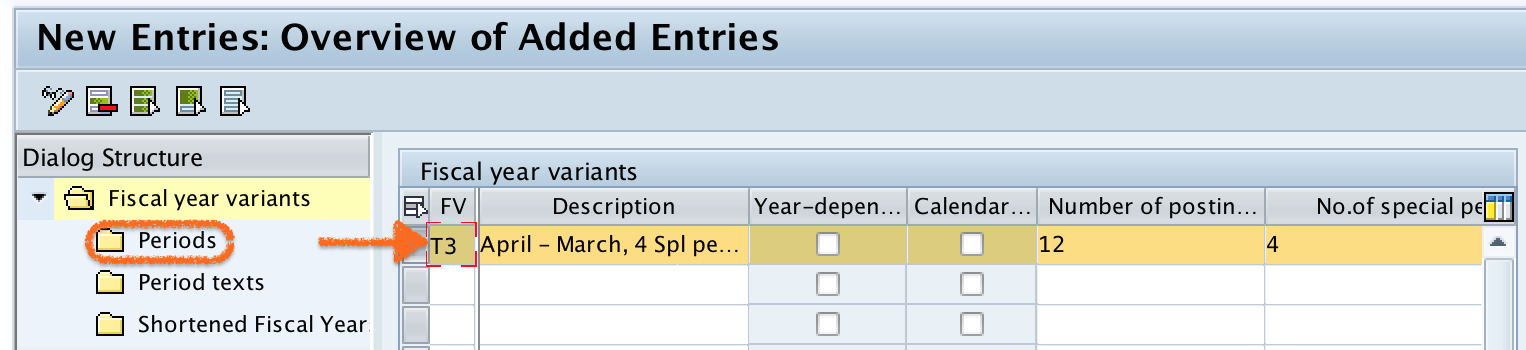
You can define fiscal year in SAP by using transaction code “OB29“. You can check here how to define fiscal year variant in SAP FICO.
You can also reach this setting through the SAP IMG path for Financial Accounting global settings, depending on the SAP release and menu structure used in your system. SAP S/4HANA Cloud configuration may expose similar fiscal year settings through configuration activities rather than the same classic transaction flow.
- Go to transaction code OB29.
- Choose an existing fiscal year variant or create a new fiscal year variant key.
- Enter a short description that clearly identifies the accounting year, such as calendar year or April to March.
- Select Calendar Year if the fiscal year is exactly January to December.
- Select Year Dependent only when the period structure must be maintained separately for each year.
- Maintain the posting periods, start/end month logic, and special periods as required.
- Save the fiscal year variant and include it in a transport request if your SAP landscape requires transports.
- Assign the fiscal year variant to the relevant company code before using the company code for financial postings.
For official product behavior, refer to SAP Help pages for fiscal year variants and configuration activities, such as SAP Help for fiscal year variants and SAP S/4HANA Cloud configuration guidance.
Fiscal year variant assignment to company code in SAP
Defining a fiscal year variant is only one part of the setup. The fiscal year variant must be assigned to the company code so that SAP can determine the correct posting period for accounting documents in that company code. In classic SAP FI configuration, this assignment is commonly maintained with transaction code OB37 or through the corresponding IMG activity.
In many projects, the fiscal year variant is discussed with finance, tax, controlling, asset accounting, and reporting teams before the company code is finalized. Changing the fiscal year variant after postings exist is not a normal maintenance task and should be handled carefully with project and SAP guidance.
Special posting periods 13 to 16 in SAP fiscal year
Special posting periods are not extra months. They are adjustment periods linked to the last normal posting period of the fiscal year. For a 12-period fiscal year, period 12 is normally the last month, and periods 13 to 16 can be used for closing adjustments when they are opened for posting.
- Period 13 may be used for finance adjustment entries.
- Period 14 may be used for tax or statutory adjustments.
- Period 15 may be used for audit-related adjustments.
- Period 16 may be reserved for final closing entries, depending on company policy.
The exact use of special periods is decided by the company. SAP provides the period structure, but finance teams decide how to control and document those postings.
Fiscal year in SAP configuration QA checklist
- Confirm whether the company code follows a calendar year, April-to-March year, or another non-calendar fiscal year.
- Check whether the fiscal year variant should be year-independent or year-dependent.
- Verify the number of normal posting periods and the requirement for special periods 13 to 16.
- Confirm the fiscal year naming rule, especially for non-calendar years such as FY25 or FY24.
- Check the company code assignment before allowing accounting postings.
- Review integration impact on asset accounting, controlling, reporting, and year-end closing.
- Avoid changing the fiscal year variant after live postings unless the change is part of a controlled SAP project.
Common SAP fiscal year mistakes to avoid
- Assuming fiscal year always means January to December: SAP supports calendar and non-calendar fiscal years.
- Confusing special periods with calendar months: Special periods are adjustment periods, not additional months after December or March.
- Using year-dependent settings unnecessarily: If the same period structure applies every year, a year-independent variant is usually easier to maintain.
- Forgetting company code assignment: A fiscal year variant must be assigned to the company code before SAP can use it for postings.
- Ignoring period opening controls: The fiscal year variant defines the period structure, but posting period controls decide which periods are open for posting.
Fiscal year in SAP FAQs
Is fiscal year the same as accounting year in SAP?
Yes, in SAP FI usage, fiscal year usually means the accounting year used for financial postings, reporting, and closing. The configuration is controlled through the fiscal year variant.
What is a fiscal year variant in SAP?
A fiscal year variant is the SAP configuration object that defines how an accounting year is divided into posting periods. It controls calendar-year or non-calendar-year behavior, special periods, and period determination from posting dates.
How many posting periods are available in an SAP fiscal year?
An SAP fiscal year can have 12 normal posting periods and up to 4 special posting periods. The special periods are normally used for year-end adjustment and closing postings.
How do you define financial year in SAP?
You define the financial year in SAP by creating or maintaining a fiscal year variant in OB29 and assigning it to the relevant company code. The variant should match the company’s statutory and reporting year.
Is FY25 or FY24 decided by the start year or end year in SAP?
The label depends on the organization’s convention and the fiscal year variant. Many businesses name a fiscal year by the year in which it ends, but SAP period and fiscal year determination should be checked from the configured variant.