 TutorialKart.com
How to create a measuring point in SAP PM using IK01
A measuring point in SAP PM is used to record readings for a technical object, such as equipment or a functional location. These readings can represent values such as operating hours, temperature, pressure, mileage, vibration, or any other monitored condition required for maintenance planning and analysis.
In this activity you create measuring point in SAP for capturing the monitored data for various equipments as configured in SAP PM module. The same process is also used when a measuring point is needed for functional locations, depending on the technical object used in your maintenance process.
IK01 transaction and SAP menu path for measuring point creation
You can create measuring point in SAP by using the following navigation method.
| Transaction Code | IK01 |
| SAP Menu Path | Logistics > Plant Maintenance > Management of Technical objects > Environment > Measuring points > Create. |
Measuring point, counter, and measuring document in SAP PM
Before creating a measuring point with IK01, understand the difference between the object that stores the reading structure and the document that records each reading.
| Term | Meaning in SAP PM |
| Measuring point | A fixed location or attribute on a technical object where readings are recorded, such as pump pressure or motor temperature. |
| Counter | A measuring point that records cumulative readings, such as operating hours, mileage, production quantity, or number of cycles. |
| Measuring document | The transaction record created when a reading is entered for a measuring point or counter. |
| Characteristic | The classification characteristic that controls the type of value, unit, and allowed value behavior for the measuring point. |
Use a normal measuring point when each reading stands on its own, such as temperature at the time of inspection. Use the counter option when the reading increases over time, such as machine running hours or vehicle kilometers.
Prerequisites before creating a measuring point in SAP PM
- The equipment or functional location should already exist in SAP PM.
- The measurement point category should be available for your process, such as M for a general measuring point.
- The required characteristic should be created and suitable for the value you want to record.
- The unit of measurement should be available in SAP and should match the characteristic, such as H for hours, BAR for pressure, or DEG for temperature, depending on your system setup.
- If the measuring point is a counter, decide whether the readings are expected to increase continuously and how counter replacement or overflow will be handled in your process.
Create measuring point in IK01 from SAP Easy Access
Perform the following configuration steps for creating the new measuring point in SAP PM.
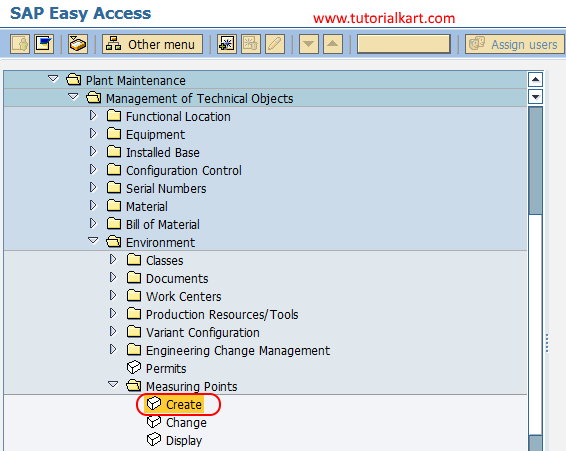
Step 1 :Execute t-code “IK01 From SAP easy access screen or follow the navigation menu node Logistics – Plant Maintenance – Management of Technical objects – Environment – Measuring points and click on activity “create”.
Enter measurement point object, equipment, category, and counter option
Step 2 : On create measuring point initial screen, update the following details.
- Measurement point object : Update the IEQ if measuring point is equipment or update the functional location object category used in your SAP system if the measuring point belongs to a functional location.
- Equipment : Update the equipment number
- Measurement point category : Keep this field as M (measurement point general).
- Choose the check box MeasPoint is counter if this is for measuring point counter.
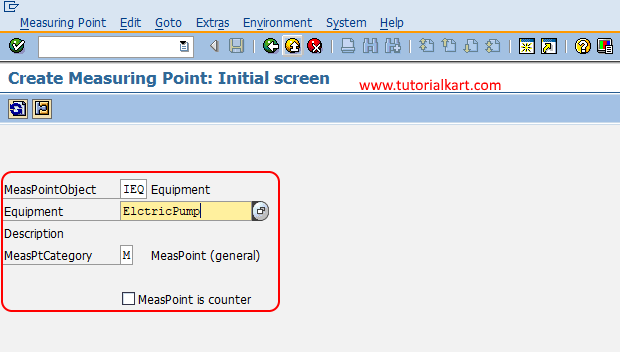
After enter the details, press enter to continue. If the system does not accept the object category, check whether you are creating the measuring point for equipment or a functional location and select the matching object category from the available input help.
Maintain measuring position, description, characteristic, and target value
Step 3 : On create measuring point general data screen, update the following details.
- Measuring position : Update the description of measuring position such as operating hours.
- Description : Update the descriptive text of measuring position.
- Characteristic : Update the corresponding characteristic of measuring position from the drop down list.
- Target Value : Update the target value by choose the addition data tab. Here you need to update the lower range and upper range values for the character.
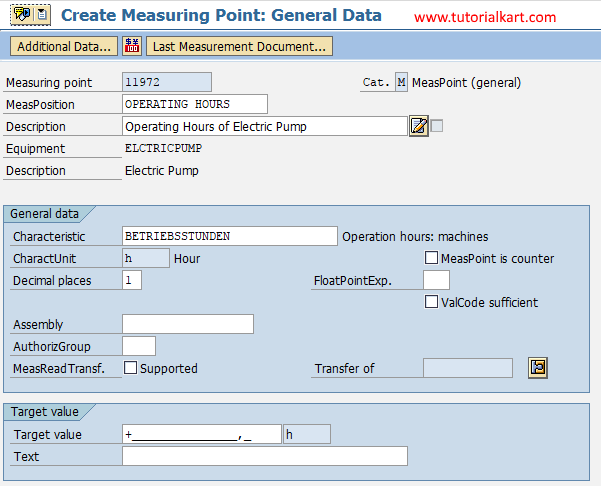
The measuring position should describe where or what is measured, not only the value type. For example, use descriptions such as Motor bearing temperature, Pump discharge pressure, Compressor running hours, or Vehicle odometer reading. This helps users select the correct measuring point when entering measuring documents later.
Use characteristic and unit of measurement correctly in measuring points
The characteristic is important because it controls the measurement value format and unit behavior. If the wrong characteristic is selected, users may enter readings with the wrong unit or value type. For example, an operating-hours counter should use a characteristic suitable for hours, while a pressure measuring point should use a characteristic suitable for pressure readings.
If a required unit of measurement is not available in the input help, it is usually a configuration or master data issue rather than an IK01 entry issue. In that case, check the characteristic setup and the unit of measurement configuration with the SAP PM or SAP basis/configuration team before saving the measuring point.
Save the SAP PM measuring point and note the measuring point number
After maintaining all the required details for measuring points in SAP, choose save icon and save the configured details.

Successfully we have created measuring point in SAP PM module. After saving, note the measuring point number shown by the system. This number is required when displaying the measuring point, changing the measuring point, or entering measurement readings for the technical object.
Useful SAP PM transaction codes for measuring points and readings
| T-Code | Purpose |
| IK01 | Create measuring point or counter |
| IK02 | Change measuring point or counter |
| IK03 | Display measuring point or counter |
| IK11 | Create measurement document for a measuring point or counter |
| IK17 | Display measurement documents in list form |
Common checks when IK01 measuring point creation fails
| Issue in IK01 | What to check |
| Equipment number is not accepted | Check whether the equipment exists, is active, and belongs to the correct plant or planning area. |
| Object category does not match | Confirm whether the measuring point is for equipment or functional location and select the correct object category from input help. |
| Characteristic is not available | Check whether the characteristic exists and is suitable for measuring point usage. |
| Unit of measurement is wrong or missing | Check the characteristic unit and the unit of measurement configuration before continuing. |
| Counter readings behave incorrectly | Confirm whether the measuring point should really be a counter and review the counter-specific settings. |
Reference links for SAP measuring points and counters
For additional background on measuring points and counters, refer to SAP Learning: Working with Measuring Points and Counters and the SAP Help documentation for SAP S/4HANA Asset Management measuring point functions.
FAQs on creating measuring points in SAP PM
What is the T-code for measuring point creation in SAP PM?
The T-code for creating a measuring point in SAP PM is IK01. IK02 is used to change a measuring point, and IK03 is used to display a measuring point.
What is a measuring point in SAP PM?
A measuring point is a place or attribute on equipment or a functional location where readings are recorded. Examples include operating hours, pressure, temperature, vibration, and odometer readings.
What is the difference between a measuring point and a counter?
A measuring point records a measured value at a point in time. A counter is a measuring point designed for cumulative readings, such as running hours, mileage, or number of cycles.
Which transaction is used to enter readings for a measuring point?
After a measuring point is created, readings are entered as measurement documents. In many SAP PM systems, IK11 is used to create a measurement document.
Can a measuring point be created for both equipment and functional location?
Yes. A measuring point can be created for equipment or for a functional location, depending on the technical object and object category selected during IK01 creation.
Editorial QA checklist for this IK01 measuring point tutorial
- The article clearly identifies IK01 as the transaction code for creating a measuring point in SAP PM.
- The difference between a measuring point, counter, and measuring document is explained before the step-by-step process.
- The tutorial keeps the original SAP screen images and explains the main fields shown in the IK01 flow.
- The content explains why characteristic and unit of measurement selection matters for readings.
- The FAQ answers the main search questions about measuring point T-code, definition, counter difference, reading entry, and technical object assignment.