 TutorialKart.com
How to Define Company in SAP FICO Using Transaction Code OX15
A company in SAP systems is an organizational unit used mainly for consolidation and group-level reporting. It represents a legal consolidation unit under which one or more company codes can be grouped. The definition of company in SAP is optional for basic company code posting, but it is required when an organization wants to consolidate financial data from two or more company codes at country level, segment level, regional level, or group level.
Under a group company, consolidated financial statements can be generated based on the reporting requirements of an organization. Examples of group company structures include Reliance Group, Wipro Group, or any parent organization that manages multiple legal entities or company codes.
Company in SAP FICO and Company Code Difference
Before defining a company in SAP, it is useful to understand the difference between company and company code. A company code is the smallest organizational unit for which complete accounting records can be maintained. A company is a higher-level consolidation unit that can be assigned to one or more company codes.
| Area | Company in SAP | Company Code in SAP |
|---|---|---|
| Purpose | Used for consolidation and group reporting | Used for day-to-day financial accounting |
| Configuration status | Optional unless consolidation is required | Required for FI postings |
| Relationship | Can be assigned to multiple company codes | Can be assigned to one company for consolidation |
| Example | TKART Group | TK01 India Company Code, TK02 US Company Code |
In SAP Customizing, company is also shown under internal trading partners. This is because the company key can be used to identify internal group entities for consolidation and intercompany reporting.
Ways to Create Company in SAP FICO
You can define company in SAP by using transaction code OX15 or by following the SAP Reference IMG navigation path.
- Transaction code: – “OX15“
- Navigation: – SPRO – SAP Reference IMG – Enterprise Structure – Definition – Financial Accounting – Define Company.
In this SAP FICO configuration tutorial, we will create a sample company key named TKART. You can follow the same steps for your own group company key, company name, country, language, and currency.
Step 1: Open Define Company Transaction OX15 in SAP
Enter Transaction code “OX15” in the SAP command field as shown below and press Enter to continue.
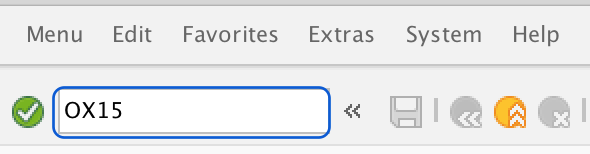
If you are using the IMG menu instead of the transaction code, open SPRO and go to the Financial Accounting enterprise structure definition path. Both methods open the same configuration activity for defining a company.
Step 2: Choose New Entries in Internal Trading Partners Overview
On the change view “Internal trading partners”: overview screen, click on “New Entries” button to define company in SAP.

The overview screen lists existing companies already maintained in the system. Use New Entries when you want to create a new company key instead of changing an existing one.
Step 3: Enter Company Key and Company Name in OX15
On the New Entries screen, update the company identification details. These values describe the group company or consolidation company that will later be assigned to company codes, if required.
- Company: – Enter a key that identifies company group in SAP. In our case we have updated “TKART” for creation of new company.
- Company Name: – In this field you need to update the full descriptive name of company.
- Name of company 2:- If second name of company available, update here or keep it as blank.
Company Address, Country, Language, and Currency Fields in SAP OX15
- Street: – Enter street name of company located
- Postal code: – Enter postal pin code
- City: – Update city name, in our case we have updated “Bangalore”
- Country: – Here you need to update country key. e.g. for India – IN, For United State – US, etc.
- Language key: – By default our language is English, so language key is “EN”
- Currency: – Enter currency key in which transactions are being maintained for the group company. It is called as home currency or local currency.
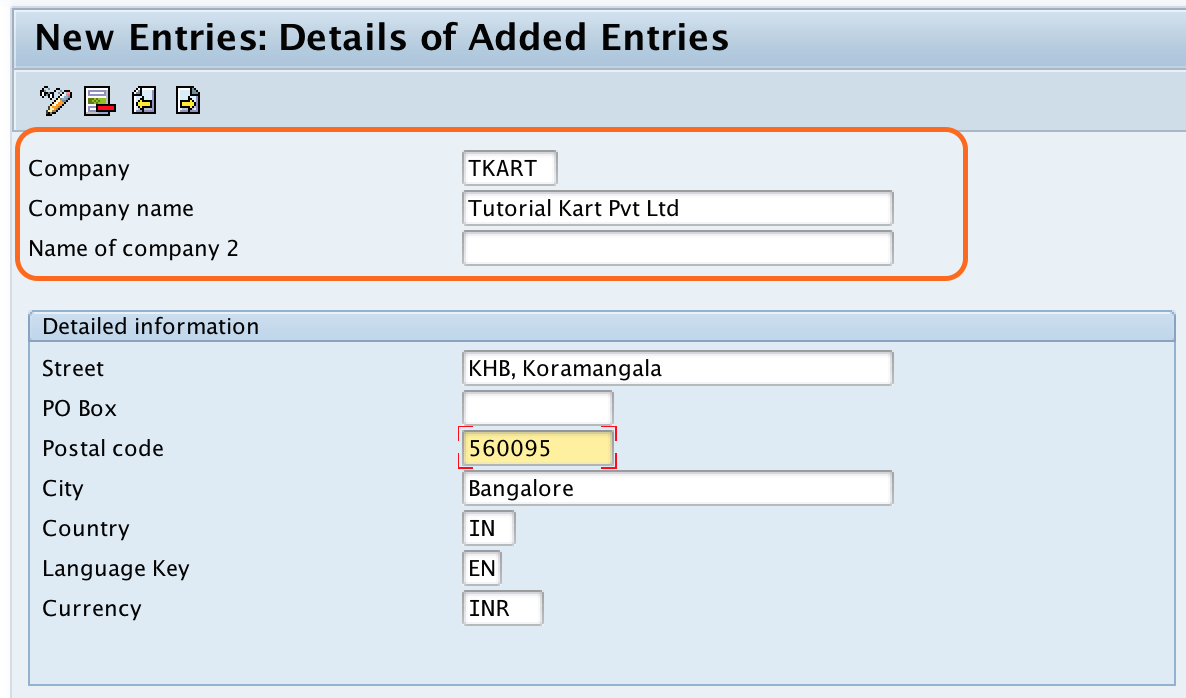
Note:- You can choose keys from the list for City, Language and Currency by pressing F4 key from your keyboard.
Use a company key that is easy to identify and consistent with your organization naming standards. In many SAP projects, company keys are kept short and meaningful so that they can be recognized easily during assignment and reporting activities.
Step 4: Save the SAP Company and Capture the Customizing Request
After updating all the required details, click on save button to save the company details. Now you are prompted for customizing request, click on new entries button to create new customizing request.
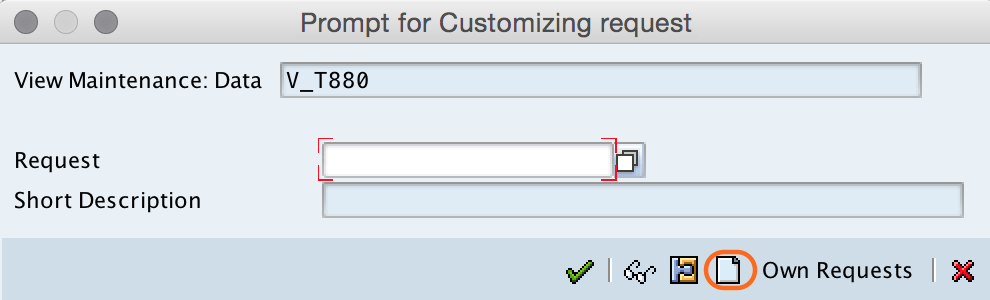
Now update description of customizing request and press enter to continue. Here we have updated description as SAP FICO configuration.
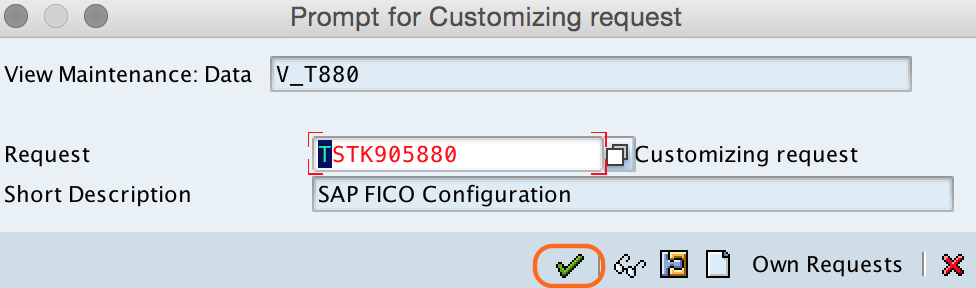
Successfully we have created company in SAP FICO.
What to Do After Defining Company in SAP
Creating a company only maintains the group company definition. If your configuration requires consolidation or group reporting, the next important step is to assign the relevant company codes to the company. This assignment is maintained separately under Enterprise Structure assignment for Financial Accounting.
- Define the company using transaction code OX15.
- Define or verify the required company codes.
- Assign company code to company under Enterprise Structure assignment.
- Check that country, currency, and language are maintained correctly.
- Transport the customizing request to the required SAP system landscape as per project process.
This distinction is important. Defining a company does not automatically create a company code, and creating a company code does not automatically complete group company assignment.
Common Mistakes While Creating Company in SAP FICO
- Confusing company with company code: Company is used for consolidation, while company code is used for accounting postings.
- Using unclear company keys: Avoid random keys that are difficult to identify later during assignment or reporting.
- Skipping currency review: Check the currency key carefully before saving the configuration.
- Forgetting company code assignment: If consolidation is required, assign the relevant company codes to the company after definition.
- Saving under the wrong request: Use the correct customizing request so that the configuration can be transported properly.
When Company Definition Is Required in SAP
Company definition is generally required when the business has multiple company codes that need to be viewed together for consolidation or group-level financial reporting. For a simple SAP setup with a single company code and no consolidation requirement, defining a separate company may not be necessary. However, many SAP FICO implementations still maintain it to support future reporting and enterprise structure clarity.
In group structures, a company can represent the parent or consolidation entity. Company codes assigned under it represent legal entities or accounting units that report into the group company.
SAP Company Configuration QA Checklist
- Is the company key short, meaningful, and aligned with project naming rules?
- Is the company name maintained clearly for business users and consultants?
- Are country, language, and currency keys selected correctly using valid SAP keys?
- Has the configuration been saved in the correct customizing request?
- If consolidation is required, has the related company code assignment been planned or completed?
FAQs on Defining Company in SAP FICO
How do you define a company in SAP?
You define a company in SAP by using transaction code OX15 or by following SPRO – SAP Reference IMG – Enterprise Structure – Definition – Financial Accounting – Define Company. Then maintain the company key, name, address, country, language, and currency, and save the entry in a customizing request.
Is company mandatory in SAP FICO?
Company is not mandatory for basic accounting postings in SAP FICO. Company code is mandatory for FI postings. Company is mainly required when company codes need to be grouped for consolidation or group reporting.
What is transaction code OX15 used for in SAP?
Transaction code OX15 is used to define a company in SAP. It opens the configuration screen where the company key, company name, address details, country, language, and currency are maintained.
What is the difference between company and company code in SAP?
A company is a consolidation unit used for group-level reporting. A company code is an accounting unit used for maintaining complete financial statements and posting transactions. One company can have multiple company codes assigned to it.
Can one company have multiple company codes in SAP?
Yes. One company can have multiple company codes assigned to it. This is common when a group company consolidates financial data from different legal entities or locations.