 TutorialKart.com
In this SAP PM tutorial, you will learn how to define maintenance planner group in SAP step by step using transaction code OIAI. A maintenance planner group is the planner or team responsible for planning and processing maintenance tasks for a maintenance planning plant.
How to define maintenance planner groups in SAP
In this activity, you define maintenance planner groups in SAP PM so that maintenance notifications, maintenance orders, task lists, and planning data can be assigned to the correct planning responsibility. The planner group is maintained for a maintenance planning plant, and each group is identified by a short planner group key and a descriptive name.
Typical planner groups are created based on how maintenance planning is organized in the business, for example mechanical maintenance, electrical maintenance, instrumentation, utilities, or a central planning team. The configuration is simple, but the key should be chosen carefully because it is used later in master data and maintenance processing.
Where maintenance planner groups fit in SAP PM organization structure
A maintenance planner group belongs to a maintenance planning plant. It represents responsibility for planning and processing maintenance work, while a maintenance work center represents a capacity or workshop where maintenance operations are executed. In practical SAP PM configuration, both are used together: the planner group answers who plans the work, and the work center answers where or by whom the operation capacity is managed.
Before creating planner groups, make sure that the maintenance planning plant is already maintained. If the planning plant is not available, create or assign it first using the maintenance planning plant configuration activity.
Navigation
You define maintenance planner groups in SAP by using one of the following navigation methods.
| Transaction code | OIAI |
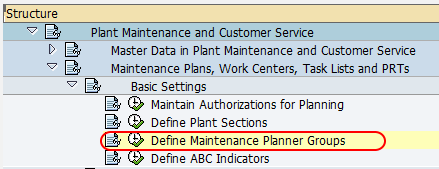
| SAP IMG Path | SPRO > Plant Maintenance & Customer Service > Maintenance plans, work Centers, Task lists and PRTs > Basic Settings > Define Maintenance planner groups. |
Planner group fields used in OIAI configuration
The OIAI configuration screen uses a small set of fields. The same planner group key can be reused in different planning plants if your organization wants plant-specific responsibilities, but within one planning plant the key should clearly identify one planning group.
| Field | Meaning in SAP PM planner group setup | Example |
|---|---|---|
| PlPl | Maintenance planning plant for which the planner group is defined. | 1000 |
| PG | Planner group key used in SAP PM transactions and master data. | M01 |
| Name | Description of the maintenance planner group. | Mechanical Planning |
| Telephone | Optional contact number for the planner group. | Extension or team phone |
Configuration steps
Perform the following configuration steps for maintaining the planner group in SAP.
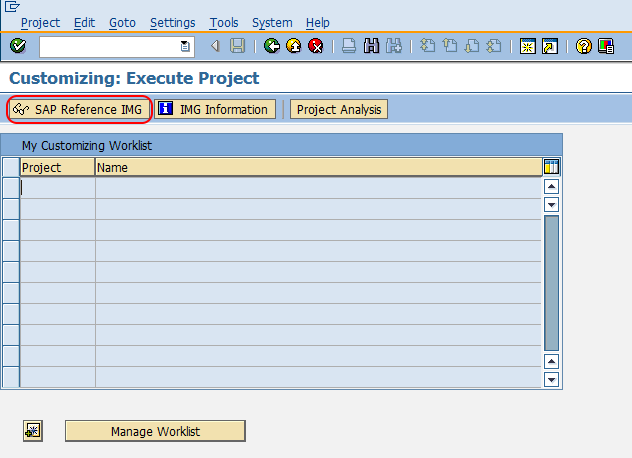
Step 1 : Execute t-code “SPRO” in command field from SAP easy access screen.

Step 2 : Choose “SAP Reference IMG”
Step 3 : Follow the navigation menu node Plant Maintenance & Customer Service Maintenance plans, work Centers, Task lists and PRTs – Basic Settings and choose img activity “Define Maintenance planner groups”.
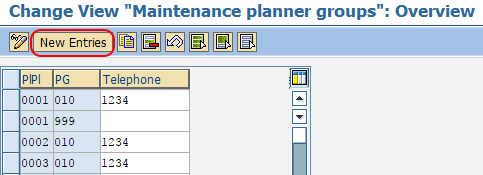
Step 4 : On change view maintenance planner groups overview screen, choose new entries button for creation of new planner group in SAP.
Step 5 : On new entries planner group screen, update the following details.
- PlPl : – Update the maintenance planning plant key for planner group.
- PG : – Update the key that defines as planner group in SAP.
- Name : – Update the descriptive name of planner group.
- Telephone : – Update the contact number planner group
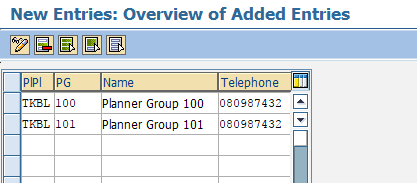
After maintaining all the required details for planner group, choose save icon and save the configured details.
Successfully we have created new maintenance planner groups in SAP PM.
After saving a maintenance planner group in SAP PM
After the configuration is saved, the planner group can be used in SAP PM objects and transactions where planning responsibility is required. Depending on the process design, users may select or default the planner group in technical object master data, maintenance notifications, maintenance orders, and maintenance planning activities.
For clean reporting and easier work assignment, keep the planner group description business-friendly. A key such as M01 may be technically valid, but the description should make the responsibility clear, such as Mechanical Planning or Electrical Maintenance Planning.
Planner group vs maintenance work center in SAP PM
Planner group and maintenance work center are often confused because both appear in maintenance processing. They are not the same configuration object.
| SAP PM object | What it represents | Where it is used |
|---|---|---|
| Maintenance planner group | Person, team, or group responsible for planning and processing maintenance tasks. | Planning responsibility in notifications, orders, and related PM data. |
| Maintenance work center | Workshop, machine group, labor group, or capacity used to perform maintenance operations. | Operation planning, scheduling, costing, and capacity planning. |
Use planner groups to structure responsibility. Use work centers to structure execution capacity. A maintenance order can use both: the planner group for ownership and the work center for the operation work to be performed.
SAP table for maintenance planner groups
Maintenance planner group configuration is commonly stored in table T024I, which contains fields such as maintenance planning plant, planner group key, planner group name, and telephone number. This is useful for consultants and support teams when they need to validate configuration or check whether a planner group exists for a planning plant.
Do not confuse this with maintenance strategy or maintenance package tables. For example, table T351P is related to maintenance packages in strategy-based maintenance planning, not to defining SAP PM planner groups.
Good naming practice for SAP PM planner group keys
Use a planner group key pattern that users and support teams can understand. The key is short, so many projects use a compact code and rely on the description for clarity. Before saving entries, confirm the naming convention with the PM functional team and avoid creating duplicate groups that represent the same responsibility.
- Use one planner group for one clear planning responsibility in a planning plant.
- Avoid vague descriptions such as Group 1 or PM Team when the plant has multiple planning teams.
- Keep the key stable after go-live because it may be referenced in master data and transactional documents.
- Create separate planner groups only when reporting, ownership, or process responsibility is different.
Related SAP S/4HANA Asset Management configuration reference
In SAP S/4HANA Asset Management configuration, planner groups are part of the organizational setup around maintenance planning plants and work centers. For broader context, refer to SAP’s learning material on configuring plants in SAP S/4HANA Asset Management and configuring organizational units for asset management.
Frequently asked questions about SAP PM maintenance planner groups
How do I create a maintenance planner group in SAP PM?
Use transaction code OIAI or follow the IMG path through SPRO to Define Maintenance planner groups. Choose New Entries, enter the maintenance planning plant, planner group key, name, and optional telephone number, and then save the entry.
What is the difference between planner group and maintenance work center?
A planner group represents planning responsibility for maintenance tasks. A maintenance work center represents the capacity or workshop used to execute maintenance operations. Both may appear in maintenance orders, but they serve different purposes.
Which SAP table stores maintenance planner groups?
Maintenance planner groups are commonly stored in table T024I. The table includes the maintenance planning plant, planner group key, planner group name, and contact information fields.
Is a maintenance planner group created for a plant or company code?
A maintenance planner group is created for a maintenance planning plant. It is not created directly for a company code, although the planning plant itself belongs to the broader enterprise structure.
Can one SAP PM planning plant have multiple planner groups?
Yes. A planning plant can have multiple planner groups when different teams or planners are responsible for different maintenance areas, such as mechanical, electrical, utilities, or instrumentation.
Editorial QA checklist for this SAP PM planner group configuration
- Confirms that OIAI is the transaction code used to define maintenance planner groups.
- Explains that the planner group is assigned to a maintenance planning plant, not directly to a company code.
- Keeps all existing screenshots and SAP PM navigation links unchanged.
- Clarifies the difference between planner group responsibility and maintenance work center capacity.
- Mentions table T024I for planner group configuration and avoids incorrectly mapping planner groups to maintenance package tables.
SAP PM maintenance planner group configuration summary
Maintenance planner groups in SAP PM are used to organize planning responsibility within a maintenance planning plant. Use transaction OIAI or the SPRO IMG path to create the planner group, enter the planning plant, planner group key, description, and optional contact number, and save the configuration. After saving, the planner group can be used in maintenance planning and processing so that responsibility is clear in SAP PM transactions.