 TutorialKart.com
How to define material groups in SAP MM using OMSF
Material groups in SAP MM are used to classify materials and services that have similar business characteristics. A material group helps purchasing, inventory, and reporting teams group related items such as desktops, televisions, speakers, spare parts, packing materials, or office supplies.
Material groups are maintained at client level. Once a material group is defined, it can be assigned in the material master and used in purchasing documents and reports. It is mainly a classification and reporting field; it is not the same as material type, which controls several master data and process settings.
What is a material group in SAP?
A material group is a key that groups materials or services with common attributes. For example, an electronics company may keep separate material groups for desktops, televisions, speakers, cables, and accessories. A manufacturing company may use material groups for raw materials, fasteners, bearings, safety items, tools, and consumables.
The material group should be planned carefully because it is commonly used for search, purchasing analysis, spend reporting, inventory review, and material master classification. Avoid creating too many narrow groups that are difficult to maintain, and avoid very broad groups that do not provide useful reporting value.
Material group vs material type in SAP MM
| Comparison point | Material group | Material type |
|---|---|---|
| Main purpose | Groups similar materials or services for classification and reporting. | Defines the nature of the material, such as raw material, finished goods, trading goods, or service. |
| Configuration use | Mostly used for grouping, search, purchasing analysis, and reporting. | Controls important settings such as number range, field selection, quantity/value update, and allowed views. |
| Example | Laptops, cables, packing material, electrical spares. | ROH, FERT, HALB, HAWA, DIEN. |
| Business impact | Useful for analysis and classification. | Affects how the material master behaves in SAP MM and related modules. |
In simple terms, material type answers what kind of material master record it is, while material group answers which business category the material belongs to.
Transaction code and IMG path to define material groups in SAP
You can create material groups in SAP MM by using transaction code OMSF or by following the SAP IMG navigation path shown below.
| Transaction code | OMSF |
| SAP Menu Path | SPRO > IMG > Logistics – General > Material Master > Settings for Key Fields > Define Material Groups |
Step 1: Open material group configuration with t-code OMSF
Execute transaction code OMSF in the command field from the SAP Easy Access screen.
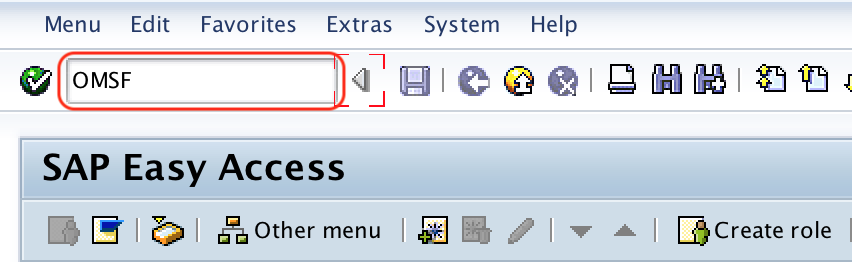
You can also reach the same activity from transaction SPRO by choosing SAP Reference IMG and navigating to the material master settings for key fields.
Step 2: Choose New Entries for SAP MM material groups

On the Change View “Material Groups”: Overview screen, choose New Entries to create a new material group based on the project requirement.
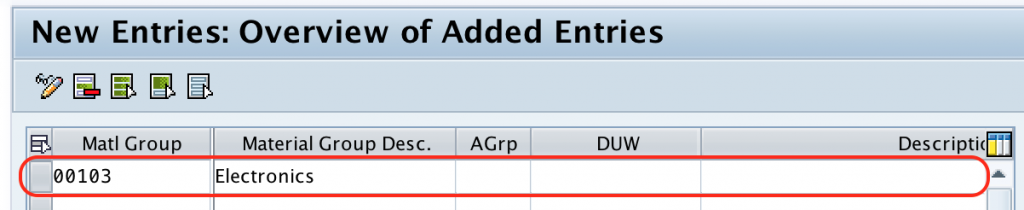
Step 3: Enter the material group key and description
On the new entries screen for material groups, maintain the following fields.
| Field | What to enter | Example |
|---|---|---|
| Matl Group | Enter the key that identifies the material group in the SAP system. The field allows up to 9 characters. | ELEC |
| Material group description | Enter a clear description that users can understand in material master and purchasing screens. | Electrical Items |
Choose meaningful keys and descriptions. A short key may be easier for users to enter, but the description should be specific enough for reporting and search. For example, Electrical Items is clearer than a generic description such as Items.
Step 4: Save the configured material group in SAP
After maintaining the material group key and description, choose the Save icon. If the system prompts for a customizing request, enter the transport request details and save the configuration.
After saving, the material group is available for assignment in material master records and other relevant SAP MM transactions. Successfully, we have defined material groups in SAP MM.
Example material group structure for SAP MM implementation
The exact material group structure depends on the business. The following examples show how a project team may classify materials for easier reporting and purchasing analysis.
| Business area | Sample material group | Possible description |
|---|---|---|
| IT procurement | LAPTOP | Laptops and notebooks |
| Electrical maintenance | ELEC | Electrical spares |
| Production stores | FASTENER | Nuts, bolts, and fasteners |
| Packaging | PACK | Packing materials |
| Office supplies | OFFSUP | Office consumables |
For a live project, finalize the grouping logic with purchasing, inventory, finance, and reporting teams before maintaining the values in SAP. This helps avoid duplicate groups such as Electrical, Elect Items, and Electrical Spares being created for the same business purpose.
Where material groups are used in SAP MM
- Material master: The material group field helps classify the material for search and reporting.
- Purchasing documents: Material groups can support purchasing analysis and spend review.
- Reporting: Reports can be filtered or summarized by material group to review related materials together.
- Service and non-stock procurement: Material groups can also be useful when the item does not have a full material master record, depending on the purchasing process.
Common mistakes while defining SAP material groups
- Creating a separate material group for every material instead of grouping similar materials.
- Using vague descriptions that do not help users identify the correct group.
- Creating duplicate groups with similar meanings.
- Mixing material type logic with material group logic.
- Changing live material group structures without checking reporting, purchasing, and master data impact.
Editorial QA checklist for SAP MM material group setup
- Confirm that the transaction code OMSF and IMG path are correct for defining material groups.
- Check that the material group key follows the project naming convention and does not duplicate an existing group.
- Verify that the description is clear for material master users and purchasing users.
- Review whether the group is broad enough for reporting but not so broad that it loses business meaning.
- Confirm that examples do not confuse material group with material type.
FAQs on material groups in SAP MM
What is meant by material group in SAP?
A material group in SAP is a classification key used to group materials or services with similar characteristics. It helps users search, classify, and report related items together.
What is the transaction code for material group configuration in SAP MM?
The transaction code to define material groups in SAP MM is OMSF. You can also access it through SPRO under Logistics – General > Material Master > Settings for Key Fields > Define Material Groups.
What is the difference between material type and material group in SAP MM?
Material type controls important behavior of a material master record, such as number range and allowed views. Material group is mainly used to classify similar materials or services for reporting, search, and purchasing analysis.
How many characters are allowed for a material group key in SAP?
The material group key allows up to 9 characters. The key should be short, consistent with the project naming standard, and supported by a clear description.
Can the same material group be assigned to many materials?
Yes. A material group is meant to group many related materials or services. For example, multiple cables, switches, and connectors may belong to one electrical spares material group if that matches the company reporting structure.