 TutorialKart.com
In this SAP PM tutorial, you will learn how to define types of technical objects in SAP PM Customizing. A technical object type is a small configuration key used to classify equipment and functional locations such as pumps, cranes, mobile equipment, power supply units, or production machines.
The setting is maintained in SAP IMG under Plant Maintenance and Customer Service. Once the object type is created, users can assign it in technical object master data so that maintenance reporting, filtering, and classification become more consistent.
How to define types of technical objects in SAP PM
In this activity, you define the technical object type that describes the category of a technical object in SAP. For example, an organization may create object types for mobile cranes, water pumps, transformers, compressors, forklifts, or HVAC units. The object type can then be assigned to equipment and functional locations.
What technical object types mean for SAP PM equipment and functional locations
Technical objects in SAP PM represent the physical or logical assets that are maintained by the maintenance team. Equipment usually represents an individual maintainable asset, while a functional location represents a position or structure in the plant where equipment can be installed. SAP documentation also describes technical objects as master data used to structure maintenance processing and asset information.
The technical object type is not the same as an equipment category or a functional location category. It is a simple classification field that helps identify what kind of object is being maintained. This is useful when users display equipment lists, review functional location data, or analyze maintenance objects by type.
| SAP PM term | Meaning in this configuration | Example |
|---|---|---|
| Technical object | A maintainable object in Plant Maintenance, such as equipment or a functional location. | Boiler, conveyor, pump, electrical panel |
| Object type | A key and description used to classify the technical object. | PUMP – Water Pump |
| Equipment | An individual asset that can be installed, maintained, dismantled, and tracked. | CRN01 – Mobile Crane |
| Functional location | A structured location or area where maintenance activities are planned. | PLANT-UTIL-WATER |
Configuration path for defining SAP PM technical object types
Configuration steps
You can define type of technical object in SAP PM by using the following navigation method.
| Transaction Code | SPRO |
| SAP IMG Path | IMG > Plant Maintenance & Customer Service > Technical Objects > General data > Define types of technical objects. |
This IMG activity maintains the allowed object type keys and descriptions. The same configuration is used when assigning object types to relevant technical object master records.
Step-by-step SAP PM configuration for technical object type
Step 1 : Execute t-code “SPRO” in command field from SAP easy access screen.

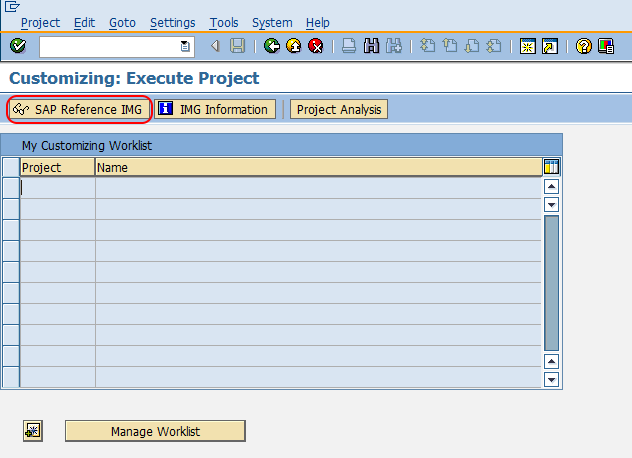
Step 2 : Choose SAP Reference IMG from Customizing execute project screen.
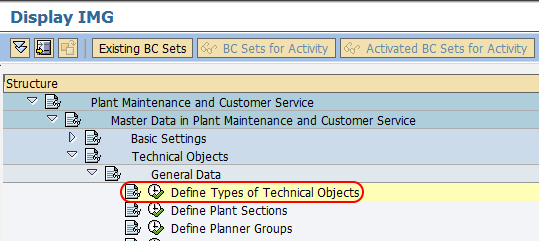
Step 3 : Follow the navigation menu node Plant Maintenance and Customer Service – Technical Objects – General data and choose IMG activity “Define types of technical objects”.
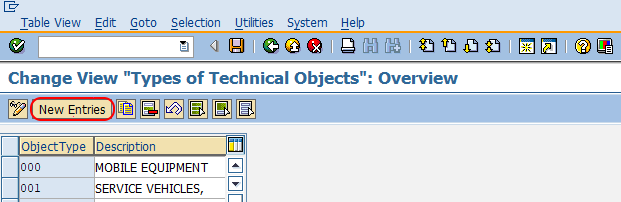
Step 4 : On change view types of technical objects overview screen, click on new entries button to create the new technical object type in SAP.
Step 5 : On new entries object type screen, update the following details.
- Object Type : – Update the key that defines as types of technical objects in SAP.
- Description : – Update the descriptive text of technical objects type.
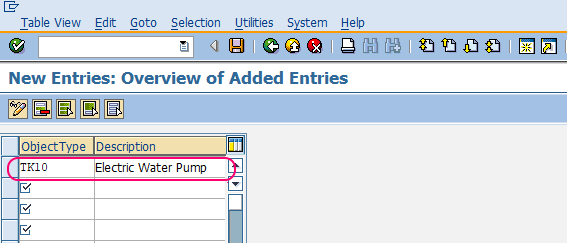
After maintaining all the required details for technical object type, choose save icon and save the configured details.
Successfully we have created new types of technical object in SAP PM module.
Field values to maintain for SAP PM object type entries
The configuration screen normally requires only a short object type key and a description. Keep the key meaningful enough for reporting, but do not make it too specific if the same type will be used across plants or maintenance areas.
| Field | How to maintain it | Practical example |
|---|---|---|
| Object Type | Enter a short key that represents the technical object category. | PUMP |
| Description | Enter a clear description that business users can understand. | Water Pump |
| Transport request | Save the Customizing entry in the correct transport request when prompted. | PM master data configuration transport |
For example, if the maintenance team wants to identify all pump-related equipment and functional locations, an object type such as PUMP with the description Water Pump can be created. The same object type can then be reused wherever the object classification is valid.
Example technical object type keys for SAP PM plants
The following examples show how object type keys can be planned. Your real naming should follow your organization’s SAP naming standards and transport governance.
| Object type key | Description | Where it may be used |
|---|---|---|
| PUMP | Water Pump | Equipment master, pump functional location |
| CRAN | Mobile Crane | Mobile equipment master |
| COMP | Air Compressor | Utility equipment |
| TRFO | Transformer | Electrical maintenance objects |
| HVAC | Heating and Cooling Unit | Facilities maintenance objects |
Where object type is used after SAP PM configuration
After you define the technical object type, it becomes available for assignment in relevant technical object master data. In daily SAP PM work, the value helps users group similar objects and search for objects of the same kind.
- Equipment master data: assign the object type to classify individual maintainable assets.
- Functional location master data: assign the object type to classify locations or plant structures.
- List display and reporting: use object type as a filter when displaying technical objects, for example in equipment or functional location reports.
- Maintenance data quality: use consistent object type values so users do not create duplicate or unclear categories.
For display and reporting, SAP PM users often work with equipment and functional location list transactions such as equipment display lists. Object type is helpful in these screens because it narrows the list to assets of a similar technical category.
Common mistakes while defining SAP PM technical object types
- Creating too many object types: avoid creating a separate object type for every individual asset. Object type should classify a group of similar objects.
- Using unclear keys: keys such as A1 or MISC are difficult to interpret in reports. Use meaningful abbreviations where possible.
- Mixing object type with equipment category: equipment category controls different equipment behavior, while object type is mainly a classification value.
- Ignoring existing entries: check whether a suitable object type already exists before creating a new one.
- Using inconsistent descriptions: maintain descriptions in a standard business language so that users can select the correct type.
QA checklist for SAP PM technical object type configuration
- Confirm that the new object type key follows the project naming convention.
- Check that the description clearly explains the technical object category.
- Verify that a duplicate object type does not already exist in the system.
- Assign the object type to sample equipment or functional location master data in the test system.
- Run a display or list report to confirm that the object type can be used for filtering and review.
Reference links for SAP PM technical objects
For additional background on SAP technical objects and equipment master data, refer to SAP Help documentation for technical objects in SAP S/4HANA and SAP Learning material on configuring and creating equipment.
FAQs on defining types of technical objects in SAP PM
What are technical objects in SAP PM?
Technical objects in SAP PM are master data objects used to represent maintainable assets and plant structures. The most common technical objects are equipment and functional locations.
What is the object type in SAP PM?
The object type in SAP PM is a configuration key used to classify technical objects. It describes the kind of equipment or functional location, such as pump, crane, compressor, or transformer.
Can the same technical object type be used for equipment and functional locations?
Yes. A technical object type can be used for equipment and functional locations when the classification is relevant for both. The exact assignment depends on how the organization structures its maintenance master data.
Is technical object type the same as equipment category in SAP PM?
No. Equipment category is a separate SAP PM control field, while technical object type is a classification value used to describe the nature of the technical object.
Which transaction is used to define types of technical objects in SAP PM?
You define types of technical objects through transaction code SPRO by following the IMG path: Plant Maintenance and Customer Service > Technical Objects > General data > Define types of technical objects.