 TutorialKart.com
How to create maintenance strategy in SAP PM using IP11
A maintenance strategy in SAP PM is used for strategy-based preventive maintenance. It groups one or more maintenance packages, such as monthly inspection, quarterly service, or yearly overhaul, under one strategy key. The same strategy can then be assigned to task lists and maintenance plans so that SAP can schedule the correct work packages at the required intervals.
In this activity, you create a maintenance strategy in SAP to define the frequency of specific work packages for a type of equipment. A work package can be an inspection, maintenance activity, service activity, calibration, overhaul, or any other planned maintenance task. Each package contains its own cycle length and short text, and these packages are later selected in the maintenance task list.
When maintenance strategy is used in SAP Plant Maintenance
Maintenance strategy is normally used when one technical object has different recurring maintenance tasks at different intervals. For example, an electric pump may require a monthly visual inspection, a three-month lubrication activity, and an annual performance check. Instead of creating completely separate plans for every frequency, you can maintain packages in one strategy and use those packages in a strategy task list and maintenance plan.
- Time-based preventive maintenance: Packages are based on days, weeks, months, or years.
- Performance-based preventive maintenance: Packages can be based on counter readings, such as running hours or kilometers, depending on the scheduling indicator and maintenance plan design.
- Multiple package maintenance: Several packages are kept under one strategy so that SAP can determine which operations are due during scheduling.
Navigation for creating maintenance strategy in SAP PM
You can define maintenance strategy in SAP PM by using the following navigation method.
| Transaction code | IP11 |
| SAP Menu Path | Logistics > Plant Maintenance> Preventive Maintenance > Maintenance planning > Maintenance strategies > change. |
In some SAP systems, the screen text may appear as Maintain Strategies, Change View Maintenance Strategies, or a similar wording depending on the SAP release and menu personalization. The transaction code IP11 is the direct method for maintaining the strategy.
Fields required before creating a maintenance strategy in SAP PM
Before you create a maintenance strategy, decide the maintenance cycle logic clearly. This helps avoid incorrect package intervals and incorrect call dates in preventive maintenance scheduling.
| Requirement | Why it is needed |
|---|---|
| Strategy key and description | Identifies the maintenance strategy clearly for planners and task list users. |
| Scheduling indicator | Determines whether the strategy is time-based, performance-based, or based on another scheduling logic available in the system. |
| Strategy unit | Defines the basic unit used for package cycles, such as month or year for time-based packages. |
| Call horizon | Controls when a maintenance call object is generated before the package due date. |
| Early and late completion rules | Determines how the next planned date is shifted when work is completed early or late. |
| Maintenance packages | Defines the actual recurring intervals, such as 1 month, 3 months, 6 months, or 12 months. |
Configuration steps to create maintenance strategy in SAP PM
Perform the following configuration steps to create maintenance strategy in SAP Plant Maintenance module.
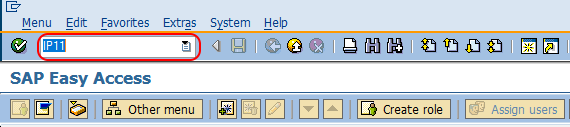
Step 1 : Execute t-code “IP11” in command field from SAP easy access screen.
This opens the maintenance strategy configuration area where you can create or change strategy keys and define their packages.
Step 2 : On change view maintain strategies overview screen, choose maintenance strategies folder under dialog structure and click on new entries button to create the new maintenance strategy in SAP.
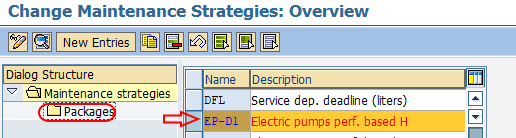
Step 3 : On change maintenance strategies details screen, update the following details.
- Name : Enter the alpha numeric key that defines as strategy in SAP.
- Description : Update the descriptive text of maintenance strategy i.e. Electric pumps perf. based H.
- Scheduling indicator : Choose the appropriate unit, i.e. time.
- Strategy unit : It defines as unit of time, choose Mon (month) or Yr (year).
- Call horizon : In most cases 100% is used for call horizon. When an order is generated before a call is required, it is expressed as percentage of cycle length.
- Shift factor for late completion : It is used to determine the impact of late completion of work. Update the percentage for late completion
- Tolerance for late completion (%) : Update percentage of tolerance for late completion
- Shift factor for early completion :It is used to determine the impact of early work completion, enter the percentage factor for early completion.
- Tolerance for early completion (%) : Update the percentage of tolerance limit for early completion.
- Factory Calendar : Leave this field as blank or choose the factory calendar as per requirements.
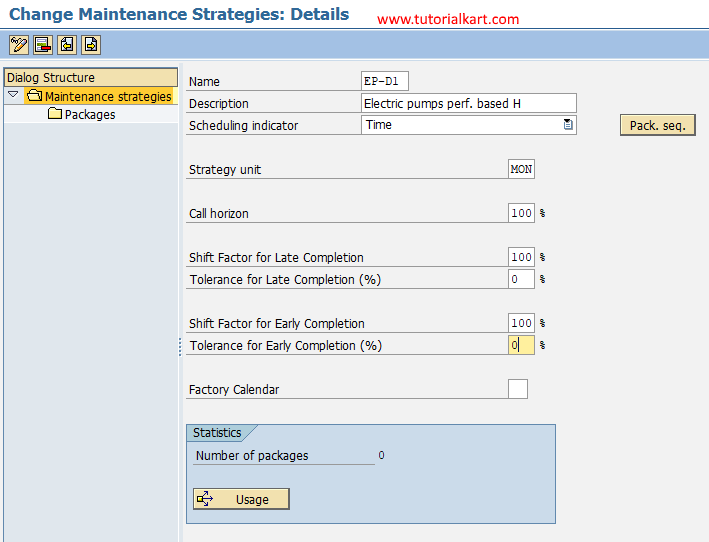
Now choose save icon and save the configured details.
Meaning of important SAP PM maintenance strategy fields
The maintenance strategy header controls how all packages under the strategy behave during scheduling. The following field explanations help you choose values correctly before saving the strategy.
| Field | Explanation | Example |
|---|---|---|
| Name | Unique strategy key used in task lists and maintenance plans. | PUMP_M |
| Description | Readable explanation of the strategy purpose. | Electric pump monthly strategy |
| Scheduling indicator | Specifies the scheduling basis, such as time-based scheduling. | Time |
| Strategy unit | Base unit for the package cycle. | MON for months |
| Call horizon | Percentage of the cycle at which SAP can generate the maintenance call. | 100% means call at full cycle |
| Shift factor | Controls whether early or late completion shifts the next planned date. | Used when completion variance should affect future calls |
| Tolerance | Defines the acceptable early or late completion range before shift logic applies. | 10% tolerance for early completion |
| Factory calendar | Controls working-day logic if calendar-based scheduling is required. | Plant-specific factory calendar |
Create maintenance packages for the SAP PM strategy
Step 4 : Choose the maintenance strategies key and click on packages folder.
Step 5 : Click on new entries button and update the following details.
- Package no : Update the sequential identifying number of cycle item, starting at 1.
- Cycle length : Frequency of inspection or maintenance period.
- Unit : Unit for performance of maintenance task.
- Maintenance cycle text : Descriptive text of work.
- Cycle short text : Update the two characteristic key as cycle short text and it is used for assigning to task list.
- Hierarchy : Enter the hierarchy level of maintenance package.
- Hierarchy shot text : Short text of hierarchy.
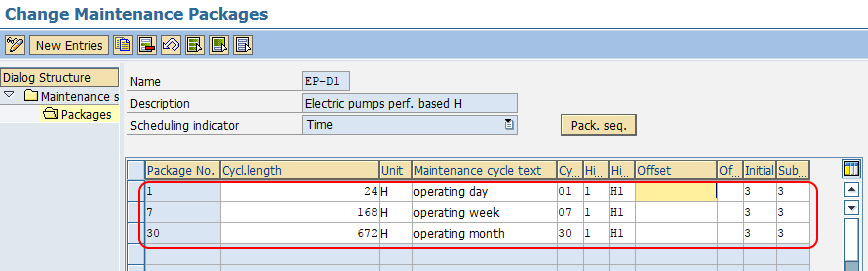
Choose save icon and save the configured maintenance packages details
Example maintenance package structure for a pump strategy
The package structure should match the real preventive maintenance program. For a time-based pump maintenance strategy, the packages may be defined as follows.
| Package no. | Cycle length | Unit | Cycle short text | Maintenance cycle text |
|---|---|---|---|---|
| 1 | 1 | MON | 1M | Monthly inspection |
| 2 | 3 | MON | 3M | Quarterly lubrication |
| 3 | 6 | MON | 6M | Half-yearly service |
| 4 | 12 | MON | 12M | Annual overhaul |
After the packages are saved, the strategy can be used in a maintenance task list. In the task list, operations are assigned to package short texts such as 1M, 3M, 6M, or 12M. During maintenance plan scheduling, SAP uses these package assignments to determine which operations are due for each call.
Package hierarchy in SAP PM maintenance strategy
The hierarchy field helps SAP handle packages when multiple cycles fall due at the same time. For example, if a 1-month inspection and a 12-month overhaul are both due, the planner may not want separate calls for both if the annual overhaul already includes the monthly inspection. The hierarchy setting supports this type of package control.
Use package hierarchy carefully. Keep the numbering and short texts simple, and make sure the task list operations are assigned to the correct packages. Incorrect hierarchy or package assignment may result in too many calls, missing operations, or confusing maintenance orders.
What to do after creating the maintenance strategy in SAP PM
Creating the strategy in IP11 only completes the strategy configuration. To make it useful in preventive maintenance, continue with the remaining master data and planning steps.
- Create or change a maintenance task list and assign the maintenance strategy.
- Assign package short texts to the relevant task list operations.
- Create a strategy-based maintenance plan for the equipment or functional location.
- Enter scheduling parameters in the maintenance plan, such as start date and scheduling period.
- Schedule the maintenance plan and check whether the correct calls are generated.
Successfully we have created maintenance strategy in SAP PM.
Common mistakes while creating maintenance strategy in SAP PM
- Using unclear strategy descriptions: A vague description makes it difficult for planners to select the right strategy in task lists and plans.
- Choosing the wrong strategy unit: A monthly package should not be mixed with an unintended yearly or day-based unit unless the maintenance program requires it.
- Leaving package short texts inconsistent: Short texts such as 1M, 3M, and 12M should be easy to identify when assigning task list operations.
- Ignoring call horizon impact: An incorrect call horizon can generate maintenance calls earlier or later than expected.
- Not testing the strategy in a maintenance plan: Always schedule a test plan in the quality or test system before using the strategy in production.
QA checklist for SAP PM maintenance strategy setup
- Confirm that the IP11 strategy key follows the naming convention used in your SAP PM system.
- Check that the scheduling indicator matches the intended preventive maintenance method.
- Verify that all package cycle lengths and units are correct.
- Confirm that package short texts are available for assignment in the task list.
- Review call horizon, shift factors, and tolerance percentages with the maintenance planning team.
- Test the strategy with a sample maintenance task list and strategy-based maintenance plan.
FAQs on creating maintenance strategy in SAP PM
What is a maintenance strategy in SAP PM?
A maintenance strategy in SAP PM is a set of maintenance packages grouped under one strategy key. It is used to plan recurring preventive maintenance tasks with different intervals, such as monthly, quarterly, and yearly work.
Which transaction code is used to create maintenance strategy in SAP PM?
Transaction code IP11 is used to create and maintain a maintenance strategy in SAP PM.
What is a maintenance package in SAP PM strategy?
A maintenance package defines one cycle inside a strategy. It contains details such as package number, cycle length, unit, cycle short text, and maintenance cycle text.
Is creating a maintenance strategy enough to generate maintenance orders?
No. After creating the maintenance strategy, it must be used in a task list and a strategy-based maintenance plan. Maintenance calls or orders are generated when the maintenance plan is scheduled according to the planning settings.
What is call horizon in SAP PM maintenance strategy?
Call horizon is the percentage of the maintenance cycle at which SAP creates the maintenance call object. For example, a 100% call horizon means the call is generated at the full cycle point, while a lower percentage can generate it earlier.