 TutorialKart.com
Go Goroutines and Concurrent Function Execution
A goroutine is a function that runs concurrently with other functions in a Go program. Goroutines are managed by the Go runtime and are generally more lightweight than operating-system threads.
Every Go program starts with at least one goroutine: the goroutine that executes the main function. A program can create additional goroutines to perform independent or overlapping work.
To start a goroutine, place the go keyword before a function or method call.
go somefunc(arg1, arg2)The function call is scheduled to run in a new goroutine. The current goroutine continues with the next statement without waiting for the new goroutine to finish.
Start a Goroutine with the go Keyword
The following program starts two goroutines. Each goroutine calls printmessage, while the main goroutine continues and prints its own message.
example.go
package main

import "fmt"

func printmessage(s string) {
	fmt.Println(s)
}

func main() {
	// a goroutine
	go printmessage("Hello World!")
	// another go routine
	go printmessage("Welcome to Go Goroutines.")

	fmt.Println("End of the main goroutine.")
}
Output
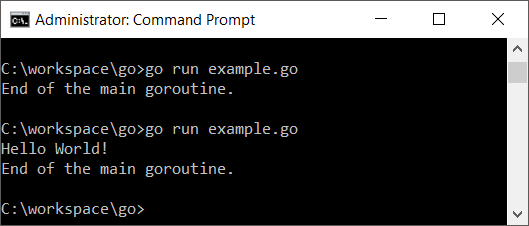
The two messages started with go may not appear before the program exits. This is not caused by the console being unavailable. The actual reason is that the main goroutine can finish before the other goroutines have an opportunity to complete.
When the main function returns, the entire program terminates immediately, including any goroutines that are still running. A program should therefore coordinate goroutines explicitly instead of relying on timing.
Wait for Go Goroutines with sync.WaitGroup
A sync.WaitGroup is commonly used when one goroutine must wait for a known number of other goroutines to finish. Call Add before starting the goroutines, call Done when each goroutine completes, and call Wait in the goroutine that must pause.
package main

import (
    "fmt"
    "sync"
)

func printMessage(message string, wg *sync.WaitGroup) {
    defer wg.Done()
    fmt.Println(message)
}

func main() {
    var wg sync.WaitGroup

    messages := []string{
        "Hello World!",
        "Welcome to Go Goroutines.",
    }

    wg.Add(len(messages))

    for _, message := range messages {
        go printMessage(message, &wg)
    }

    wg.Wait()
    fmt.Println("All goroutines completed.")
}
Possible output
Welcome to Go Goroutines.
Hello World!
All goroutines completed.
The first two lines may appear in either order because goroutine scheduling is not deterministic. The final line always appears after both worker goroutines call Done.
Send Results Between Goroutines with Go Channels
A channel lets goroutines send and receive typed values. Channels are useful when a goroutine must return a result, report completion, or pass data to another goroutine.
ch := make(chan valueType)
ch <- value
received := <-ch
The send operation uses <- with the channel on the left. A receive operation uses <- before the channel.
package main

import "fmt"

func square(number int, result chan int) {
    result <- number * number
}

func main() {
    result := make(chan int)

    go square(6, result)

    value := <-result
    fmt.Println(value)
}
Output
36The receive operation blocks until the goroutine sends a value. This provides both communication and synchronization.
Unbuffered and Buffered Channels with Goroutines
An unbuffered channel is created without a capacity. A send on an unbuffered channel waits until another goroutine is ready to receive the value.
messages := make(chan string)A buffered channel stores a limited number of values before a receiver must consume them. Its capacity is supplied as the second argument to make.
messages := make(chan string, 2)package main
import "fmt"
func main() {
messages := make(chan string, 2)
messages <- "first"
messages <- "second"
fmt.Println(<-messages)
fmt.Println(<-messages)
}Output
first
second
A channel buffer is not a replacement for synchronization design. Its capacity should reflect how producers and consumers are expected to interact.
Run an Anonymous Function as a Goroutine
A goroutine can run an anonymous function. Add parentheses after the function body to invoke it.
package main

import (
    "fmt"
    "sync"
)

func main() {
    var wg sync.WaitGroup
    wg.Add(1)

    go func(message string) {
        defer wg.Done()
        fmt.Println(message)
    }("Message from an anonymous goroutine")

    wg.Wait()
}
Output
Message from an anonymous goroutinePassing values as function arguments makes it clear which value each goroutine receives.
Pass Loop Values Safely to Goroutines
When starting goroutines inside a loop, pass the current value as an argument to the goroutine function. This avoids ambiguity about which iteration value the goroutine should use and keeps the data flow explicit.
package main

import (
    "fmt"
    "sync"
)

func main() {
    var wg sync.WaitGroup

    for number := 1; number <= 3; number++ {
        wg.Add(1)

        go func(value int) {
            defer wg.Done()
            fmt.Println(value)
        }(number)
    }

    wg.Wait()
}
Possible output
3
1
2
All three values are printed, but their order is not guaranteed.
Protect Shared Data Used by Goroutines
Goroutines in the same process share memory. If multiple goroutines access the same variable and at least one goroutine writes to it without synchronization, the program may contain a data race.
Use channels to transfer ownership of data, or protect shared state with synchronization types such as sync.Mutex or sync.RWMutex.
package main

import (
    "fmt"
    "sync"
)

func main() {
    var wg sync.WaitGroup
    var mu sync.Mutex
    counter := 0

    for i := 0; i < 1000; i++ {
        wg.Add(1)

        go func() {
            defer wg.Done()

            mu.Lock()
            counter++
            mu.Unlock()
        }()
    }

    wg.Wait()
    fmt.Println(counter)
}
Output
1000The mutex ensures that only one goroutine changes counter at a time.
Detect Goroutine Data Races with the Go Race Detector
The Go race detector can help identify unsynchronized memory access while a program or test is running.
go run -race example.goFor a package with tests, run:
go test -race ./...The race detector reports races that occur during the executed code paths. It does not prove that unexecuted paths are race-free.
Goroutine vs Operating-System Thread
A goroutine is scheduled by the Go runtime, while an operating-system thread is scheduled by the operating system. The runtime can schedule many goroutines across a smaller or changing set of operating-system threads.
- A goroutine is created with the
gokeyword. - Goroutine stacks begin small and can grow as needed.
- The Go runtime schedules runnable goroutines on available threads.
- Blocking operations do not necessarily block every goroutine in the program.
- Developers usually coordinate goroutines with channels and the
syncpackage rather than managing threads directly.
The exact scheduling order should not be treated as part of program logic.
Goroutines vs Coroutines
The terms goroutine and coroutine are related to concurrent execution, but they are not interchangeable. A goroutine is a Go runtime construct started with the go keyword and scheduled independently by the runtime. Coroutine behavior varies by language and often involves explicit suspension and resumption at defined points.
Go programmers normally work with goroutines, channels, and synchronization primitives rather than directly controlling when a goroutine yields.
Control Goroutine Cancellation with context
Long-running goroutines should usually have a way to stop. The context package is commonly used to propagate cancellation signals and deadlines.
package main

import (
    "context"
    "fmt"
    "time"
)

func worker(ctx context.Context) {
    for {
        select {
        case <-ctx.Done():
            fmt.Println("worker stopped")
            return
        default:
            fmt.Println("working")
            time.Sleep(50 * time.Millisecond)
        }
    }
}

func main() {
    ctx, cancel := context.WithCancel(context.Background())

    go worker(ctx)

    time.Sleep(120 * time.Millisecond)
    cancel()

    time.Sleep(20 * time.Millisecond)
}
The worker checks ctx.Done() and returns after cancellation. In production code, the caller should also wait for the worker to confirm that it has stopped.
Avoid Goroutine Leaks and Deadlocks
A goroutine leak occurs when a goroutine remains blocked or running even though its result is no longer needed. Common causes include waiting forever on a channel, failing to send a cancellation signal, and starting background work without defining who stops it.
A deadlock occurs when goroutines wait for operations that cannot proceed. For example, sending on an unbuffered channel without a corresponding receiver can block indefinitely.
package main

func main() {
    messages := make(chan string)
    messages <- "hello"
}
This program blocks while sending because no other goroutine is ready to receive from messages. The Go runtime detects that all goroutines are blocked and reports a deadlock.
Common Go Goroutine Coordination Patterns
- Use
sync.WaitGroupwhen waiting for a fixed group of goroutines to finish. - Use channels when goroutines must exchange data or completion signals.
- Use
context.Contextto communicate cancellation and deadlines. - Use
sync.Mutexwhen multiple goroutines must safely update shared state. - Use worker pools when a controlled number of goroutines should process many jobs.
- Close a channel from the sending side when no more values will be sent.
Frequently Asked Questions About Go Goroutines
What does a goroutine mean in Go?
A goroutine is a concurrently executing function managed by the Go runtime. Start one by placing the go keyword before a function call.
Why does my goroutine not print any output?
The main function may be returning before the goroutine finishes. Coordinate completion with a channel or sync.WaitGroup instead of adding an arbitrary sleep.
Do goroutines run in parallel?
Goroutines are concurrent. They may also execute in parallel when the runtime schedules them on multiple operating-system threads and processor cores, but code must not depend on a particular scheduling order.
When should I use a channel instead of a WaitGroup?
Use a channel when goroutines must communicate values or events. Use a WaitGroup when the main requirement is waiting for a known group of goroutines to complete. Some programs use both.
How many goroutines can a Go program create?
Go does not define one fixed application-wide limit. The practical limit depends on available memory, goroutine stack growth, scheduler overhead, open resources, and the work performed by each goroutine. Programs should still bound concurrency when processing large or untrusted workloads.
Go Goroutines Tutorial Editorial QA Checklist
- Confirm that the tutorial explains that program termination, not console contention, causes unfinished goroutine output to disappear.
- Verify that every goroutine example has an explicit completion, communication, or cancellation mechanism when required.
- Do not imply that goroutine execution order is deterministic.
- Check that channel sends have matching receivers or sufficient buffering.
- Ensure shared writable data is protected by channels, mutexes, atomics, or another valid synchronization method.
- Use
sync.WaitGroup.Addbefore starting the goroutines being counted. - Confirm that goroutines which can block indefinitely also have a cancellation or shutdown path.
- Run concurrent examples with the Go race detector during editorial verification.
Go Goroutines Summary
In this Go Tutorial, we learned how to start goroutines with the go keyword, wait for them with sync.WaitGroup, exchange values through channels, protect shared data, detect races, handle cancellation, and avoid goroutine leaks and deadlocks.