 TutorialKart.com
Run a Go Program from the Terminal
After installing Go, you can run a Go source file directly from Command Prompt, PowerShell, or a terminal by using the go run command. This command compiles the program to a temporary executable, runs it, and then removes the temporary build output.
Before continuing, open a terminal and confirm that Go is available:
go versionThe command should display the installed Go version and your operating system architecture. If the terminal reports that go is not recognized or not found, complete the Go installation and ensure that the Go binary directory is included in your system’s PATH.
Create a Go Hello World Source File
To run a Go program, create a text file with the .go extension and write the Go source code in that file. In this example, create a file named helloworld.go.
helloworld.go
package main

import "fmt"

func main() {
   fmt.Println("Hello World")
}
The package main declaration identifies an executable program. The fmt package provides formatted input and output functions, and main() is the function at which program execution begins.
Run the Go File with the go run Command
Open Command Prompt, PowerShell, or a terminal and navigate to the directory containing helloworld.go. For example, use cd followed by the directory path:
cd path/to/your/go/filesRun the following command from that directory.
go run helloworld.goIf Go is installed correctly and the source code contains no errors, the program prints Hello World in the terminal.
Hello World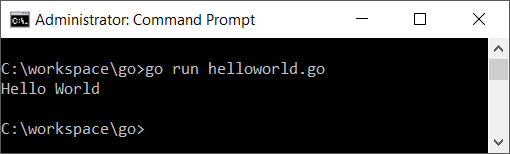
Go Run Command Syntax
The basic syntax for running a single Go source file is:
go run filenameReplace filename with the complete name of the Go source file, including its .go extension. For example:
go run main.goRun Multiple Go Files in the Same Package
A Go program may be divided across several .go files that belong to the same package. You can list the required source files in one go run command:
go run main.go helper.goFor a module-based project, it is usually simpler to run the package in the current directory:
go run .The dot represents the current directory. Go loads the appropriate non-test source files in the package and runs the resulting program.
Run a Go Program Inside a Module
For a project containing multiple files or external dependencies, create a Go module in the project directory. The module file records the module path, Go version, and dependency information.
mkdir hello-app
cd hello-app
go mod init example.com/hello-app
Create a main.go file in that directory, and then run the package:
go run .The official Go getting started tutorial provides another module-based example.
Build a Reusable Go Executable
Use go run while developing or testing a program. To create an executable file that can be run again without recompiling the source each time, use go build:
go build helloworld.goOn Windows, this normally creates helloworld.exe. On macOS and Linux, it normally creates an executable named helloworld. Run the generated executable from the current directory as appropriate for your operating system.
# Windows PowerShell
.\helloworld.exe

# macOS or Linux
./helloworld
Run a Go File in the VS Code Terminal
In Visual Studio Code, open the folder containing your Go file and select Terminal > New Terminal. The integrated terminal usually opens in the selected project folder. Run the same command used in any other terminal:
go run helloworld.goIf the terminal opens in a different directory, use cd to move to the folder containing the file before running the command.
Format Go Code Before Running It
Go includes the gofmt formatter. Formatting the source before running it keeps indentation and spacing consistent:
gofmt -w helloworld.go
go run helloworld.go
The -w option writes the formatted code back to the file.
Common Errors When Running a Go Program
go: command not found or go is not recognized
This error means the terminal cannot locate the Go executable. Verify the installation with go version, restart the terminal after installing Go, and check that the Go binary directory is available through the system PATH.
stat filename.go: no such file or directory
The current directory does not contain the named file, or the filename was typed incorrectly. Use pwd on macOS or Linux, or cd without arguments in Windows Command Prompt, to inspect the current directory. Then list the files and confirm the exact filename.
package command-line-arguments is not a main package
A directly executable Go program must use package main and normally contain a func main() entry point. A library package cannot be run as a standalone application.
undefined errors when running one file
The selected file may depend on functions, types, or variables declared in other files. Run all required files together or, for a module-based package, run go run . from the package directory.
Run Go Code Online Without Installing Go
For a small example, you can use the official Go Playground. Paste the program into the editor and select Run. The playground is useful for testing short, self-contained programs, although it has restrictions compared with running Go locally.
Frequently Asked Questions About Running Go Programs
What command runs a Go program in the terminal?
Use go run filename.go to run one source file. Use go run . to run the main package in the current module directory.
Does go run create an executable file?
go run compiles and runs the program using temporary build output. It does not leave a reusable executable in the working directory. Use go build when you need an executable file.
Can I run a Go program without a go.mod file?
A simple standalone file that uses only the standard library can generally be run by specifying its filename, such as go run helloworld.go. A module is recommended for projects with multiple packages or dependencies.
Why does go run work in one terminal but not another?
The terminals may have different environment variables, working directories, or shell startup settings. Check go version in each terminal and confirm that both terminals are opened in the directory containing the source file.
Is Go easier to run than Python?
Both languages provide straightforward commands for running source files. Python typically executes a script through the Python interpreter, while go run first compiles the Go program and then executes it. The broader learning difficulty depends on the program, language features, and the learner’s background.
Editorial QA Checklist for This Go Run Tutorial
- Confirm that
go versionis used to verify the Go installation. - Confirm that the example file uses
package mainand containsfunc main(). - Test
go run helloworld.gofrom the directory containing the file. - Verify that the documented output is exactly
Hello World. - Keep the distinction between
go runandgo buildclear. - Confirm that module instructions use
go mod initfollowed bygo run ..
Conclusion
In this Go Tutorial, we learned how to create a Go source file, run it with go run, execute a package with go run ., and create a reusable executable with go build.