 TutorialKart.com
Union Transformation in Informatica is an active, connected transformation used to combine rows from multiple input pipelines into one output pipeline. The input data may come from homogeneous sources, such as two Oracle tables, or heterogeneous sources, such as a relational table and a flat file.
The transformation appends rows vertically. It works in a way similar to the SQL UNION ALL operator because it retains duplicate rows instead of removing them.
How Union Transformation Works in Informatica
A Union transformation accepts data through two or more input groups and sends the combined rows through one output group. Each input group must contain compatible ports in the same order.
For example, if one input group contains POSTAL_CODE, COUNTRY_CODE, and REGION, every other input group must provide corresponding ports with compatible metadata. During execution, Informatica reads rows from each input pipeline and passes all of them to the common output group.
Union Transformation Rules and Limitations
- You can create multiple input groups, but the Union transformation has only one output group.
- All input groups and the output group must have matching ports. Port order, data type, precision, and scale must be compatible across the groups.
- The Union transformation does not remove duplicate rows.
- You cannot use a Sequence Generator or Update Strategy transformation directly upstream from a Union transformation.
- The number of ports in every input group must match the number of ports in the output group.
- When source columns have different names, map them to corresponding Union ports based on their meaning and compatible data types.
Union Transformation and SQL UNION ALL Comparison
| Feature | Informatica Union Transformation | SQL UNION ALL |
|---|---|---|
| Purpose | Combines rows from multiple mapping pipelines | Combines rows returned by multiple SQL queries |
| Duplicate rows | Retained | Retained |
| Input structure | Ports in all input groups must match | Selected columns must be compatible |
| Output | One output group | One combined result set |
| Execution location | Within an Informatica mapping | Within the database engine |
If duplicate removal is required, add appropriate downstream logic instead of expecting the Union transformation to perform the equivalent of SQL UNION.
Create a Union Transformation in Informatica PowerCenter
The following mapping combines rows from the GLB_REGIONS and US_REGIONS source tables and loads them into the STG_UN_REGIONS target table.
- Import the source definitions into Source Analyzer and the target definition into Target Designer by using the configured database connection.
- Create a mapping and drag both source definitions and the target definition into the Mapping Designer workspace.
- Confirm that both source pipelines provide the columns required by the target.
Union Transformation Mapping Scenario
| Source | Transformation | Mapping logic | Target |
|---|---|---|---|
| GLB_REGIONS | SQ_GLB_REGIONS | Read global region records | STG_UN_REGIONS |
| US_REGIONS | SQ_US_REGIONS | Read US region records | STG_UN_REGIONS |
| Both source pipelines | Union transformation | Append rows from both sources, including duplicates | STG_UN_REGIONS |
Add the First Input Group to the Union Transformation
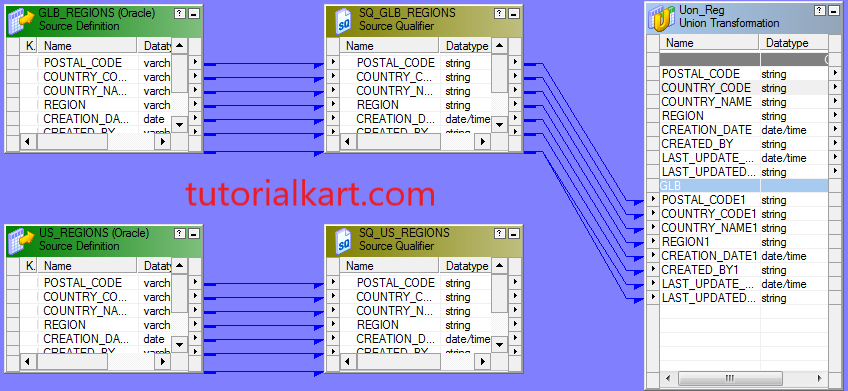
- Open the Transformation menu and choose the option to create a Union transformation.
- Enter a meaningful transformation name and place it in the mapping workspace.
- Drag the required ports from one source qualifier to the Union transformation. Informatica creates the first input group and corresponding output ports.
Create the Second Union Input Group
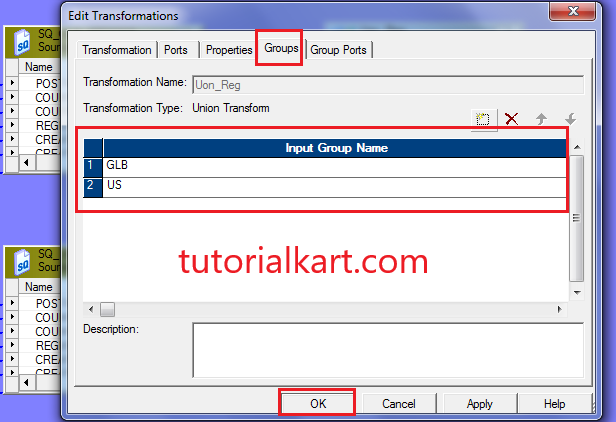
- Double-click the Union transformation to open the Edit Transformations window.
- Open the Groups tab.
- Create a second input group for the second source pipeline.
- Verify that the input groups contain the same number of corresponding ports.
Connect the Second Source to the Union Group
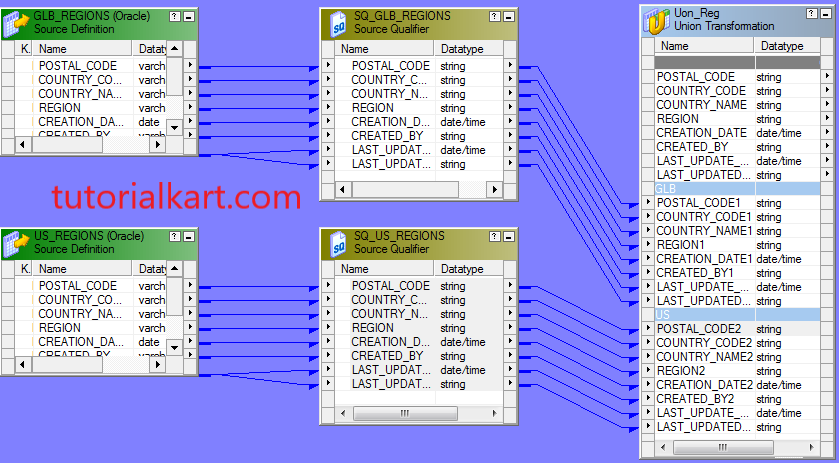
Drag the required ports from the second source qualifier to the second Union input group. Connect every source column to the corresponding port. Check the data type, precision, scale, and port order before validating the mapping.
Connect the Union Output to the Target
Drag all required output ports from the Union transformation to the corresponding target columns. The completed mapping should contain two source pipelines feeding the Union transformation and one output pipeline loading the target.
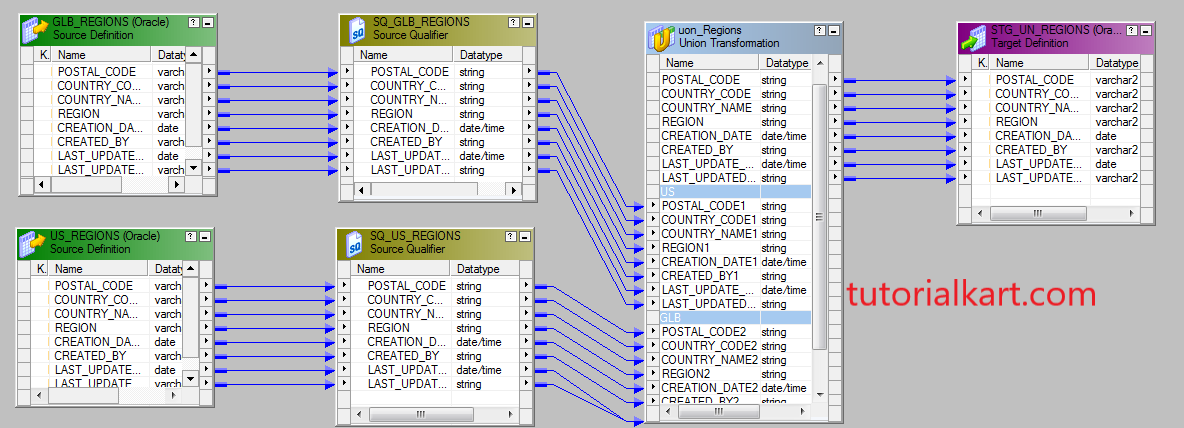
Validate and save the mapping. Next, create the session and workflow, configure the source and target connections, and execute the workflow.
How to Test a Union Transformation Mapping
Validate Union Ports and Mapping Connections
Before executing the mapping, validate its structure. Confirm that both source qualifiers are connected to separate Union input groups and that the Union output is connected to the intended target columns.
- Check that every input group contains the same number of ports.
- Verify that corresponding ports use compatible data types, precision, and scale.
- Confirm that the output ports are linked to the correct target columns.
- Validate the mapping and resolve all reported errors before creating or running the session.
- Review session properties, source connections, target connections, and target load options.
Compare Source and Target Row Counts
For this mapping, the expected target row count is the total number of rows returned by both source pipelines. Because the Union transformation retains duplicates, the basic validation rule is:
Expected target row count = GLB_REGIONS row count + US_REGIONS row count
The following existing SQL checks can be used to compare the target count with the combined source result.
Select count(*) from Stg_Un_Regions.Select count(*) from (SELECT GLB_REGIONS.POSTAL_CODE, GLB_REGIONS.COUNTRY_CODE,
GLB_REGIONS.COUNTRY_NAME, GLB_REGIONS.REGION, GLB_REGIONS.CREATION_DATE,
GLB_REGIONS.CREATED_BY, GLB_REGIONS.LAST_UPDATE_DATE,
GLB_REGIONS.LAST_UPDATED_BY FROM GLB_REGIONSUNION ALL
SELECT US_REGIONS.POSTAL_CODE, US_REGIONS.COUNTRY_CODE, US_REGIONS.COUNTRY_NAME,
US_REGIONS.REGION, US_REGIONS.CREATION_DATE, US_REGIONS.CREATED_BY,
 US_REGIONS.LAST_UPDATE_DATE, US_REGIONS.LAST_UPDATED_BY FROM US_REGIONS)
Run the source-side query against the source database and the target count query against the target database. Compare the results after the workflow completes successfully. Investigate filtering, rejected rows, session errors, or target constraints when the counts do not match.
Verify Union Output Data Against the Target
Row-count validation confirms volume, but it does not prove that every value was loaded correctly. Compare the combined source data with the target data by using the following queries.
SELECT GLB_REGIONS.POSTAL_CODE, GLB_REGIONS.COUNTRY_CODE, GLB_REGIONS.COUNTRY_NAME,
 GLB_REGIONS.REGION, GLB_REGIONS.CREATION_DATE, GLB_REGIONS.CREATED_BY,
 GLB_REGIONS.LAST_UPDATE_DATE, GLB_REGIONS.LAST_UPDATED_BY FROM GLB_REGIONS
UNION ALL
SELECT US_REGIONS.POSTAL_CODE, US_REGIONS.COUNTRY_CODE, US_REGIONS.COUNTRY_NAME,
US_REGIONS.REGION, US_REGIONS.CREATION_DATE, US_REGIONS.CREATED_BY,
US_REGIONS.LAST_UPDATE_DATE, US_REGIONS.LAST_UPDATED_BY FROM US_REGIONS;SELECT POSTAL_CODE,COUNTRY_CODE,COUNTRY_NAME,REGION,CREATION_DATE,
CREATED_BY,LAST_UPDATE_DATE,LAST_UPDATED_BY FROM STG_UN_REGIONS;Whenever practical, compare the complete source and target datasets rather than checking only a small sample. Include null values, duplicate rows, date columns, and boundary values in the review.
Use MINUS to Find Missing Union Rows
If the source and target objects are accessible from the same Oracle database, the MINUS operator can identify rows present in the combined source result but missing from the target.
SELECT GLB_REGIONS.POSTAL_CODE, GLB_REGIONS.COUNTRY_CODE,
GLB_REGIONS.COUNTRY_NAME, GLB_REGIONS.REGION, GLB_REGIONS.CREATION_DATE,
GLB_REGIONS.CREATED_BY, GLB_REGIONS.LAST_UPDATE_DATE,
GLB_REGIONS.LAST_UPDATED_BY FROM READONLY.GLB_REGIONS
UNION ALL
SELECT US_REGIONS.POSTAL_CODE, US_REGIONS.COUNTRY_CODE, US_REGIONS.COUNTRY_NAME,
 US_REGIONS.REGION, US_REGIONS.CREATION_DATE, US_REGIONS.CREATED_BY, US_REGIONS.LAST_UPDATE_DATE,
 US_REGIONS.LAST_UPDATED_BY FROM READONLY.US_REGIONS
MINUS
SELECT POSTAL_CODE,COUNTRY_CODE,COUNTRY_NAME,REGION,CREATION_DATE,
CREATED_BY,LAST_UPDATE_DATE,LAST_UPDATED_BY FROM STAGEDB.STG_UN_REGIONS;
A result containing zero rows indicates that no combined source row is missing from the target for the selected columns. For a complete comparison, run the reverse comparison as well to detect rows present in the target but absent from the source result.
Common Union Transformation Errors in Informatica
| Problem | Likely cause | Recommended check |
|---|---|---|
| Ports cannot be connected | Data types or port structures are incompatible | Compare data type, precision, scale, and port order |
| Mapping validation fails | Input groups contain different numbers of ports | Add or remove ports so every group matches the output structure |
| Target contains duplicate rows | Union retains duplicates by design | Add explicit duplicate-handling logic when required |
| Target count is lower than expected | Rejected rows, target constraints, filters, or session errors | Review session logs, reject files, and target properties |
| Values appear in the wrong target columns | Ports were connected by position incorrectly | Verify that each source field maps to the correct Union and target port |
Union Transformation Questions
Is Union Transformation active or passive in Informatica?
Union is an active transformation because it can affect the number and arrangement of rows passing through the mapping by combining multiple input pipelines into one output pipeline.
Does Union Transformation remove duplicate records?
No. It preserves duplicate rows and therefore behaves like SQL UNION ALL, not SQL UNION.
Can Union Transformation combine more than two sources?
Yes. You can create multiple input groups and connect multiple source pipelines, provided that every group has a compatible port structure.
Can different source column names be used in Union groups?
Yes. The source column names do not need to be identical, but each source column must be connected to the corresponding Union port with a compatible data type, precision, and scale.
How should duplicate rows be removed after a Union transformation?
Use explicit downstream logic appropriate to the mapping design, such as a Sorter transformation configured for distinct rows or an Aggregator transformation with suitable grouping ports. Confirm that the chosen method preserves the required business data.
Union Transformation Editorial QA Checklist
- Confirm that the tutorial describes Union as an active, connected transformation.
- Verify that duplicate rows are described as retained rather than removed.
- Check that all Union input groups have matching port counts and compatible metadata.
- Confirm that the GLB_REGIONS and US_REGIONS pipelines connect to separate input groups.
- Verify that all original screenshots remain in the correct procedural order.
- Ensure that source count, target count, full-data comparison, and MINUS validation are explained separately.
- Check that target row-count expectations account for rejected rows, filters, constraints, and session failures.
- Confirm that duplicate-removal guidance is presented as optional downstream logic rather than a Union feature.