 TutorialKart.com
What is Informatica PowerCenter?
Informatica PowerCenter is an enterprise data integration and ETL platform used to extract data from source systems, transform it according to business rules, and load it into target systems such as data warehouses, databases, files, and enterprise applications. In many projects, the word Informatica is used informally to refer to Informatica PowerCenter, though Informatica is the company and PowerCenter is one of its data integration products.
PowerCenter is commonly used in data warehouse, reporting, migration, master data, and batch integration projects. It provides visual development tools for designing mappings, server services for running jobs, and repository services for storing metadata about sources, targets, mappings, workflows, sessions, and transformations.

Informatica PowerCenter as an ETL and data integration tool
At its core, Informatica PowerCenter performs three main ETL activities: extraction, transformation, and loading. A developer designs the data movement logic in a mapping, connects that mapping to a session or workflow, and schedules or runs the workflow through the PowerCenter services.
| ETL stage | What happens in Informatica PowerCenter |
|---|---|
| Extract | PowerCenter reads data from sources such as Oracle, SQL Server, flat files, XML files, SAP, mainframe systems, and other supported connectors. |
| Transform | The data is cleaned, joined, filtered, aggregated, validated, formatted, or derived using transformations inside mappings. |
| Load | The transformed data is written to target tables, files, warehouses, or other supported systems. |
What data extraction means in Informatica PowerCenter
Data extraction is the process of reading data from one or more operational source systems and bringing it into the PowerCenter pipeline. These source systems may include relational databases, flat files, XML files, ERP systems, CRM systems, or other enterprise applications. In a typical mapping, source definitions describe the structure of the incoming data so that PowerCenter can read it correctly.
What data transformation means in Informatica PowerCenter
Data transformation is the process of converting source data into the required target format. In PowerCenter, transformations are objects used inside mappings to apply business rules. Common transformation work includes merging, cleansing, filtering, aggregating, validating, looking up reference data, and deriving new values.
- Data merging: combining data from multiple sources into one consistent flow.
- Data cleansing: correcting, standardising, or removing unwanted data before loading it to the target.
- Data aggregation: calculating summaries such as totals, counts, minimum values, maximum values, and averages.
- Data derivation: creating new values from existing fields, expressions, or business rules.
- Data validation: checking whether values meet required rules before they are inserted into the target system.
What data loading means in Informatica PowerCenter
Data loading is the process of writing the final transformed data to the target system. In data warehouse projects, this target is often a warehouse table, staging table, fact table, dimension table, or file. PowerCenter supports both full loads and incremental loads.
- Initial load or full load: loading a complete data set into an empty or refreshed target for the first time.
- Delta load, incremental load, or daily load: loading only new records and changed records after the initial load.
How Informatica PowerCenter works in a real ETL flow
Informatica PowerCenter uses a visual development approach. Developers drag and configure objects known as transformations, connect them in a mapping, and define how data should move from sources to targets. Once the mapping is ready, it is executed through sessions and workflows. In the background, PowerCenter services read the source data, apply transformation logic, and load the result into the target.
A simple PowerCenter ETL flow usually follows this order:
- Define source structures such as database tables or files.
- Define target structures such as warehouse tables or output files.
- Create a mapping to connect sources, transformations, and targets.
- Create a session to run the mapping with execution settings.
- Create a workflow to control job order, scheduling, dependencies, and run logic.
- Monitor workflow execution, errors, rejected rows, and session logs.
Informatica can communicate with many major data sources such as mainframe systems, relational databases, flat files, XML, SAP, and other supported systems. It can move and transform large data volumes, perform joins across different sources, and load data in controlled batches. In warehouse projects, this helps teams separate data integration logic from application code.
Informatica PowerCenter architecture and main services
Informatica PowerCenter follows a client-server architecture. The client tools are used to design and manage ETL objects. The server-side services execute workflows and manage metadata. The repository stores definitions for sources, targets, mappings, transformations, sessions, workflows, users, and other configuration objects.
Informatica PowerCenter Architecture
It is a client server technology with service oriented architecture (SOA). It has separate client components and server components. But if we want to work with any client or server components, we should first start the Informatica services. So how do we start Informatica Services?
In windows Operating system, we can access Informatica services at the Informatica server location at C:\Informatica\10.2.0\tomcat\bin.
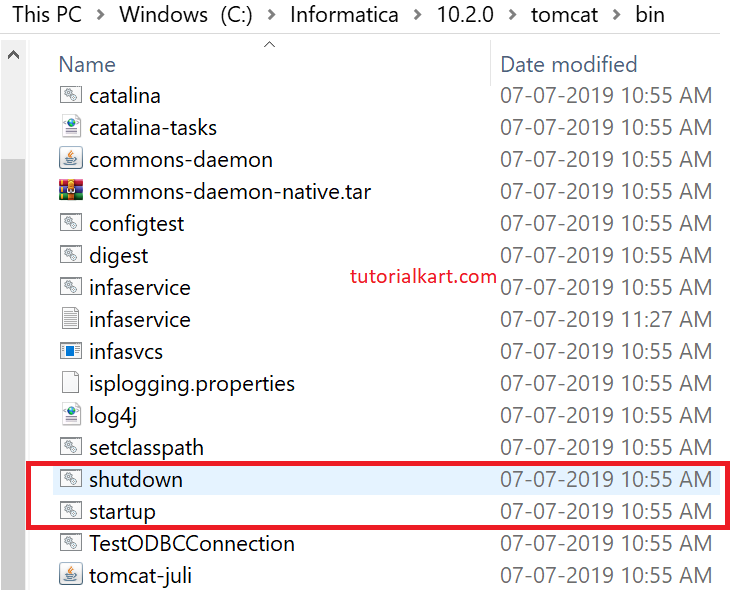
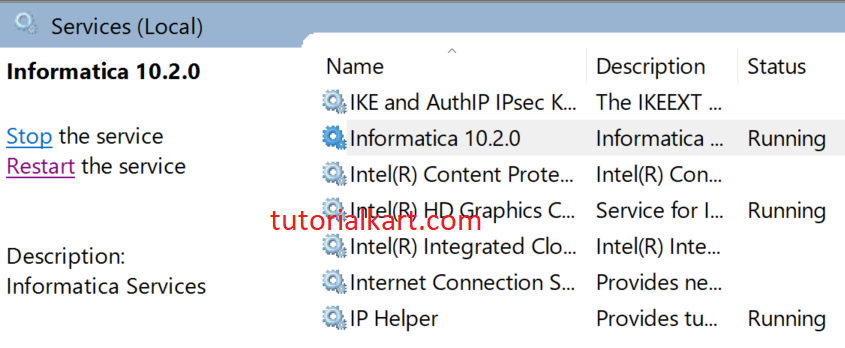
Second one is we can access Informatica services, if we configure Informatica server on windows with Services.msc file in system Administrative tools.
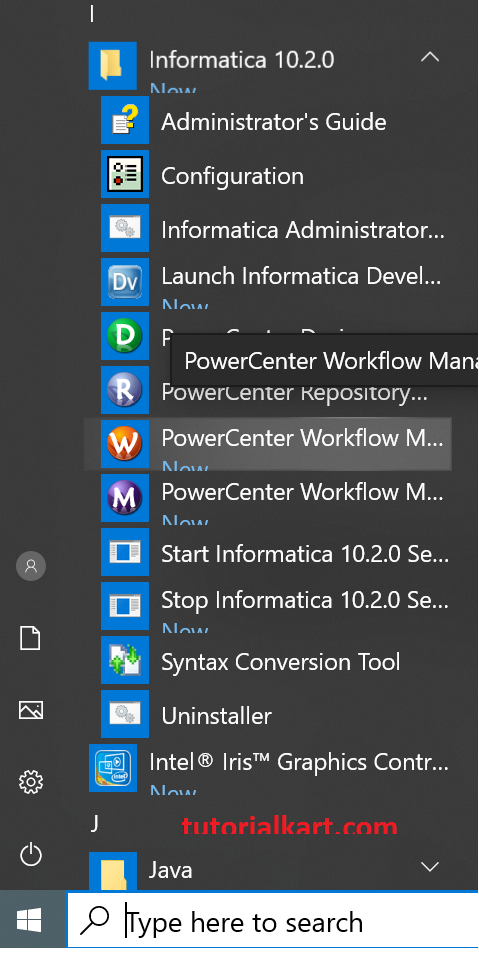
Third one is if we configure server and client o one machine with windows, we can get services in All Programs as shown below.
Four core components of Informatica PowerCenter architecture
The exact component names may vary by product version and installation, but a basic PowerCenter setup is usually explained through these four core parts.
| PowerCenter component | Purpose |
|---|---|
| PowerCenter Client tools | Used by developers and administrators to create mappings, workflows, source definitions, target definitions, and repository objects. |
| PowerCenter Repository | Stores metadata for mappings, sessions, workflows, transformations, users, folders, sources, and targets. |
| PowerCenter Repository Service | Manages access to repository metadata and allows client tools and services to read and write repository objects. |
| PowerCenter Integration Service | Runs sessions and workflows, reads source data, performs transformations, and loads data to targets. |
In an enterprise installation, additional services may be configured for monitoring, web services, metadata management, reporting, PowerExchange connectivity, and other integration needs.
PowerCenter client tools used by developers and administrators
PowerCenter client tools provide the graphical interface for design, execution setup, administration, and monitoring. Common tools include Designer, Workflow Manager, Workflow Monitor, and Repository Manager. Developers spend most of their time defining mappings and workflows, while administrators manage repositories, services, permissions, and operational settings.
Informatica PowerCenter services and server-side components
- PowerCenter Repository Service.
- PowerCenter Integration Service.
- Analyst Service.
- Model Repository Service.
- Data Integration Service.
- Web Services Hub.
- Metadata Manager Service.
- SAP BW Service.
- Reporting Service.
- Content Management Service.
- Reporting and Dashboards Service.
- PowerExchange Listener Service.
- PowerExchange Logger Service.
Not every environment uses every service in the list. A smaller PowerCenter setup may use only the services required for repository access and workflow execution, while larger environments may add services for metadata, reporting, data quality, real-time integration, or specialised connectivity.
Important Informatica PowerCenter objects
Understanding PowerCenter is easier when you know the objects used in day-to-day ETL development.
| Object | Meaning in PowerCenter |
|---|---|
| Source definition | Metadata that describes the input structure, such as columns in a table or fields in a file. |
| Target definition | Metadata that describes where the transformed data will be loaded. |
| Mapping | The main design object that connects sources, transformations, and targets. |
| Transformation | A processing object used to filter, join, aggregate, look up, route, validate, or modify data. |
| Session | Execution settings for running a mapping, including connections, commit settings, and error handling options. |
| Workflow | A group of tasks that controls the execution order, dependencies, scheduling, and run logic. |
| Repository folder | A logical container used to organise mappings, workflows, and related metadata. |
PowerCenter options and capabilities used in data projects
- Partitioning: uses parallel processing to improve performance for large data volumes when the environment and mapping design support it.
- Real-time and on-demand execution: supports job execution beyond simple batch schedules when configured for the project requirement.
- Data cleansing: helps standardise and correct data before it is loaded into reporting or warehouse systems.
- Data profiling: helps teams examine source data quality and structure before building mappings.
- Metadata management: helps teams understand dependencies, mappings, source-to-target movement, and repository objects.
- Reusable transformations and mapplets: allow repeated logic to be defined once and used in multiple mappings.
- Workflow scheduling and monitoring: allow teams to run jobs at defined times and review logs when issues occur.
Informatica vs Informatica PowerCenter
Informatica is the company and broader data management platform brand. It includes several products and cloud services for data integration, data quality, master data management, governance, cataloging, and related data management needs. Informatica PowerCenter specifically refers to the traditional enterprise ETL and data integration product used mostly in on-premises and hybrid environments.
In simple terms, Informatica is the vendor and wider platform family; PowerCenter is one product within that ecosystem. When someone says they are working on an Informatica ETL project, they may often mean PowerCenter mappings, workflows, and repository objects.
Informatica PowerCenter compared with cloud data integration
PowerCenter is widely associated with enterprise ETL jobs, repository-based development, and controlled on-premises or hybrid data integration environments. Modern Informatica cloud services are designed for cloud-native and SaaS-oriented integration patterns. The right choice depends on the existing architecture, support lifecycle, connectors, operations model, compliance requirements, and migration plans.
For new implementation decisions, teams should verify the current Informatica product lifecycle, licensing, and support guidance. PowerCenter is still important in many existing enterprise environments, but new projects may also evaluate Informatica cloud data integration options depending on the organisation’s roadmap.
Common use cases of Informatica PowerCenter
- Data warehouse loading: moving cleansed and transformed data from operational systems to warehouse tables.
- Enterprise reporting: preparing consistent data for reporting tools and dashboards.
- Data migration: moving data from old systems to new applications or databases.
- Data consolidation: combining information from multiple departments, regions, or applications.
- Batch integration: running scheduled jobs for daily, weekly, or monthly data processing.
- Source-to-target transformation: applying rules, lookups, joins, calculations, and validations before loading data.
Advantages of Informatica PowerCenter in ETL projects
- Visual mapping design makes complex ETL logic easier to review than hand-coded scripts in many enterprise teams.
- Reusable transformations, mapplets, and workflows help reduce repeated development effort.
- Repository metadata helps with impact analysis, dependency tracking, and governance.
- Workflow Monitor and logs support operational troubleshooting.
- Partitioning and performance tuning options help with large data processing workloads.
- Connectivity options allow integration across different databases, files, and enterprise systems.
Limitations and planning points before using Informatica PowerCenter
PowerCenter is a mature enterprise product, so teams should plan carefully before starting or extending a project. Important points include product version, support lifecycle, licensing, available skills, cloud migration plans, infrastructure cost, and whether the integration requirement is batch-oriented, real-time, cloud-native, or hybrid.
- Check whether the required source and target connectors are available for the project version.
- Confirm support status and upgrade options before planning a long-term implementation.
- Design mappings with maintainability, logging, and restartability in mind.
- Use naming standards for mappings, sessions, workflows, sources, and targets.
- Review performance requirements early when large data volumes or tight batch windows are involved.
FAQs on Informatica PowerCenter
1. What does Informatica PowerCenter do?
Informatica PowerCenter extracts data from source systems, transforms it using mapping logic, and loads it into target systems. It is mainly used for ETL, data warehouse loading, data migration, and enterprise data integration.
2. What are the four main components of Informatica PowerCenter?
The four commonly discussed components are PowerCenter Client tools, PowerCenter Repository, PowerCenter Repository Service, and PowerCenter Integration Service. Together, they support design, metadata storage, repository access, and workflow execution.
3. What is the difference between Informatica and Informatica PowerCenter?
Informatica is the company and wider data management platform brand. Informatica PowerCenter is a specific ETL and enterprise data integration product from Informatica.
4. Is Informatica PowerCenter discontinued?
PowerCenter is a mature product used in many existing environments, but support and lifecycle status depend on the version and contract. For a new project, upgrade, or migration plan, check the current Informatica lifecycle and support documentation before making a decision.
5. Is Informatica PowerCenter only for data warehouses?
No. Data warehouse loading is a common use case, but PowerCenter can also be used for data migration, batch integration, data consolidation, file processing, and source-to-target transformation across supported systems.
Editorial QA checklist for this Informatica PowerCenter overview
- Explains that Informatica is the vendor and PowerCenter is a specific ETL/data integration product.
- Covers extraction, transformation, and loading with clear PowerCenter context.
- Identifies core architecture pieces: client tools, repository, repository service, and integration service.
- Describes mappings, transformations, sessions, workflows, and repository objects.
- Answers search-intent questions about what PowerCenter does, its components, and whether lifecycle status should be checked.
- Keeps product lifecycle wording cautious so readers verify current support before making implementation decisions.
Summary of Informatica PowerCenter overview
Informatica PowerCenter is an enterprise ETL and data integration platform used to move data from source systems to target systems through extraction, transformation, and loading. It uses visual mappings, transformations, sessions, workflows, repository metadata, and server services to run integration jobs. It is commonly used in data warehouse, migration, reporting, and batch integration projects.
Learn how to Install Informatica PowerCenter